
English
Function calling and the client pipeline
Function calling
A model does not know which books are in a library, what the weather is right now, or how much money is in an account. But modern models can call functions (function calling, tool calling): the application describes the available methods, and instead of text the model responds with a request "call SearchBooks with the argument query = "Franko"". The application executes the method and sends the result to the model, which forms the final response (Fig. 16.6).
Fig. 16.6. The function calling loop
In MEAI, a C# method is turned into a tool by AIFunctionFactory.Create: the name, the description from the [Description] attribute, and the JSON schema of the parameters are taken from the method signature. Tools are passed in ChatOptions.Tools, and the "request – call – result – request" loop is run by the FunctionInvokingChatClient middleware client, which UseFunctionInvocation() adds (https://learn.microsoft.com/dotnet/ai/quickstarts/use-function-calling). Not all models support functions: the model's Ollama page must have the tools tag.
Tools are code that the model runs, so security requirements apply to them:
- expose only the necessary actions and only the necessary data (the principle of least privilege);
- validate the arguments in the method just like user input;
- actions that change data (reservations, payments, deletions) are confirmed by a human. For this you can ask the user in the method itself or wrap the function in an
ApprovalRequiredAIFunction, and then the client returns an approval request instead of the call; - limit the number of loop steps:
MaximumIterationsPerRequest.
Example: a library assistant
The assistant searches for books in the catalog (in the lab assignment, in a database, Topics 7–8) and reserves them after the reader confirms. The log at the Debug level shows every request to the model and every function call. Besides the packages from the previous example, Microsoft.Extensions.Logging.Console is needed. The tools class:
cs
using System.ComponentModel;

public record Book(int Id, string Author, string Title, int Copies);

public class LibraryTools
{
    private readonly List<Book> books =
    [
        new(1, "Ivan Franko", "Zakhar Berkut", 2),
        new(2, "Ivan Franko", "Crossroads", 0),
        new(3, "Lesya Ukrainka", "The Forest Song", 3),
        new(4, "Lina Kostenko", "Marusia Churai", 1)
    ];

    [Description("Searches for books by part of the author's last name or the title")]
    public List<Book> SearchBooks(
        [Description("The author's last name or a word from the title")]
        string query)
    {
        return books
            .Where(b => b.Author.Contains(query,
                            StringComparison.OrdinalIgnoreCase)
                     || b.Title.Contains(query,
                            StringComparison.OrdinalIgnoreCase))
            .ToList();
    }

    [Description("Reserves a copy of a book by its Id")]
    public string ReserveBook(
        [Description("The book Id from the search results")] int bookId)
    {
        int index = books.FindIndex(b => b.Id == bookId);
        if (index < 0) return "Book not found.";
        Book book = books[index];
        if (book.Copies == 0) return "No copies available.";

        // The action changes data, so a human confirms it, not the model.
        Console.Write($"Reserve \"{book.Title}\"? (y/n): ");
        if (Console.ReadLine()?.Trim().ToLower() != "y")
            return "The user canceled the reservation.";

        books[index] = book with { Copies = book.Copies - 1 };
        return $"Reserved \"{book.Title}\", " +
               $"{book.Copies - 1} left.";
    }
}
The program builds a client with two middleware layers and passes both methods as tools. The functions are created from instance methods, so they have access to the instance data:
cs
using Microsoft.Extensions.AI;
using Microsoft.Extensions.Logging;
using OllamaSharp;

Console.InputEncoding = System.Text.Encoding.UTF8;
Console.OutputEncoding = System.Text.Encoding.UTF8;

using ILoggerFactory loggers = LoggerFactory.Create(b => b
    .AddSimpleConsole(o => o.SingleLine = true)
    .SetMinimumLevel(LogLevel.Debug));

IChatClient client = new ChatClientBuilder(
        new OllamaApiClient(
            new Uri("http://localhost:11434"), "qwen3:4b-instruct"))
    .UseFunctionInvocation(loggers, f =>
        f.MaximumIterationsPerRequest = 5)
    .UseLogging(loggers)
    .Build();

var library = new LibraryTools();
var options = new ChatOptions
{
    Temperature = 0f,
    Tools =
    [
        AIFunctionFactory.Create(library.SearchBooks),
        AIFunctionFactory.Create(library.ReserveBook)
    ]
};
List<ChatMessage> history =
[
    new(ChatRole.System,
        "You are a library assistant. Answer questions about books only " +
        "from the function data, do not make anything up. " +
        "Answer in English.")
];

while (true)
{
    Console.Write("\nReader: ");
    string? text = Console.ReadLine();
    if (string.IsNullOrWhiteSpace(text)) break;
    history.Add(new ChatMessage(ChatRole.User, text));

    ChatResponse response =
        await client.GetResponseAsync(history, options);
    history.AddMessages(response);
    Console.WriteLine($"Library: {response.Text}");
}
The log of the first question (the category names are shortened to …AI.): the model receives a request twice – before the function call and after it. At the Trace level the log also contains the full text of the messages with the arguments, so it is not enabled where personal data is present (Fig. 16.7):
Reader: Which books by Franko do you have?
dbug: …AI.LoggingChatClient[1723383095] GetResponseAsync invoked.
dbug: …AI.LoggingChatClient[1553703230] GetResponseAsync completed.
dbug: …AI.FunctionInvokingChatClient[807273242] Invoking SearchBooks.
dbug: …AI.FunctionInvokingChatClient[1098781176] SearchBooks
      invocation completed. Duration: 00:00:00.0097365
dbug: …AI.LoggingChatClient[1723383095] GetResponseAsync invoked.
dbug: …AI.LoggingChatClient[1553703230] GetResponseAsync completed.
Library: The catalog has two books by Ivan Franko: Zakhar Berkut
(2 copies) and Crossroads (currently unavailable).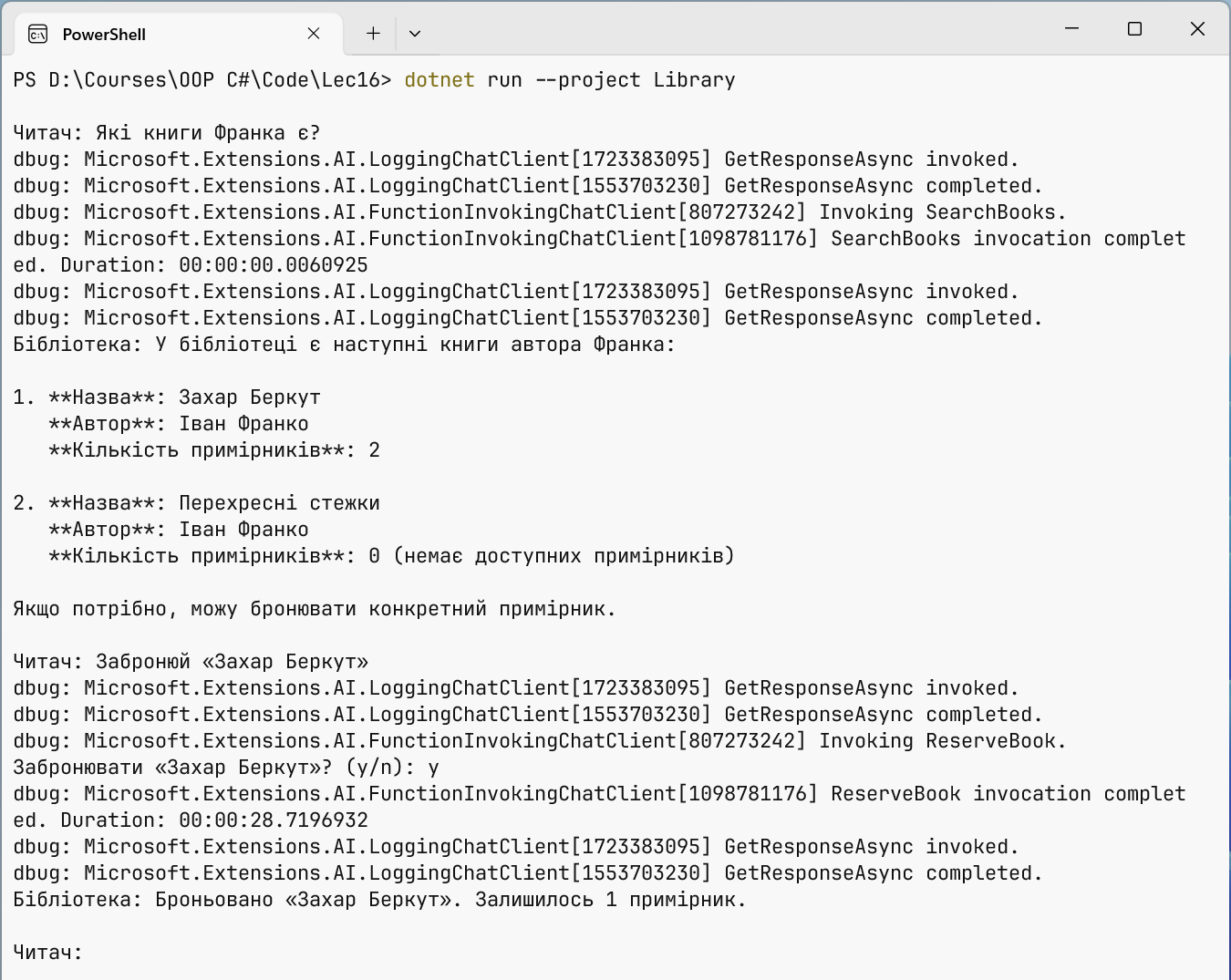
Fig. 16.7. A function calling log
The middleware client pipeline
The ChatClientBuilder class wraps the provider's client in a chain of middleware clients, each of which implements IChatClient itself. The first layer added is the outer one: it receives the request first and the response last. This was checked with two delegate layers Use(async (messages, options, next, token) => …) that print messages before and after calling next: the output order is "A: before", "B: before", "B: after", "A: after".
Ready-made layers (Table 16.3) are added with the Use… methods. The order matters: if UseDistributedCache comes before UseFunctionInvocation, the final response after the function calls is cached, and a repeated question does not call them again.
Table 16.3. ChatClientBuilder middleware clients
| Method | What it does |
|---|---|
UseFunctionInvocation | executes the functions the model asks for and repeats the request |
UseLogging | writes every request and response to an ILogger (Topic 6) |
UseDistributedCache | returns a stored response to an identical request from IDistributedCache |
UseOpenTelemetry | metrics and tracing following the OpenTelemetry conventions for generative AI |
ConfigureOptions | sets default parameters, for example ModelId |
Use(…) | a custom layer: a delegate or a class derived from DelegatingChatClient |
A custom middleware client
The DelegatingChatClient base class passes all calls to the inner client, so a derived class overrides only what is needed. The TokenLimitChatClient client counts the tokens used and blocks requests when the limit is exhausted, so that a program with a bug in a loop does not spend the whole budget of a cloud provider:
cs
using Microsoft.Extensions.AI;

// A middleware client: counts tokens and stops requests over the limit.
public sealed class TokenLimitChatClient(
    IChatClient inner, long limit) : DelegatingChatClient(inner)
{
    public long UsedTokens { get; private set; }

    public override async Task<ChatResponse> GetResponseAsync(
        IEnumerable<ChatMessage> messages,
        ChatOptions? options = null,
        CancellationToken cancellationToken = default)
    {
        ThrowIfExhausted();
        ChatResponse response = await base.GetResponseAsync(
            messages, options, cancellationToken);
        UsedTokens += response.Usage?.TotalTokenCount ?? 0;
        return response;
    }

    private void ThrowIfExhausted()
    {
        if (UsedTokens >= limit)
            throw new InvalidOperationException(
                $"The limit of {limit} tokens is exhausted.");
    }
}
The GetStreamingResponseAsync method is overridden the same way; in streaming mode the token count arrives as separate UsageContent content, usually in the last update.
Registration in DI and changing the provider
In an application with the Generic Host (Topic 6), the client is registered with the AddChatClient method, and the pipeline is built with methods of the same chain. The provider is chosen by the configuration: the AI section specifies Provider, Model, and, for a cloud provider, ApiKey. The rest of the code receives IChatClient through the constructor and does not know which model responds:
cs
using Microsoft.Extensions.AI;
using Microsoft.Extensions.Configuration;
using Microsoft.Extensions.DependencyInjection;
using Microsoft.Extensions.Hosting;
using OllamaSharp;
using OpenAI;

HostApplicationBuilder builder = Host.CreateApplicationBuilder(args);
builder.Configuration.AddUserSecrets<Program>(optional: true);
IConfigurationSection ai = builder.Configuration.GetSection("AI");
string model = ai["Model"] ?? "qwen3:4b-instruct";

// The only place that knows the specific provider.
IChatClient provider = ai["Provider"] switch
{
    "OpenAI" => new OpenAIClient(ai["ApiKey"] ?? throw
            new InvalidOperationException("The AI:ApiKey key is missing"))
        .GetChatClient(model)
        .AsIChatClient(),
    _ => new OllamaApiClient(
        new Uri(ai["Endpoint"] ?? "http://localhost:11434"), model)
};

builder.Services.AddDistributedMemoryCache();
builder.Services.AddChatClient(provider)
    .UseLogging()
    .UseDistributedCache()
    .Use(inner => new TokenLimitChatClient(inner, limit: 20_000));

using IHost host = builder.Build();
IChatClient client = host.Services.GetRequiredService<IChatClient>();
The Microsoft.Extensions.Hosting and Microsoft.Extensions.Caching.Memory packages and, for OpenAI, Microsoft.Extensions.AI.OpenAI are needed (https://learn.microsoft.com/dotnet/ai/quickstarts/prompt-model). The logging layer is outermost and records all requests, including those answered by the cache, while TokenLimitChatClient is closest to the model and counts only real calls to it. A test with a fake client that responds with an 800 ms delay showed that a repeated question "What is DI?" got an answer from the cache in a few milliseconds, without calling the model.
The GitHub Models service, which used to be used for free experiments with cloud models, was completely shut down on July 30, 2026 (https://docs.github.com/github-models). Cloud models are now provided by OpenAI (https://platform.openai.com/docs) and Azure AI Foundry (https://learn.microsoft.com/azure/ai-foundry/). Ollama also has an OpenAI-compatible address http://localhost:11434/v1, so the OpenAI adapter can also be tested with a local model (https://docs.ollama.com/api/openai-compatibility).
API keys in user secrets
An API key is a password for which the provider bills you. It is never written in code or appsettings.json: files end up in Git (Topic 1), and automated programs find and use keys from public repositories. During development the key is stored in user secrets – a secrets.json file in the Windows profile outside the project folder (https://learn.microsoft.com/aspnet/core/security/app-secrets):
powershell
dotnet user-secrets init
dotnet user-secrets set "AI:Provider" "OpenAI"
dotnet user-secrets set "AI:Model" "<model-name>"
dotnet user-secrets set "AI:ApiKey" "<your-key>"
In Visual Studio the file is opened with the Manage User Secrets command in the project context menu (Fig. 16.8). On a server, the key is set with the AI__ApiKey environment variable or a cloud secret store.
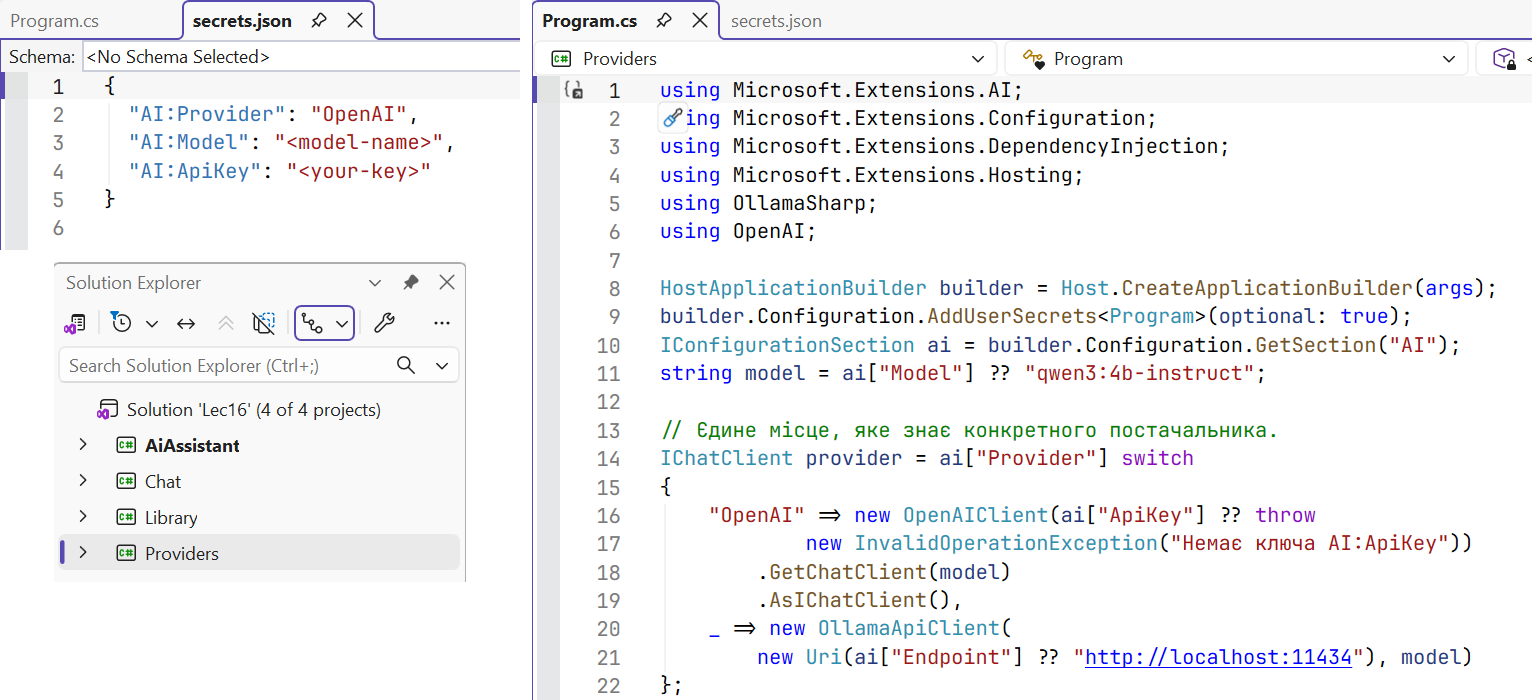
Fig. 16.8. An API key in user secrets