
English
Groups, typed hubs, and forms
Connections, groups, and strongly typed hubs
The connection context
The hub's Context property describes the connection that called the method: ConnectionId is a unique identifier, User is the authenticated user, and Items is a dictionary for connection data. The Context.GetHttpContext() method returns the HTTP context with the query string and headers.
The hub's OnConnectedAsync and OnDisconnectedAsync(Exception? exception) methods are called after a client connects and after it disconnects (the parameter contains an exception if the connection was broken by an error). They are overridden to maintain a list of participants, send a greeting, or notify others that someone left.
In the lecture examples, the user name is passed in the query string of the hub address: /hubs/rooms?user=Olena. This way the name is not verified: anyone can claim to be anyone. Real applications use authentication (cookies or JWT tokens), the [Authorize] attribute on the hub, and the Context.User property, and Clients.User(id) sends a message to all of a user's connections (https://learn.microsoft.com/aspnet/core/signalr/authn-and-authz).
Groups
A group is a named set of connections: a chat room, a topic subscription, a table in a restaurant (https://learn.microsoft.com/aspnet/core/signalr/groups). The Groups.AddToGroupAsync(connectionId, name) and Groups.RemoveFromGroupAsync(connectionId, name) methods add and remove connections, and Clients.Group(name) sends a message to all members. Groups do not need to be created in advance: a group appears with its first member. The server does not keep membership after a disconnect and does not provide a list of groups or their members, so such data, if needed, is stored separately.
A strongly typed hub
The client method name in SendAsync("ReceiveMessage", …) is a string, and the compiler will not catch a typo in it. A strongly typed hub Hub<T> uses an interface T with the client methods instead of strings: Clients.All.ReceiveMessage(user, text). Each interface method returns Task, and the method name becomes the message name (the Async suffix is not dropped). The SendAsync method is not available in such a hub.
The client receives an exception thrown in a hub method with a generic message without details, so as not to expose the server's internal information. If the error text is intended for the client, throw a HubException: its message is passed to the client unchanged.
Example: a chat with rooms
The RoomHub hub serves rooms: a user connects with a name in the query string, joins a room (a group), and writes messages only to its members. The hub is strongly typed with the IRoomClient interface. User information is stored by the UserRegistry singleton service based on a thread-safe ConcurrentDictionary, because hub methods for different clients run in parallel:
cs
using System.Collections.Concurrent;

public class ChatUser(string name)
{
    public string Name { get; } = name;
    public string? Room { get; set; }
}

// Singleton: lives for the whole lifetime of the server, unlike the hub.
public class UserRegistry
{
    private readonly ConcurrentDictionary<string, ChatUser> users =
        new();

    public int Count => users.Count;

    public void Add(string connectionId, string name) =>
        users[connectionId] = new ChatUser(name);

    public ChatUser Get(string connectionId) => users[connectionId];

    public ChatUser? Remove(string connectionId) =>
        users.TryRemove(connectionId, out ChatUser? user)
            ? user : null;
}
The hub receives the registry and a logger (ILogger, Topic 6) through a primary constructor:
cs
using Microsoft.AspNetCore.SignalR;

// Methods the server calls on the clients.
public interface IRoomClient
{
    Task ReceiveMessage(string user, string text);
    Task Notify(string text);
}

public class RoomHub(UserRegistry users, ILogger<RoomHub> logger)
    : Hub<IRoomClient>
{
    public override async Task OnConnectedAsync()
    {
        // The name is passed in the query string: /hubs/rooms?user=Olena
        string? name =
            Context.GetHttpContext()?.Request.Query["user"];
        name = string.IsNullOrWhiteSpace(name)
            ? "Guest" : name.Trim();
        users.Add(Context.ConnectionId, name);
        logger.LogInformation("Connected: {User}", name);
        await Clients.Caller.Notify(
            $"Welcome, {name}! Users online: {users.Count}");
    }

    public override async Task OnDisconnectedAsync(
        Exception? exception)
    {
        ChatUser? user = users.Remove(Context.ConnectionId);
        if (user?.Room is not null)
        {
            await Clients.Group(user.Room)
                .Notify($"{user.Name} left {user.Room}");
        }
        logger.LogInformation("Disconnected: {User}", user?.Name);
    }

    public async Task JoinRoom(string room)
    {
        ChatUser user = users.Get(Context.ConnectionId);
        if (user.Room == room)
        {
            return;
        }
        if (user.Room is not null)
        {
            await Groups.RemoveFromGroupAsync(Context.ConnectionId,
                user.Room);
            await Clients.Group(user.Room)
                .Notify($"{user.Name} left {user.Room}");
        }
        await Groups.AddToGroupAsync(Context.ConnectionId, room);
        user.Room = room;
        logger.LogInformation("{User} joined group {Room}",
            user.Name, room);
        await Clients.OthersInGroup(room)
            .Notify($"{user.Name} joined {room}");
    }

    public async Task SendToRoom(string text)
    {
        ChatUser user = users.Get(Context.ConnectionId);
        if (user.Room is null)
        {
            // The HubException text is passed to the client.
            throw new HubException("Join a room first");
        }
        await Clients.Group(user.Room)
            .ReceiveMessage(user.Name, text);
    }
}
The hub is hosted in the same ChatServer server: in Program.cs, builder.Services.AddSingleton<UserRegistry>(); is added after AddSignalR(), and app.MapHub<RoomHub>("/hubs/rooms"); after the first MapHub. Clients.OthersInGroup is used for the newcomer notification: the newcomer does not receive it.
A Windows Forms client
A GUI application has an important peculiarity: SignalR calls On handlers and connection events (Reconnecting, Reconnected, Closed) on thread pool threads, not on the UI thread. Controls must not be changed from another thread (Topic 5), so code that updates the form is marshaled to the UI thread with the Control.InvokeAsync (.NET 9+) or BeginInvoke method (https://learn.microsoft.com/dotnet/api/system.windows.forms.control.invokeasync). In contrast, the button handler code after await connection.StartAsync() continues on the UI thread, because await returns to the form's synchronization context.
Example: a client for the chat with rooms
The MainForm form (SignalR Rooms) contains at the top a FlowLayoutPanel with a Name: label, a nameTextBox field, a connectButton button (Connect), a roomComboBox room list (DropDownStyle = DropDownList), and a joinButton button (Join); in the center, a messagesListBox list (Dock = Fill); at the bottom, a messageTextBox field and a sendButton button (Send, the form's AcceptButton); and a statusStrip status bar with a statusLabel label. The form's FormClosing event is subscribed in the form designer. The form code:
cs
using Microsoft.AspNetCore.SignalR;
using Microsoft.AspNetCore.SignalR.Client;

namespace RoomsClient;

public partial class MainForm : Form
{
    private const string HubUrl = "http://localhost:5110/hubs/rooms";
    private HubConnection? connection;
    private string? room;             // the room that was joined

    public MainForm()
    {
        InitializeComponent();
        roomComboBox.Items.AddRange("General", "Games", "Music");
        roomComboBox.SelectedIndex = 0;
        SetOnline(false, "Offline");
    }

    private async void connectButton_Click(object sender, EventArgs e)
    {
        string name = nameTextBox.Text.Trim();
        if (name.Length == 0)
        {
            MessageBox.Show("Enter your name", Text);
            return;
        }
        connection = new HubConnectionBuilder()
            .WithUrl($"{HubUrl}?user={Uri.EscapeDataString(name)}")
            .WithAutomaticReconnect()
            .Build();
        // On handlers and connection events are called on thread pool
        // threads, so form elements are changed through InvokeAsync.
        connection.On<string, string>("ReceiveMessage",
            (user, text) => AddLine($"{user}: {text}"));
        connection.On<string>("Notify", text => AddLine($"* {text}"));
        connection.Reconnecting += error =>
            InvokeAsync(() => SetOnline(false, "Reconnecting..."));
        connection.Reconnected += async connectionId =>
        {
            await InvokeAsync(() => SetOnline(true, "Online"));
            await JoinRoomAsync();    // a new connection has no groups
        };
        connection.Closed += error =>
            InvokeAsync(() => SetOnline(false, "Offline"));
        try
        {
            connectButton.Enabled = nameTextBox.Enabled = false;
            await connection.StartAsync();
            SetOnline(true, "Online");   // after await – the UI thread
        }
        catch (HttpRequestException ex)
        {
            connection = null;
            connectButton.Enabled = nameTextBox.Enabled = true;
            MessageBox.Show(ex.Message, Text);
        }
    }

    private async void joinButton_Click(object sender, EventArgs e)
    {
        room = (string)roomComboBox.SelectedItem!;
        await JoinRoomAsync();
        await AddLine($"* You are in {room}");
    }

    private async void sendButton_Click(object sender, EventArgs e)
    {
        if (connection is null || messageTextBox.Text.Length == 0)
        {
            return;
        }
        try
        {
            await connection.InvokeAsync("SendToRoom",
                messageTextBox.Text);
            messageTextBox.Clear();
        }
        catch (HubException ex)   // an error passed by the hub
        {
            MessageBox.Show(ex.Message, Text);
        }
    }

    private async void MainForm_FormClosing(object sender,
        FormClosingEventArgs e)
    {
        if (connection is null)
        {
            return;
        }
        e.Cancel = true;             // close the connection first
        HubConnection current = connection;
        connection = null;
        await current.DisposeAsync();
        Close();
    }

    private async Task JoinRoomAsync()
    {
        if (connection is not null && room is not null)
        {
            await connection.InvokeAsync("JoinRoom", room);
        }
    }

    private Task AddLine(string line) => InvokeAsync(() =>
    {
        messagesListBox.Items.Add(line);
        messagesListBox.TopIndex = messagesListBox.Items.Count - 1;
    });

    private void SetOnline(bool online, string status)
    {
        joinButton.Enabled = sendButton.Enabled = online;
        statusLabel.Text = status;
    }
}
The On handlers return the Task from InvokeAsync: the code that changes the list runs on the UI thread, and the handler completes after the form is updated. When the form is closing, the FormClosing handler first cancels the closing, closes the connection, and only then closes the form again: otherwise the Closed event would try to update a form that has already been destroyed.
After the server and two clients are started, Olena and Taras join the General room and exchange messages (Fig. 11.5). The first client's list:
* Welcome, Olena! Users online: 1
* You are in General
* Taras joined General
Olena: Hi, Taras! Ready for the lab?
Taras: Almost, 5 minutes
After Taras closes his window, the line * Taras left General appears in Olena's list. An attempt to send a message before choosing a room shows a MessageBox with the text Join a room first, preceded by a standard prefix the client adds with the SendToRoom method name. The server log contains entries of the RoomHub[0] category with the text Connected: Olena, Connected: Taras, Olena joined group General, Taras joined group General, and Disconnected: Taras.
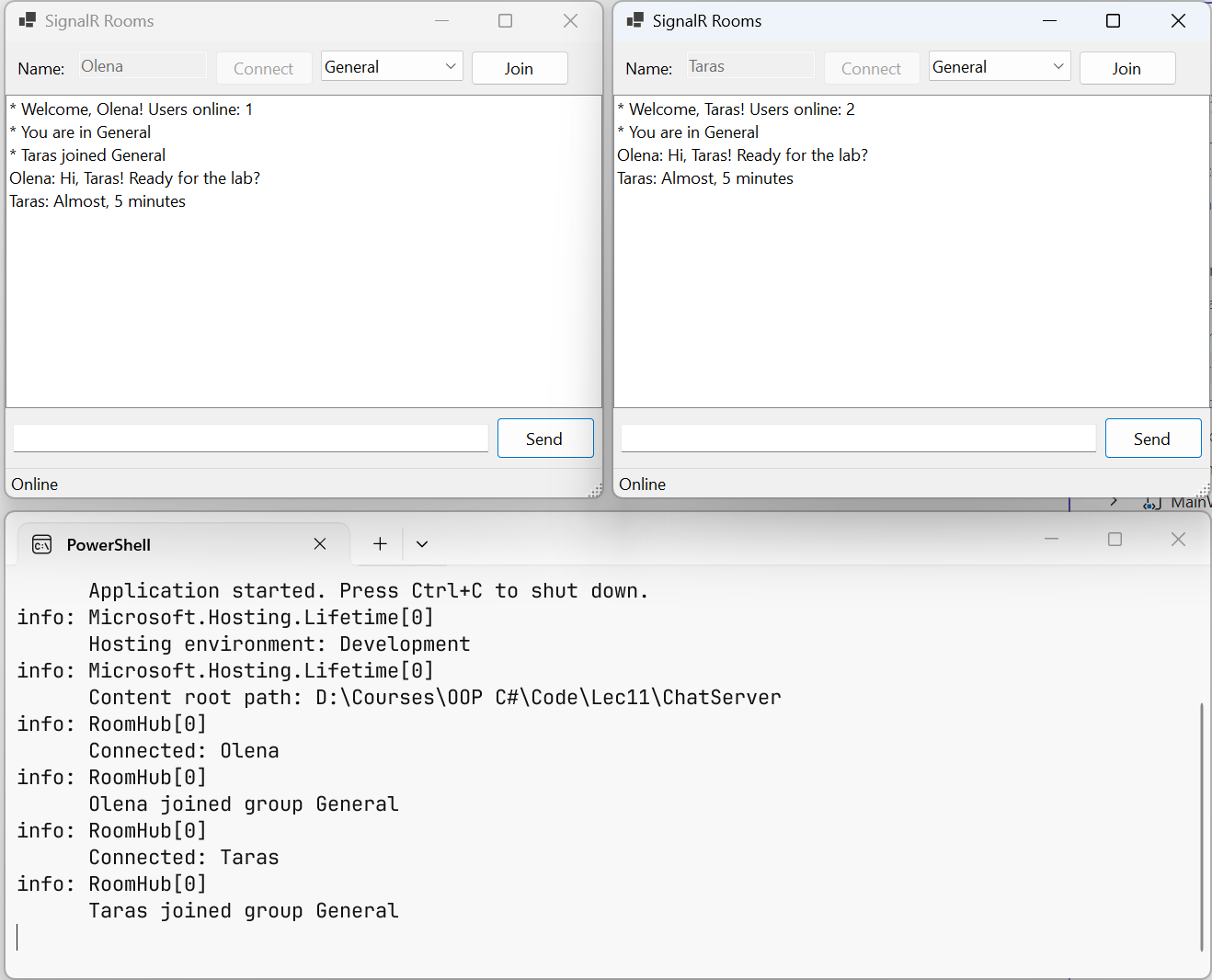
Fig. 11.5. Two Windows Forms clients in the General room and the server log