
English
Practice
Example 1. A unit converter
Create a WPF application that converts values between units of length, mass, and temperature. Each category is placed on a separate TabControl tab. The value is entered in a field or set with a Slider, the units are chosen in two ComboBox lists, the Swap button swaps them, and the result is updated after every change.
Units are described by records: a linear unit is defined by a factor relative to the base unit (meter, kilogram), while temperature conversion is nonlinear, so the record stores two functions. The Units.cs file:
cs
namespace UnitConverter;

// A unit of measurement: conversion to the base unit and back.
public record Unit(string Symbol, Func<double, double> ToBase,
    Func<double, double> FromBase)
{
    public static Unit Linear(string symbol, double factor) =>
        new(symbol, v => v * factor, v => v / factor);

    public override string ToString() => Symbol;   // for the ComboBox
}

public record Category(string Name, double Min, double Max,
    Unit[] Units)
{
    public static readonly Category[] All =
    [
        new("Length", 0, 1000,
        [
            Unit.Linear("m", 1), Unit.Linear("km", 1000),
            Unit.Linear("cm", 0.01), Unit.Linear("mi", 1609.344),
            Unit.Linear("ft", 0.3048), Unit.Linear("in", 0.0254)
        ]),
        new("Mass", 0, 1000,
        [
            Unit.Linear("kg", 1), Unit.Linear("g", 0.001),
            Unit.Linear("t", 1000), Unit.Linear("lb", 0.45359237),
            Unit.Linear("oz", 0.028349523125)
        ]),
        new("Temperature", -100, 200,
        [
            Unit.Linear("°C", 1),
            new("°F", f => (f - 32) * 5 / 9, c => c * 9 / 5 + 32),
            new("K", k => k - 273.15, c => c + 273.15)
        ])
    ];
}
The tabs are identical, so their content is moved into a ConverterPanel user control that receives the category in its constructor. ConverterPanel.xaml:
xml
<UserControl x:Class="UnitConverter.ConverterPanel"
    xmlns="http://schemas.microsoft.com/winfx/2006/xaml/presentation"
    xmlns:x="http://schemas.microsoft.com/winfx/2006/xaml">
    <Grid Margin="8" ColumnDefinitions="Auto, *, Auto"
          RowDefinitions="Auto, Auto, Auto, Auto">
        <Label Content="_Value:"
               Target="{Binding ElementName=valueBox}"/>
        <TextBox x:Name="valueBox" Grid.Column="1" Margin="3"
                 TextChanged="ValueBox_TextChanged"/>
        <ComboBox x:Name="fromBox" Grid.Column="2" Margin="3"
                  MinWidth="60"
                  SelectionChanged="Unit_SelectionChanged"/>

        <Slider x:Name="valueSlider" Grid.Row="1" Grid.Column="1"
                Margin="3" ValueChanged="Slider_ValueChanged"/>

        <Label Grid.Row="2" Content="_To:"
               Target="{Binding ElementName=toBox}"/>
        <Button Grid.Row="2" Grid.Column="1" Content="_Swap"
                HorizontalAlignment="Right" Margin="3" Padding="8,0"
                Click="Swap_Click"/>
        <ComboBox x:Name="toBox" Grid.Row="2" Grid.Column="2"
                  Margin="3"
                  SelectionChanged="Unit_SelectionChanged"/>

        <TextBlock x:Name="resultText" Grid.Row="3"
                   Grid.ColumnSpan="3" Margin="3,8"
                   FontSize="16" FontWeight="Bold"/>
    </Grid>
</UserControl>ConverterPanel.xaml.cs:
cs
using System.Windows;
using System.Windows.Controls;

namespace UnitConverter;

public partial class ConverterPanel : UserControl
{
    private bool updating;   // protection against mutual event calls

    public ConverterPanel(Category category)
    {
        InitializeComponent();
        valueSlider.Minimum = category.Min;
        valueSlider.Maximum = category.Max;
        fromBox.ItemsSource = category.Units;
        toBox.ItemsSource = category.Units;
        fromBox.SelectedIndex = 0;
        toBox.SelectedIndex = 1;
        valueBox.Text = "1";
    }

    private void Slider_ValueChanged(object sender,
        RoutedPropertyChangedEventArgs<double> e)
    {
        if (updating)
        {
            return;
        }
        updating = true;
        valueBox.Text = $"{e.NewValue:0.#}";
        updating = false;
        Convert();
    }

    private void ValueBox_TextChanged(object sender,
        TextChangedEventArgs e)
    {
        if (!updating && double.TryParse(valueBox.Text, out double v))
        {
            updating = true;
            valueSlider.Value = v;   // the Slider clamps the value itself
            updating = false;
        }
        Convert();
    }

    private void Unit_SelectionChanged(object sender,
        SelectionChangedEventArgs e) => Convert();

    private void Swap_Click(object sender, RoutedEventArgs e) =>
        (fromBox.SelectedIndex, toBox.SelectedIndex) =
            (toBox.SelectedIndex, fromBox.SelectedIndex);

    private void Convert()
    {
        if (fromBox.SelectedItem is not Unit from
            || toBox.SelectedItem is not Unit to)
        {
            return;
        }
        if (!double.TryParse(valueBox.Text, out double value))
        {
            resultText.Text = "Enter a number";
            return;
        }
        double result = to.FromBase(from.ToBase(value));
        resultText.Text =
            $"{value:0.###} {from} = {result:0.###} {to}";
    }
}
The main window contains only <TabControl x:Name="categoryTabs" Margin="6"/> and creates the tabs in code (MainWindow.xaml.cs):
cs
using System.Windows;
using System.Windows.Controls;

namespace UnitConverter;

public partial class MainWindow : Window
{
    public MainWindow()
    {
        InitializeComponent();
        foreach (Category category in Category.All)
        {
            categoryTabs.Items.Add(new TabItem
            {
                Header = category.Name,
                Content = new ConverterPanel(category)
            });
        }
        categoryTabs.SelectedIndex = 0;
    }
}
The slider and the field change each other: assigning valueBox.Text raises TextChanged, and changing valueSlider.Value raises ValueChanged. The updating flag breaks this cycle; otherwise, while you type 12., the slider would rewrite the text to 12 and erase the decimal point. The ComboBox shows the Unit records through the overridden ToString().
After startup (with US regional settings), the Length tab shows 1 m = 0.001 km. For 42.195 with the units km and mi it shows 42.195 km = 26.219 mi, and after Swap, 42.195 mi = 67.906 km. The value 5000 is greater than the slider maximum (1000): the slider stops at the edge, and the result is computed from the text (5000 m = 3.107 mi). For abc the label shows Enter a number. On the Mass tab: 70 kg = 154.324 lb; on the Temperature tab: 36.6 °C = 97.88 °F, -40 °F = -40 °C, 0 K = -273.15 °C (Fig. 12.11).
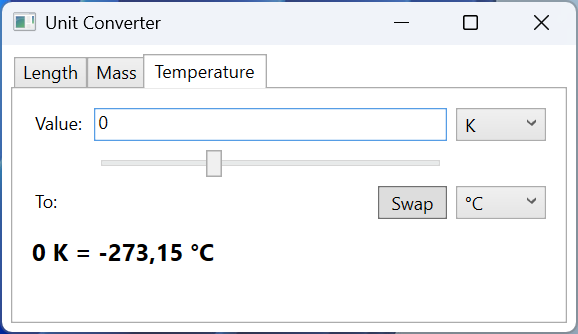
Fig. 12.11. The "Unit converter" application
Example 2. A routed event demonstrator
Create a WPF application that shows the route of the PreviewMouseDown and MouseDown events through the nested elements Window, Border, StackPanel, Button, and Ellipse. Each handler appends a line to a list with the event name, the listening element, the OriginalSource, and a handled mark. Check boxes let you mark the tunneling event as handled on the panel and attach the handlers with the handledEventsToo parameter. MainWindow.xaml:
xml
<Window x:Class="EventDemo.MainWindow"
    xmlns="http://schemas.microsoft.com/winfx/2006/xaml/presentation"
    xmlns:x="http://schemas.microsoft.com/winfx/2006/xaml"
    x:Name="window" Title="Routed Events" Width="600" Height="330">
    <Grid Margin="8" ColumnDefinitions="220, *"
          RowDefinitions="*, Auto">
        <Border x:Name="border" BorderBrush="Black"
                BorderThickness="1" Padding="16" Margin="0,0,8,0">
            <StackPanel x:Name="panel" Background="WhiteSmoke"
                        VerticalAlignment="Center">
                <TextBlock Text="StackPanel" Margin="4"/>
                <Button x:Name="button" Margin="12" Padding="8">
                    <StackPanel Orientation="Horizontal">
                        <Ellipse x:Name="icon" Width="16" Height="16"
                                 Fill="Black" Margin="0,0,6,0"/>
                        <TextBlock Text="Button"/>
                    </StackPanel>
                </Button>
            </StackPanel>
        </Border>
        <ListBox x:Name="logList" Grid.Column="1"
                 FontFamily="Consolas"/>
        <StackPanel Grid.Row="1" Grid.ColumnSpan="2" Margin="0,8,0,0">
            <CheckBox x:Name="stopBox"
                      Content="Handle PreviewMouseDown on panel"/>
            <CheckBox x:Name="handledTooBox" Margin="0,4"
                      Content="Handlers with handledEventsToo = true"
                      Click="HandledTooBox_Click"/>
        </StackPanel>
    </Grid>
</Window>MainWindow.xaml.cs:
cs
using System.Windows;
using System.Windows.Input;

namespace EventDemo;

public partial class MainWindow : Window
{
    private readonly FrameworkElement[] elements;
    private readonly MouseButtonEventHandler previewHandler;
    private readonly MouseButtonEventHandler bubbleHandler;

    public MainWindow()
    {
        InitializeComponent();
        elements = [this, border, panel, button, icon];
        previewHandler = OnPreviewMouseDown;
        bubbleHandler = OnMouseDown;
        Subscribe(handledEventsToo: false);
    }

    private void Subscribe(bool handledEventsToo)
    {
        foreach (FrameworkElement element in elements)
        {
            element.RemoveHandler(PreviewMouseDownEvent,
                previewHandler);
            element.RemoveHandler(MouseDownEvent, bubbleHandler);
            element.AddHandler(PreviewMouseDownEvent, previewHandler,
                handledEventsToo);
            element.AddHandler(MouseDownEvent, bubbleHandler,
                handledEventsToo);
        }
    }

    private void OnPreviewMouseDown(object sender,
        MouseButtonEventArgs e)
    {
        if (!IsInDemo(e))
        {
            return;
        }
        if (sender == this && logList.Items.Count > 0)
        {
            logList.Items.Add("");          // a new click
        }
        Log("Preview", sender, e);
        if (sender == panel && stopBox.IsChecked == true)
        {
            e.Handled = true;
        }
    }

    private void OnMouseDown(object sender, MouseButtonEventArgs e)
    {
        if (IsInDemo(e))
        {
            Log("MouseDown", sender, e);
        }
    }

    // Only clicks inside the border, not on the check boxes or the list.
    private bool IsInDemo(RoutedEventArgs e) =>
        e.OriginalSource is DependencyObject source
        && (source == border || border.IsAncestorOf(source));

    private void Log(string name, object sender, RoutedEventArgs e)
    {
        string element = ((FrameworkElement)sender).Name;
        string source = (e.OriginalSource as FrameworkElement)?.Name
            ?? e.OriginalSource.GetType().Name;
        string handled = e.Handled ? "handled" : "";
        logList.Items.Add(
            $"{name,-9} {element,-6} from {source,-6} {handled}");
    }

    private void HandledTooBox_Click(object sender,
        RoutedEventArgs e) =>
        Subscribe(handledTooBox.IsChecked == true);
}
The handlers are attached with the AddHandler method: this is the only way to set handledEventsToo, and to change the parameter the handler is removed (RemoveHandler) and attached again. Element names (x:Name) are available through FrameworkElement.Name; for an element without a name, the type name is printed, for example TextBlock after a click on the button's label.
By default, a click on the black circle on the button gives five Preview lines (window, border, panel, button, icon, all from icon) and only one line MouseDown icon from icon. The tunneling event traveled from the window to the circle, while the bubbling event stopped at the circle: the button marked MouseLeftButtonDown (and therefore the shared MouseDown data) as handled and raised Click. A click on the panel outside the button gives the full route: MouseDown on panel, border, window. If you enable Handlers with handledEventsToo = true, after MouseDown icon the lines MouseDown button from icon handled appear, followed by panel, border, and window with the same mark. If instead you mark PreviewMouseDown as handled on the panel without handledEventsToo, the log ends with the line Preview panel from icon: the ordinary handlers of the button and the circle are no longer called (Fig. 12.12).
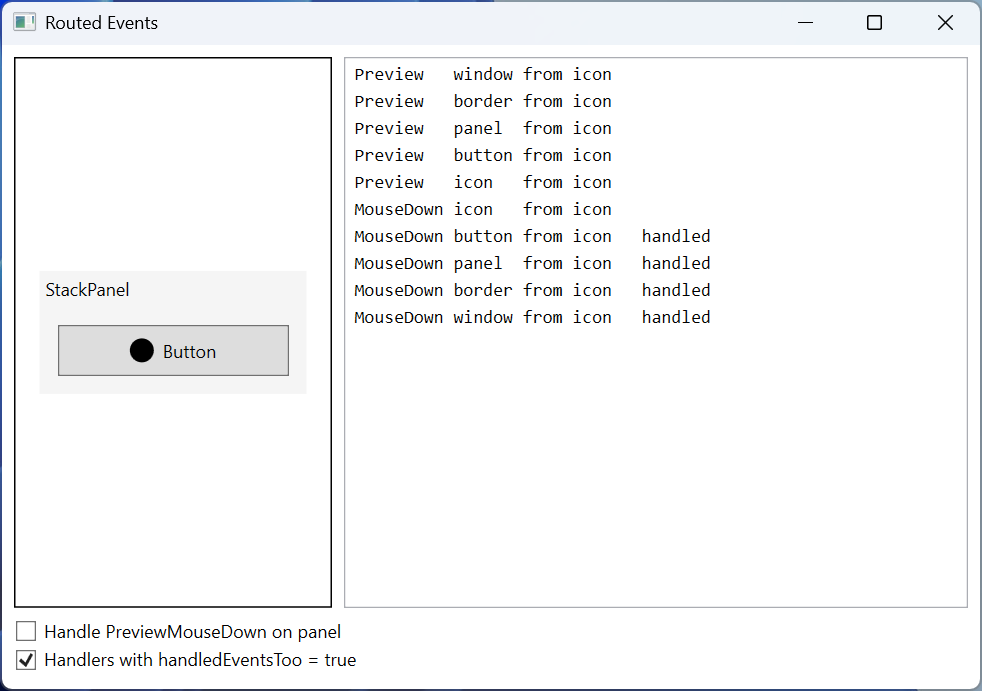
Fig. 12.12. The "Routed event demonstrator" application
Example 3. A file manager
Create a WPF application for browsing files: a TreeView folder tree on the left, a ListView file table on the right with the columns Name, Size, KB, and Modified, and a GridSplitter between them. The File → Open Folder… menu command (Ctrl+O) chooses the root folder with an OpenFolderDialog. Subfolders are loaded only when a node is expanded, and the status bar shows the number and total size of the files in the selected folder. Access errors are shown in the status bar. MainWindow.xaml:
xml
<Window x:Class="FileManager.MainWindow"
    xmlns="http://schemas.microsoft.com/winfx/2006/xaml/presentation"
    xmlns:x="http://schemas.microsoft.com/winfx/2006/xaml"
    Title="File Manager" Width="640" Height="380">
    <Window.CommandBindings>
        <CommandBinding Command="Open" Executed="Open_Executed"/>
    </Window.CommandBindings>
    <DockPanel>
        <Menu DockPanel.Dock="Top">
            <MenuItem Header="_File">
                <MenuItem Header="_Open Folder..." Command="Open"/>
                <Separator/>
                <MenuItem Header="E_xit" Click="Exit_Click"/>
            </MenuItem>
        </Menu>
        <StatusBar DockPanel.Dock="Bottom">
            <StatusBarItem x:Name="statusItem"/>
        </StatusBar>
        <Grid ColumnDefinitions="200, Auto, *">
            <TreeView x:Name="folderTree"
                TreeViewItem.Expanded="Folder_Expanded"
                SelectedItemChanged="Folder_SelectedItemChanged"/>
            <GridSplitter Grid.Column="1" Width="5"
                          HorizontalAlignment="Stretch"/>
            <ListView x:Name="fileList" Grid.Column="2">
                <ListView.View>
                    <GridView>
                        <GridViewColumn Header="Name" Width="200"
                          DisplayMemberBinding="{Binding Name}"/>
                        <GridViewColumn Header="Size, KB" Width="80"
                          DisplayMemberBinding="{Binding Size}"/>
                        <GridViewColumn Header="Modified" Width="120"
                          DisplayMemberBinding="{Binding Modified}"/>
                    </GridView>
                </ListView.View>
            </ListView>
        </Grid>
    </DockPanel>
</Window>MainWindow.xaml.cs:
cs
using System.IO;
using System.Windows;
using System.Windows.Controls;
using System.Windows.Input;
using Microsoft.Win32;

namespace FileManager;

// A row of the file table: the values are already formatted.
public record FileRow(string Name, string Size, string Modified);

public partial class MainWindow : Window
{
    private const string Placeholder = "...";  // "not loaded yet"

    public MainWindow()
    {
        InitializeComponent();
        OpenFolder(Environment.GetFolderPath(
            Environment.SpecialFolder.MyDocuments));
    }

    public void OpenFolder(string path)
    {
        folderTree.Items.Clear();
        var root = CreateItem(new DirectoryInfo(path));
        folderTree.Items.Add(root);
        root.IsExpanded = true;       // raises the Expanded event
        root.IsSelected = true;
    }

    private static TreeViewItem CreateItem(DirectoryInfo dir)
    {
        var item = new TreeViewItem { Header = dir.Name, Tag = dir };
        item.Items.Add(Placeholder);   // an arrow will appear
        return item;
    }

    // The Expanded event bubbles from a TreeViewItem node to the TreeView.
    private void Folder_Expanded(object sender, RoutedEventArgs e)
    {
        if (e.OriginalSource is not TreeViewItem
            { Tag: DirectoryInfo dir } item
            || item.Items.Count != 1
            || item.Items[0] as string != Placeholder)
        {
            return;                   // already loaded
        }
        item.Items.Clear();
        try
        {
            foreach (DirectoryInfo sub in dir.EnumerateDirectories())
            {
                item.Items.Add(CreateItem(sub));
            }
        }
        catch (Exception ex) when (ex is UnauthorizedAccessException
            or IOException)
        {
            statusItem.Content = ex.Message;
        }
    }

    private void Folder_SelectedItemChanged(object sender,
        RoutedPropertyChangedEventArgs<object> e)
    {
        if (e.NewValue is not TreeViewItem { Tag: DirectoryInfo dir })
        {
            return;
        }
        try
        {
            FileInfo[] files = dir.GetFiles();
            fileList.ItemsSource = files
                .OrderBy(f => f.Name)
                .Select(f => new FileRow(f.Name,
                    $"{Math.Ceiling(f.Length / 1024.0):N0}",
                    $"{f.LastWriteTime:g}"))
                .ToList();
            long total = files.Sum(f => f.Length);
            statusItem.Content = $"{dir.Name}   Files: {files.Length}"
                + $"   Total: {total / 1024.0:N1} KB";
        }
        catch (Exception ex) when (ex is UnauthorizedAccessException
            or IOException)
        {
            fileList.ItemsSource = null;
            statusItem.Content = ex.Message;
        }
    }

    private void Open_Executed(object sender,
        ExecutedRoutedEventArgs e)
    {
        var dialog = new OpenFolderDialog
        {
            Title = "Choose a folder"
        };
        if (dialog.ShowDialog(this) == true)
        {
            OpenFolder(dialog.FolderName);
        }
    }

    private void Exit_Click(object sender, RoutedEventArgs e) =>
        Close();
}
Each new node gets a ... "placeholder", thanks to which the TreeView shows an arrow. The Expanded event of a TreeViewItem node bubbles, so one handler attached to the TreeView with the TreeViewItem.Expanded attribute serves all nodes: e.OriginalSource is the node that was expanded. A ListView with a GridView view shows the properties of FileRow objects through DisplayMemberBinding (data binding, Topic 13). The values are formatted in code with the user's regional settings: a binding with StringFormat uses the en-US language by default.
For a Labs folder with a readme.txt file and the folders Lab12 and Photos, the status bar shows Labs Files: 1 Total: 0.1 KB (with US regional settings). After Lab12 is selected, the table contains the rows Lab12.csproj (1 KB, 9/14/2026 9:30 AM), MainWindow.xaml (2 KB), and MainWindow.xaml.cs (4 KB, 9/15/2026 11:05 AM), and the status bar shows Lab12 Files: 3 Total: 5.4 KB. For the Photos\2026 folder with a 2,457,600-byte photo it shows 2026 Files: 1 Total: 2,400.0 KB (Fig. 12.13).
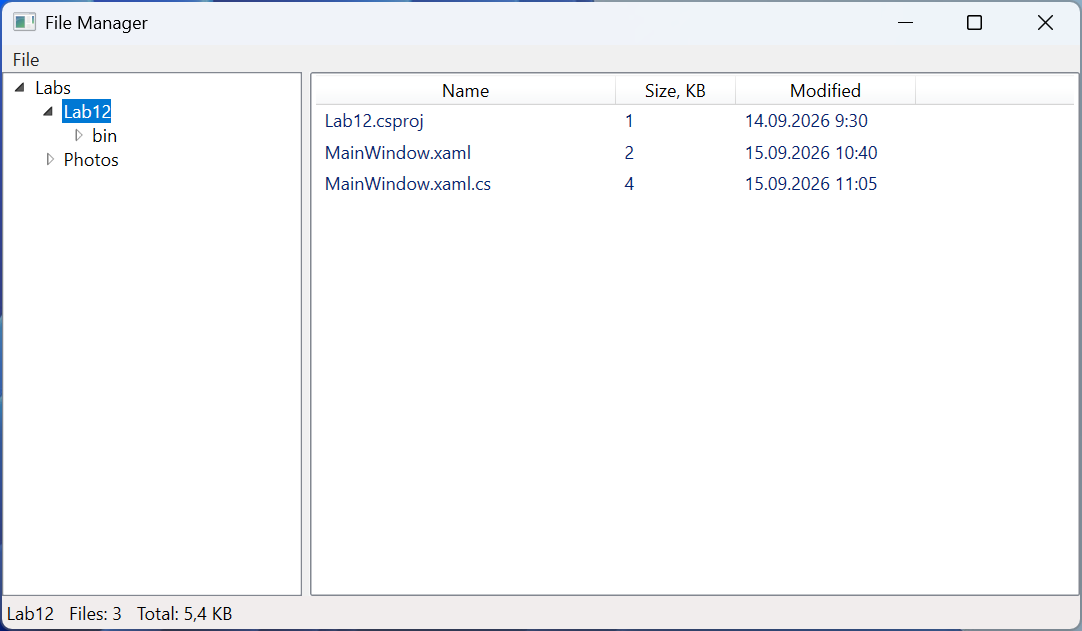
Fig. 12.13. The "File manager" application