
English
UDP, errors, and diagnostics
UDP and broadcast messages
For UDP, use the UdpClient class (https://learn.microsoft.com/dotnet/api/system.net.sockets.udpclient). The new UdpClient(endPoint) constructor binds the socket to an address and port; SendAsync(bytes, endPoint) sends a datagram; ReceiveAsync(token) waits for the next datagram and returns a UdpReceiveResult with the Buffer bytes and the sender address RemoteEndPoint, which is convenient for replying. One send operation is one datagram, so you do not need to define message boundaries, but:
- a datagram may be lost, so important requests are repeated or wait for a reply with a timeout;
- the datagram size is limited; messages over 1400 bytes may be fragmented and get lost more often;
- on Windows, sending to a port nobody listens on can cause the next
ReceiveAsyncto throw aSocketExceptionwith theConnectionResetcode, so it is handled and the loop continues.
A broadcast message sent to the address 255.255.255.255 is received by all computers on the local network that listen on that port. To send one, you must set EnableBroadcast = true. Routers do not forward such messages beyond the local network. A typical use is server discovery: the client does not know the server's address, sends a request to everyone, and the server replies with its address and port.
Example: finding a server
The discovery server listens on UDP port 5070 and replies to the request DISCOVER CHAT/1 with the line CHAT/1 5055 <name>, that is, the chat port and its name. An optional argument sets the local address, as in the chat server.
cs
using System.Net;
using System.Net.Sockets;
using System.Text;

Console.OutputEncoding = Encoding.UTF8;
IPAddress local = args.Length > 0
    ? IPAddress.Parse(args[0]) : IPAddress.Any;

using var udp = new UdpClient(new IPEndPoint(local, 5070));
Console.WriteLine($"Waiting for requests: {udp.Client.LocalEndPoint}");

byte[] reply = Encoding.UTF8.GetBytes("CHAT/1 5055 Group CS-25 chat");
while (true)
{
    UdpReceiveResult request = await udp.ReceiveAsync();
    string text = Encoding.UTF8.GetString(request.Buffer);
    Console.WriteLine($"{request.RemoteEndPoint}: {text}");
    if (text == "DISCOVER CHAT/1")
    {
        await udp.SendAsync(reply, request.RemoteEndPoint);
    }
}
The client sends the broadcast request three times and collects replies for 2 s. The timeout is set by CancellationTokenSource(2000): when the time runs out, ReceiveAsync throws OperationCanceledException. A HashSet discards duplicate replies to the repeated requests.
cs
using System.Net;
using System.Net.Sockets;
using System.Text;

Console.OutputEncoding = Encoding.UTF8;
IPAddress local = args.Length > 0
    ? IPAddress.Parse(args[0]) : IPAddress.Any;

using var udp = new UdpClient(new IPEndPoint(local, 0));
udp.EnableBroadcast = true;       // allow broadcast sending
byte[] request = Encoding.UTF8.GetBytes("DISCOVER CHAT/1");
var everyone = new IPEndPoint(IPAddress.Broadcast, 5070);

// A datagram may be lost, so the request is sent three times.
for (int i = 0; i < 3; i++)
{
    await udp.SendAsync(request, everyone);
}
Console.WriteLine($"Request sent to {everyone}");

var found = new HashSet<string>();
using var timeout = new CancellationTokenSource(2000);
try
{
    while (true)
    {
        UdpReceiveResult result =
            await udp.ReceiveAsync(timeout.Token);
        string[] parts = Encoding.UTF8.GetString(result.Buffer)
            .Split(' ', 3);
        if (parts.Length != 3 || parts[0] != "CHAT/1") continue;

        string server = $"{result.RemoteEndPoint.Address}:{parts[1]}";
        if (found.Add(server))
        {
            Console.WriteLine($"Found \"{parts[2]}\" – {server}");
        }
    }
}
catch (OperationCanceledException)
{
    Console.WriteLine($"Search finished, servers: {found.Count}");
}
The result when the server and client are started with the argument 127.0.0.1 (on a local network without the argument, the client finds servers on other computers):
Request sent to 255.255.255.255:5070
Found "Group CS-25 chat" – 127.0.0.1:5055
Search finished, servers: 1
The server log contains three identical lines 127.0.0.1:63836: DISCOVER CHAT/1; if the server is not running, the client prints Search finished, servers: 0.
Errors, timeouts, and security
Exceptions from network operations
Socket errors are reported with a SocketException; its SocketErrorCode property contains a value of the SocketError enumeration (https://learn.microsoft.com/dotnet/api/system.net.sockets.socketerror) (Table 9.3). Operations on a NetworkStream wrap the SocketException in an IOException, and operations on a closed stream throw ObjectDisposedException.
Table 9.3. Common socket error codes
SocketError | Code | Typical cause |
|---|---|---|
ConnectionRefused | 10061 | nobody is listening on the address and port: the server is not running, or the port is different |
AddressAlreadyInUse | 10048 | the port is already taken by another program or another instance of the server |
TimedOut | 10060 | the computer is unreachable or a firewall blocks the packets |
ConnectionReset | 10054 | the peer closed the connection abnormally; for UDP, the recipient's port is closed |
HostNotFound | 11001 | DNS did not find the computer name |
A broken connection shows up in different ways: a proper close appears as the end of the stream (ReadAsync returns 0, ReadLineAsync returns null), and an abnormal one as an IOException. But if the cable is unplugged or the computer is turned off, TCP may report nothing for a long time: the read simply keeps waiting.
Timeouts and keepalive checks
To keep the program from waiting forever, operations are limited in time with a cancellation token:
cs
using var timeout = new CancellationTokenSource(
    TimeSpan.FromSeconds(5));
await client.ConnectAsync("127.0.0.1", 5055, timeout.Token);
string? line = await reader.ReadLineAsync(timeout.Token);
After cancellation the state of the stream is undefined (part of a line might have been read), so the connection is closed. For long-lived connections without activity, a heartbeat is used: the client periodically sends a service message (PING), and the server replies with PONG and closes a connection from which nothing has arrived for a long time.
Security
A server on the network receives data from anyone, so:
- validate all input: lengths, sizes, number ranges, file names (the file transfer example); do not trust values sent by the client;
- limit resources: line length, number of connections, idle time. The
ReadLineAsyncmethod reads a line of any length, so public servers read lines with their own limit; - encrypt data: TCP transfers bytes in plain text, and anyone with access to the network can see them. For a secure connection, the stream is wrapped in the
SslStreamclass, which implements the TLS protocol: the server callsAuthenticateAsServerAsyncwith a certificate, the client callsAuthenticateAsClientAsyncwith the server name, and then the exchange goes through theSslStreamlike a regular stream (https://learn.microsoft.com/dotnet/api/system.net.security.sslstream); - do not invent your own encryption: home-made algorithms almost always have vulnerabilities, while TLS has been proven by years of use. Passwords are never transferred without TLS.
Diagnosing network applications
When a client cannot connect, first check whether the server is listening on the right port. The PowerShell cmdlet Get-NetTCPConnection (https://learn.microsoft.com/powershell/module/nettcpip/get-nettcpconnection) shows TCP connections, their state, and the process ID (Fig. 9.10). For a chat server with two clients:
powershell
Get-NetTCPConnection -LocalPort 5055 |
    Format-Table LocalAddress, LocalPort, RemoteAddress,
        RemotePort, State, OwningProcess
For a server with two clients, the cmdlet prints three lines: one in the Listen state (the server is listening, remote address 0.0.0.0:0) and two in the Established state (established connections with the client ports, for example 59438 and 59439), all with the same OwningProcess. Other tools:
netstat -ano | findstr :5055– the classic command with the same data (https://learn.microsoft.com/windows-server/administration/windows-commands/netstat);Test-NetConnection 127.0.0.1 -Port 5055– checks whether a connection to the port succeeds (theTcpTestSucceededproperty);- Resource Monitor (
resmon), the Network → Listening Ports tab – the ports programs listen on and the firewall status for each of them; - temporary console output on the server (as in the examples) and breakpoints in Visual Studio: while stopped at a breakpoint, the peer may get a timeout.
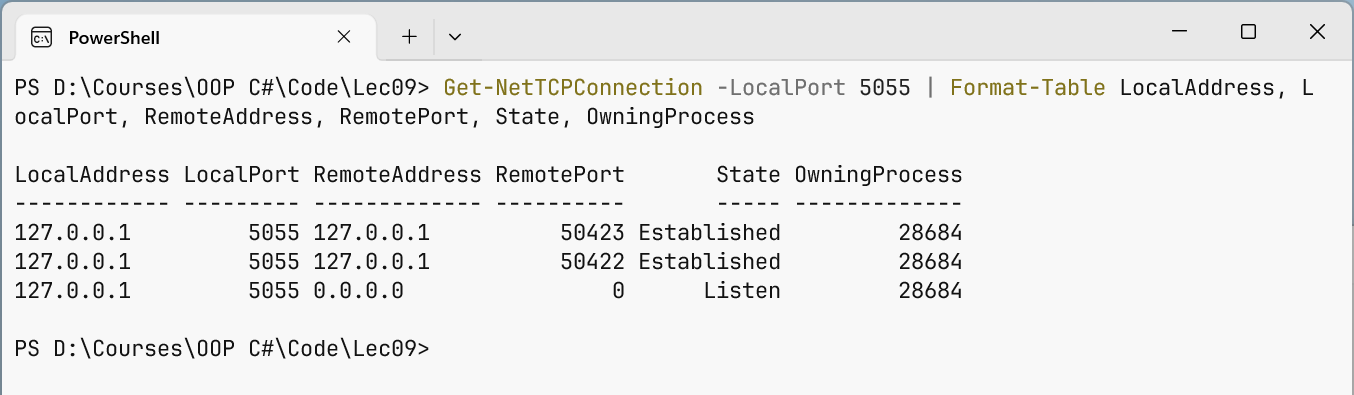
Fig. 9.10. Viewing the chat server's TCP connections