
English
HTTP, REST, JSON, and Minimal API
The HTTP protocol
A web service is a program that provides data and operations to other programs over the network using the HTTP protocol (Hypertext Transfer Protocol). Unlike sockets (Topic 9), where the programmer invents the message format, HTTP already defines what a request and a response look like, so a client in C#, JavaScript, or Python works with the service in the same way. The modern semantics of HTTP are described in the RFC 9110 standard (https://www.rfc-editor.org/rfc/rfc9110).
The exchange is always started by the client: it sends a request, and the server returns one response. Both messages have the same structure (Fig. 10.1): a start line, headers, an empty line, and an optional body. The Content-Type header reports the body format (for web services, application/json), Accept says which format the client expects, and Location gives the address of a newly created resource.
Fig. 10.1. The structure of an HTTP request and response
HTTP methods
The method (or "verb") shows what the client wants to do with the resource (Table 10.1). A method is safe if it does not change data on the server, and idempotent if several identical requests produce the same result as one. The client can safely retry idempotent requests after a network failure; retrying a POST creates a duplicate.
Table 10.1. The main HTTP methods
| Method | Purpose | Safe | Idempotent |
|---|---|---|---|
GET | get a resource or a collection | yes | yes |
POST | create a resource in a collection | no | no |
PUT | replace a resource completely | no | yes |
PATCH | change part of a resource | no | no |
DELETE | delete a resource | no | yes |
HEAD | like GET, but without a response body | yes | yes |
Status codes
A response starts with a status code – a three-digit number the client uses to decide what to do next. The first digit sets the class: 2xx – success, 3xx – redirection, 4xx – client error (a bad request), 5xx – server error (Table 10.2).
Table 10.2. The HTTP status codes a web service returns most often
| Code | When it is returned |
|---|---|
200 OK | a successful GET or another operation with a response body |
201 Created | a POST created a resource; the Location header contains its address |
204 No Content | a successful PUT, PATCH, DELETE without a response body |
400 Bad Request | invalid JSON or validation errors |
401 Unauthorized | missing or invalid credentials (token) |
404 Not Found | there is no resource at this address |
405 Method Not Allowed | the route exists, but not for this method |
500 Internal Server Error | an unhandled exception on the server |
The REST architectural style
REST (Representational State Transfer) is an architectural style for web services proposed by Roy Fielding. It is not a separate protocol or library but a set of rules for using HTTP:
- data is presented as resources – to-dos, books, users; each resource has its own URI:
/api/todos/7; - the client receives not the server object itself but its representation, most often JSON;
- the action on a resource is defined by the HTTP method, not by a name in the address:
DELETE /api/todos/7, notPOST /api/deleteTodo?id=7; - the server does not store client state between requests (stateless): each request contains everything needed, so the service is easy to scale across several servers.
Resources form a hierarchy (Fig. 10.2). A collection is denoted by a plural noun (/api/todos), an item by an identifier within the collection (/api/todos/7), and dependent resources by a nested collection (/api/authors/5/books). Filtering, sorting, and paging are set with the query string: /api/todos?done=false&page=2. Addresses are written in lowercase, words are separated with hyphens, and there is no trailing "/".
Fig. 10.2. A REST resource hierarchy
A typical set of CRUD operations (Create, Read, Update, Delete) for a to-do collection is given in Table 10.3. This is exactly the service built next.
Table 10.3. Endpoints of the "To-do list" service
| Request | Action | Codes |
|---|---|---|
GET /api/todos | list of to-dos (a page) | 200, 400 |
GET /api/todos/{id} | a single to-do | 200, 404 |
POST /api/todos | create a to-do | 201, 400 |
PUT /api/todos/{id} | replace a to-do | 204, 400, 404 |
DELETE /api/todos/{id} | delete a to-do | 204, 404 |
The JSON format and System.Text.Json
JSON (JavaScript Object Notation) is a text data format with objects { }, arrays [ ], strings, numbers, true, false, and null. In .NET, converting objects to JSON (serialization) and back (deserialization) is handled by the System.Text.Json library built into the platform (https://learn.microsoft.com/dotnet/standard/serialization/system-text-json/overview).
Settings are defined by the JsonSerializerOptions class. By default, property names are written as in C# (Title), while web services usually use camelCase (title). The ready-made set of web settings JsonSerializerOptions.Web enables camelCase, case-insensitive name matching, and reading numbers from strings; ASP.NET Core and the HttpClient JSON methods use exactly these settings. An example:
cs
using System.Text.Encodings.Web;
using System.Text.Json;
using System.Text.Json.Serialization;

Console.OutputEncoding = System.Text.Encoding.UTF8;

var book = new Book(7, "Leaves of Grass", Genre.Poetry, null);

Console.WriteLine(JsonSerializer.Serialize(book));
Console.WriteLine(JsonSerializer.Serialize(book,
    JsonSerializerOptions.Web));

var options = new JsonSerializerOptions(JsonSerializerOptions.Web)
{
    WriteIndented = true,
    DefaultIgnoreCondition = JsonIgnoreCondition.WhenWritingNull,
    Encoder = JavaScriptEncoder.UnsafeRelaxedJsonEscaping,
    Converters = { new JsonStringEnumConverter() }
};
Console.WriteLine(JsonSerializer.Serialize(book, options));

Book? copy = JsonSerializer.Deserialize<Book>(
    """{"ID":"7","title":"Leaves of Grass","genre":"Poetry"}""", options);
Console.WriteLine(copy);

enum Genre { Novel, Poetry }

record Book(int Id, string Title, Genre Genre,
    [property: JsonPropertyName("isbn")] string? Isbn13);
Output:
{"Id":7,"Title":"Leaves of Grass","Genre":1,"isbn":null}
{"id":7,"title":"Leaves of Grass","genre":1,"isbn":null}
{
  "id": 7,
  "title": "Leaves of Grass",
  "genre": "Poetry"
}
Book { Id = 7, Title = Leaves of Grass, Genre = Poetry, Isbn13 =  }
The [JsonPropertyName] attribute sets the JSON name regardless of the naming policy. Enumerations are written as numbers by default ("genre":1), while the JsonStringEnumConverter writes them as names, which are clearer to clients. By default JsonSerializer escapes non-ASCII characters such as Cyrillic (\u041C…) – this is valid but hard-to-read JSON; ASP.NET Core writes such characters without escaping. WhenWritingNull skips properties whose value is null. When reading, "ID" is matched case-insensitively, and the number 7 is read from the string "7".
In a web service, the same settings are applied to all endpoints with the ConfigureHttpJsonOptions method (see the "To-do list" example).
An ASP.NET Core Minimal API project
ASP.NET Core is a cross-platform .NET framework for web applications and web services. Service endpoints can be described in two ways: with controller classes or with Minimal API – calls to MapGet, MapPost, and so on, without controllers (https://learn.microsoft.com/aspnet/core/fundamentals/minimal-apis). Minimal API needs less code and starts faster; in .NET 10 it supports everything a typical service needs: route groups, validation, OpenAPI, filters.
Creating the project
In Visual Studio 2026 (the ASP.NET and web development workload), choose File → New → Project…, select the ASP.NET Core Web API template, and in the Additional information window (Fig. 10.3) set .NET 10.0 (Long Term Support), check Configure for HTTPS and Enable OpenAPI support, and clear the Use controllers check box. The same project is created by the command
powershell
dotnet new webapi -n TodoApi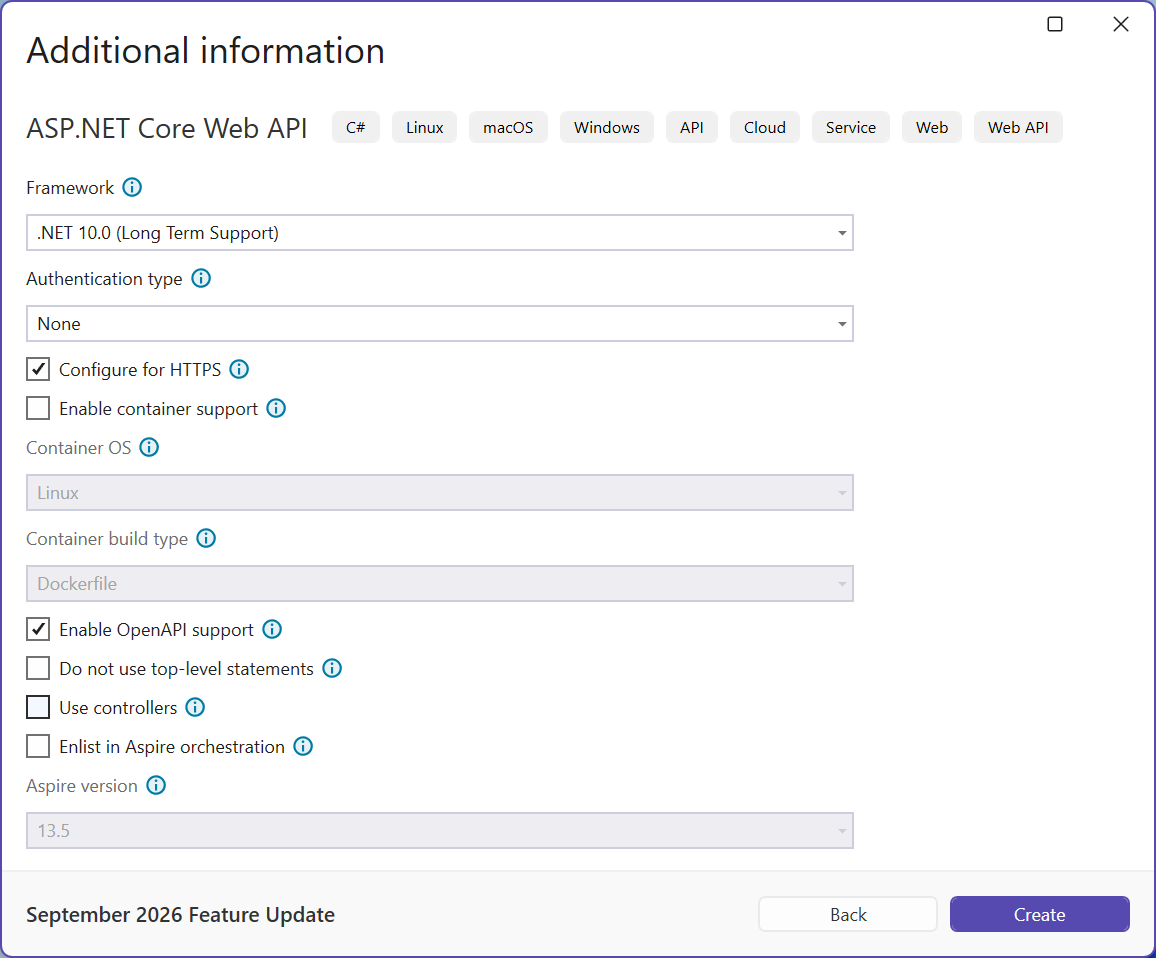
Fig. 10.3. Settings of a new ASP.NET Core Web API project
The template creates a project file with the Microsoft.NET.Sdk.Web SDK and the Microsoft.AspNetCore.OpenApi package, and the files Program.cs, appsettings.json, Properties/launchSettings.json, and TodoApi.http. The whole service starts in Program.cs with two stages:
WebApplication.CreateBuilder(args)creates the builder: configuration, logging, and the dependency containerbuilder.Services(Topic 6). Services are registered here:AddOpenApi(),AddProblemDetails(), your own classes;builder.Build()creates the applicationapp. Next you configure the middleware pipeline (app.Use…) and the endpoints (app.Map…), andapp.Run()starts the server and blocks until it stops.
Kestrel, launch profiles, and HTTPS
Requests are accepted by the built-in Kestrel web server (https://learn.microsoft.com/aspnet/core/fundamentals/servers/kestrel). Addresses and the environment are set in the Properties/launchSettings.json file: the http profile listens on, for example, http://localhost:5080, the https profile also on https://localhost:7080 (the template chooses the ports at random), and the variable ASPNETCORE_ENVIRONMENT=Development enables the development environment (Topic 6). To start from the terminal, use dotnet run --launch-profile https. HTTPS on a developer machine requires a trusted certificate, created with the command dotnet dev-certs https --trust (https://learn.microsoft.com/aspnet/core/security/enforcing-ssl).
The request pipeline
Each request goes through the middleware pipeline: a chain of components that are called in the order of app.Use… registration and can handle the request, change the response, or pass the request on (https://learn.microsoft.com/aspnet/core/fundamentals/middleware/). At the end, routing selects the endpoint that produces the response (Fig. 10.4). Order matters: the exception handler is registered first so that it catches errors from all subsequent components.
Fig. 10.4. Request processing in ASP.NET Core; the middleware is outlined with a dashed line