
English
Shell navigation
Shell navigation
Shell is the application shell that describes its visual structure: TabBar tabs, a FlyoutItem side menu, and ShellContent pages (https://learn.microsoft.com/dotnet/maui/fundamentals/shell/). The ContentTemplate="{DataTemplate views:NotesPage}" attribute creates a page only on the first navigation to it, which speeds up startup. Each element has a route in its Route property.
Pages that are not part of the Shell structure (details, editing) are registered as global routes with the Routing.RegisterRoute method and opened with the Shell.Current.GoToAsync method (Fig. 15.9) (https://learn.microsoft.com/dotnet/maui/fundamentals/shell/navigation):
GoToAsync("note")– relative navigation: the page is pushed onto the navigation stack of the current tab;GoToAsync("//about")– absolute navigation to an element of the Shell structure (the stack is cleared);GoToAsync("..")– back to the previous page,"../.."– two pages back;GoToAsync("note?id=5&mode=edit")– string query parameters;GoToAsync("note", parameters)– passing objects: aDictionary<string, object>is kept while the page is on the stack, andShellNavigationQueryParametersis cleared after navigation.
Fig. 15.9. Shell navigation in the "Notes" application
A page or its ViewModel receives parameters in the ApplyQueryAttributes method of the IQueryAttributable interface or through [QueryProperty(nameof(Id), "id")] attributes. The documentation recommends IQueryAttributable: QueryProperty attributes use reflection and are not compatible with full trimming and NativeAOT. QueryProperty attributes URL-decode string values automatically, and IQueryAttributable does not. A GoToAsync call is always awaited: without await, the code after the call runs before navigation completes. A modal page is set with the Shell.PresentationMode="Modal" attribute on its root.
Example: notes
The application has Notes and About tabs. The list of notes opens an edit page, and notes are stored as separate text files in the application data folder.
The Note model has the FileName, Text, and Date properties. The data service is described by an interface, and its FileNoteStore(string folder) implementation stores each note in a *.note.txt file: LoadAllAsync reads the folder's files with File.ReadAllTextAsync and sorts them by modification date, SaveAsync creates a name from Guid.NewGuid() for a new note, and Delete deletes the file:
cs
public interface INoteStore
{
    Task<List<Note>> LoadAllAsync();
    Task SaveAsync(Note note);
    void Delete(Note note);
}
FileNoteStore does not depend on MAUI, so it was tested in a console program. The list ViewModel opens the note page when the user selects an item and passes the Note object as a navigation parameter:
cs
using System.Collections.ObjectModel;
using CommunityToolkit.Mvvm.ComponentModel;
using CommunityToolkit.Mvvm.Input;
using Notes.Models;
using Notes.Services;

namespace Notes.ViewModels;

public partial class NotesViewModel(INoteStore store)
    : ObservableObject
{
    public ObservableCollection<Note> Notes { get; } = [];

    [ObservableProperty]
    public partial Note? SelectedNote { get; set; }

    [RelayCommand]
    private async Task LoadAsync()
    {
        Notes.Clear();
        foreach (Note note in await store.LoadAllAsync())
        {
            Notes.Add(note);
        }
    }

    [RelayCommand]
    private Task AddAsync() => Shell.Current.GoToAsync("note");

    // Called by the generated SelectedNote property.
    async partial void OnSelectedNoteChanged(Note? value)
    {
        if (value is null)
        {
            return;
        }
        SelectedNote = null;      // clear the selection in the list
        await Shell.Current.GoToAsync("note",
            new ShellNavigationQueryParameters { ["note"] = value });
    }
}
The note page ViewModel receives the parameter in ApplyQueryAttributes. For a new note there is no parameter, and an empty Note object is edited. The Save command is available only for non-empty text:
cs
using CommunityToolkit.Mvvm.ComponentModel;
using CommunityToolkit.Mvvm.Input;
using Notes.Models;
using Notes.Services;

namespace Notes.ViewModels;

public partial class NoteViewModel(INoteStore store)
    : ObservableObject, IQueryAttributable
{
    private Note note = new();

    [ObservableProperty]
    [NotifyCanExecuteChangedFor(nameof(SaveCommand))]
    public partial string Text { get; set; } = "";

    // Receives navigation parameters: the note passed from NotesPage.
    public void ApplyQueryAttributes(
        IDictionary<string, object> query)
    {
        if (query.TryGetValue("note", out object? value)
            && value is Note existing)
        {
            note = existing;
            Text = existing.Text;
        }
    }

    private bool CanSave() => !string.IsNullOrWhiteSpace(Text);

    [RelayCommand(CanExecute = nameof(CanSave))]
    private async Task SaveAsync()
    {
        note.Text = Text.Trim();
        await store.SaveAsync(note);
        await Shell.Current.GoToAsync("..");
    }

    [RelayCommand]
    private async Task DeleteAsync()
    {
        store.Delete(note);
        await Shell.Current.GoToAsync("..");
    }
}
The Views/NotesPage.xaml list page has a toolbar button and a CollectionView with compiled bindings:
xml
<ContentPage xmlns="http://schemas.microsoft.com/dotnet/2021/maui"
             xmlns:x="http://schemas.microsoft.com/winfx/2009/xaml"
             xmlns:vm="clr-namespace:Notes.ViewModels"
             xmlns:models="clr-namespace:Notes.Models"
             x:Class="Notes.Views.NotesPage"
             x:DataType="vm:NotesViewModel"
             Title="Notes">
    <ContentPage.ToolbarItems>
        <ToolbarItem Text="Add" Command="{Binding AddCommand}" />
    </ContentPage.ToolbarItems>

    <CollectionView ItemsSource="{Binding Notes}" Margin="16"
                    SelectionMode="Single"
                    SelectedItem="{Binding SelectedNote}">
        <CollectionView.EmptyView>
            <Label Text="No notes yet. Click Add."
                   HorizontalOptions="Center" Margin="0,40" />
        </CollectionView.EmptyView>
        <CollectionView.ItemTemplate>
            <DataTemplate x:DataType="models:Note">
                <VerticalStackLayout Padding="8">
                    <Label Text="{Binding Text}" FontSize="18"
                           MaxLines="1"
                           LineBreakMode="TailTruncation" />
                    <Label Text="{Binding Date, StringFormat='{0:g}'}"
                           FontSize="12" TextColor="Gray" />
                </VerticalStackLayout>
            </DataTemplate>
        </CollectionView.ItemTemplate>
    </CollectionView>
</ContentPage>
The Views/NotePage.xaml page (x:DataType="vm:NoteViewModel") contains a Grid with an Editor (Text="{Binding Text}") and Save and Delete buttons bound to SaveCommand and DeleteCommand. The page code only receives the ViewModel in the constructor and assigns it to BindingContext, and NotesPage runs await viewModel.LoadCommand.ExecuteAsync(null) in the overridden OnAppearing method, so the list is refreshed after returning from editing.
The Shell structure (AppShell.xaml), the note page route, and the service registration:
xml
<Shell xmlns="http://schemas.microsoft.com/dotnet/2021/maui"
       xmlns:x="http://schemas.microsoft.com/winfx/2009/xaml"
       xmlns:views="clr-namespace:Notes.Views"
       x:Class="Notes.AppShell"
       Title="Notes">
    <TabBar>
        <ShellContent Title="Notes" Route="notes"
            ContentTemplate="{DataTemplate views:NotesPage}" />
        <ShellContent Title="About" Route="about"
            ContentTemplate="{DataTemplate views:AboutPage}" />
    </TabBar>
</Shell>
cs
public partial class AppShell : Shell
{
    public AppShell()
    {
        InitializeComponent();
        // The note page is outside the TabBar: a global route.
        Routing.RegisterRoute("note", typeof(NotePage));
    }
}
The pages, ViewModels, and data service are registered in the DI container:
cs
public static class MauiProgram
{
    public static MauiApp CreateMauiApp()
    {
        var builder = MauiApp.CreateBuilder();
        builder.UseMauiApp<App>();

        builder.Services.AddSingleton<INoteStore>(
            new FileNoteStore(FileSystem.AppDataDirectory));
        builder.Services.AddSingleton<NotesViewModel>();
        builder.Services.AddSingleton<NotesPage>();
        builder.Services.AddTransient<NoteViewModel>();
        builder.Services.AddTransient<NotePage>();

        return builder.Build();
    }
}
The About page shows the application version AppInfo.Current.VersionString, the platform DeviceInfo.Current.Platform, and the path FileSystem.Current.AppDataDirectory. After startup the list is empty and shows the EmptyView. The Add button opens the Note page with a back button, and the Save button is unavailable while the field is empty. After saving, the note appears first in the list with a date in the format 9/17/2026 10:15 AM (with US regional settings), and clicking it opens the same note for editing (Fig. 15.10). On Windows the files are in the user's local data folder, and on Android in the application's private folder, which other programs cannot access.
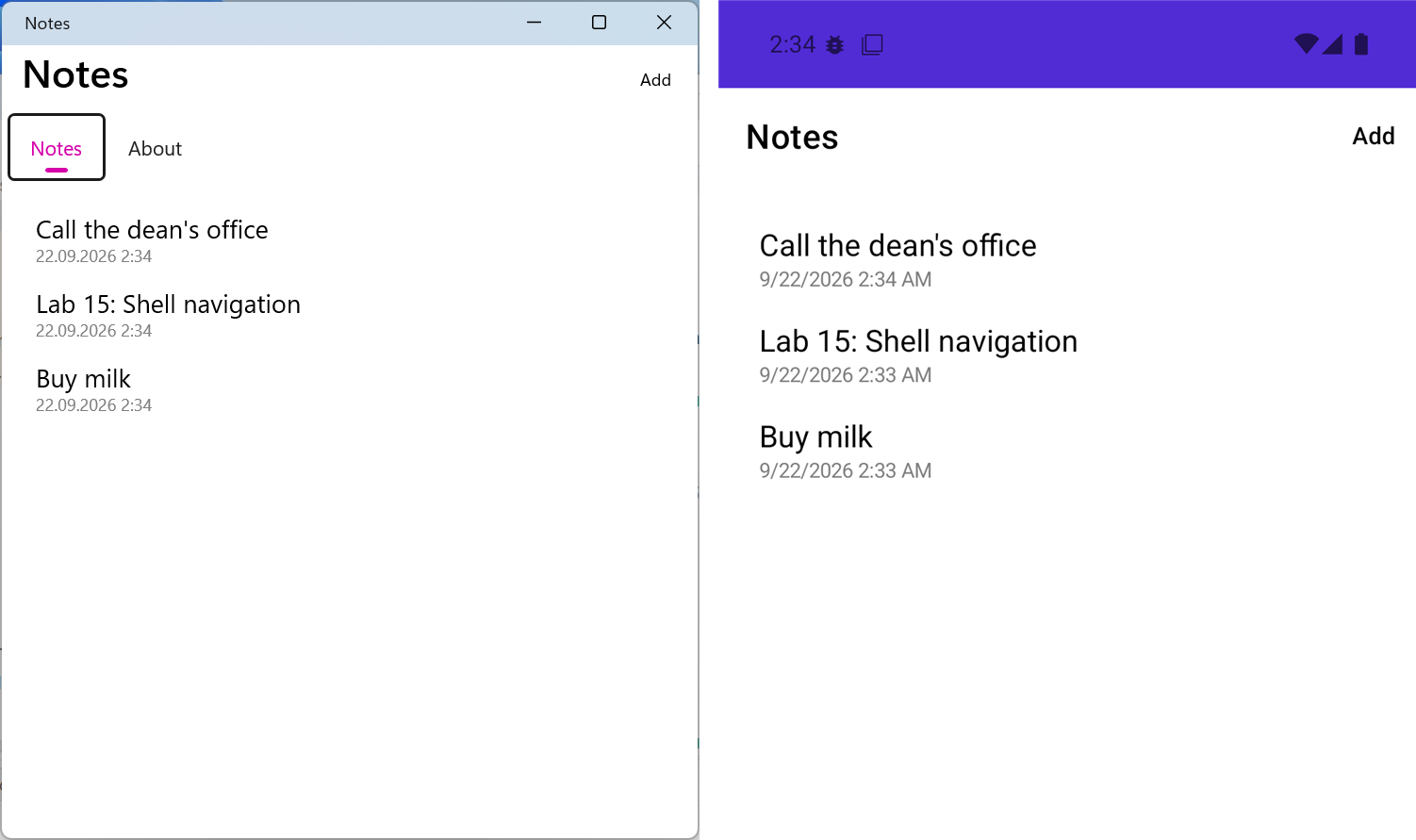
Fig. 15.10. The "Notes" application on Windows and in the Android emulator