
English
Validation, MVVM, and CommunityToolkit
Input validation
A binding validates data at three levels: conversion errors (the text abc for an int property is not written to the source), rules ValidationRule in the Binding.ValidationRules collection, and the INotifyDataErrorInfo interface, implemented by the source itself: the HasErrors property, the GetErrors(propertyName) method, and the ErrorsChanged event. The last approach suits MVVM, because the rules live in the ViewModel and are tested without the interface (https://learn.microsoft.com/dotnet/api/system.componentmodel.inotifydataerrorinfo).
An element with an error gets the attached properties Validation.HasError and Validation.Errors, and the Validation.ErrorTemplate template is drawn around it (a red border by default). The registration form ViewModel validates the age (the Email property with a check for the @ character works the same way):
cs
using System.Collections;
using System.ComponentModel;

namespace Registration;

public class RegistrationViewModel : ObservableObject,
    INotifyDataErrorInfo
{
    private readonly Dictionary<string, string> errors = [];

    public int Age
    {
        get;
        set
        {
            SetProperty(ref field, value);
            SetError(nameof(Age), value is >= 16 and <= 100
                ? null : "Age must be from 16 to 100");
        }
    } = 18;

    public bool HasErrors => errors.Count > 0;

    public event EventHandler<DataErrorsChangedEventArgs>?
        ErrorsChanged;

    public IEnumerable GetErrors(string? propertyName) =>
        propertyName is not null
        && errors.TryGetValue(propertyName, out string? error)
            ? new[] { error } : Array.Empty<string>();

    private void SetError(string property, string? error)
    {
        if (error is null)
        {
            errors.Remove(property);
        }
        else
        {
            errors[property] = error;
        }
        ErrorsChanged?.Invoke(this,
            new DataErrorsChangedEventArgs(property));
        OnPropertyChanged(nameof(HasErrors));
    }
}
An implicit field style in the window resources shows the text of the first error in a tooltip. A custom error look (in the example, a border with a "!" sign) is set by a Validation.ErrorTemplate setter with a ControlTemplate, in which the AdornedElementPlaceholder element marks the place of the field:
xml
<Style TargetType="TextBox">
    <Style.Triggers>
        <Trigger Property="Validation.HasError" Value="True">
            <Setter Property="ToolTip" Value="{Binding
                RelativeSource={RelativeSource Self},
                Path=(Validation.Errors)[0].ErrorContent}"/>
        </Trigger>
    </Style.Triggers>
</Style>
The Save button is disabled by a data trigger in its style: a DataTrigger bound to {Binding HasErrors} with the value True and a setter for the IsEnabled property.
After olena is entered in the Email field and 12 in the Age field, both fields get a border and the tooltips Email must contain @ and Age must be from 16 to 100, and Save becomes unavailable (Fig. 13.8). The text x in the age field gives the conversion error Value 'x' could not be converted., which the ViewModel does not know about (HasErrors does not change), so such a value is also checked before saving.
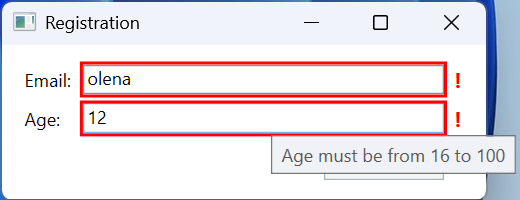
Fig. 13.8. Displaying validation errors
The MVVM pattern and commands
The roles of the parts
Model–View–ViewModel (MVVM) is an architectural pattern that separates the interface from the logic (Fig. 13.9) (https://learn.microsoft.com/dotnet/communitytoolkit/mvvm/):
- Model – data and business rules, services for accessing files, databases (Topics 7–8), and web services (Topic 10); it knows nothing about the interface;
- View – the XAML markup: elements, styles, templates; the code-behind contains only purely visual code;
- ViewModel – a class that prepares data for the View in a convenient form (properties with notification, collections), holds the interface state (the selected item, the search text), and performs actions (commands). The ViewModel does not reference controls.
Fig. 13.9. The structure of the MVVM pattern
Compared with event handlers in the code-behind, MVVM gives testability and reuse of the ViewModel, but it adds classes, so for a window with two buttons the pattern is overkill.
For the XAML editor to suggest ViewModel properties in {Binding}, you set a design-time data context: attributes with the d: prefix (the xmlns:d and xmlns:mc namespaces are already in the window template, mc:Ignorable="d") are used only by the designer and are absent from the compiled application (https://learn.microsoft.com/visualstudio/xaml-tools/xaml-designtime-data). For the to-do list window this is the root element attribute d:DataContext="{d:DesignInstance Type=core:TodoViewModel}", where xmlns:core="clr-namespace:TodoApp.Core;assembly=TodoApp.Core". Now IntelliSense inside {Binding } suggests NewTitle, Items, AddCommand (Fig. 13.10), and a mistake in a name is underlined.
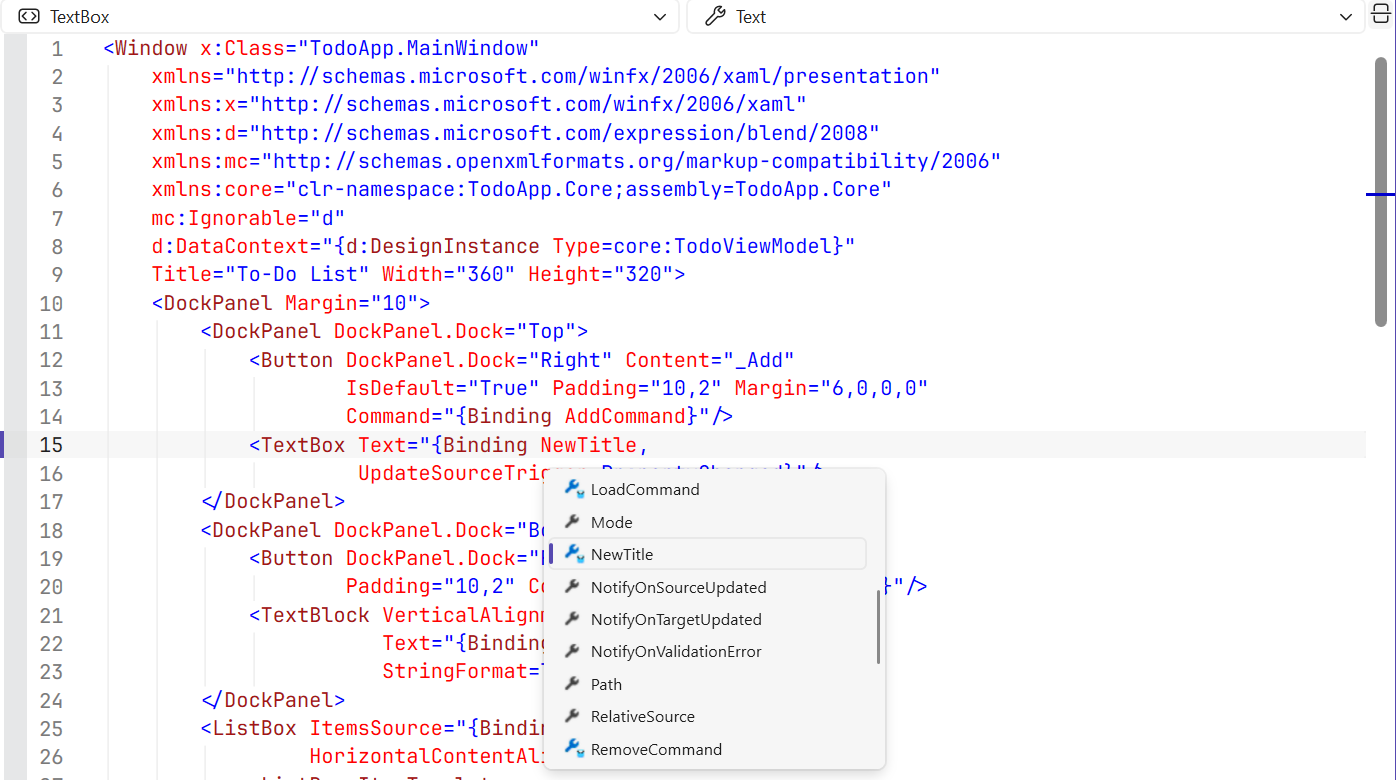
Fig. 13.10. Binding suggestions with d:DataContext
Commands
In MVVM, buttons and menu items have no Click handlers: their Command property is bound to a ViewModel command – an object with the ICommand interface (the System.Windows.Input namespace) (https://learn.microsoft.com/dotnet/api/system.windows.input.icommand):
Execute(parameter)– performs the action; the parameter is passed byCommandParameter;CanExecute(parameter)– whether the action can be performed now; an element with a command automatically becomes unavailable when the method returnsfalse;- the
CanExecuteChangedevent – a signal to the element thatCanExecutemust be called again.
The built-in WPF commands (RoutedCommand, Topic 12) look for handlers in the element tree, so for a ViewModel you write your own command that "relays" calls to delegates:
cs
using System.Windows.Input;

namespace Manual;

public class RelayCommand(Action<object?> execute,
    Func<object?, bool>? canExecute = null) : ICommand
{
    public event EventHandler? CanExecuteChanged;

    public bool CanExecute(object? parameter) =>
        canExecute?.Invoke(parameter) ?? true;

    public void Execute(object? parameter) => execute(parameter);

    // The ViewModel reports that the CanExecute condition may have changed.
    public void RaiseCanExecuteChanged() =>
        CanExecuteChanged?.Invoke(this, EventArgs.Empty);
}
The ViewModel creates the command in the constructor and calls RaiseCanExecuteChanged from the setter of the property the condition depends on:
cs
AddCommand = new RelayCommand(_ => Add(),
    _ => !string.IsNullOrWhiteSpace(NewTitle));
// in the NewTitle setter:
if (SetProperty(ref field, value))
{
    AddCommand.RaiseCanExecuteChanged();
}
The button <Button Content="_Add" Command="{Binding AddCommand}"/> is unavailable while the title field is empty and becomes enabled after the first character is typed. The command parameter is set with a binding, for example CommandParameter="{Binding SelectedItem, ElementName=itemsList}"; a change of the parameter also makes the button call CanExecute again.
The CommunityToolkit.Mvvm library
A base class, commands, and notifications would have to be written in every project, so Microsoft supports the CommunityToolkit.Mvvm library (MVVM Toolkit, the CommunityToolkit.Mvvm NuGet package, current version 8.4.2). It does not depend on WPF and also works in WinUI and .NET MAUI (Topic 15) (https://www.nuget.org/packages/CommunityToolkit.Mvvm). The ObservableObject base class contains SetProperty and OnPropertyChanged; the [ObservableProperty] attribute generates a property with notification, [NotifyPropertyChangedFor] a notification about a dependent property, [RelayCommand] a command from a method (Add() → AddCommand, SaveAsync() → SaveCommand), and [NotifyCanExecuteChangedFor] a repeated CanExecute check after a property changes. The ObservableValidator class implements INotifyDataErrorInfo for the validation attributes [Required], [Range] (the [NotifyDataErrorInfo] attribute), and WeakReferenceMessenger passes messages between ViewModels.
Classes with the attributes must be partial, because source generators write the second part of the class during compilation (https://learn.microsoft.com/dotnet/communitytoolkit/mvvm/generators/overview). The documentation shows the [ObservableProperty] attribute on fields (private string name; → the Name property), but starting with version 8.4 partial properties are recommended: since C# 14 they do not require a preview language version, and the MVVMTK0042 analyzer offers to convert a field into a property. The generated property is visible to other generators and to IntelliSense.
A method with the [RelayCommand] attribute that returns Task becomes an asynchronous IAsyncRelayCommand: while it runs, the IsRunning property is true, and starting it again is not allowed. A CancellationToken parameter of the method links the command to cancellation, and [RelayCommand(IncludeCancelCommand = true)] also creates a …CancelCommand command (https://learn.microsoft.com/dotnet/communitytoolkit/mvvm/generators/relaycommand). The generated code can be viewed in Solution Explorer: Dependencies → Analyzers → CommunityToolkit.Mvvm.SourceGenerators (Fig. 13.11).
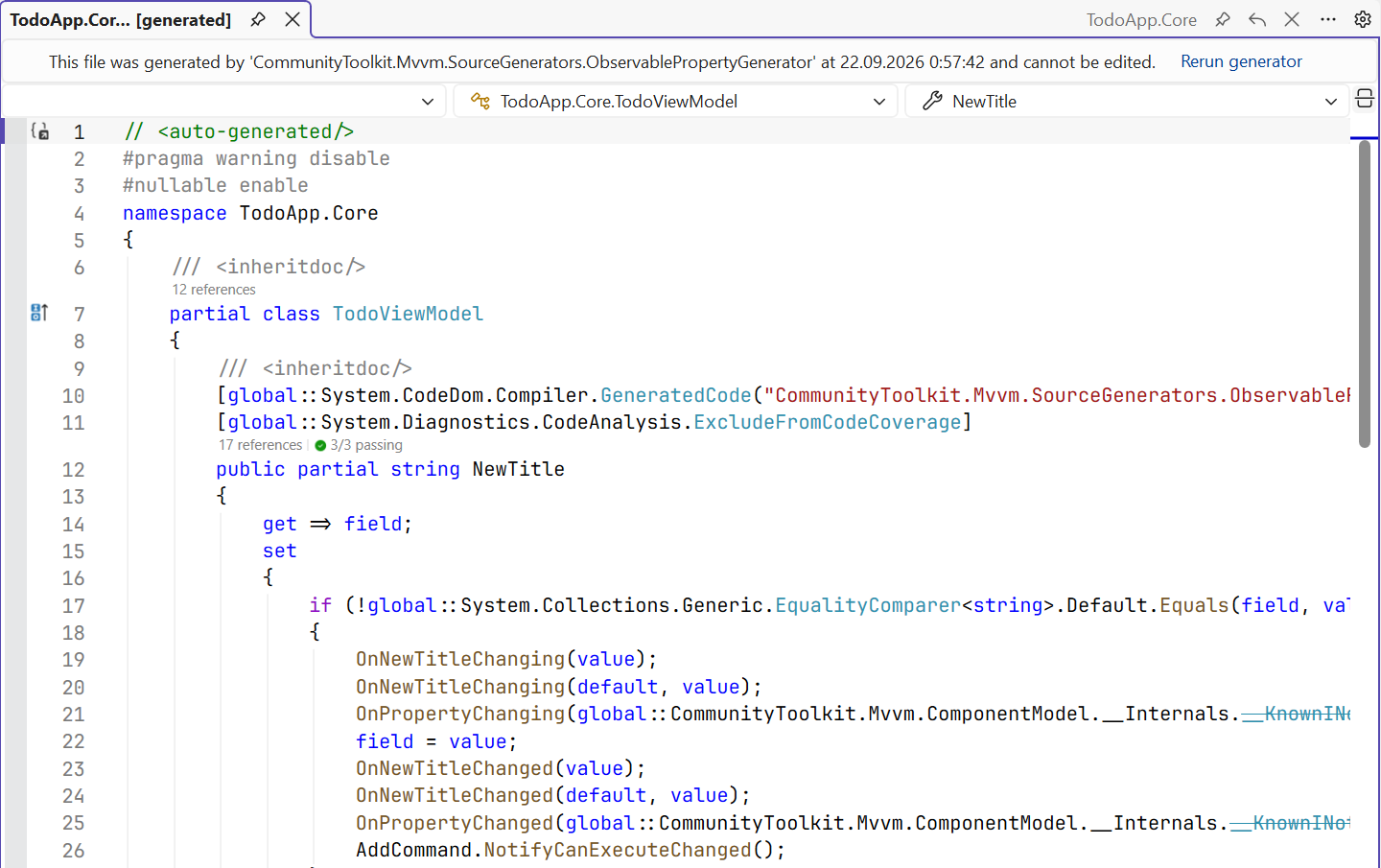
Fig. 13.11. Code generated by CommunityToolkit.Mvvm
The messenger passes messages between parts of the application that have no references to each other (for example, a to-do list and a status bar). WeakReferenceMessenger holds recipients through weak references, so a forgotten unsubscription does not cause a memory leak (https://learn.microsoft.com/dotnet/communitytoolkit/mvvm/messenger). The Send and Register methods are extension methods from the CommunityToolkit.Mvvm.Messaging namespace:
cs
public record TodoAddedMessage(string Title);
// Recipient (in the StatusViewModel constructor):
WeakReferenceMessenger.Default
    .Register<StatusViewModel, TodoAddedMessage>(this,
        (recipient, message) =>
            recipient.LastAdded = message.Title);
// Sender:
WeakReferenceMessenger.Default.Send(new TodoAddedMessage("Walk"));