
English
The data context and model
ORM and Entity Framework Core
In Topic 7, the program worked with PostgreSQL through ADO.NET: it wrote SQL commands, passed parameters, and manually converted NpgsqlDataReader rows into objects. Such code repeats for every table, and an error in a column name is detected only at run time.
The object and relational models are organized differently, and this difference is called the object-relational impedance mismatch: objects refer to each other, while tables do so through key values; a List<Post> collection has no corresponding column; classes have inheritance, tables do not; an object has identity in memory, while a row has a primary key. ORM (object-relational mapping) is a library that bridges this gap: classes are mapped to tables, properties to columns, and references to foreign keys (Fig. 8.1), and the programmer writes queries in C#.
Figure 8.1. Mapping classes to tables
Entity Framework Core (EF Core) is an open-source ORM from Microsoft (https://learn.microsoft.com/ef/core/). The current version, EF Core 10 (November 2025), has long-term support (LTS) until November 2028 and runs only on .NET 10. EF Core supports different DBMSs through database providers: SQL Server, SQLite, and Azure Cosmos DB from Microsoft, and PostgreSQL through the Npgsql.EntityFrameworkCore.PostgreSQL package from the Npgsql developers (https://www.npgsql.org/efcore/).
A comparison of data access approaches:
- ADO.NET—full control over SQL and the lowest overhead, but a lot of repetitive code;
- a micro-ORM (for example, the Dapper library)—the programmer writes the SQL, and the library only converts the result rows into objects;
- EF Core—SQL is generated from LINQ queries, object changes are tracked and saved with a single call, and the database schema is created and changed with migrations.
EF Core supports two approaches. In the code-first approach, the programmer writes classes, and EF Core creates tables from them. In the database-first approach, the database already exists, and the classes are generated from it with the dotnet ef dbcontext scaffold command. The lecture uses code-first.
How EF Core works
The application accesses the DbSet<T> properties of a context object, DbContext (Fig. 8.2). A LINQ query against a DbSet<T> is not executed immediately: the C# compiler stores it as an expression tree—an object that describes the condition p => p.Price < 1000 as data rather than compiled code. The provider translates the tree into the PostgreSQL SQL dialect, executes the command through Npgsql, and materializes the result—creates objects from the rows. The context remembers the loaded objects in the change tracker (ChangeTracker) so that it can later save their changes with INSERT, UPDATE, and DELETE commands.
Figure 8.2. The architecture of Entity Framework Core
Installation and the data context
To work with PostgreSQL, the following packages are added to the project (a .NET 10 console application):
powershell
dotnet add package Npgsql.EntityFrameworkCore.PostgreSQL
dotnet add package Microsoft.EntityFrameworkCore.Design
$cfg = "Microsoft.Extensions.Configuration"
dotnet add package "$cfg.UserSecrets"
dotnet add package "$cfg.EnvironmentVariables"
The provider package (version 10.0.3) itself brings in Microsoft.EntityFrameworkCore, Microsoft.EntityFrameworkCore.Relational, and Npgsql. The …Design package is needed only by the command-line tools; it does not end up in the program. In Visual Studio, packages are found in the Manage NuGet Packages window (Fig. 8.3). For migrations, the dotnet-ef tool is installed (https://learn.microsoft.com/ef/core/cli/dotnet):
powershell
dotnet tool install --global dotnet-ef   # or update
dotnet ef --version                      # 10.0.12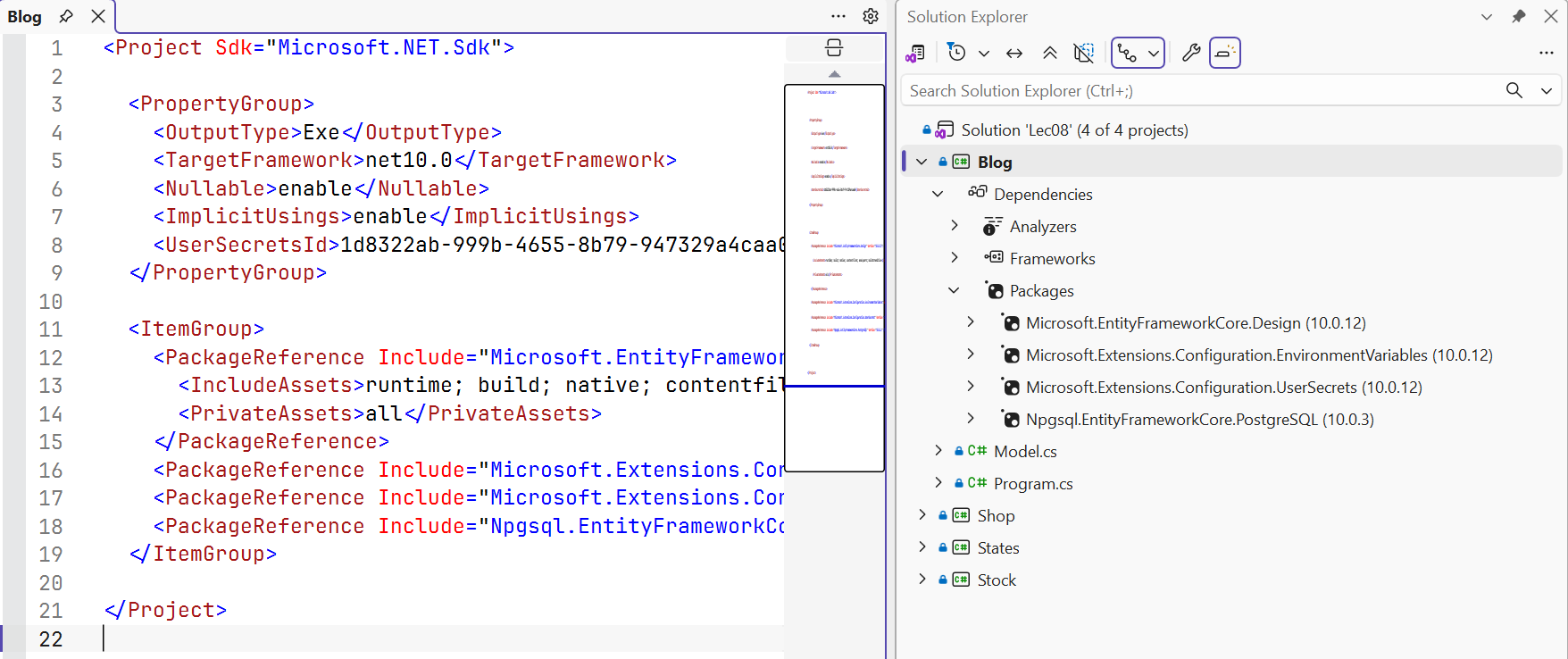
Figure 8.3. EF Core packages in a project
The database for each example is created separately in psql or DataGrip as postgres, and the library_app role from Topic 7 is made its owner: CREATE DATABASE blog_ef OWNER library_app;. EF Core will create the tables. As in Topic 7, the connection string is stored in user secrets:
powershell
dotnet user-secrets init
$cs = "Host=localhost;Database=blog_ef;" +
      "Username=library_app;Password=Change-Me-2026"
dotnet user-secrets set "ConnectionStrings:Blog" $cs
DbContext and DbSet<T>
A context class inherits DbContext and represents a session of work with the database (https://learn.microsoft.com/ef/core/dbcontext-configuration/). Its DbSet<T> properties correspond to tables: queries are executed and objects are added through them. The OnConfiguring method chooses the provider and the connection string, and the OnModelCreating method refines the model. The classes that EF Core maps to tables are called entities. The blog model (the Model.cs file):
cs
using Microsoft.EntityFrameworkCore;
using Microsoft.Extensions.Configuration;

namespace Blog;

public class Author
{
    public int Id { get; set; }
    public string Name { get; set; } = "";
    public List<Post> Posts { get; } = [];
}

public class Post
{
    public int Id { get; set; }
    public string Title { get; set; } = "";
    public DateOnly Published { get; set; }
    public int AuthorId { get; set; }             // foreign key
    public Author Author { get; set; } = null!;   // navigation
}

public class BlogContext : DbContext
{
    public DbSet<Author> Authors => Set<Author>();
    public DbSet<Post> Posts => Set<Post>();

    // The connection string: user secrets or an environment variable
    private static readonly string? ConnectionString =
        new ConfigurationBuilder()
            .AddUserSecrets<BlogContext>()
            .AddEnvironmentVariables()
            .Build()
            .GetConnectionString("Blog");

    protected override void OnConfiguring(
        DbContextOptionsBuilder options) =>
        options.UseNpgsql(ConnectionString);
}
A context is created for one logical operation and disposed: await using var db = new BlogContext();. In applications with dependency injection (Topic 6), the context receives its options through the constructor BlogContext(DbContextOptions<BlogContext> options) : DbContext(options) and is registered with the method services.AddDbContext<BlogContext>(o => o.UseNpgsql(connectionString)).
The model: conventions, annotations, and the Fluent API
Conventions
EF Core builds the model by conventions—rules that require no configuration (https://learn.microsoft.com/ef/core/modeling/):
- a table is named after the
DbSet<T>property (Posts), and a column after the property; - the
Idor<Class>Idproperty is the primary key; a key of typeintis generated by the database (in PostgreSQL, aGENERATED BY DEFAULT AS IDENTITYcolumn); - a property that refers to another entity (
Author) or a collection (Posts) is a navigation property, andAuthorIdis the relationship's foreign key; - with nullable reference types enabled (
<Nullable>enable</Nullable>), thestringtype becomes aNOT NULLcolumn, andstring?a column that allowsNULL; likewiseintandint?.
C# types are mapped to PostgreSQL types (Table 8.1). Npgsql does not change the case of names, so the tables are named "Posts", "Authors" in quotes: in psql they are also written in quotes, SELECT * FROM "Posts";.
Table 8.1. Mapping C# types to PostgreSQL types
| C# type | PostgreSQL type | Note |
|---|---|---|
int, long | integer, bigint | a key—with IDENTITY |
string | text | with [MaxLength(n)]—character varying(n) |
decimal | numeric | with [Precision(10, 2)]—numeric(10,2) |
bool, double | boolean, double precision | |
DateOnly, TimeOnly | date, time | |
DateTime | timestamp with time zone | only values with Kind = Utc |
Guid, byte[] | uuid, bytea |
Annotations and the Fluent API
If the conventions are not enough, the model is refined in two ways. Data annotations are attributes from the System.ComponentModel.DataAnnotations and Microsoft.EntityFrameworkCore namespaces placed on classes and properties. The Fluent API consists of calls to ModelBuilder methods in OnModelCreating (Table 8.2). The Fluent API can do everything attributes can and more (composite keys, multi-column indexes, CHECK constraints), and it takes precedence when configurations conflict.
Table 8.2. Data annotations and the corresponding Fluent API methods
| Annotation | Fluent API and purpose |
|---|---|
[Key] | HasKey(p => p.Code)—a primary key with a different name |
[Required] | Property(p => p.Name).IsRequired()—NOT NULL |
[MaxLength(200)] | HasMaxLength(200)—character varying(200) |
[Precision(10, 2)] | HasPrecision(10, 2)—numeric(10,2) |
[Column("title")], [Table("books")] | HasColumnName("title"), ToTable("books") |
[NotMapped] | Ignore(p => p.Total)—a property without a column |
[Index(nameof(Name), IsUnique = true)] | HasIndex(t => t.Name).IsUnique() |
[Timestamp] | IsRowVersion()—a concurrency token |
| – | ToTable(t => t.HasCheckConstraint(…)), HasDefaultValueSql("now()") |
The configuration of one entity is conveniently moved into a separate class that implements IEntityTypeConfiguration<T> with a Configure(EntityTypeBuilder<T> b) method; all such classes in the assembly are applied with a single call, model.ApplyConfigurationsFromAssembly(typeof(ShopContext).Assembly), in OnModelCreating.
A practical rule: simple constraints ([MaxLength], [Precision]) are written as attributes, because they are visible next to the property, while indexes, relationships, and database constraints go through the Fluent API.
Relationships between entities
A relationship is described by navigation properties and a foreign key (https://learn.microsoft.com/ef/core/modeling/relationships). The main kinds of relationships are shown in Fig. 8.4.
Figure 8.4. Relationships between entities
- One-to-many (1:N):
Categoryhas aList<Product> Productscollection, andProducthas aCategoryIdkey and aCategoryreference. Anintkey means a required relationship, andint?an optional one. - One-to-one (1:1):
Userhas aProfile? Profilereference, andProfilehas aUserIdkey and aUserreference. The dependent entity is the one with the foreign key. - Many-to-many (N:M):
StudenthasList<Course> Courses, andCoursehasList<Student> Students. EF Core creates theCourseStudentjunction table with a composite key itself. If the relationship needs its own data (a grade, an enrollment date), an explicitEnrollmententity with two 1:N relationships is created (a relationship with a payload).
Relationships that cannot be inferred by convention are configured with the HasOne/HasMany and WithOne/WithMany methods:
cs
model.Entity<Session>()
    .HasOne(s => s.Hall)          // a session has one hall
    .WithMany(h => h.Sessions)    // a hall has many sessions
    .HasForeignKey(s => s.HallId)
    .OnDelete(DeleteBehavior.Restrict);
Cascade delete: for a required relationship, EF Core creates ON DELETE CASCADE by default—deleting a category also deletes its products; for an optional one, the key of the dependent objects loaded into the context is set to NULL. The behavior is changed with the OnDelete method: Restrict forbids deleting the principal row while dependent ones exist (https://learn.microsoft.com/ef/core/saving/cascade-delete).
A value object without its own key (an address, a date range) is modeled as a complex type: model.Entity<Customer>().ComplexProperty(c => c.Address); or the [ComplexType] attribute on the class. Its properties become the Address_City, Address_Street columns of the owner's table. The older mechanism of owned types (OwnsOne) has a hidden key and behaves like an entity; for new models, the documentation recommends complex types (https://learn.microsoft.com/ef/core/modeling/complex-types).