
English
The Regex class and groups
The Regex class and match results
The Regex class has static methods, to which the pattern is passed as a parameter, and instance methods of an object created with the new Regex(pattern) constructor (Table 2.3). When the object is created, the pattern is parsed and validated. An error in the pattern causes a RegexParseException (a descendant of ArgumentException) with a description and the position of the error: for "(abc" it is Invalid pattern '(abc' at offset 4. Not enough )'s. (https://learn.microsoft.com/dotnet/api/system.text.regularexpressions.regex).
Table 2.3. Main methods of the Regex class
| Method | Result |
|---|---|
IsMatch(input) | bool: whether the text contains at least one match |
Match(input) | the first match—a Match object |
Matches(input) | all matches—a MatchCollection |
Count(input) | the number of matches (.NET 7 and later) |
Replace(input, replacement) | a new string in which the matches are replaced |
Split(input) | an array of the parts into which the matches divide the text |
EnumerateMatches(span) | matches without allocating objects (see below) |
Static methods are convenient for a one-time search. To avoid parsing the pattern every time, .NET keeps the last 15 patterns of static calls in a cache (the Regex.CacheSize property). If a pattern is used many times, you create a single Regex object and store it in a field, or use the source generator (the section "The [GeneratedRegex] source generator").
A search result is described by the Match class (Fig. 2.4):
Success—whether a match was found;Value,Index,Length—the text of the match, its position, and its length;NextMatch()—the next match after the current one;Groups—the groups discussed in the next section.
The Match method never returns null: if there is no match, it returns an object with Success == false and an empty Value, so you must not skip the Success check.
cs
string text = "Order 1045 of 12.09, 1046 of 15.09.";
var regex = new Regex(@"\b\d{4}\b");

Match m = regex.Match(text);
while (m.Success)
{
    Console.WriteLine($"{m.Value} [{m.Index}, {m.Length}]");
    m = m.NextMatch();
}
Console.WriteLine(regex.Count(text));   // 2
1045 [6, 4]
1046 [21, 4]
2The same traversal is written more briefly with a foreach (Match m in regex.Matches(text)) loop. A MatchCollection is filled lazily, during enumeration.
Figure 2.4. The structure of a search result
Example 1. Validating contacts
The program reads the contacts.txt file (or a file specified as a command-line argument) and determines for each line whether it is a Ukrainian phone number, an email address, or an error. The validation rules are collected in the static ContactValidator class.
cs
using System.Text.RegularExpressions;

Console.OutputEncoding = System.Text.Encoding.UTF8;

string path = args.Length > 0 ? args[0] : "contacts.txt";
int phones = 0, emails = 0, errors = 0, number = 0;

foreach (string line in File.ReadLines(path))
{
    number++;
    string value = line.Trim();
    string kind;
    if (ContactValidator.IsValidPhone(value))
    {
        kind = "phone";
        phones++;
    }
    else if (ContactValidator.IsValidEmail(value))
    {
        kind = "email";
        emails++;
    }
    else
    {
        kind = "error";
        errors++;
    }
    Console.WriteLine($"{number,2}. {value,-26} {kind}");
}
Console.WriteLine($"Phones: {phones}, emails: {emails}, " +
    $"errors: {errors}");

static class ContactValidator
{
    // 0XX XXX XX XX, country code +38, spaces or hyphens.
    const string PhonePattern =
        @"^(\+38)?0\d{2}[ -]?\d{3}([ -]?\d{2}){2}$";

    // [email protected], the zone is at least two letters.
    const string EmailPattern =
        @"^[\w.+-]+@[\w-]+(\.[\w-]+)*\.\p{L}{2,}$";

    public static bool IsValidPhone(string text) =>
        Regex.IsMatch(text, PhonePattern);

    public static bool IsValidEmail(string text) =>
        Regex.IsMatch(text, EmailPattern);
}
The phone pattern consists of an optional country code (\+38)?, an operator code 0\d{2}, and groups of 3–2–2 digits, which may be separated by a single space or hyphen ([ -]?). The ^ and $ anchors do not allow extra characters, so a 13-digit number is rejected. The email pattern requires name characters, @, a domain, and a zone of letters; since \w and \p{L} cover Unicode, an address with the Cyrillic domain .укр also passes. The result for a ten-line file:
 1. +380671234567              phone
 2. 067 123 45 67              phone
 3. +38050-123-45-67           phone
 4. 0671234567890              error
 5. +44 20 7946 0958           error
 6. [email protected]    email
 7. [email protected]      email
 8. student@localhost          error
 9. петро@пошта.укр            email
10. mail@@example.com          error
Phones: 3, emails: 3, errors: 4
Groups and backreferences
Parentheses combine part of a pattern into a group. A group lets you apply a quantifier to several characters ((\d{2}\.){2}) and captures the text that matches it. The captured values are available through the Match.Groups collection (https://learn.microsoft.com/dotnet/standard/base-types/grouping-constructs-in-regular-expressions):
- numbered groups
( … )are numbered in the order of their opening parentheses starting from 1, andGroups[0]is the whole match; - named groups
(?<name> … )are accessible by name:Groups["name"]; code that uses them is clearer and does not break when a new group is added to the pattern; - noncapturing groups
(?: … )only group without storing anything.
cs
var date = new Regex(
    @"^(?<day>\d{2})\.(?<month>\d{2})\.(?<year>\d{4})$");
Match m = date.Match("17.09.2026");
Console.WriteLine(m.Groups["year"].Value);   // 2026
Console.WriteLine(m.Groups[1].Value);        // 17 – the first group
Console.WriteLine(m.Groups.Count);           // 4 – including Groups[0]
int year = int.Parse(m.Groups["year"].ValueSpan);   // 2026
The ValueSpan property returns the group value as a ReadOnlySpan<char> without creating a new string. If an optional group did not participate in the match, its Success is false and its Value is an empty string. Groups are convenient to inspect in the debugger's Locals window (Fig. 2.5).
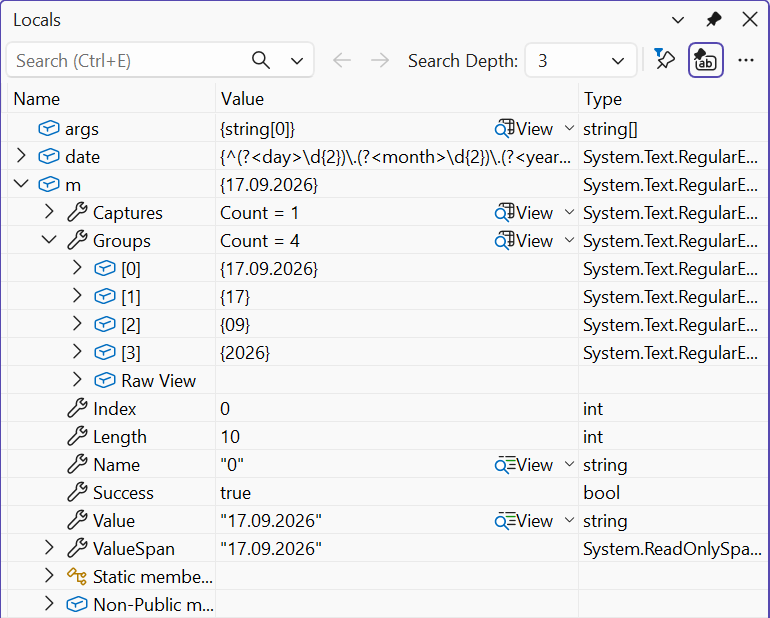
Figure 2.5. Match groups in the debugger's Locals window
Backreferences
A backreference \1 or \k<name> requires the text already captured by a group to repeat at this point. This is how you find repeated words or paired tags:
cs
string text = "This this is very very important, yes yes.";
foreach (Match m in Regex.Matches(text, @"\b(\w+)\s+\1\b",
             RegexOptions.IgnoreCase))
    Console.WriteLine(m.Value);    // This this, very very, yes yes

Regex.IsMatch("<b>text</b>", @"<(?<tag>\w+)>.*</\k<tag>>");  // True
Regex.IsMatch("<b>text</i>", @"<(?<tag>\w+)>.*</\k<tag>>");  // False
The Captures collection
If a group is under a quantifier, it captures text several times. Group.Value stores only the last capture, and all captures are available in the Group.Captures collection:
cs
Match list = Regex.Match("10,20,30", @"^(?:(?<n>\d+),?)+$");
Console.WriteLine(list.Groups["n"].Value);          // 30
foreach (Capture c in list.Groups["n"].Captures)
    Console.Write(c.Value + " ");                   // 10 20 30
Example 2. Analyzing a web server log
Web servers write every request to a log in the widely used Common Log Format: the client IP address, date and time, request line, response code, and response size in bytes. The access.log file (Windows line endings \r\n) contains one corrupted line:
10.0.0.5 - - [17/Sep/2026:10:15:32 +0300] "GET / HTTP/2" 200 5120
10.0.0.7 - - [17/Sep/2026:10:15:40 +0300] "GET /news HTTP/2" 200 812
10.0.0.5 - - [17/Sep/2026:10:16:02 +0300] "POST /login HTTP/2" 302 -
10.0.0.9 - - [17/Sep/2026:10:16:11 +0300] "GET /admin HTTP/2" 403 199
10.0.0.5 - - [17/Sep/2026:10:17:45 +0300] "GET /logo HTTP/2" 200 9480
10.0.0.9 - - [17/Sep/2026:10:18:03 +0300] "GET /.env HTTP/2" 404 153
corrupted log line
10.0.0.7 - - [17/Sep/2026:10:19:27 +0300] "GET /api/v1 HTTP/2" 500 97
The program finds all records with a single Matches call and displays the failed requests (codes 4xx and 5xx), the number of records by response code, the amount of data transferred, and the most active IP address.
cs
using System.Text.RegularExpressions;

Console.OutputEncoding = System.Text.Encoding.UTF8;

// IP - - [time] "method path protocol" code size
var regex = new Regex("""
    ^(?<ip>\S+)\s\S+\s\S+\s
    \[(?<time>[^\]]+)\]\s
    "(?<method>[A-Z]+)\s(?<path>\S+)\s[^"]*"\s
    (?<status>\d{3})\s(?<size>\d+|-)\r?$
    """,
    RegexOptions.Multiline | RegexOptions.IgnorePatternWhitespace);

string log = File.ReadAllText("access.log");
MatchCollection records = regex.Matches(log);
int lines = log.Split('\n',
    StringSplitOptions.RemoveEmptyEntries).Length;

var byStatus = new SortedDictionary<string, int>();
var byIp = new Dictionary<string, int>();
long bytes = 0;

foreach (Match m in records)
{
    string status = m.Groups["status"].Value;
    byStatus[status] = byStatus.GetValueOrDefault(status) + 1;
    string ip = m.Groups["ip"].Value;
    byIp[ip] = byIp.GetValueOrDefault(ip) + 1;
    if (long.TryParse(m.Groups["size"].ValueSpan, out long size))
        bytes += size;
    if (status[0] is '4' or '5')
    {
        Console.WriteLine($"{m.Groups["time"].Value[12..20]} " +
            $"{status} {m.Groups["method"].Value} " +
            $"{m.Groups["path"].Value}");
    }
}

Console.WriteLine($"Records: {records.Count} of {lines}, " +
    $"transferred {bytes:N0} bytes");
foreach (var (status, count) in byStatus)
    Console.WriteLine($"  {status}: {count}");
var top = byIp.MaxBy(pair => pair.Value);
Console.WriteLine($"Most active IP: {top.Key} ({top.Value})");
The long pattern is written in a raw string literal across several lines. This is possible thanks to the IgnorePatternWhitespace option: spaces and line breaks in the pattern are ignored, and real spaces in the text are denoted by \s. The Multiline option makes ^ and $ work for each line of the file, and \r? before $ skips the \r character of the Windows line ending. The size - (a response without a body) is not a number, so TryParse skips it. The result:
10:16:11 403 GET /admin
10:18:03 404 GET /.env
10:19:27 500 GET /api/v1
Records: 7 of 8, transferred 15,861 bytes
  200: 3
  302: 1
  403: 1
  404: 1
  500: 1
Most active IP: 10.0.0.5 (3)