
English
Related data and change tracking
Loading related data
The query db.Categories.ToListAsync() reads only the categories table: the Products collections remain empty. Related data is loaded in three ways (https://learn.microsoft.com/ef/core/querying/related-data/).
Eager loading—the Include and ThenInclude methods add a JOIN to the query. Inside Include, the collection can be filtered and sorted:
cs
var categories = await db.Categories
    .Include(c => c.Products.Where(p => p.Stock > 0))
    .ThenInclude(p => p.Tags)
    .ToListAsync();
Explicit loading—loading a relationship of an already loaded object: await db.Entry(category).Collection(c => c.Products).LoadAsync(); or db.Entry(product).Reference(p => p.Category).LoadAsync().
Lazy loading loads a relationship automatically on the first access to the property. It requires the Microsoft.EntityFrameworkCore.Proxies package, a UseLazyLoadingProxies() call, and virtual navigation properties (https://learn.microsoft.com/ef/core/querying/related-data/lazy). The convenience is deceptive:
cs
// An antiexample: 1 query for categories + one query per category
foreach (var c in await db.Categories.ToListAsync())
    Console.WriteLine($"{c.Name}: {c.Products.Count}");
For three categories, the log shows four SELECT commands, and for a thousand, a thousand and one. This is the N+1 query problem: the number of round trips to the server grows with the amount of data, and each one adds network latency. That is why this course does not use lazy loading: related data is loaded explicitly through Include, and for reports a projection is written that calculates everything in a single query: db.Categories.Select(c => new { c.Name, Count = c.Products.Count }).
Split queries. Several collection Includes in one query multiply the result rows (a "cartesian explosion"): a category with 100 products, each with 5 tags, gives 500 rows. The AsSplitQuery() method executes a separate SELECT for each collection (https://learn.microsoft.com/ef/core/querying/single-split-queries).
The "Online store" example
The store model contains 1:N (category – products) and N:M (products – tags) relationships; the tables are created by the InitialCreate migration, the database is shop_ef, and the secrets key is ConnectionStrings:Shop (the Model.cs file):
cs
using System.ComponentModel.DataAnnotations;
using Microsoft.EntityFrameworkCore;
using Microsoft.Extensions.Configuration;

namespace Shop;

public class Category
{
    public int Id { get; set; }
    [MaxLength(100)]
    public required string Name { get; set; }
    public List<Product> Products { get; } = [];      // 1:N
}

public class Product
{
    public int Id { get; set; }
    [MaxLength(200)]
    public required string Name { get; set; }
    [Precision(10, 2)]
    public decimal Price { get; set; }
    public int Stock { get; set; }
    public int CategoryId { get; set; }
    public Category Category { get; set; } = null!;
    public List<Tag> Tags { get; } = [];              // N:M
    [Timestamp]
    public uint Version { get; set; }                 // xmin
}

public class Tag
{
    public int Id { get; set; }
    [MaxLength(50)]
    public required string Name { get; set; }
    public List<Product> Products { get; } = [];      // N:M
}
cs
public class ShopContext : DbContext
{
    public DbSet<Category> Categories => Set<Category>();
    public DbSet<Product> Products => Set<Product>();
    public DbSet<Tag> Tags => Set<Tag>();

    // The connection string: user secrets or an environment variable
    private static readonly string? ConnectionString =
        new ConfigurationBuilder()
            .AddUserSecrets<ShopContext>()
            .AddEnvironmentVariables()
            .Build()
            .GetConnectionString("Shop");

    protected override void OnConfiguring(
        DbContextOptionsBuilder options) =>
        options.UseNpgsql(ConnectionString);

    protected override void OnModelCreating(ModelBuilder model)
    {
        model.Entity<Tag>().HasIndex(t => t.Name).IsUnique();
        model.Entity<Product>().ToTable(t => t.HasCheckConstraint(
            "CK_Products_Stock", "\"Stock\" >= 0"));
    }
}
The migration creates the "Categories", "Products", and "Tags" tables and the "ProductTag" junction table with the "ProductsId" and "TagsId" columns and a composite primary key. The Version property does not get a column: it is mapped to the PostgreSQL system column xmin (the section "Transactions and concurrency"). The program fills an empty database and runs three queries (the Program.cs file):
cs
using Microsoft.EntityFrameworkCore;
using Shop;

await using var db = new ShopContext();
if (!await db.Categories.AnyAsync())
{
    var sale = new Tag { Name = "sale" };
    var hit = new Tag { Name = "hit" };
    var books = new Category { Name = "Books" };
    var games = new Category { Name = "Games" };
    Product P(string name, decimal price, int stock, Category c,
        params Tag[] tags)
    {
        var p = new Product
        {
            Name = name, Price = price, Stock = stock, Category = c
        };
        p.Tags.AddRange(tags);
        return p;
    }
    db.Products.AddRange(
        P("C# in Depth", 1250m, 4, books, hit),
        P("Clean Code", 890.5m, 0, books, sale),
        P("Pro EF Core", 1490m, 7, books),
        P("Chess", 640m, 12, games, sale, hit),
        P("Carcassonne", 1720m, 3, games));
    await db.SaveChangesAsync();
}
cs
// 1:N – categories with products sorted by price
var categories = await db.Categories
    .OrderBy(c => c.Name)
    .Include(c => c.Products.OrderBy(p => p.Price))
    .ThenInclude(p => p.Tags.OrderBy(t => t.Name))
    .AsNoTracking()
    .ToListAsync();
foreach (var c in categories)
{
    Console.WriteLine($"{c.Name}:");
    foreach (var p in c.Products)
    {
        var tags = string.Join(", ", p.Tags.Select(t => t.Name));
        Console.WriteLine($"  {p.Name,-12} {p.Price,9:N2} {tags}");
    }
}

// A DTO projection and pagination: the second page of 2 products
const int PageSize = 2;
int pageNo = 2;
List<ProductRow> page = await db.Products
    .OrderBy(p => p.Price)
    .Skip((pageNo - 1) * PageSize)
    .Take(PageSize)
    .Select(p => new ProductRow(p.Name, p.Category.Name, p.Price))
    .ToListAsync();
Console.WriteLine($"Page {pageNo}: " +
    string.Join("; ", page.Select(r => $"{r.Name} ({r.Category})")));

// Grouping and aggregates are performed in the database
var stats = await db.Products
    .GroupBy(p => p.Category.Name)
    .Select(g => new
    {
        Category = g.Key,
        Count = g.Count(),
        InStock = g.Sum(p => p.Stock),
        MaxPrice = g.Max(p => p.Price)
    })
    .OrderBy(s => s.Category)
    .ToListAsync();
foreach (var s in stats)
    Console.WriteLine($"{s.Category}: {s.Count} products, " +
        $"{s.InStock} in stock, max {s.MaxPrice:N2}");

record ProductRow(string Name, string Category, decimal Price);
The result:
Books:
  Clean Code      890.50 sale
  C# in Depth   1,250.00 hit
  Pro EF Core   1,490.00
Games:
  Chess           640.00 hit, sale
  Carcassonne   1,720.00
Page 2: C# in Depth (Books); Pro EF Core (Books)
Books: 3 products, 11 in stock, max 1,490.00
Games: 2 products, 15 in stock, max 1,720.00
The first query is translated into one SELECT with two LEFT JOINs (categories – products – tags through "ProductTag") and the sorting ORDER BY c."Name", c."Id", s0."Price", …: EF Core adds the keys to the sorting in order to assemble the rows back into collections. To add tags to a product, p.Tags.AddRange(tags) is enough: EF Core inserts the junction table rows itself. AsNoTracking() speeds up a query whose data is only displayed (the section "Change tracking").
Change tracking
For each loaded or added object, the context stores an entry with a state and a snapshot of the original property values (https://learn.microsoft.com/ef/core/change-tracking/). The state is described by the EntityState enumeration (Fig. 8.9):
Detached—the object is not tracked by the context;Added—new; saving will perform anINSERT;Unchanged—loaded and not changed;Modified—at least one property changed; anUPDATEof only the changed columns will be performed;Deleted—marked with theRemovemethod; aDELETEwill be performed.
Figure 8.9. Entity states in ChangeTracker
SaveChangesAsync calls ChangeTracker.DetectChanges(), compares the current values with the snapshots, executes the commands in one transaction, and moves the entries to the Unchanged state (deleted ones to Detached). The Update(entity) method marks all properties of an object created outside the context (for example, obtained from a form) as Modified, and Attach(entity) adds it as Unchanged. An entry's state can be read and changed: db.Entry(product).State; a property's original value is db.Entry(product).Property(p => p.Price).OriginalValue. A text description of all entries is given by the db.ChangeTracker.DebugView.LongView property, which is convenient to view in the debugger (Fig. 8.10).
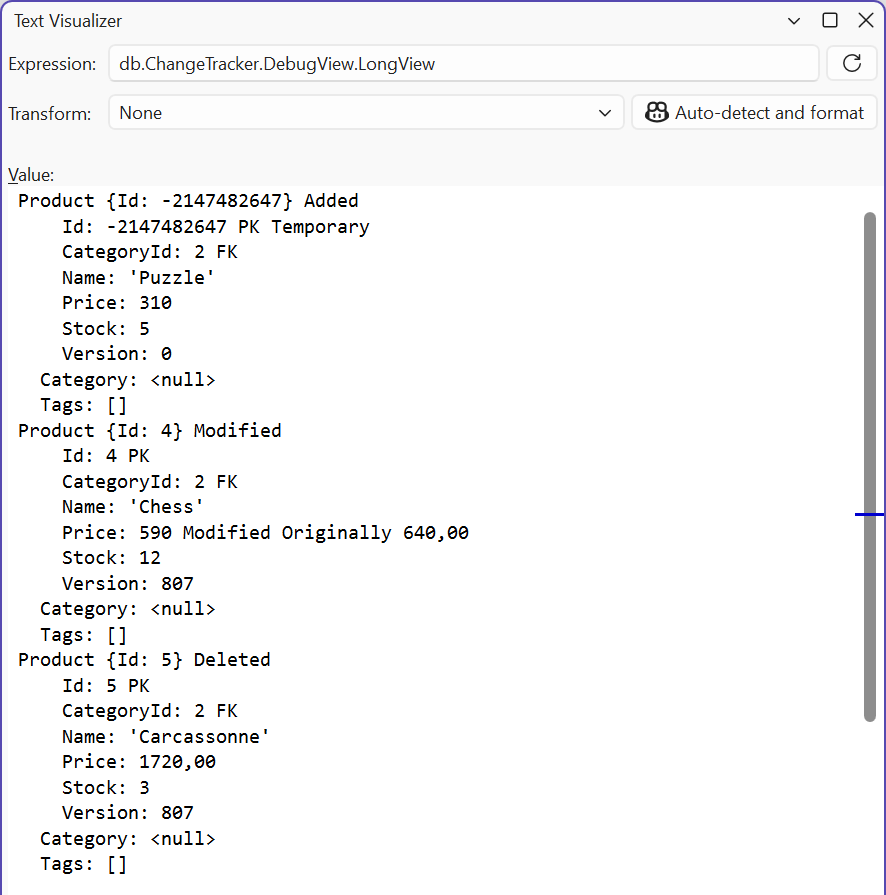
Figure 8.10. The change tracking state in the debugger
No-tracking queries. Snapshots and entries require memory and time. For data that is only displayed, AsNoTracking() is used (https://learn.microsoft.com/ef/core/querying/tracking); such objects cannot be changed through SaveChanges, because the context does not know about them.
Bulk operations. To change or delete thousands of rows, you should not load them into memory. The ExecuteUpdateAsync and ExecuteDeleteAsync methods immediately execute one UPDATE or DELETE command for the query condition, bypassing ChangeTracker (https://learn.microsoft.com/ef/core/saving/execute-insert-update-delete). In EF Core 10, the ExecuteUpdateAsync parameter is an ordinary lambda expression, so you can write if in it and add SetProperty conditionally. Objects loaded earlier do not learn about such changes.
The "Entity states" example
The program works with the shop_ef database after the "Online store" example and shows the states of entries before and after saving, a no-tracking query, and bulk operations:
cs
using Microsoft.EntityFrameworkCore;
using Shop;

await using var db = new ShopContext();

var chess = await db.Products.SingleAsync(p => p.Name == "Chess");
Console.WriteLine($"Loaded: {db.Entry(chess).State}");

chess.Price = 590m;                                  // Modified
var puzzle = new Product
    { Name = "Puzzle", Price = 310m, Stock = 5,
      CategoryId = chess.CategoryId };
db.Products.Add(puzzle);                             // Added
var old = await db.Products
    .SingleAsync(p => p.Name == "Carcassonne");
db.Products.Remove(old);                             // Deleted

db.ChangeTracker.DetectChanges();       // update the states
Console.Write(db.ChangeTracker.DebugView.ShortView);
var price = db.Entry(chess).Property(p => p.Price);
Console.WriteLine($"Price: {price.OriginalValue} -> " +
    $"{price.CurrentValue}");

int saved = await db.SaveChangesAsync();
Console.WriteLine($"Saved: {saved}; Chess: {db.Entry(chess).State}" +
    $", Carcassonne: {db.Entry(old).State}, Puzzle Id: {puzzle.Id}");

// A no-tracking query: the objects do not get into ChangeTracker
db.ChangeTracker.Clear();
var all = await db.Products.AsNoTracking().ToListAsync();
Console.WriteLine($"Read {all.Count} products, tracked: " +
    $"{db.ChangeTracker.Entries().Count()}");

// Bulk operations: one SQL command, without loading objects
int updated = await db.Products
    .Where(p => p.Category.Name == "Books")
    .ExecuteUpdateAsync(s =>
        s.SetProperty(p => p.Price, p => p.Price * 0.9m));
int deleted = await db.Products
    .Where(p => p.Stock == 0)
    .ExecuteDeleteAsync();
Console.WriteLine($"Updated: {updated}, deleted: {deleted}");
The result:
Loaded: Unchanged
Product {Id: -2147482642} Added FK {CategoryId: 2}
Product {Id: 4} Modified FK {CategoryId: 2}
Product {Id: 5} Deleted FK {CategoryId: 2}
Price: 640.00 -> 590
Saved: 3; Chess: Unchanged, Carcassonne: Detached, Puzzle Id: 6
Read 5 products, tracked: 0
Updated: 3, deleted: 1
Before saving, a new object has a temporary negative key, and after SaveChangesAsync a real one generated by the database. DebugView does not call DetectChanges itself, so without an explicit call the price change is not visible yet. The original value 640.00 was read from a numeric(10,2) column and keeps two decimal places. The bulk update changed three books, and ExecuteDeleteAsync deleted the product with zero stock.