
English
ADO.NET architecture and commands
ADO.NET architecture
ADO.NET is a set of .NET classes for working with data sources (https://learn.microsoft.com/dotnet/framework/data/adonet/ado-net-overview). The abstract base classes of the System.Data.Common namespace define a common interface, and a data provider for a particular DBMS implements them (Table 7.2). Providers are distributed as NuGet packages: Microsoft.Data.SqlClient (SQL Server), Microsoft.Data.Sqlite, MySqlConnector, Npgsql (PostgreSQL). So code for different DBMSs is similar: the class prefixes and the SQL dialect differ.
Table 7.2. The main ADO.NET and Npgsql provider classes
| Base class | Npgsql | Purpose |
|---|---|---|
DbDataSource | NpgsqlDataSource | a factory of connections and commands, the connection pool |
DbConnection | NpgsqlConnection | a connection to the server |
DbCommand | NpgsqlCommand | an SQL command with parameters |
DbParameter | NpgsqlParameter | the value of a command parameter |
DbDataReader | NpgsqlDataReader | sequential reading of result rows |
DbTransaction | NpgsqlTransaction | a transaction |
DbDataAdapter | NpgsqlDataAdapter | filling a DataTable and saving changes |
ADO.NET has two modes of operation. In connected mode, the program opens a connection, executes a command, and reads the result while the connection is open (Fig. 7.8). In disconnected mode, the data is copied into a DataTable object in memory, the connection is closed, and changes are saved later in a single operation. The Entity Framework Core object-relational mapper (Topic 8) is built on top of an ADO.NET provider.
Figure 7.8. ADO.NET architecture with the Npgsql provider
The Npgsql package
Npgsql is an open-source ADO.NET provider for PostgreSQL (https://www.npgsql.org/doc/). As of September 2026, the current package version is 10.0.3 for .NET 8, 9, and 10 (https://www.nuget.org/packages/Npgsql). The package is added in Solution Explorer: the project context menu Manage NuGet Packages…, the Browse tab, search for Npgsql, the Install button (Fig. 7.9), or with the command:
powershell
dotnet add package Npgsql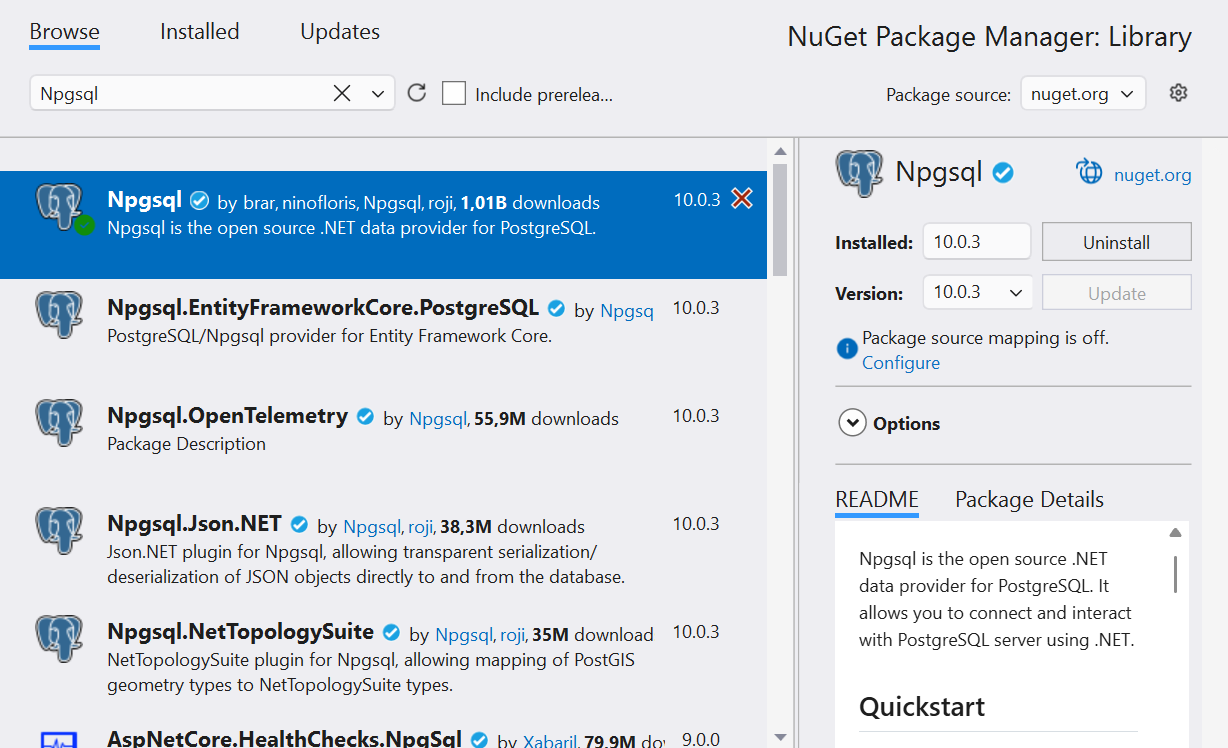
Figure 7.9. Installing the Npgsql package in Visual Studio
The connection string and configuration
A connection string contains key=value pairs separated by semicolons (https://www.npgsql.org/doc/connection-string-parameters.html):
Host=localhost;Port=5432;Database=library;Username=library_app;
Password=Change-Me-2026
A connection string with a password must not be written in code or in appsettings.json, which goes into Git. As discussed in Topic 6, during development it is stored in user secrets—a secrets.json file in the user profile outside the project folder (https://learn.microsoft.com/aspnet/core/security/app-secrets)—and on a server in the ConnectionStrings__Library environment variable. Secrets are added with the Microsoft.Extensions.Configuration.UserSecrets package:
powershell
dotnet add package Microsoft.Extensions.Configuration.UserSecrets
dotnet add package `
    Microsoft.Extensions.Configuration.EnvironmentVariables
dotnet user-secrets init
$cs = "Host=localhost;Database=library;Username=library_app;" +
    "Password=Change-Me-2026"
dotnet user-secrets set "ConnectionStrings:Library" $cs
The config.GetConnectionString("Library") method reads the ConnectionStrings:Library key; if the string is not configured, it returns null.
NpgsqlDataSource and the connection pool
Opening a physical connection to the server is an expensive operation: a network connection, authentication, creating a process on the server. So Npgsql uses a connection pool by default: when the program closes or disposes an NpgsqlConnection, the physical connection is not closed but is returned to the pool and used by the next open (https://www.npgsql.org/doc/basic-usage.html). The pool parameters are set in the connection string: Pooling (true by default), Minimum Pool Size (0), Maximum Pool Size (100), Connection Idle Lifetime (300 s—the time after which extra idle connections are closed).
The pool belongs to the NpgsqlDataSource object, which is created once for the whole application and is thread-safe.
The dataSource.CreateCommand(sql) method creates a command that takes a connection from the pool itself and returns it after execution, and await dataSource.OpenConnectionAsync() opens a connection for several commands and a transaction.
Thanks to the pool, the right style is to open connections as late as possible and release them as early as possible (await using), rather than keeping one connection open for the entire run of the program.
Executing commands
The ExecuteNonQuery, ExecuteScalar, and ExecuteReader methods
An NpgsqlCommand object executes SQL with one of three methods, depending on the result (Table 7.3). Each has an asynchronous version with the Async suffix that does not block the thread while waiting for the server's response (Topic 5): in desktop applications the interface does not "freeze", and in web services the thread serves other requests.
Table 7.3. Command execution methods
| Method | Returns | Use |
|---|---|---|
ExecuteNonQueryAsync | int—the number of rows changed | INSERT, UPDATE, DELETE, DDL |
ExecuteScalarAsync | object?—the first value of the first row | count(*), INSERT … RETURNING id |
ExecuteReaderAsync | NpgsqlDataReader | SELECT with many rows |
Reading results
NpgsqlDataReader reads the result sequentially, forward only: the ReadAsync() method moves to the next row and returns false when the rows run out. The values of the current row are read with typed methods by column number (from 0): GetInt32, GetInt64, GetString, GetDecimal, GetBoolean, GetDateTime, or the universal GetFieldValue<T> (for example, GetFieldValue<DateOnly>). The column number for a name is returned by GetOrdinal("title").
If a cell contains NULL, the typed methods throw an InvalidCastException. So columns that can be empty are first checked with the IsDBNull method. Likewise, ExecuteScalarAsync returns DBNull.Value if the value is empty, and null if there are no rows. To pass NULL in a parameter, use DBNull.Value.
While a reader is open, the connection is occupied by it: another command cannot be executed on the same connection. So the reader is disposed immediately after reading (await using).
The "Book catalog" example
A console application adds a book, changes the number of copies, searches for books by part of the title, and issues a loan. All the SQL for the books table is collected in a repository class: the rest of the program calls the AddAsync and FindAsync methods and does not depend on SQL. The project is a .NET 10 console application with the Npgsql, Microsoft.Extensions.Configuration.UserSecrets, and …EnvironmentVariables packages. A book is described by the record public record Book(int Id, string Title, int? PubYear, string? Isbn, int Copies); (the Book.cs file).
The repository receives NpgsqlDataSource through a primary constructor. Command parameters are positional: $1, $2 correspond to the first and second parameters added (the BookRepository.cs file):
cs
using Npgsql;

namespace Library;

// A repository: all the SQL for the books table in one class.
public class BookRepository(NpgsqlDataSource dataSource)
{
    public async Task<long> CountAsync()
    {
        await using NpgsqlCommand cmd =
            dataSource.CreateCommand("SELECT count(*) FROM books");
        return (long)(await cmd.ExecuteScalarAsync())!;
    }

    public async Task<int> AddAsync(string title, int? pubYear,
        string? isbn, int copies)
    {
        await using NpgsqlCommand cmd = dataSource.CreateCommand("""
            INSERT INTO books (title, pub_year, isbn, copies)
            VALUES ($1, $2, $3, $4)
            RETURNING id
            """);
        cmd.Parameters.AddWithValue(title);
        cmd.Parameters.AddWithValue((object?)pubYear ?? DBNull.Value);
        cmd.Parameters.AddWithValue((object?)isbn ?? DBNull.Value);
        cmd.Parameters.AddWithValue(copies);
        return (int)(await cmd.ExecuteScalarAsync())!;
    }
The count(*) function returns bigint, so the result is cast to long. The raw string literal """…""" keeps multiline SQL without escaping.
cs
public async Task<int> UpdateCopiesAsync(int id, int copies)
{
    await using NpgsqlCommand cmd = dataSource.CreateCommand(
        "UPDATE books SET copies = $1 WHERE id = $2");
    cmd.Parameters.AddWithValue(copies);
    cmd.Parameters.AddWithValue(id);
    return await cmd.ExecuteNonQueryAsync();  // number of rows
}
The ExecuteNonQueryAsync method returns 0 if there is no book with that id: this is how the program learns that there was nothing to change. The DeleteAsync method with the DELETE FROM books WHERE id = $1 command is written the same way. The search reads rows into a list of Book objects:
cs
    public async Task<List<Book>> FindAsync(string text)
    {
        await using NpgsqlCommand cmd = dataSource.CreateCommand("""
            SELECT id, title, pub_year, isbn, copies
            FROM books
            WHERE title ILIKE $1
            ORDER BY title
            """);
        cmd.Parameters.AddWithValue($"%{text}%");
        await using NpgsqlDataReader reader =
            await cmd.ExecuteReaderAsync();
        var books = new List<Book>();
        while (await reader.ReadAsync())
        {
            books.Add(new Book(
                reader.GetInt32(0),
                reader.GetString(1),
                reader.IsDBNull(2) ? null : reader.GetInt32(2),
                reader.IsDBNull(3) ? null : reader.GetString(3),
                reader.GetFieldValue<int>(4)));
        }
        return books;
    }
}
The Program.cs file reads the connection string from the configuration, creates a single NpgsqlDataSource, and catches database errors. The LoanService class is covered in the section "Transactions".
cs
using Library;
using Microsoft.Extensions.Configuration;
using Npgsql;

IConfiguration config = new ConfigurationBuilder()
    .AddUserSecrets<Program>()
    .AddEnvironmentVariables()
    .Build();
string connectionString = config.GetConnectionString("Library")
    ?? throw new InvalidOperationException(
        "Connection string 'Library' is not configured.");

await using NpgsqlDataSource dataSource =
    NpgsqlDataSource.Create(connectionString);
var books = new BookRepository(dataSource);
var loans = new LoanService(dataSource);
cs
try
{
    Console.WriteLine($"Books: {await books.CountAsync()}");
    int id = await books.AddAsync("Code Complete", 2004,
        "978-0735619678", 2);
    Console.WriteLine($"Added book {id}");
    Console.WriteLine(
        $"Updated: {await books.UpdateCopiesAsync(id, 5)}");
    foreach (Book b in await books.FindAsync("code"))
    {
        Console.WriteLine(
            $"{b.Id,3} {b.Title,-15} {b.PubYear,5} {b.Copies,3}");
    }

    long loanId = await loans.IssueAsync(id, readerId: 3, days: 14);
    Console.WriteLine($"Loan {loanId} issued");
    await loans.IssueAsync(bookId: 4, readerId: 3, days: 14);
}
catch (InvalidOperationException ex)
{
    Console.Error.WriteLine(ex.Message);
}
catch (PostgresException ex)
    when (ex.SqlState == PostgresErrorCodes.UniqueViolation)
{
    Console.Error.WriteLine($"Duplicate: {ex.ConstraintName}");
}
catch (NpgsqlException ex)
{
    Console.Error.WriteLine($"Database error: {ex.Message}");
}
The result of the first run after the "Library" script: the case-insensitive search for "code" finds two books, and book 4 (Clean Architecture) has no available copies:
Books: 5
Added book 6
Updated: 1
  3 Clean Code       2008   1
  6 Code Complete    2004   5
Loan 6 issued
Book 4 is not available.
An error reported by the server is represented by a PostgresException (a descendant of NpgsqlException) with the SqlState code and the ConstraintName constraint name: running the program again causes an ISBN uniqueness violation (code 23505, the constant PostgresErrorCodes.UniqueViolation) and prints Duplicate: books_isbn_key. If the server is not running, the program prints:
Database error: Failed to connect to 127.0.0.1:5432