
English
Asynchronous streams and multiple tasks
Asynchronous data streams
A method that returns Task<List<string>> yields its results only all together at the end. If results appear gradually (lines of a file, found files, messages from the network), an async stream is more convenient—an async IAsyncEnumerable<T> method that can use both await and yield return. It is iterated with an await foreach loop: each iteration waits for the next value without blocking the thread (https://learn.microsoft.com/dotnet/csharp/asynchronous-programming/generate-consume-asynchronous-stream).
A cancellation token is passed to an async stream as a parameter with the [EnumeratorCancellation] attribute (the System.Runtime.CompilerServices namespace). Then the token works even when it is passed not to the method call but through stream.WithCancellation(token).
The "File search" example
The application searches a folder and its subfolders for *.txt text files that contain a given string (case-insensitively), shows found files immediately, displays progress, and lets you cancel the search. The search is moved into the static FileSearcher class, which knows nothing about the form:
cs
using System.Runtime.CompilerServices;

namespace FileSearch;

public static class FileSearcher
{
    // Returns *.txt files that contain text, one at a time,
    // as soon as a file is found; percent is the progress in percent.
    public static async IAsyncEnumerable<string> FindAsync(
        string folder, string text, IProgress<int>? percent,
        [EnumeratorCancellation] CancellationToken token = default)
    {
        string[] files = await Task.Run(() => Directory.GetFiles(
            folder, "*.txt", SearchOption.AllDirectories), token);
        for (int i = 0; i < files.Length; i++)
        {
            token.ThrowIfCancellationRequested();
            if (await ContainsAsync(files[i], text, token))
            {
                yield return files[i];
            }
            percent?.Report((i + 1) * 100 / files.Length);
        }
    }

    private static async Task<bool> ContainsAsync(
        string path, string text, CancellationToken token)
    {
        using var reader = new StreamReader(path);
        string? line;
        while ((line = await reader.ReadLineAsync(token)) is not null)
        {
            if (line.Contains(text,
                StringComparison.OrdinalIgnoreCase))
            {
                return true;
            }
        }
        return false;
    }
}
The Directory.GetFiles method is synchronous, and traversing a large folder tree takes a long time, so it is called inside Task.Run. Files are read line by line with the asynchronous ReadLineAsync, and reading a file stops at the first match.
The form contains the fields folderTextBox and textTextBox, the buttons searchButton (Search) and cancelButton (Cancel), the list resultsListBox (Dock = Fill), the indicator progressBar, and the label statusLabel; the form's FormClosing event is connected to the MainForm_FormClosing handler:
cs
namespace FileSearch;

public partial class MainForm : Form
{
    private CancellationTokenSource? cts;

    public MainForm()
    {
        InitializeComponent();
        cancelButton.Enabled = false;
    }

    private async void searchButton_Click(object sender, EventArgs e)
    {
        resultsListBox.Items.Clear();
        progressBar.Value = 0;
        cts = new CancellationTokenSource();
        var progress = new Progress<int>(p => progressBar.Value = p);
        searchButton.Enabled = false;
        cancelButton.Enabled = true;
        statusLabel.Text = "Searching...";
        try
        {
            await foreach (string file in FileSearcher.FindAsync(
                folderTextBox.Text, textTextBox.Text, progress,
                cts.Token))
            {
                resultsListBox.Items.Add(file);
            }
            statusLabel.Text = $"Found: {resultsListBox.Items.Count}";
        }
        catch (OperationCanceledException)
        {
            statusLabel.Text =
                $"Canceled, found: {resultsListBox.Items.Count}";
        }
        catch (Exception ex) when (ex is IOException
            or UnauthorizedAccessException or ArgumentException)
        {
            statusLabel.Text = "Error";
            MessageBox.Show(ex.Message, Text,
                MessageBoxButtons.OK, MessageBoxIcon.Error);
        }
        finally
        {
            cts.Dispose();
            cts = null;
            searchButton.Enabled = true;
            cancelButton.Enabled = false;
        }
    }

    private void cancelButton_Click(object sender, EventArgs e) =>
        cts?.Cancel();

    private void MainForm_FormClosing(object sender,
        FormClosingEventArgs e) => cts?.Cancel();
}
The body of await foreach runs on the UI thread, so the item is added to the list directly. The cts field exists only during the search: the Cancel button and closing the form cancel the current operation, and finally releases the cancellation source. Resetting progressBar.Value = 0 at the start is needed because otherwise, after a previous search, the indicator would show 100%.
For testing, 500 text files were created in 10 subfolders, 64 of which contain the word CancellationToken. Searching for the string cancellationtoken showed Found: 64 (in half a second, when the files were already in the disk cache), and clicking Cancel at 40% progress showed Canceled, found: 21 (Fig. 5.9). For a nonexistent folder, Directory.GetFiles throws a DirectoryNotFoundException (a descendant of IOException), and await passes it to the handler, which shows a MessageBox.
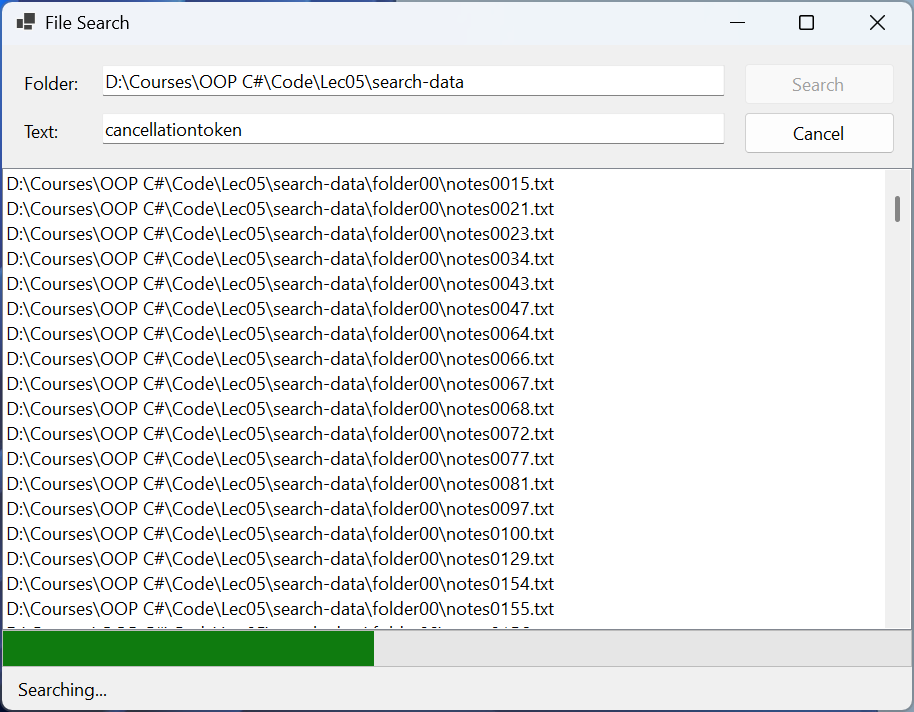
Figure 5.9. File search with progress and cancellation
Several tasks at once
Independent operations are best started at the same time and then awaited all together or until the first one completes. The main tools are listed in Table 5.2 (https://learn.microsoft.com/dotnet/standard/asynchronous-programming-patterns/consuming-the-task-based-asynchronous-pattern).
Table 5.2. Tools for working with several tasks
| Tool | Purpose |
|---|---|
Task.WhenAll(tasks) | a task that completes when all of them complete; for Task<T>, returns an array of results in task order |
Task.WhenAny(tasks) | a task that completes together with the first of the tasks; the result is that task itself |
Task.WhenEach(tasks) | .NET 9+: an IAsyncEnumerable of tasks in the order of their completion |
task.WaitAsync(timeout) | wait no longer than the specified time, otherwise TimeoutException (the operation itself does not stop) |
SemaphoreSlim | limit the number of concurrent operations: await WaitAsync() and Release() |
Parallel.ForEachAsync | process a collection with several parallel branches with MaxDegreeOfParallelism |
A task starts running at the moment the method is called, and await only waits for it. So await A(); await B(); performs the operations sequentially, while Task a = A(); Task b = B(); await Task.WhenAll(a, b); performs them concurrently. Examples with three tasks that complete after 300, 100, and 200 ms: await Task.WhenAny(…) returns the 100 ms task (for example, the fastest server mirror), and the loop await foreach (Task<string> t in Task.WhenEach(tasks)) receives the results in the order B, C, A—this is how a results table is filled in gradually.
A timeout for a single wait is set with WaitAsync, but only a token can stop the operation itself: new CancellationTokenSource(TimeSpan.FromSeconds(10)) cancels everything that received its token.
An unlimited number of concurrent requests overloads the server and the network, and processing a hundred large images at once overloads memory. SemaphoreSlim(n) is a counter with n permits: await gate.WaitAsync() takes a permit or waits for one asynchronously, and Release() returns the permit, so no more than n operations run at the same time (https://learn.microsoft.com/dotnet/api/system.threading.semaphoreslim). The Parallel.ForEachAsync method does the same for a collection, running the loop body in the thread pool (https://learn.microsoft.com/dotnet/api/system.threading.tasks.parallel.foreachasync).
The "Page download" example
The application downloads web pages from a list of addresses concurrently, but no more than a given number at a time, with an overall timeout, and shows a table with the size, time, and status of each page. An error on one page (for example, 404) does not stop the others:
cs
using System.Diagnostics;

namespace Pages;

public record PageResult(string Url, int Kilobytes, long Ms,
    string Status);

public static class PageLoader
{
    private static readonly HttpClient http = new();

    public static async Task<PageResult[]> LoadAllAsync(
        IEnumerable<string> urls, int maxParallel,
        CancellationToken token)
    {
        using var gate = new SemaphoreSlim(maxParallel);
        Task<PageResult>[] tasks = urls
            .Select(url => LoadAsync(url, gate, token))
            .ToArray();                 // all tasks are started
        return await Task.WhenAll(tasks);
    }

    private static async Task<PageResult> LoadAsync(string url,
        SemaphoreSlim gate, CancellationToken token)
    {
        await gate.WaitAsync(token);    // no more than maxParallel
        var watch = Stopwatch.StartNew();
        try
        {
            byte[] data = await http.GetByteArrayAsync(url, token);
            return new PageResult(url, data.Length / 1024,
                watch.ElapsedMilliseconds, "OK");
        }
        catch (HttpRequestException ex)
        {
            string status = ex.StatusCode?.ToString() ?? ex.Message;
            return new PageResult(url, 0,
                watch.ElapsedMilliseconds, status);
        }
        finally
        {
            gate.Release();
        }
    }
}
The ToArray() call is important: a LINQ query is lazy, and without it the tasks would not be created before WhenAll. The form contains a multiline address field urlsTextBox, the fields parallelNumeric (1–8) and timeoutNumeric (seconds), the button loadButton, the table resultsGrid, and the label statusLabel. The button handler is organized the same way as in the file search: it disables the button, creates using var cts = new CancellationTokenSource(timeout), awaits await PageLoader.LoadAllAsync(urls, parallel, cts.Token), assigns the array of results to the resultsGrid.DataSource property, and shows a summary; the catch (OperationCanceledException) block shows Timeout: … s, and finally re-enables the button.
DataGridView creates the Url, Kilobytes, Ms, and Status columns from the record's properties itself. For five addresses (two learn.microsoft.com pages, the home pages of dotnet.microsoft.com and nuget.org, and a nonexistent page), after the connections "warmed up", the label showed Loaded 4 of 5, 351 KB, 1,771 ms for one branch and Loaded 4 of 5, 351 KB, 558 ms for four; the row of the nonexistent page has the status NotFound. With a 1 s timeout and one branch, the label showed Timeout: 1 s. Sizes and times depend on the network and the current versions of the pages.