
English
Streaming and structured responses
Streaming responses
Generating a long response takes seconds or even minutes. For the user to see the text immediately, a streaming response is used: the GetStreamingResponseAsync method returns IAsyncEnumerable<ChatResponseUpdate>, and each update contains a few new tokens. They are iterated with an await foreach loop (Topic 5), and the ToChatResponse method combines the updates into one response for the history and token counting (the example below). The method's third parameter, a CancellationToken, lets you interrupt generation: in a GUI application it is canceled by a Cancel button, and the loop ends with an OperationCanceledException. Streaming output cannot be combined with structured output: JSON makes sense only as a whole.
Example: a console chat
The program holds a conversation with a local model: the system instruction sets the assistant's role, the response is printed as a stream, after each response the number of tokens is shown, and the history is trimmed to the last 10 messages. The project is a .NET 10 console application with the Microsoft.Extensions.AI and OllamaSharp packages (dotnet add package OllamaSharp).
cs
using Microsoft.Extensions.AI;
using OllamaSharp;

Console.InputEncoding = System.Text.Encoding.UTF8;
Console.OutputEncoding = System.Text.Encoding.UTF8;

const int MaxHistory = 10;   // messages, excluding the system one

IChatClient client = new OllamaApiClient(
    new Uri("http://localhost:11434"), "qwen3:4b-instruct");

List<ChatMessage> history =
[
    new(ChatRole.System,
        "You are an assistant for a student learning C# programming. " +
        "Answer in English, briefly, in 3–5 sentences. " +
        "If you don't know the answer, say so.")
];
var options = new ChatOptions
{
    Temperature = 0.3f,
    MaxOutputTokens = 500
};
long totalTokens = 0;
The main loop reads questions until an empty line or the /exit command. If the Ollama server is not running, an HttpRequestException does not end the program: the question is removed from the history:
cs
while (true)
{
    Console.Write("\nYou: ");
    string? question = Console.ReadLine();
    if (string.IsNullOrWhiteSpace(question) || question == "/exit")
        break;
    history.Add(new ChatMessage(ChatRole.User, question));

    Console.Write("Assistant: ");
    List<ChatResponseUpdate> updates = [];
    try
    {
        await foreach (ChatResponseUpdate update in
            client.GetStreamingResponseAsync(history, options))
        {
            Console.Write(update.Text);
            updates.Add(update);
        }
    }
    catch (HttpRequestException ex)
    {
        Console.Error.WriteLine($"No connection: {ex.Message}");
        history.RemoveAt(history.Count - 1);
        continue;
    }

    ChatResponse response = updates.ToChatResponse();
    history.AddMessages(response);

    UsageDetails? usage = response.Usage;
    totalTokens += usage?.TotalTokenCount ?? 0;
    Console.WriteLine();
    Console.WriteLine($"[tokens: request {usage?.InputTokenCount}, " +
        $"response {usage?.OutputTokenCount}, " +
        $"session {totalTokens}]");

    // The oldest "question – answer" pairs are removed.
    while (history.Count > MaxHistory + 1)
        history.RemoveRange(1, 2);
}
The system message (index 0) is never removed, so the model remembers its role even in a long conversation. The second question relies on the history: the model understands that "it" means var. An approximate session (Fig. 16.5; the response text differs every time):
You: What is var in C#?
Assistant: The var keyword lets you omit the type of a local
variable: the compiler infers it from the initializer expression.
The type is still static and does not change.
[tokens: request 58, response 41, session 99]

You: When is it better not to use it?
Assistant: When the type is not obvious from the right-hand side, for example
var result = Calculate(); – the reader will have to look up the type.
[tokens: request 116, response 32, session 247]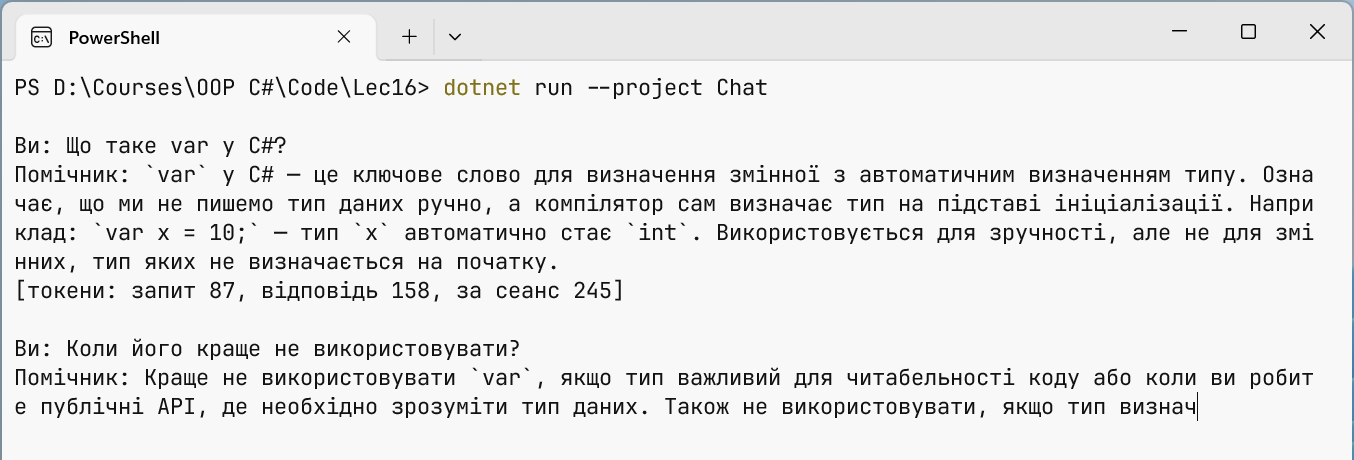
Fig. 16.5. A console chat with a streaming response
The request counter of the second question is larger because the model received the whole history. This is exactly how the cost of long conversations grows with cloud models.
Structured output
Response text is convenient for a human but not for a program. The GetResponseAsync<T> extension method asks the model to return JSON matching a C# type T: the library builds a JSON schema from the type, passes it to the model in ChatOptions.ResponseFormat, and deserializes the response (https://learn.microsoft.com/dotnet/ai/quickstarts/structured-output). For record Ad(string Title, decimal? Price, string City) the model receives the schema:
json
{"type":"object","properties":{"title":{"type":"string"},
 "price":{"type":["number","null"]},"city":{"type":"string"}},
 "required":["title","price","city"]}
The result is returned as a ChatResponse<T>: the Result property throws an exception if the JSON is invalid, while the TryGetResult method simply returns false. Even valid JSON can contain implausible values, so the result is always checked in code. The [Description] attribute ends up in the schema and tells the model what a field means.
Example: parsing classified ads
The program turns text ads into Ad records with a category, title, price, and city and prints a table. An ad without content is rejected by validation.
cs
using System.ComponentModel;
using Microsoft.Extensions.AI;
using OllamaSharp;

Console.OutputEncoding = System.Text.Encoding.UTF8;

IChatClient client = new OllamaApiClient(
    new Uri("http://localhost:11434"), "qwen3:4b-instruct");

string[] ads =
[
    "Selling a Trek Marlin 5 bike, size M frame, good condition. " +
        "4,500 UAH, negotiable. London, Camden.",
    "Renting out a one-bedroom apartment near Retiro metro, " +
        "Madrid. 9000 per month + utilities.",
    "Urgent!!! Call now!!!"
];

var options = new ChatOptions { Temperature = 0f };
Console.WriteLine(
    $"{"Category",-9} {"Title",-26} {"Price",8}  City");
For each ad, the system instruction and the text are sent. The instruction explicitly forbids making up missing data:
cs
foreach (string text in ads)
{
    List<ChatMessage> messages =
    [
        new(ChatRole.System,
            "Extract the data from the ad. Do not make anything up: " +
            "if there is no price, Price = null; if the city is not given, " +
            "City = \"\"."),
        new(ChatRole.User, text)
    ];
    ChatResponse<Ad> response =
        await client.GetResponseAsync<Ad>(messages, options);

    if (!response.TryGetResult(out Ad? ad))
    {
        Console.Error.WriteLine($"Invalid JSON: {response.Text}");
        continue;
    }
    string? error = Validate(ad);
    if (error is not null)
    {
        Console.Error.WriteLine($"Skipped \"{text}\": {error}");
        continue;
    }
    string price = ad.Price is null ? "–" : $"{ad.Price:N0}";
    Console.WriteLine(
        $"{ad.Category,-9} {ad.Title,-26} {price,8}  {ad.City}");
}

static string? Validate(Ad ad)   // check the content, not just the JSON
{
    if (string.IsNullOrWhiteSpace(ad.Title)) return "no title";
    if (ad.Price is < 0 or > 10_000_000) return "odd price";
    return null;
}

enum Category { Sale, Rent, Free, Other }

record Ad(
    [property: Description("A short title, up to 5 words")]
    string Title,
    Category Category,
    [property: Description("The price in hryvnias or null")]
    decimal? Price,
    string City);
The Category enumeration ends up in the schema as a set of allowed strings, so the model cannot return an arbitrary category. Temperature 0 makes data extraction more stable. The expected result (the skip message is written to the error stream):
Category  Title                         Price  City
Sale      Trek Marlin 5 bicycle         4,500  London
Rent      One-bedroom apartment         9,000  Madrid
Skipped "Urgent!!! Call now!!!": no title