
English
Tasks, async, and await
Why the interface "freezes"
A process is a running program with its own memory. A process has one or more threads—sequences of code execution that the operating system gives turns on the processor cores. Creating a thread is expensive (memory for the stack, context switching), so .NET has a thread pool—a set of ready worker threads that execute short work items and return to the pool (https://learn.microsoft.com/dotnet/standard/threading/the-managed-thread-pool).
A Windows Forms application has a single UI thread: on it, the Application.Run method starts the message loop, all controls are created, and all event handlers run (Topic 3). The loop takes messages from the queue (clicks, key presses, repaints) and calls the handlers one at a time. If a handler runs for 5 seconds, then for all those 5 seconds messages only pile up in the queue (Fig. 5.1).
Figure 5.1. A long-running handler blocks the UI thread's message loop
After a few seconds, Windows notices that the window is not processing messages: the title gets the "(Not Responding)" mark, the content turns pale, and an attempt to close the window offers to terminate the program (Fig. 5.2). The user cannot even click the Cancel button.
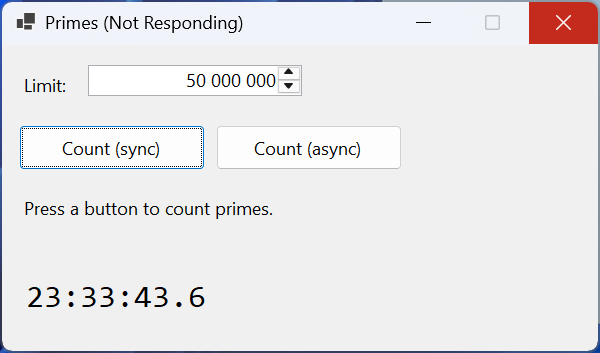
Figure 5.2. A blocked interface during a synchronous operation
An operation is called synchronous if the code that called it waits for it to complete, and asynchronous if the call returns control immediately and the result appears later. Long-running operations come in two kinds:
- I/O-bound operations—reading a file, a request to a web server or database: the processor barely works, and the program waits for a device or the network;
- CPU-bound computations—finding prime numbers, image processing, hashing: the processor is busy the whole time.
In both cases, the UI thread must not wait. C# solves this with Task objects and the async/await keywords; this approach is called the Task-based Asynchronous Pattern (TAP) (https://learn.microsoft.com/dotnet/csharp/asynchronous-programming/).
Task and Task<T>
A task is an object that represents an operation that is running now or will complete later. The Task class (the System.Threading.Tasks namespace) describes an operation without a result, and Task<T> one with a result of type T. You can wait for a task, find out its state, and get its result or exception. A task is not necessarily executed by a separate thread: Task.Delay(1000) merely starts a system timer, and a file task waits for a signal from the disk.
The main ways to get a task:
Task.Run(() => …)—queue a delegate to the thread pool (for computations);Task.Delay(ms)—a task that completes after the specified time (instead ofThread.Sleep, which blocks the thread);- .NET methods whose names end in
Async, for exampleFile.ReadAllTextAsync,HttpClient.GetStringAsync,Stream.CopyToAsync; - your own methods with the
asyncmodifier (the next section).
The state of a task is shown by the Status property (Table 5.1). The IsCompleted, IsCompletedSuccessfully, IsFaulted, and IsCanceled properties check the state more concisely.
Table 5.1. The main task states
TaskStatus value | Meaning |
|---|---|
WaitingForActivation | the task is waiting for an external event: a timer, I/O, other tasks (this is how tasks of async methods look) |
WaitingToRun | the Task.Run delegate is queued in the thread pool |
Running | the delegate is executing |
RanToCompletion | the task completed successfully, and the result is available |
Faulted | the task completed with an exception (the Exception property) |
Canceled | the task was canceled through a CancellationToken |
For example, right after Task.Run(…) the state is WaitingToRun, after await it is RanToCompletion, the state of Task.Delay(100) is WaitingForActivation, and a task with an exception is Faulted.
A task's result can be obtained in three ways: await task, the task.Result property, or the task.Wait() method. The last two block the calling thread until the task completes. On the UI thread this brings us back to "freezing", and combined with await it can lead to a deadlock (the section "The synchronization context"). In addition, Wait() and Result wrap the exception in an AggregateException. So in GUI applications, a task's result is obtained only through await.
The async and await keywords
How await works
The async modifier allows the await operator to be used in a method. The await task operator checks whether the task is complete. If not, the method returns control to its caller, and the rest of the method, the continuation, is executed after the task completes. When the continuation starts running, await returns the task's result or throws its exception (https://learn.microsoft.com/dotnet/csharp/asynchronous-programming/task-asynchronous-programming-model).
For an event handler, this means: the code before the first await runs on the UI thread, then the handler returns to the message loop, which processes repaints and clicks, and after the operation completes, the continuation again runs on the UI thread (Fig. 5.3). No thread "waits" for the task in the meantime.
Figure 5.3. An asynchronous event handler on a timeline
The compiler transforms an async method into a state machine: a hidden class that stores the local variables and the step number, and each await becomes a point where the method can pause and later resume. That is why code with await reads like ordinary sequential code: loops, try/catch, and using work as usual.
Return types of an async method
An async method can return (https://learn.microsoft.com/dotnet/csharp/asynchronous-programming/async-return-types):
Task—an operation without a result:async Task SaveAsync(…);Task<T>—an operation with a result:async Task<int> CountAsync(…), andreturn 42;inside sets the task's result;ValueTaskandValueTask<T>—structures for methods that often complete without waiting (for example, take a value from a cache): they save memory allocations, but they can be awaited only once;IAsyncEnumerable<T>—an asynchronous stream of values (the section "Asynchronous data streams");void—only for event handlers.
An async void method cannot be awaited: its caller does not know when the method finished and cannot catch its exception. An event handler has the signature of the EventHandler delegate, which returns void, so private async void button_Click(…) is acceptable. All other asynchronous methods return Task or Task<T> and have the Async suffix in their names.
If you call a method that returns Task and forget await, the method starts running, and the code moves on without waiting for it to finish and missing a possible exception. The compiler warns about this inside async methods with warning CS4014 (Fig. 5.4). If the task really does not need to be awaited, it is discarded explicitly: _ = SaveAsync(); (https://learn.microsoft.com/dotnet/csharp/language-reference/compiler-messages/async-await-errors).
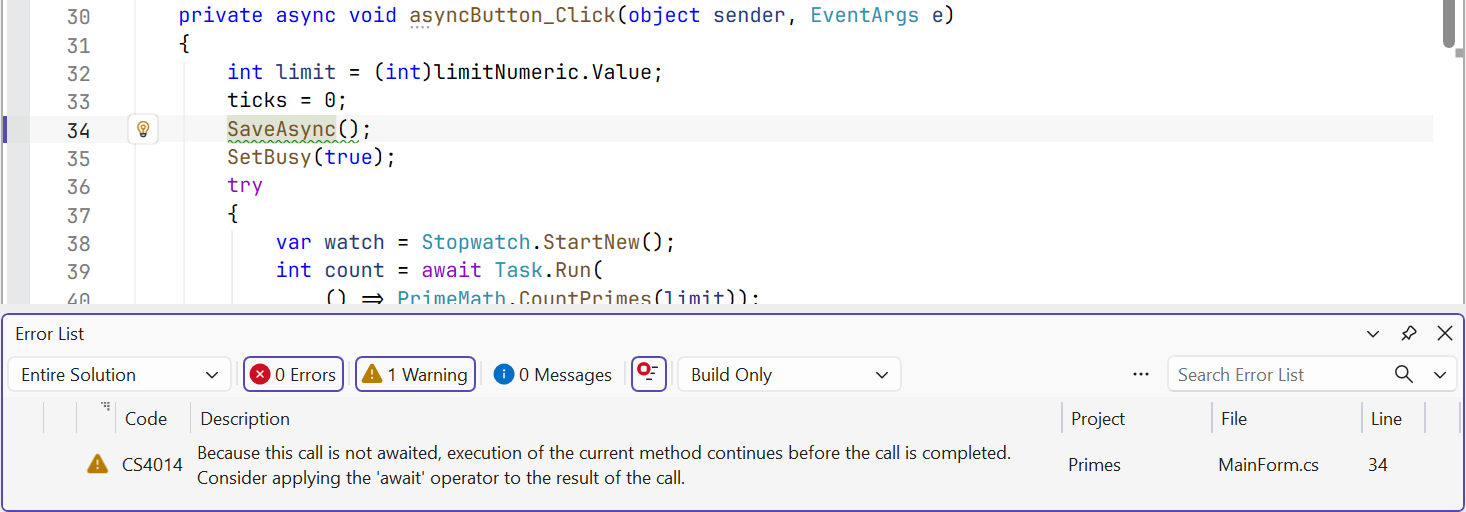
Figure 5.4. Warning CS4014 about a missing await
The "Prime numbers" example
The form contains the field limitNumeric (NumericUpDown, 2–100,000,000, value 10,000,000, ThousandsSeparator = true), the buttons syncButton (Count (sync)) and asyncButton (Count (async)), the labels resultLabel and clockLabel, and the timer clockTimer with a 100 ms interval. The timer shows the current time and counts its ticks: if the UI thread is free, the timer fires about 10 times per second. Both buttons perform the same computational work—counting prime numbers by trial division:
cs
using System.Diagnostics;

namespace Primes;

public partial class MainForm : Form
{
    private int ticks;       // how many times the timer fired

    public MainForm()
    {
        InitializeComponent();
        clockTimer.Start();  // Interval = 100 ms
    }

    private void clockTimer_Tick(object sender, EventArgs e)
    {
        ticks++;
        clockLabel.Text = DateTime.Now.ToString("HH:mm:ss.f");
    }

    private void syncButton_Click(object sender, EventArgs e)
    {
        int limit = (int)limitNumeric.Value;
        ticks = 0;
        var watch = Stopwatch.StartNew();
        int count = PrimeMath.CountPrimes(limit);  // the UI is blocked
        ShowResult(limit, count, watch.ElapsedMilliseconds);
    }

    private async void asyncButton_Click(object sender, EventArgs e)
    {
        int limit = (int)limitNumeric.Value;
        ticks = 0;
        SetBusy(true);
        try
        {
            var watch = Stopwatch.StartNew();
            int count = await Task.Run(
                () => PrimeMath.CountPrimes(limit));
            ShowResult(limit, count, watch.ElapsedMilliseconds);
        }
        finally
        {
            SetBusy(false);
        }
    }

    private void ShowResult(int limit, int count, long ms) =>
        resultLabel.Text = $"Primes up to {limit:N0}: {count:N0}"
            + $"\n{ms:N0} ms, timer ticks: {ticks}";

    private void SetBusy(bool busy)
    {
        syncButton.Enabled = !busy;
        asyncButton.Enabled = !busy;
        UseWaitCursor = busy;
    }
}

public static class PrimeMath
{
    public static int CountPrimes(int limit)
    {
        int count = 0;
        for (int n = 2; n <= limit; n++)
        {
            if (IsPrime(n))
            {
                count++;
            }
        }
        return count;
    }

    private static bool IsPrime(int n)
    {
        if (n % 2 == 0)
        {
            return n == 2;
        }
        for (int d = 3; (long)d * d <= n; d += 2)
        {
            if (n % d == 0)
            {
                return false;
            }
        }
        return true;
    }
}
The Count (sync) button shows Primes up to 10,000,000: 664,579 and 1,907 ms, timer ticks: 0: during the count the timer did not fire once, the clock stopped, and the window could not be dragged. The Count (async) button gives the same result in 1,863 ms, timer ticks: 17: the computation was performed by a pool thread, while the UI thread updated the clock and repainted the window (the time depends on the processor).
Note three rules that recur in all the examples in this lecture:
- control values (
limitNumeric.Value) are read beforeTask.Run: the lambda expression runs on another thread and must not access the form; - the buttons are disabled during the operation; otherwise, a second click would start a second operation while the first is still running (reentrancy);
- the buttons are re-enabled in a
finallyblock so that the interface is restored even after an exception.