
English
Dependency injection and the container
Dependencies and their injection
Classes rarely work alone. An order service sends an email to a customer, a report reads data from a database, a form calls a storage service. An object on which another object's work depends is called a dependency. The simplest approach is to create the dependency right in the class:
cs
public class OrderService
{
    private readonly SmtpSender sender = new("smtp.example.com");

    public void PlaceOrder(int id, string customer) =>
        sender.Send(customer, $"Order {id} accepted");
}
Such code is tightly coupled: OrderService knows the concrete class, its constructor, and the server address. To send SMS messages instead of emails, you would have to change OrderService; to test it, you would have to actually send emails; and if SmtpSender itself needs settings and a logger, OrderService would create those too.
The solution comes from the Dependency Inversion Principle (the letter D in SOLID): high-level modules depend on abstractions, not on concrete classes. Dependency injection (DI) is a technique in which an object does not create its dependencies but receives ready-made ones from outside, most often through constructor parameters (constructor injection). The class only declares what it needs (Fig. 6.1) (https://learn.microsoft.com/dotnet/core/extensions/dependency-injection/overview).
Figure 6.1. Creating a dependency directly and injecting it
Objects are wired together in one place at the start of the program—the composition root, usually Program.cs. That is also where it is decided which implementation each class gets.
The opposite approach is the Service Locator: a class itself calls a global registry, ServiceLocator.Get<IMessageSender>(). Such code compiles without explicit dependencies in the constructor, so they are not visible from outside, and a "service not registered" error shows up only at run time. The service locator is considered an antipattern; the DI container is used only in the composition root.
The "Notification service" example
The order service depends on the IMessageSender interface. The program wires the objects in three ways: manually, with a container, and with a fake implementation for testing. The container is added with a NuGet package: dotnet add package Microsoft.Extensions.DependencyInjection.
cs
using Microsoft.Extensions.DependencyInjection;

Console.OutputEncoding = System.Text.Encoding.UTF8;

// 1. Manual injection: the dependency is passed to the constructor.
var manual = new OrderService(new EmailSender("[email protected]"));
manual.PlaceOrder(1045, "[email protected]");

// 2. The container: registering services and creating them automatically.
var services = new ServiceCollection();
services.AddSingleton<IMessageSender, SmsSender>();
services.AddTransient<OrderService>();

using ServiceProvider provider = services.BuildServiceProvider();
var orders = provider.GetRequiredService<OrderService>();
orders.PlaceOrder(1046, "+380671234567");

// 3. A fake implementation for testing without real emails.
var fake = new FakeSender();
new OrderService(fake).PlaceOrder(1047, "[email protected]");
Console.WriteLine($"Fake stored: {fake.Sent[0]}");

public interface IMessageSender
{
    void Send(string to, string text);
}

public class EmailSender(string from) : IMessageSender
{
    public void Send(string to, string text) =>
        Console.WriteLine($"E-mail {from} → {to}: {text}");
}

public class SmsSender : IMessageSender
{
    public void Send(string to, string text) =>
        Console.WriteLine($"SMS → {to}: {text}");
}

public class FakeSender : IMessageSender
{
    public List<string> Sent { get; } = [];
    public void Send(string to, string text) =>
        Sent.Add($"{to}: {text}");
}

// The service depends only on the interface, not on a class.
public class OrderService(IMessageSender sender)
{
    public void PlaceOrder(int id, string customer)
    {
        // ... saving the order ...
        sender.Send(customer, $"Order {id} accepted");
    }
}
The OrderService class is declared with a C# 12 primary constructor: the sender parameter is available in all methods. The container sees that the constructor needs IMessageSender, finds the registered SmsSender implementation, and creates both objects itself. The OrderService code never changed. The result:
E-mail [email protected] → [email protected]: Order 1045 accepted
SMS → +380671234567: Order 1046 accepted
Fake stored: [email protected]: Order 1047 accepted
The Microsoft.Extensions.DependencyInjection container
A DI container consists of two parts. The IServiceCollection collection (the ServiceCollection class) contains registrations: which type is requested (service type), which class to create (implementation type), and how long the instance lives. The BuildServiceProvider method turns the collection into a service provider, IServiceProvider, which creates objects and their dependencies (Table 6.1). In DI terms, a service is any object that provides functionality to other objects, not just a web service.
Table 6.1. Registering and resolving services
| Call | What it registers or returns |
|---|---|
AddSingleton<IService, Impl>() | one instance for the entire container |
AddScoped<IService, Impl>() | one instance per scope |
AddTransient<IService, Impl>() | a new instance for every request |
AddSingleton<Impl>() | a class without an interface |
AddSingleton<IService>(sp => …) | a factory: your code creates the object |
AddSingleton<IService>(obj) | a ready-made object |
TryAddSingleton<…>() | a registration only if the type is not registered yet |
AddKeyedSingleton<…>(key) | a keyed service (also AddKeyedScoped, …Transient) |
GetService<T>() | the object, or null if the type is not registered |
GetRequiredService<T>() | the object, or an InvalidOperationException |
GetServices<T>() | all implementations of the type |
The container chooses the public constructor with the largest number of parameters it can create. A parameter that cannot be resolved produces an error with the type name:
Unable to resolve service for type 'IMessageSender' while attempting
to activate 'OrderService'.
In Visual Studio, this exception stops the debugger on the GetRequiredService line (Fig. 6.2). To find such errors immediately when the container is built, pass the parameter new ServiceProviderOptions { ValidateOnBuild = true }.
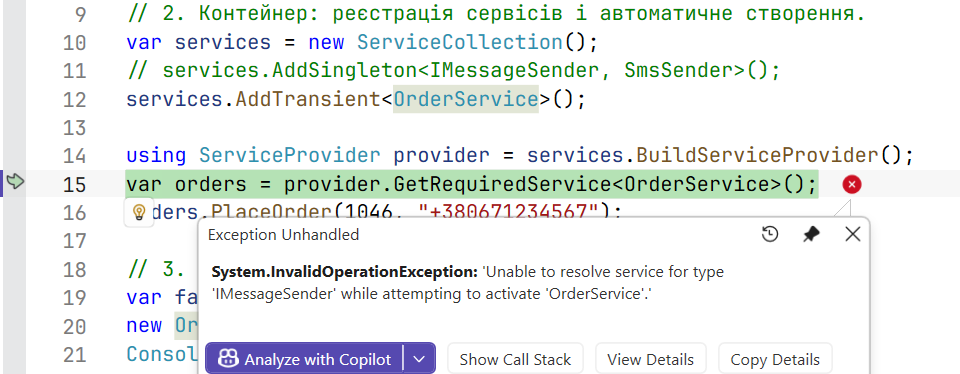
Figure 6.2. An exception caused by an unregistered dependency
Multiple implementations and keyed services
One type can be registered several times. GetRequiredService returns the last registration, and an IEnumerable<T> parameter returns all of them in registration order. The TryAdd… methods (the Microsoft.Extensions.DependencyInjection.Extensions namespace) add nothing if the type is already registered, so libraries use them to register "default" implementations.
When a specific implementation out of several is needed, keyed services (.NET 8+) are used: the registration has a key (a string, an enumeration, or another object with a correct Equals), and the constructor parameter has the [FromKeyedServices] attribute. In the fragment below, the IMessageSender interface has a Name property ("email" or "sms"):
cs
var services = new ServiceCollection();
services.AddSingleton<IMessageSender, EmailSender>();
services.AddSingleton<IMessageSender, SmsSender>();
services.AddKeyedSingleton<IMessageSender, EmailSender>("email");
services.AddKeyedSingleton<IMessageSender, SmsSender>("sms");
services.AddTransient<Broadcast>();
services.AddTransient<Alarm>();
using var provider = services.BuildServiceProvider();

var last = provider.GetRequiredService<IMessageSender>();
var email = provider.GetRequiredKeyedService<IMessageSender>("email");
Console.WriteLine($"Last: {last.Name}, by key: {email.Name}");
provider.GetRequiredService<Broadcast>().Run();
provider.GetRequiredService<Alarm>().Run();

public class Broadcast(IEnumerable<IMessageSender> senders)
{
    public void Run() =>
        Console.WriteLine($"Channels: {senders.Count()}");
}

public class Alarm([FromKeyedServices("sms")] IMessageSender sender)
{
    public void Run() => Console.WriteLine($"Alarm: {sender.Name}");
}
Last: sms, by key: email
Channels: 2
Alarm: smsKeyed and regular registrations do not mix: IEnumerable<IMessageSender> contains only the two regular ones. The special key KeyedService.AnyKey in a GetKeyedServices<T> call returns all implementations registered with keys (in .NET 10, a single GetKeyedService with AnyKey throws an exception).
Service lifetimes
The lifetime determines when the container creates a new instance and when it releases it (Fig. 6.3, https://learn.microsoft.com/dotnet/core/extensions/dependency-injection/service-lifetimes):
- Singleton—one instance for the entire container: a cache, settings, a counter;
- Scoped—one instance per scope. A scope is created by
CreateScope(); in a web application it is one HTTP request, and in a background service one operation. A typical example is a database context; - Transient—a new instance for every request: lightweight stateless objects.
Figure 6.3. Service lifetimes in two scopes
The container releases the objects it created that implement IDisposable: Scoped and Transient ones when the scope is disposed, and Singleton ones together with the container. An object passed to a registration ready-made (AddSingleton(obj)) is not released by the container.
The "Lifetimes" example
Each service gets an instance number for its type and prints it when disposed. The Checkout service depends on three services with different lifetimes and is requested twice in each of two scopes. The ValidateScopes parameter enables scope validation (see below).
cs
using Microsoft.Extensions.DependencyInjection;

Console.OutputEncoding = System.Text.Encoding.UTF8;

var services = new ServiceCollection();
services.AddSingleton<Counter>();
services.AddScoped<Basket>();
services.AddTransient<PriceFormatter>();
services.AddTransient<Checkout>();

using (var provider = services.BuildServiceProvider(
           new ServiceProviderOptions { ValidateScopes = true }))
{
    for (int n = 1; n <= 2; n++)
    {
        Console.WriteLine($"Scope {n}:");
        using IServiceScope scope = provider.CreateScope();
        IServiceProvider sp = scope.ServiceProvider;
        sp.GetRequiredService<Checkout>().Print();
        sp.GetRequiredService<Checkout>().Print();
    }
    Console.WriteLine("Container shutting down");
}

// Base class: an instance number for each type separately.
public abstract class Tracked : IDisposable
{
    private static readonly Dictionary<string, int> Counts = [];
    public string Id { get; }

    protected Tracked()
    {
        string type = GetType().Name;
        Counts[type] = Counts.GetValueOrDefault(type) + 1;
        Id = $"{type}#{Counts[type]}";
    }

    public void Dispose() => Console.WriteLine($"  Dispose {Id}");
}

public class Counter : Tracked { }
public class Basket : Tracked { }
public class PriceFormatter : Tracked { }

public class Checkout(Counter counter, Basket basket,
    PriceFormatter formatter)
{
    public void Print() => Console.WriteLine(
        $"  {counter.Id}, {basket.Id}, {formatter.Id}");
}
The result matches Fig. 6.3 exactly: Counter is one for the whole program, Basket is separate in each scope, and PriceFormatter is new for every Checkout. On leaving the scope's using block, its Scoped and Transient objects are released (in reverse order of creation), and the Singleton only together with the container:
Scope 1:
  Counter#1, Basket#1, PriceFormatter#1
  Counter#1, Basket#1, PriceFormatter#2
  Dispose PriceFormatter#2
  Dispose PriceFormatter#1
  Dispose Basket#1
Scope 2:
  Counter#1, Basket#2, PriceFormatter#3
  Counter#1, Basket#2, PriceFormatter#4
  Dispose PriceFormatter#4
  Dispose PriceFormatter#3
  Dispose Basket#2
Container shutting down
  Dispose Counter#1
Captive dependencies and scope validation
A service may depend only on services that live at least as long as it does. If a Singleton receives a Scoped service in its constructor, that service gets "stuck" in the Singleton forever and effectively becomes a Singleton. This is called a captive dependency. The bug is insidious: the program works, but, for example, one database context is used by all requests simultaneously.
cs
services.AddScoped<Basket>();
services.AddSingleton<ReportCache>();   // error: Scoped in a Singleton

public class ReportCache(Basket basket) { … }
Without validation, both scopes get the same basket (the same Guid). The ValidateScopes = true and ValidateOnBuild = true parameters detect the error when the container is built, and a request for a Scoped service from the root provider (outside a scope) at the time of the call:
Cannot consume scoped service 'Basket' from singleton 'ReportCache'.
Cannot resolve scoped service 'Basket' from root provider.
The Generic Host (the next section) enables both checks automatically in the Development environment. If a Singleton really needs a Scoped service (for example, a background service needs a database context), it receives IServiceScopeFactory and creates a scope for each operation.