
English
Application composition and testing
Application composition and testing
Dependency injection
A ViewModel receives services through its constructor (Topic 6), so it can no longer be created in XAML: the objects are created by a ServiceCollection container in the OnStartup method of the App class, and the StartupUri attribute is removed from App.xaml.
Navigation between pages is also performed by the ViewModel: the CurrentPage property stores the ViewModel of the current page, <ContentControl Content="{Binding CurrentPage}"/> shows it, and implicit data templates in the window resources (<DataTemplate DataType="{x:Type vm:SettingsPageViewModel}"> with the page's UserControl inside) choose the View by type. A command merely assigns CurrentPage = new SettingsPageViewModel(), and the window content changes.
Example: a to-do list
The solution consists of three projects. The TodoApp.Core library (net10.0) contains the model, the ViewModel, and the store and does not reference WPF, so the test project does not need net10.0-windows. The projects were created with dotnet new classlib, dotnet new wpf, and dotnet new xunit3 -f net10.0 (the xUnit.net v3 templates – Topic 2); the CommunityToolkit.Mvvm package was added to the library, and Microsoft.Extensions.DependencyInjection to the application.
The model and the ViewModel with the library's attributes:
cs
using CommunityToolkit.Mvvm.ComponentModel;

namespace TodoApp.Core;

public partial class TodoItem : ObservableObject
{
    [ObservableProperty]
    public partial string Title { get; set; } = "";

    [ObservableProperty]
    public partial bool IsDone { get; set; }
}

// The TodoViewModel.cs file
using System.Collections.ObjectModel;
using CommunityToolkit.Mvvm.ComponentModel;
using CommunityToolkit.Mvvm.Input;

namespace TodoApp.Core;

public partial class TodoViewModel(ITodoStore store)
    : ObservableObject
{
    public ObservableCollection<TodoItem> Items { get; } = [];

    [ObservableProperty]
    [NotifyCanExecuteChangedFor(nameof(AddCommand))]
    public partial string NewTitle { get; set; } = "";

    [RelayCommand(CanExecute = nameof(CanAdd))]
    private void Add()
    {
        Items.Add(new TodoItem { Title = NewTitle.Trim() });
        NewTitle = "";
    }

    private bool CanAdd() => !string.IsNullOrWhiteSpace(NewTitle);

    [RelayCommand]
    private void Remove(TodoItem item) => Items.Remove(item);

    [RelayCommand]
    private async Task LoadAsync(CancellationToken token)
    {
        Items.Clear();
        foreach (TodoItem item in await store.LoadAsync(token))
        {
            Items.Add(item);
        }
    }

    [RelayCommand]
    private Task SaveAsync(CancellationToken token) =>
        store.SaveAsync(Items, token);
}
Compared with the manual version, the base class, the command fields, the constructor, and the RaiseCanExecuteChanged call are gone. The store is described by the ITodoStore interface; the JsonTodoStore(string path) class implements it with the JsonSerializer.DeserializeAsync and SerializeAsync methods over a FileStream (if the file does not exist yet, LoadAsync returns an empty list). In the application, App.xaml has no StartupUri, and App.xaml.cs registers the services, the ViewModel, and the window:
cs
// The ITodoStore.cs file (the TodoApp.Core library)
namespace TodoApp.Core;

public interface ITodoStore
{
    Task<List<TodoItem>> LoadAsync(CancellationToken token);
    Task SaveAsync(IEnumerable<TodoItem> items,
        CancellationToken token);
}

// The App.xaml.cs file (the TodoApp application)
using System.IO;
using System.Windows;
using Microsoft.Extensions.DependencyInjection;
using TodoApp.Core;

namespace TodoApp;

public partial class App : Application
{
    private ServiceProvider? services;

    protected override void OnStartup(StartupEventArgs e)
    {
        base.OnStartup(e);
        string file = Path.Combine(Environment.GetFolderPath(
            Environment.SpecialFolder.ApplicationData),
            "TodoApp", "todos.json");

        var collection = new ServiceCollection();
        collection.AddSingleton<ITodoStore>(new JsonTodoStore(file));
        collection.AddTransient<TodoViewModel>();
        collection.AddTransient<MainWindow>();
        services = collection.BuildServiceProvider();

        services.GetRequiredService<MainWindow>().Show();
    }
}
The window constructor receives the ViewModel from the container, assigns it to DataContext, and in the Loaded handler runs viewModel.LoadCommand.Execute(null).
The window header with d:DataContext is shown above. At the top of the window there is a field {Binding NewTitle, UpdateSourceTrigger=PropertyChanged} and an Add button (IsDefault="True", Command="{Binding AddCommand}"), at the bottom a label {Binding Items.Count, StringFormat=Tasks: {0}} and a Save button (SaveCommand), and in the middle a list:
xml
<ListBox ItemsSource="{Binding Items}"
         HorizontalContentAlignment="Stretch">
    <ListBox.ItemTemplate>
        <DataTemplate DataType="{x:Type core:TodoItem}">
            <DockPanel>
                <Button DockPanel.Dock="Right"
                    Content="Remove"
                    CommandParameter="{Binding}"
                    Command="{Binding
                        DataContext.RemoveCommand,
                        RelativeSource={RelativeSource
                        AncestorType=ListBox}}"/>
                <CheckBox IsChecked="{Binding IsDone}"
                          Content="{Binding Title}"
                          VerticalAlignment="Center"/>
            </DockPanel>
        </DataTemplate>
    </ListBox.ItemTemplate>
</ListBox>
Inside the template the data context is a TodoItem, which has no RemoveCommand, so the button looks for the command in the DataContext of the ListBox ancestor through RelativeSource and passes the item itself in CommandParameter="{Binding}". After two to-dos are added, the label shows Tasks: 2, and Save writes [{"Title":"Buy milk","IsDone":false},{"Title":"Read lecture 13","IsDone":true}] to the file; the next start loads them with the LoadCommand command.
Unit tests for a ViewModel
A ViewModel does not create windows, so tests call commands and check properties. A fake in-memory store is used instead of a file:
cs
using TodoApp.Core;

namespace TodoApp.Tests;

public class TodoViewModelTests
{
    // A fake store: no files, data in memory.
    private class FakeStore : ITodoStore
    {
        public List<TodoItem> Saved { get; } = [];

        public Task<List<TodoItem>> LoadAsync(CancellationToken t) =>
            Task.FromResult(new List<TodoItem>
            {
                new() { Title = "Buy milk" },
                new() { Title = "Read lecture 13", IsDone = true }
            });

        public Task SaveAsync(IEnumerable<TodoItem> items,
            CancellationToken t)
        {
            Saved.AddRange(items);
            return Task.CompletedTask;
        }
    }

    private readonly FakeStore store = new();

    [Fact]
    public void AddCommand_AddsItemAndClearsTitle()
    {
        var vm = new TodoViewModel(store) { NewTitle = " Walk " };
        var changed = new List<string?>();
        vm.PropertyChanged += (s, e) => changed.Add(e.PropertyName);

        vm.AddCommand.Execute(null);

        TodoItem item = Assert.Single(vm.Items);
        Assert.Equal("Walk", item.Title);
        Assert.Equal("", vm.NewTitle);
        Assert.Contains(nameof(TodoViewModel.NewTitle), changed);
        Assert.False(vm.AddCommand.CanExecute(null));
    }
}
An asynchronous command is awaited in a test with the ExecuteAsync method. The class contains three more tests: AddCommand_EmptyTitle_CannotExecute (a title of spaces), LoadAndRemove_UpdateItems (after await vm.LoadCommand.ExecuteAsync(null) and removing the first to-do, one remains), and SaveCommand_PassesItemsToStore (checks store.Saved). The dotnet test command in the solution folder prints (the path is shortened):
…\TodoApp.Tests.dll (net10.0|x64) passed (4s 751ms)

Test run summary: Passed!
  total: 4
  failed: 0
  succeeded: 4
  skipped: 0
  duration: 6s 820ms
In Visual Studio the same tests are run from the Test → Test Explorer window (Fig. 13.12).
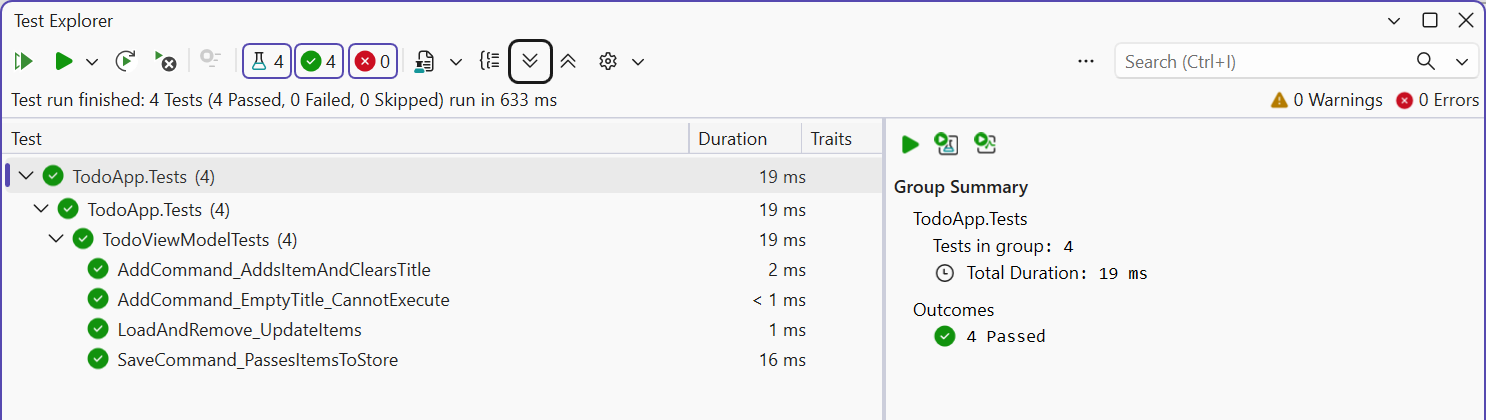
Fig. 13.12. ViewModel unit tests in Test Explorer