
English
Images, sound, and video
Images and sound
Images: Image and BitmapImage
The Image element shows an image (PNG, JPEG, BMP, GIF, TIFF, ICO); Stretch sets the scaling: Uniform (the default, preserving proportions), UniformToFill, Fill, None (https://learn.microsoft.com/dotnet/desktop/wpf/graphics-multimedia/imaging-overview). An image added to the project with the Resource build action is specified by a relative path: <Image Source="Images/logo.png"/>. For a file on disk, a BitmapImage is created in code:
cs
var bitmap = new BitmapImage();
bitmap.BeginInit();
bitmap.UriSource = new Uri(path);        // the full file path
bitmap.DecodePixelWidth = 400;           // shrink while reading
bitmap.CacheOption = BitmapCacheOption.OnLoad;   // do not hold the file
bitmap.EndInit();
bitmap.Freeze();
photo.Source = bitmap;                   // an Image element
DecodePixelWidth decodes the photo directly at the required size and saves memory (a 1920 × 1200 Windows wallpaper was read as a 400 × 250 image), and CacheOption.OnLoad reads the whole file during EndInit, so it can be deleted or overwritten immediately.
Sound: SoundPlayer, MediaPlayer, SoundPlayerAction
There are three tools for short sound signals:
System.Media.SoundPlayer– WAV files only; theLoad,Play(asynchronous),PlaySync,PlayLooping,Stopmethods (https://learn.microsoft.com/dotnet/api/system.media.soundplayer). If the file does not exist,LoadandPlaythrow aFileNotFoundExceptionwith the message Please be sure a sound file exists at the specified location;System.Windows.Media.MediaPlayer– audio and video without a visual element (MP3, WMA, WAV, M4A, and the formats Windows Media Foundation supports),Volume, several players at the same time (https://learn.microsoft.com/dotnet/api/system.windows.media.mediaplayer);SoundPlayerAction– a trigger action in XAML that plays a WAV file without code:<EventTrigger RoutedEvent="Button.Click"><SoundPlayerAction Source="Sounds/click.wav"/></EventTrigger>(https://learn.microsoft.com/dotnet/api/system.windows.controls.soundplayeraction).
cs
private readonly MediaPlayer player = new();   // a class field

player.MediaFailed += (s, e) =>
    status.Text = e.ErrorException.Message;
player.Open(new Uri(Path.Combine(AppContext.BaseDirectory,
    "Sounds", "click.wav")));
player.Play();
MediaPlayer opens a file asynchronously: errors do not throw exceptions but arrive through the MediaFailed event. For a missing file, e.ErrorException is a FileNotFoundException Cannot find the media file. The duration NaturalDuration is known only after the MediaOpened event (1.62 s for the system sound tada.wav).
Video and MediaElement
MediaElement is an interface element that shows video and plays audio; it can be placed on any panel, rotated with a transform, or have text overlaid on it (https://learn.microsoft.com/dotnet/desktop/wpf/graphics-multimedia/multimedia-overview). It uses Windows codecs (Windows Media Player / Media Foundation): WPF plays the formats the operating system supports (usually MP4 with H.264, WMV, MP3, WAV). The main members:
Source– the fileUri;LoadedBehavior:Playby default (playback right after loading). To control playback with thePlay,Pause, andStopmethods, you must setLoadedBehavior="Manual", otherwise the calls do not work;Position– the current position; assigning it moves to another place (seeking);NaturalDuration– the duration, available afterMediaOpened(HasTimeSpan);Volume(0–1, 0.5 by default),IsMuted,Balance,SpeedRatio;- the
MediaOpened,MediaEnded,MediaFailed(ExceptionRoutedEventArgs.ErrorException),BufferingStarted, andBufferingEndedevents.
MediaElement has no position change event, so the position slider is updated by a DispatcherTimer several times per second.
Media files in a project
A media file cannot be embedded as a resource (Resource): MediaElement and MediaPlayer read only files. The file is added to the project (for example, Media/intro.mp4), and in Properties you set Build Action = Content and Copy to Output Directory = Copy if newer (Fig. 14.8), which corresponds to this entry in the .csproj:
xml
<ItemGroup>
  <Content Include="Media\intro.mp4">
    <CopyToOutputDirectory>PreserveNewest</CopyToOutputDirectory>
  </Content>
</ItemGroup>
A relative Uri is resolved against the process's current directory, which depends on how the program was started, so it is more reliable to build the full path from the program folder: new Uri(Path.Combine(AppContext.BaseDirectory, "Media", "intro.mp4")).
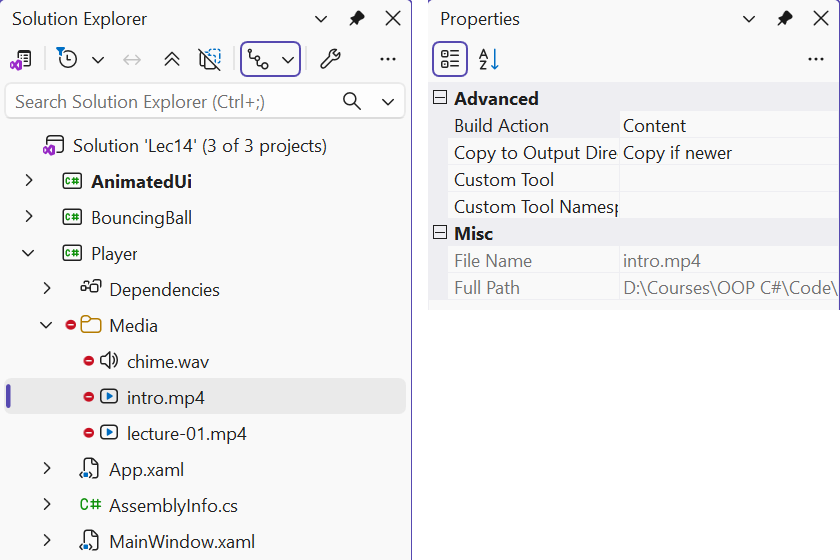
Fig. 14.8. Media file settings in the Properties window
For the learning examples, use your own files: a video recorded with the Windows Camera app or a smartphone, sound recorded with the Sound Recorder app, or freely licensed files from an official source whose terms allow such use. Do not add files from unverified sites to the project.
Example: a media player
The media player opens several files into a playlist, shows video, has Play/Pause and Stop buttons, a position slider with a "current / total" time, and a volume slider, and moves to the next file after the current one ends (Fig. 14.9). MediaElement is controlled by methods rather than properties, so the example is written in the code-behind; in an MVVM application (Topic 13) these calls are moved into a view service. The MainWindow.xaml markup:
xml
<Window x:Class="Player.MainWindow"
    xmlns="http://schemas.microsoft.com/winfx/2006/xaml/presentation"
    xmlns:x="http://schemas.microsoft.com/winfx/2006/xaml"
    Title="Media Player" Width="720" Height="460">
    <DockPanel>
        <DockPanel DockPanel.Dock="Bottom" Margin="8">
            <Button Content="Open..." Padding="8,2"
                    Click="Open_Click"/>
            <Button x:Name="playButton" Content="Play" Width="60"
                    Margin="6,0" Click="Play_Click"/>
            <Button Content="Stop" Padding="8,2" Click="Stop_Click"/>
            <Slider x:Name="volumeSlider" DockPanel.Dock="Right"
                    Width="80" Maximum="1" Value="0.5"
                    VerticalAlignment="Center" ToolTip="Volume"/>
            <TextBlock x:Name="timeText" DockPanel.Dock="Right"
                       Text="00:00 / 00:00" Margin="0,0,8,0"
                       VerticalAlignment="Center"/>
            <Slider x:Name="positionSlider" Margin="8,0"
                    VerticalAlignment="Center"
                    Thumb.DragStarted="Position_DragStarted"
                    Thumb.DragCompleted="Position_DragCompleted"/>
        </DockPanel>
        <ListBox x:Name="playlist" DockPanel.Dock="Right" Width="180"
                 DisplayMemberPath="Name"
                 SelectionChanged="Playlist_SelectionChanged"/>
        <Border Background="Black">
            <MediaElement x:Name="media" LoadedBehavior="Manual"
                Volume="{Binding Value, ElementName=volumeSlider}"
                MediaOpened="Media_MediaOpened"
                MediaEnded="Media_MediaEnded"
                MediaFailed="Media_MediaFailed"/>
        </Border>
    </DockPanel>
</Window>
The volume is linked to the slider through element binding. The attached events Thumb.DragStarted and Thumb.DragCompleted report that the user is dragging the position slider's thumb: during that time the timer must not overwrite the slider value. The MainWindow.xaml.cs file:
cs
using System.IO;
using System.Windows;
using System.Windows.Controls;
using System.Windows.Controls.Primitives;
using System.Windows.Threading;
using Microsoft.Win32;

namespace Player;

public partial class MainWindow : Window
{
    private readonly DispatcherTimer timer =
        new() { Interval = TimeSpan.FromMilliseconds(250) };
    private bool isPlaying;
    private bool isDragging;       // the user is dragging the slider

    public MainWindow()
    {
        InitializeComponent();
        timer.Tick += (s, e) => UpdatePosition();
    }

    private void Open_Click(object sender, RoutedEventArgs e)
    {
        var dialog = new OpenFileDialog
        {
            Filter = "Media files|*.mp4;*.wmv;*.mp3;*.m4a;*.wav"
                + "|All files|*.*",
            Multiselect = true
        };
        if (dialog.ShowDialog(this) != true) return;
        foreach (string file in dialog.FileNames)
            playlist.Items.Add(new FileInfo(file));
        if (playlist.SelectedIndex < 0) playlist.SelectedIndex = 0;
    }

    private void Playlist_SelectionChanged(object sender,
        SelectionChangedEventArgs e)
    {
        if (playlist.SelectedItem is not FileInfo file) return;
        media.Source = new Uri(file.FullName);
        SetPlaying(true);
    }
The playlist stores FileInfo objects, and DisplayMemberPath="Name" shows only the file names. Selecting a list item (with a click or from code) opens the file and starts playback. The SetPlaying method toggles between playback and pause, changes the button caption, and enables the timer only during playback.
cs
private void SetPlaying(bool play)
{
    if (play) media.Play();
    else media.Pause();
    isPlaying = play;
    playButton.Content = play ? "Pause" : "Play";
    timer.IsEnabled = play;
}

private void Play_Click(object sender, RoutedEventArgs e)
{
    if (media.Source != null) SetPlaying(!isPlaying);
}

private void Stop_Click(object sender, RoutedEventArgs e)
{
    SetPlaying(false);
    media.Stop();                // the position returns to 0
    UpdatePosition();
}

private void Media_MediaOpened(object sender, RoutedEventArgs e)
{
    positionSlider.Maximum = media.NaturalDuration.HasTimeSpan
        ? media.NaturalDuration.TimeSpan.TotalSeconds : 0;
    UpdatePosition();
}

private void Media_MediaEnded(object sender, RoutedEventArgs e)
{
    if (playlist.SelectedIndex < playlist.Items.Count - 1)
        playlist.SelectedIndex++;          // the next file
    else
        Stop_Click(sender, e);
}

private void Media_MediaFailed(object? sender,
    ExceptionRoutedEventArgs e)
{
    Stop_Click(this, e);
    MessageBox.Show(this, e.ErrorException.Message,
        "Cannot play the file", MessageBoxButton.OK,
        MessageBoxImage.Error);
}
The position slider works in seconds: its maximum is the file duration, and its value is the current position. When the user releases the thumb, the player seeks to the selected position:
cs
    private void Position_DragStarted(object sender,
        DragStartedEventArgs e) => isDragging = true;

    private void Position_DragCompleted(object sender,
        DragCompletedEventArgs e)
    {
        isDragging = false;
        media.Position = TimeSpan.FromSeconds(positionSlider.Value);
    }

    private void UpdatePosition()
    {
        if (!isDragging)
            positionSlider.Value = media.Position.TotalSeconds;
        TimeSpan total = media.NaturalDuration.HasTimeSpan
            ? media.NaturalDuration.TimeSpan : TimeSpan.Zero;
        timeText.Text = $@"{media.Position:mm\:ss} / {total:mm\:ss}";
    }
}
In the mm\:ss format string the colon is escaped, because in a custom TimeSpan format it is not a separator by default. During testing, two Windows system sounds were added to the list: after MediaOpened the slider got a maximum of 1.09 (the duration of the first file), after MediaEnded the player moved to the second file by itself (5.57 s), seeking Position to 1 s showed "00:01 / 00:05", and Stop showed "00:00 / 00:05".
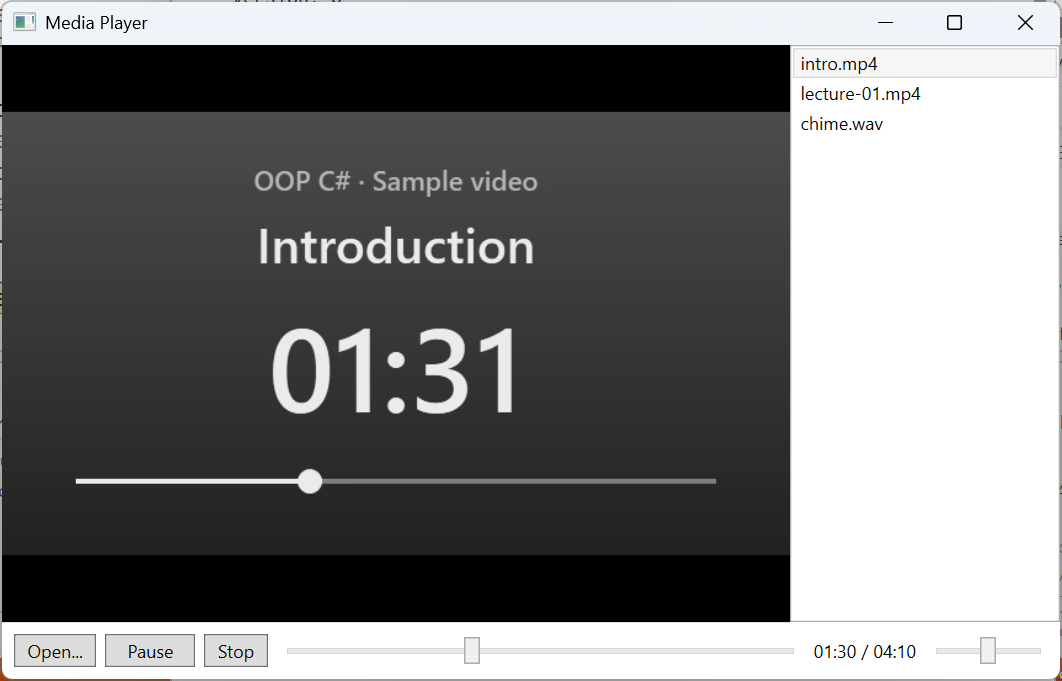
Fig. 14.9. The "Media player" application