
English
Practice
Example 1. Body mass index calculator
Create a Windows Forms application that calculates the body mass index (BMI) from height and weight: BMI = m / h2, where m is the weight in kilograms and h is the height in meters. The result updates immediately after any value changes; next to it, the WHO category is shown, marked with a background color, along with the normal weight range for the entered height. The Esc key restores the initial values.
The MainForm form (BMI Calculator, FormBorderStyle = FixedSingle) contains the labels Height, cm: and Weight, kg:, the fields heightNumeric (100–250, value 170) and weightNumeric (20–300, DecimalPlaces = 1, Increment = 0.5, value 65), the button resetButton (Reset (Esc)), the label bmiLabel (14 pt bold font), the label categoryLabel (BorderStyle = FixedSingle, TextAlign = MiddleCenter), and the label rangeLabel. The form property CancelButton = resetButton. In the Properties window, the ValueChanged event of both fields is connected to one handler, inputs_ValueChanged: for the second field, it is selected in the event's drop-down list.
cs
namespace BmiCalculator;

public partial class MainForm : Form
{
    private const decimal DefaultHeight = 170m, DefaultWeight = 65m;

    public MainForm()
    {
        InitializeComponent();
        ShowBmi();
    }

    // One handler for the ValueChanged events of both fields.
    private void inputs_ValueChanged(object sender, EventArgs e) =>
        ShowBmi();

    private void resetButton_Click(object sender, EventArgs e)
    {
        heightNumeric.Value = DefaultHeight;
        weightNumeric.Value = DefaultWeight;
    }

    private void ShowBmi()
    {
        double height = (double)heightNumeric.Value / 100;   // m
        double weight = (double)weightNumeric.Value;
        double bmi = weight / (height * height);

        var (category, color) = bmi switch
        {
            < 18.5 => ("Underweight", Color.LightSkyBlue),
            < 25 => ("Normal weight", Color.LightGreen),
            < 30 => ("Overweight", Color.Khaki),
            _ => ("Obesity", Color.LightCoral)
        };
        bmiLabel.Text = $"BMI: {bmi:F1}";
        categoryLabel.Text = category;
        categoryLabel.BackColor = color;

        double min = 18.5 * height * height;
        double max = 24.9 * height * height;
        rangeLabel.Text = $"Normal weight: {min:F1}–{max:F1} kg";
    }
}
The Value property of the NumericUpDown control is of type decimal, so an explicit cast is needed for calculations in double. The (category, color) tuple gets its value from a switch expression with the relational patterns < 18.5, < 25, < 30; the color only complements the category text. The resetButton button is the form's CancelButton, so the Esc key clicks it wherever the focus is.
After starting, the form shows BMI: 22.5, the Normal weight category, and Normal weight: 53.5–72.0 kg. For 180 cm and 95.5 kg it shows BMI: 29.5 and Overweight (normal range 59.9–80.7 kg), for 165 cm and 48 kg BMI: 17.6 and Underweight, and for 175 cm and 105 kg BMI: 34.3 and Obesity (Fig. 3.14).
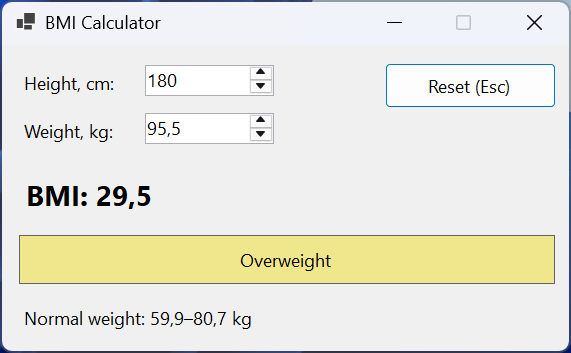
Figure 3.14. The "BMI Calculator" application
Example 2. A stopwatch with laps
Create a "Stopwatch" application that starts and stops timing with a button or the Space key, shows the time in the mm:ss.ff format, records laps (lap time and total time) in a list, resets the stopwatch, and saves the list of laps to a text file. Buttons unavailable in the current state are disabled.
The form contains the label timeLabel (Dock = Top, Consolas 32 pt font), a FlowLayoutPanel (Dock = Top, AutoSize = true) with the buttons startStopButton (Start), lapButton (Lap), resetButton (Reset), and saveButton (Save…), the list lapsListBox (Dock = Fill, Consolas font), the timer uiTimer (Interval = 50), and saveFileDialog (FileName = laps.txt, a text file filter). The form property KeyPreview = true.
cs
using System.Diagnostics;

namespace StopwatchApp;

public partial class MainForm : Form
{
    private const string TimeFormat = @"mm\:ss\.ff";
    private readonly Stopwatch stopwatch = new();
    private TimeSpan lastLap = TimeSpan.Zero;

    public MainForm()
    {
        InitializeComponent();
        UpdateButtons();
    }

    private void startStopButton_Click(object sender, EventArgs e)
    {
        if (stopwatch.IsRunning)
        {
            stopwatch.Stop();
            uiTimer.Stop();
        }
        else
        {
            stopwatch.Start();
            uiTimer.Start();
        }
        ShowTime();
        UpdateButtons();
    }

    private void lapButton_Click(object sender, EventArgs e)
    {
        TimeSpan total = stopwatch.Elapsed;
        TimeSpan lap = total - lastLap;
        lastLap = total;
        int number = lapsListBox.Items.Count + 1;
        string lapText = lap.ToString(TimeFormat);
        string totalText = total.ToString(TimeFormat);
        lapsListBox.Items.Add(
            $"Lap {number,2}  {lapText}  {totalText}");
        UpdateButtons();
    }

    private void resetButton_Click(object sender, EventArgs e)
    {
        stopwatch.Reset();
        uiTimer.Stop();
        lastLap = TimeSpan.Zero;
        lapsListBox.Items.Clear();
        ShowTime();
        UpdateButtons();
    }

    private void saveButton_Click(object sender, EventArgs e)
    {
        if (saveFileDialog.ShowDialog(this) != DialogResult.OK)
        {
            return;
        }
        File.WriteAllLines(saveFileDialog.FileName,
            lapsListBox.Items.Cast<string>());
        MessageBox.Show($"Saved {lapsListBox.Items.Count} laps.",
            Text, MessageBoxButtons.OK, MessageBoxIcon.Information);
    }

    private void uiTimer_Tick(object sender, EventArgs e) =>
        ShowTime();

    private void MainForm_KeyDown(object sender, KeyEventArgs e)
    {
        // KeyPreview = true: the form receives keys before the buttons.
        if (e.KeyCode == Keys.Space)
        {
            startStopButton.PerformClick();
            e.SuppressKeyPress = true;   // do not pass it to the button
        }
    }

    private void ShowTime() =>
        timeLabel.Text = stopwatch.Elapsed.ToString(TimeFormat);

    private void UpdateButtons()
    {
        startStopButton.Text =
            stopwatch.IsRunning ? "&Stop" : "&Start";
        lapButton.Enabled = stopwatch.IsRunning;
        saveButton.Enabled = lapsListBox.Items.Count > 0;
    }
}
Time is measured by the Stopwatch class (the System.Diagnostics namespace), and the timer only updates the label 20 times per second: if the UI thread is briefly busy, the Tick event will be late, but the measured time stays accurate. The mm\:ss\.ff format of the TimeSpan.ToString method requires escaping the colon and the period, so the format string is written as a verbatim string (@).
The Space key normally clicks the button that has focus. Thanks to KeyPreview = true, the form receives the KeyDown event first, and e.SuppressKeyPress = true prevents the button from handling the same key a second time. Access keys work even without Alt because the form has no text input fields: the L key clicks the Lap button. After starting, recording two laps (at about 1.4 and 2.1 s), and stopping, the list contains the lines Lap 1 and Lap 2 with the lap time (00:01.40, 00:00.71) and the total time (00:01.40, 00:02.12). The Save… button writes them to a file and shows the message Saved 2 laps., and Reset clears the list and shows 00:00.00 (Fig. 3.15).
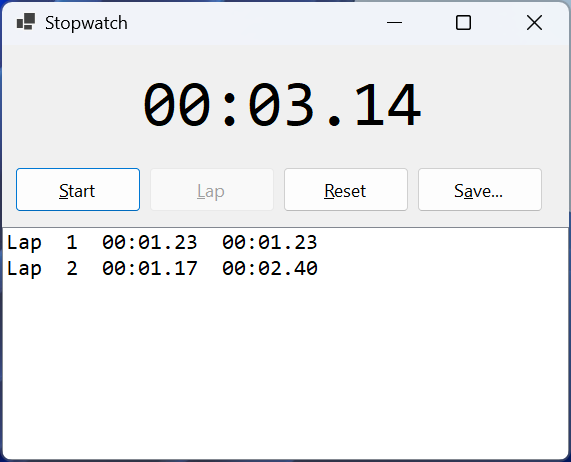
Figure 3.15. The "Stopwatch" application
Example 3. Phone book
Create a "Phone book" application that stores contacts (name and phone number) in a JSON file in the user's folder, loads them at startup, and saves them on closing. The contact list is sorted by name and filtered as the search text is typed. A new contact is added after its fields are validated; the phone number can contain digits, spaces, parentheses, hyphens, and a leading + (7 to 20 characters). The list's context menu deletes a contact.
The form contains a SplitContainer (Dock = Fill). The left panel: the search field searchTextBox (Dock = Top, PlaceholderText = Search by name or phone), the list contactsListBox (Dock = Fill, ContextMenuStrip = contactMenu), and the label countLabel (Dock = Bottom). The right panel: the fields nameTextBox and phoneTextBox with labels and the button addButton (Add, which is the form's AcceptButton); the fields are anchored Anchor = Top, Left, Right, and the button Top, Right. The contactMenu context menu has the item deleteMenuItem (Delete). The data is described by the Contact record at the end of the file:
cs
using System.ComponentModel;
using System.Text.Encodings.Web;
using System.Text.Json;
using System.Text.RegularExpressions;

namespace PhoneBook;

public partial class MainForm : Form
{
    private static readonly JsonSerializerOptions JsonOptions = new()
    {
        WriteIndented = true,
        // "+" and non-ASCII letters in the file without \uXXXX sequences.
        Encoder = JavaScriptEncoder.UnsafeRelaxedJsonEscaping
    };
    private readonly string dataFile = Path.Combine(
        Environment.GetFolderPath(
            Environment.SpecialFolder.ApplicationData),
        "PhoneBook", "contacts.json");
    private List<Contact> contacts = [];

    public MainForm()
    {
        InitializeComponent();
    }

    [GeneratedRegex(@"^\+?[0-9 ()-]{7,20}$")]
    private static partial Regex PhoneRegex();

    private void MainForm_Load(object sender, EventArgs e)
    {
        try
        {
            if (File.Exists(dataFile))
            {
                string json = File.ReadAllText(dataFile);
                contacts = JsonSerializer
                    .Deserialize<List<Contact>>(json) ?? [];
            }
        }
        catch (Exception ex) when (ex is IOException
            or JsonException)
        {
            MessageBox.Show($"Cannot read contacts: {ex.Message}",
                Text, MessageBoxButtons.OK, MessageBoxIcon.Warning);
        }
        ShowContacts();
    }

    private void MainForm_FormClosed(object sender,
        FormClosedEventArgs e)
    {
        Directory.CreateDirectory(Path.GetDirectoryName(dataFile)!);
        File.WriteAllText(dataFile,
            JsonSerializer.Serialize(contacts, JsonOptions));
    }

    private void searchTextBox_TextChanged(object sender,
        EventArgs e) => ShowContacts();

    private void ShowContacts()
    {
        string filter = searchTextBox.Text.Trim();
        contactsListBox.BeginUpdate();
        contactsListBox.Items.Clear();
        foreach (Contact c in contacts.OrderBy(c => c.Name))
        {
            if (c.Name.Contains(filter,
                    StringComparison.CurrentCultureIgnoreCase)
                || c.Phone.Contains(filter))
            {
                contactsListBox.Items.Add(c);
            }
        }
        contactsListBox.EndUpdate();
        int shown = contactsListBox.Items.Count;
        countLabel.Text = $"Shown: {shown} of {contacts.Count}";
    }

    private void addButton_Click(object sender, EventArgs e)
    {
        string name = nameTextBox.Text.Trim();
        string phone = phoneTextBox.Text.Trim();
        bool nameOk = Check(nameTextBox, name.Length > 0,
            "Enter a name");
        bool phoneOk = Check(phoneTextBox,
            PhoneRegex().IsMatch(phone),
            "Use digits, spaces, ( ) and -, e.g. +380 67 123 4567");
        if (!nameOk || !phoneOk)
        {
            return;
        }
        contacts.Add(new Contact(name, phone));
        nameTextBox.Clear();
        phoneTextBox.Clear();
        nameTextBox.Focus();
        ShowContacts();
    }

    private bool Check(Control control, bool isValid, string message)
    {
        errorProvider.SetError(control, isValid ? "" : message);
        return isValid;
    }

    private void contactsListBox_MouseDown(object sender,
        MouseEventArgs e)
    {
        if (e.Button == MouseButtons.Right)
        {
            // A right-click selects the contact under the cursor.
            contactsListBox.SelectedIndex =
                contactsListBox.IndexFromPoint(e.Location);
        }
    }

    private void contactMenu_Opening(object sender,
        CancelEventArgs e) =>
        e.Cancel = contactsListBox.SelectedItem is null;

    private void deleteMenuItem_Click(object sender, EventArgs e)
    {
        if (contactsListBox.SelectedItem is Contact contact)
        {
            contacts.Remove(contact);
            ShowContacts();
        }
    }
}

public record Contact(string Name, string Phone)
{
    // ListBox displays an item using ToString().
    public override string ToString() => $"{Name}   {Phone}";
}
The list on the form is refilled each time by the ShowContacts method, taking the filter into account; BeginUpdate and EndUpdate eliminate flicker. The data file is in the %APPDATA%\PhoneBook folder returned by Environment.GetFolderPath: the application may not have write permission for the folder where the .exe is located. The Check method shows or clears an ErrorProvider error and returns the validation result, so both fields are validated at once. The phone number is validated by a [GeneratedRegex] regular expression (Topic 2).
The context menu opens with a right-click, but a ListBox does not select the item under the cursor by itself. The MouseDown handler receives the coordinates in MouseEventArgs and selects the item with the IndexFromPoint method, which returns −1 (ListBox.NoMatches) for an empty area, clearing the selection. The menu's Opening event cancels showing the menu if no contact is selected.
An attempt to add a contact with an empty name and the phone abc shows error icons next to both fields, and the phone 12 is rejected as too short. After three contacts are added, the label shows Shown: 3 of 3. Searching for an leaves only the contact Andrii Melnyk with the phone (056) 401-22-33 (Shown: 1 of 3). After a contact is deleted through the context menu and the form is closed, the contacts.json file contains an array of two objects with the Name and Phone properties, for example "Phone": "+380 67 123 4567", on indented lines (WriteIndented). Without the Encoder = JavaScriptEncoder.UnsafeRelaxedJsonEscaping parameter, the serializer would replace the + character and Cyrillic letters with \uXXXX sequences (Fig. 3.16).
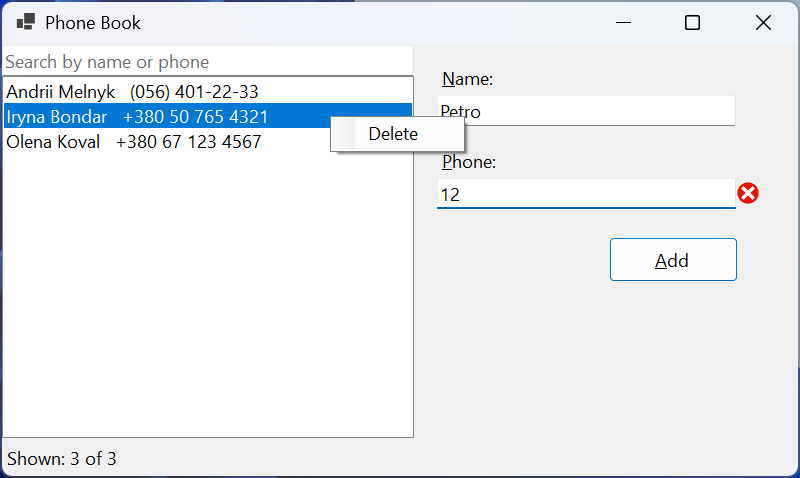
Figure 3.16. The "Phone book" application with a context menu