
English
Branches, merges, and conflicts
Branches, merging, and rebasing
Branches let you develop a new feature separately from the working version. The typical workflow: create a feature branch from main with a name like feature/miles, make commits in it, and when the feature is finished and tested, merge the branch back into main.
Let's look at a "Distance converter" program (D:\Courses\OOP C#\Code\Lec01\UnitConverter) that converts kilometers to meters. Its history already contains two commits:
cs
Console.OutputEncoding = System.Text.Encoding.UTF8;
Console.InputEncoding = System.Text.Encoding.UTF8;

Console.Write("Distance, km: ");
double km = double.Parse(Console.ReadLine() ?? "0");

Console.WriteLine($"{km} km = {km * 1000} m");
Creating a branch and a fast-forward merge
The git switch -c <name> command creates a branch from the current commit and switches to it, git switch <name> switches to an existing branch, and git branch lists branches (an asterisk marks the current one) (https://git-scm.com/docs/git-switch). When switching, Git replaces the files in the working directory with the contents of the branch, so before switching you should commit or stash your changes.
In the feature/miles branch, we add the line Console.WriteLine($"{km} km = {km / 1.609344:F3} miles"); and commit:
PS> git switch -c feature/miles
Switched to a new branch 'feature/miles'

PS> git commit -am "Add miles"
[feature/miles d7f9c46] Add miles
 1 file changed, 1 insertion(+)

PS> git switch main
Switched to branch 'main'
PS> git merge feature/miles
Updating 994e248..d7f9c46
Fast-forward
Program.cs | 1 +
1 file changed, 1 insertion(+)
PS> git branch -d feature/miles
Deleted branch feature/miles (was d7f9c46).The git merge <branch> command merges the specified branch into the current one. While the branch existed, no new commits appeared in main, so Git simply moved the main pointer forward to commit d7f9c46. This kind of merge is called a fast-forward: no new commit is created. A merged branch is deleted with git branch -d; Git will not let you delete an unmerged branch—that requires the -D option.
Three-way merge
A harder case is when both branches evolved in parallel. We create a feature/feet branch with a line for feet, and meanwhile in main we replace double.Parse with input validation using double.TryParse and an error message:
PS> git switch -c feature/feet
Switched to a new branch 'feature/feet'

PS> git commit -am "Add feet"
[feature/feet dfb633b] Add feet
 1 file changed, 1 insertion(+)

PS> git switch main
Switched to branch 'main'
PS> git commit -am "Validate distance"
[main adca857] Validate distance
1 file changed, 5 insertions(+), 1 deletion(-)The branches diverged after commit d7f9c46. A fast-forward is impossible here, so Git performs a three-way merge: it compares both latest versions with their common ancestor and creates a merge commit with two parents (Fig. 1.5, top). Git combines changes in different parts of the file automatically:
PS> git merge --no-edit feature/feet
Auto-merging Program.cs
Merge made by the 'ort' strategy.
 Program.cs | 1 +
 1 file changed, 1 insertion(+)
PS> git log --oneline --graph
* 9ae4f9a Merge branch 'feature/feet'
|\
| * dfb633b Add feet
* | adca857 Validate distance
|/
* d7f9c46 Add miles
* 994e248 Convert kilometres to metres
* 4826ae3 Create console projectPS> git branch -d feature/feet
Deleted branch feature/feet (was dfb633b).Without --no-edit, Git opens an editor with the message Merge branch 'feature/feet': you can change it or just save and close the file. ort is the name of the default merge strategy.
Figure 1.5. Merging and rebasing branches
Rebasing: git rebase
Rebasing is another way to get changes from main: Git takes the branch commits that are missing from main and reapplies them on top of the latest main commit (Fig. 1.5, bottom). The result is a linear history without a merge commit, but the branch commits get new hashes (https://git-scm.com/docs/git-rebase).
In the feature/yards branch, yards were added, and meanwhile a program title was added in main. Let's rebase the branch onto main; after that, git switch main and git merge feature/yards merge it with a fast-forward:
PS> git switch feature/yards
Switched to branch 'feature/yards'

PS> git rebase main
Successfully rebased and updated refs/heads/feature/yards.
PS> git log --oneline --graph --all -4
* b0a4ec3 Add yards
* 40d0f1c Show program title
* 9ae4f9a Merge branch 'feature/feet'
|\Before the rebase, the Add yards commit had the hash 336b5ca, and after it, b0a4ec3. That is why the rule from the previous section applies: do not rebase branches that other team members already have. For your own local branches, rebase makes the history easier to read. If a conflict occurs during a rebase, resolve it the same way as a merge conflict and then run git rebase --continue (or git rebase --abort to cancel the rebase).
Moving individual commits: git cherry-pick
Sometimes you need just one commit from another branch, for example a fix made in an experimental branch. The git cherry-pick <commit> command copies the commit's changes into the current branch as a new commit (https://git-scm.com/docs/git-cherry-pick). The experiment/table branch has the commits df794e9 Print table header and f22b758 Explain input format; main needs only the second one:
PS> git switch main
Switched to branch 'main'

PS> git cherry-pick f22b758
Auto-merging Program.cs
[main e043f6d] Explain input format
 Date: Thu Sep 17 10:27:43 2026 +0300
 1 file changed, 1 insertion(+), 1 deletion(-)
Only the Explain input format commit went into main (with the new hash e043f6d), while the unsuccessful table attempt remained in the experiment/table branch, which is then deleted with git branch -D experiment/table.
Merge conflicts
Git merges changes in different lines automatically. But if both branches changed the same fragment of a file, Git cannot decide which version is correct and reports a merge conflict.
Let's look at a "Discount calculator" program (D:\Courses\OOP C#\Code\Lec01\DiscountCalculator). In main it gives a 5% discount on purchases of 1000 UAH or more:
cs
decimal discount = sum >= Threshold ? sum * 0.05m : 0;In the feature/discount branch, this line was replaced by a tiered discount (10% from 5000 UAH), and meanwhile in main the discount was increased to 7%. The merge attempt stops:
PS> git merge feature/discount
Auto-merging Program.cs
CONFLICT (content): Merge conflict in Program.cs
Automatic merge failed; fix conflicts and then commit the result.
PS> git status
On branch main
You have unmerged paths.
(fix conflicts and run "git commit")
(use "git merge --abort" to abort the merge)
Unmerged paths:
(use "git add <file>..." to mark resolution)
both modified: Program.cs
no changes added to commit (use "git add" and/or "git commit -a")Fig. 1.6 shows these messages in the terminal. Git has already merged the files without conflicts, and it inserted conflict markers into Program.cs:
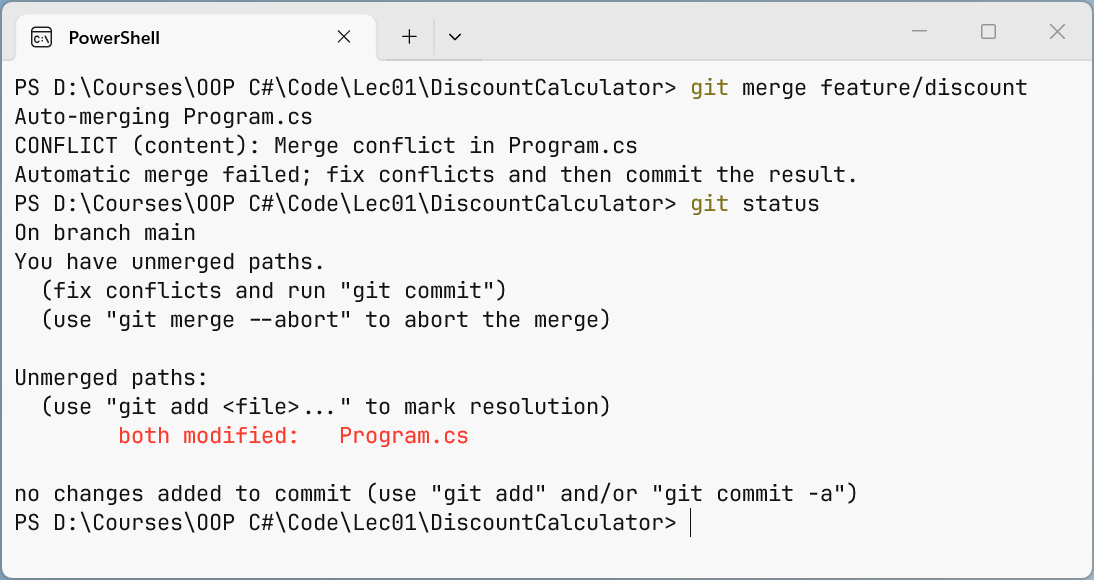
Figure 1.6. Merge conflict message
cs
<<<<<<< HEAD
decimal discount = sum >= Threshold ? sum * 0.07m : 0;
=======
decimal rate = sum switch
{
    >= 5000m => 0.10m,
    >= Threshold => 0.05m,
    _ => 0m
};
decimal discount = Math.Round(sum * rate, 2);
>>>>>>> feature/discount
Console.WriteLine($"Discount: {discount:N2} UAH");- between
<<<<<<< HEADand=======is the version from the current branch (main); - between
=======and>>>>>>> feature/discountis the version from the branch being merged.
Resolving a conflict
To resolve a conflict, open each file from the Unmerged paths list, keep the correct code (one of the versions or a combination of them), and remove all markers. Here both changes are needed: the tiered discount from the branch and the new 7% rate from main. Then build and test the program, mark the conflict as resolved with git add, and complete the merge with git commit.
After editing, the fragment looks like this:
cs
decimal rate = sum switch
{
    >= 5000m => 0.10m,
    >= Threshold => 0.07m,
    _ => 0m
};
decimal discount = Math.Round(sum * rate, 2);
PS> git add Program.cs
PS> git status
On branch main
All conflicts fixed but you are still merging.
(use "git commit" to conclude merge)
Changes to be committed:
modified: Program.csPS> git commit --no-edit
[main a73de7b] Merge branch 'feature/discount'PS> git log --oneline --graph
* a73de7b Merge branch 'feature/discount'
|\
| * 90bcc96 Add discount tiers
* | dcd4bda Increase discount to 7%
|/
* 3df4eb6 Calculate 5% discount
* ea033df Create console projectIf now is not a good time to resolve the conflict, the git merge --abort command returns the repository to its state before the merge. The C# compiler finds markers forgotten in the code on its own: the build fails with error CS8300 Merge conflict marker encountered. Resolving a conflict in the Visual Studio merge editor is covered in the section "Git in Visual Studio 2026".
Tip
You get fewer conflicts if you make small commits, frequently merge main into your branch (or rebase it), and avoid reformatting other people's code unnecessarily.