
English
Replacement, options, and lookarounds
Replacing and splitting text
The Replace method
The Replace method returns a new string in which each match is replaced with a replacement string. The replacement string can refer to groups (Table 2.4, https://learn.microsoft.com/dotnet/standard/base-types/substitutions-in-regular-expressions).
Table 2.4. Substitutions in a replacement string
| Substitution | What is inserted |
|---|---|
$1, $2 | the text of a numbered group |
${name} | the text of a named group |
${1}0 | group 1 followed by the character 0 ($10 would mean group 10) |
$0 | the whole match |
$$ | the $ character |
cs
Regex.Replace("  Too    many   spaces ", @"\s+", " ").Trim();
// "Too many spaces"
Regex.Replace("17.09.2026 and 01.10.2026",
    @"(\d{2})\.(\d{2})\.(\d{4})", "$3-$2-$1");
// "2026-09-17 and 2026-10-01"
Regex.Replace("Price 250", @"\d+", "$0 UAH");   // "Price 250 UAH"
The Replace in Files window in Visual Studio performs the same replacements: find and replace in the editor use .NET regular expressions (https://learn.microsoft.com/visualstudio/ide/using-regular-expressions-in-visual-studio). Just turn on the Use Regular Expressions button (Alt+E) (Fig. 2.6).
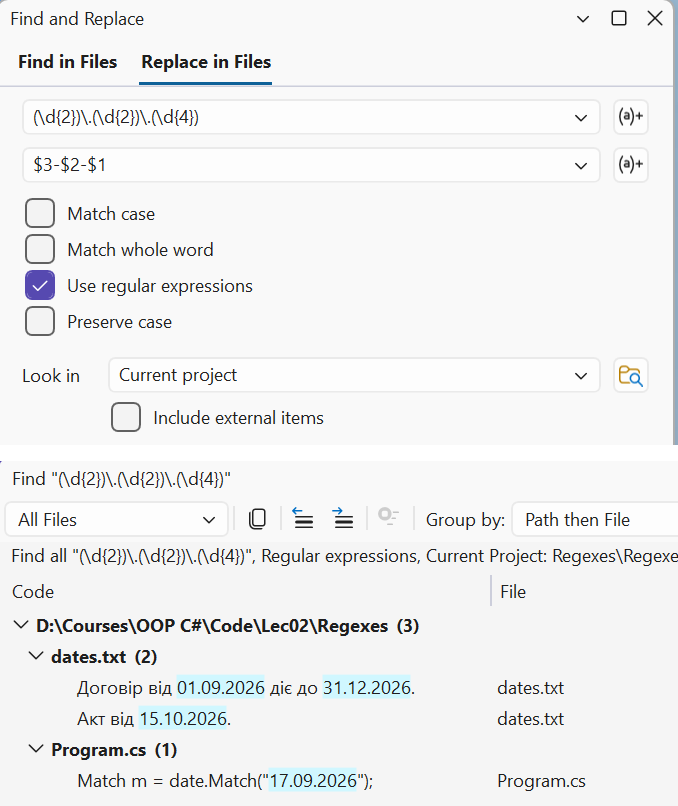
Figure 2.6. Find and replace with regular expressions in Visual Studio
Replacing with a MatchEvaluator
If the replacement depends on processing the match (calculation, validation, formatting), instead of a string you pass a method or lambda expression of type MatchEvaluator: it receives a Match and returns the replacement string (https://learn.microsoft.com/dotnet/api/system.text.regularexpressions.matchevaluator):
cs
string masked = Regex.Replace("Olena Petrenko, Ihor Koval",
    @"\b(\p{Lu})\p{Ll}+\b", m => m.Groups[1].Value + ".");
// "O. P., I. K."
string doubled = Regex.Replace("price 12.5 and 7.25", @"\d+\.\d+",
    m => (decimal.Parse(m.Value) * 2).ToString());
// "price 25.0 and 14.50"
The Split method and Regex.Escape
Regex.Split splits a string at the matches. Unlike string.Split, the separator can be any pattern, for example "a comma, semicolon, or vertical bar together with the surrounding spaces". If the pattern contains a group, the captured separators are also included in the result:
cs
Regex.Split("apples, pears;plums |  cherries", @"\s*[,;|]\s*");
// apples / pears / plums / cherries
Regex.Split("2+3*4-1", @"([+*-])");
// 2 / + / 3 / * / 4 / - / 1
When part of a pattern is entered by the user (for example, a search string), it must be passed through Regex.Escape. The method escapes metacharacters and spaces, so the text is searched literally. Without escaping, the string C++ causes a RegexParseException (Nested quantifier '+'):
cs
string find = "C++";
Regex.Escape("price (UAH): 12.50?");   // price\ \(UAH\):\ 12\.50\?
Regex.Count("C++ and C++/CLI, but not C", Regex.Escape(find));   // 2
Example 3. Normalizing dates
The program converts dates from the dd.mm.yyyy format used in Ukraine to the international ISO 8601 format yyyy-mm-dd. First, a simple group substitution is performed, and then a replacement with a MatchEvaluator that checks whether the date exists in the calendar.
cs
using System.Globalization;
using System.Text.RegularExpressions;

Console.OutputEncoding = System.Text.Encoding.UTF8;

string text = """
    Contract No. 17/2026 of 01.09.2026 is valid until 31.12.2026.
    Certificate of 31.02.2026 signed 3.10.2026, version 2.14.2026.1.
    """;

var date = new Regex(
    @"\b(?<day>\d{1,2})\.(?<month>\d{1,2})\.(?<year>\d{4})\b");

// 1. Group substitution: only rearranging the parts.
Console.WriteLine(date.Replace(text, "${year}-${month}-${day}"));

// 2. MatchEvaluator: validating the date and padding with zeros.
int fixedCount = 0, invalid = 0;
string result = date.Replace(text, match =>
{
    string value = match.Value;
    if (DateOnly.TryParseExact(value, "d.M.yyyy",
            CultureInfo.InvariantCulture, DateTimeStyles.None,
            out DateOnly parsed))
    {
        fixedCount++;
        return parsed.ToString("yyyy-MM-dd");
    }
    invalid++;
    return $"[{value}?]";
});

Console.WriteLine();
Console.WriteLine(result);
Console.WriteLine($"Dates: {fixedCount}, invalid: {invalid}");
A regular expression checks only the shape of the text: it does not know that February has no 31st day or that 2.14.2026.1 is a version number rather than a date. So the first replacement produces the nonexistent dates 2026-02-31 and 2026-14-2 and does not pad the day with a zero. The second replacement checks each match with the DateOnly.TryParseExact method, formats the valid dates, and marks the invalid ones:
Contract No. 17/2026 of 2026-09-01 is valid until 2026-12-31.
Certificate of 2026-02-31 signed 2026-10-3, version 2026-14-2.1.

Contract No. 17/2026 of 2026-09-01 is valid until 2026-12-31.
Certificate of [31.02.2026?] signed 2026-10-03, version [2.14.2026?].1.
Dates: 3, invalid: 2
RegexOptions
The engine's behavior is changed by the options of the RegexOptions enumeration, which are passed to a constructor or static method and combined with the | operator (Table 2.5). Some options can be set as an inline option directly in the pattern: (?i) at the beginning or (?i:…) for part of the pattern (https://learn.microsoft.com/dotnet/standard/base-types/regular-expression-options).
Table 2.5. RegexOptions
| Option | In the pattern | Effect |
|---|---|---|
IgnoreCase | (?i) | case-insensitive matching |
Multiline | (?m) | ^ and $ match the start and end of each line of text |
Singleline | (?s) | . also matches \n |
IgnorePatternWhitespace | (?x) | ignore whitespace in the pattern, comments after # |
ExplicitCapture | (?n) | capture only named groups |
CultureInvariant | – | compare case regardless of culture |
Compiled | – | compile the pattern to IL code at run time |
NonBacktracking | – | a backtracking-free engine with linear time (.NET 7+) |
ECMAScript | – | JavaScript behavior: \d and \w are ASCII only |
RightToLeft | – | search from right to left |
cs
string text = "1. Introduction\n2. Syntax\ntext\n3. Classes";
Regex.Count(text, @"^\d+\.");                          // 1
Regex.Count(text, @"^\d+\.", RegexOptions.Multiline);  // 3
Regex.Count(text, @"(?m)^\d+\.");                      // 3

string comment = "/* line 1\nline 2 */";
Regex.IsMatch(comment, @"/\*.*\*/");                          // False
Regex.IsMatch(comment, @"/\*.*\*/", RegexOptions.Singleline);  // True

Regex.IsMatch("HEDGEHOG", "(?i)hedgehog");        // True
Regex.IsMatch("Rome CITY", "Rome (?i:city)");     // True
The names of the Multiline and Singleline options are not opposites, as they may seem: the first changes how ^/$ work, the second changes the period, and they can be enabled together. IgnorePatternWhitespace lets you split a complex pattern into lines with comments after #, as in Example 2.
Important
In .NET 10, the $ character in Multiline mode matches only the position before \n. For text with Windows line endings \r\n, the pattern ^.+$ also captures the \r character, and ^\w+$ finds no lines at all. Write \r?$ or replace \r\n with \n beforehand. The RegexOptions.AnyNewLine option, which recognizes all kinds of line endings, appears only in .NET 11.
The CultureInvariant option is needed together with IgnoreCase if the pattern compares keywords and the program may run under any culture. In the Turkish culture, the lowercase "i" corresponds to the uppercase dotted "İ", so with IgnoreCase the string FILE does not match the pattern file, but with IgnoreCase | CultureInvariant it does.
Lookahead and lookbehind
A lookaround is a condition that checks the text to the right or left of the current position without including it in the match. Like anchors, a lookaround has zero width (Table 2.6).
Table 2.6. Lookahead and lookbehind
| Notation | Name | Example |
|---|---|---|
X(?=Y) | lookahead: Y follows | \d+(?=\s?UAH)—a number before "UAH" |
X(?!Y) | negative lookahead: Y does not follow | \b\d+\b(?!%)—a number that is not a percentage |
(?<=Y)X | lookbehind: Y precedes X | (?<=№\s?)\d+—a number after "№" |
(?<!Y)X | negative lookbehind: Y does not precede X | (?<!\d)\d{4}(?!\d)—exactly 4 digits |
cs
string price = "Price 250 UAH, discount 15 %, delivery 1250UAH";
Regex.Matches(price, @"\d+(?=\s?UAH)");                  // 250, 1250
Regex.Matches("Invoices №42 and № 107", @"(?<=№\s?)\d+"); // 42, 107
Regex.Matches("discount 15%, 20 pcs.", @"\d+(?!%)");      // 1, 20 (!)
Regex.Matches("discount 15%, 20 pcs.", @"\b\d+\b(?!%)");  // 20
Regex.Replace("1234567", @"(?<=\d)(?=(?:\d{3})+\b)", ",");
// "1,234,567"
The third line shows a trap: for 15%, the pattern \d+(?!%) does not find 15, but the engine backtracks one digit and finds 1, which is followed not by % but by 5. Word boundaries \b forbid such "truncated" matches. The last example inserts a comma at each position that is preceded by a digit and followed by a number of digits to the end of the number that is a multiple of three.
Several lookaheads at the start of a pattern check several independent conditions for one string. This is how a password policy is written: at least 8 characters, including a digit, a lowercase letter, and an uppercase letter:
cs
var password = new Regex(@"^(?=.*\d)(?=.*\p{Ll})(?=.*\p{Lu}).{8,}$");
password.IsMatch("Rome2026");   // True
password.IsMatch("rome2026");   // False – no uppercase letter
Each lookahead (?=.*…) scans the string from the beginning and "consumes" nothing, so the next condition is again checked from position 0. To tell the user which condition was violated, each rule is checked with a separate pattern.