
English
Parameters, transactions, and DataGridView
SQL injection and parameterized queries
The most dangerous mistake when working with a database is building SQL text from strings entered by the user. SQL injection is an attack in which an attacker enters a fragment of SQL, and the server executes it as part of the command (https://owasp.org/www-community/attacks/SQL_Injection). This can be used to read other people's data, bypass a password check, or drop tables.
The "SQL injection" example
The program searches for a reader by name in two ways: by string concatenation and with a parameter. The using directives and the creation of dataSource are the same as in Program.cs of the "Book catalog" example.
cs
Console.Write("Reader name: ");
string name = Console.ReadLine() ?? "";

// DANGEROUS: the entered text becomes part of the SQL command.
string sql = "SELECT id, name FROM readers "
    + $"WHERE name = '{name}' ORDER BY id";
Console.WriteLine(sql);
await using (NpgsqlCommand unsafeCmd = dataSource.CreateCommand(sql))
{
    await PrintReadersAsync("Concatenated query", unsafeCmd);
}
cs
// Safe: the value is sent separately from the command text.
await using (NpgsqlCommand safeCmd = dataSource.CreateCommand(
    "SELECT id, name FROM readers WHERE name = $1 ORDER BY id"))
{
    safeCmd.Parameters.AddWithValue(name);
    await PrintReadersAsync("Parameterized query", safeCmd);
}

static async Task PrintReadersAsync(string title, NpgsqlCommand cmd)
{
    Console.WriteLine($"{title}:");
    await using NpgsqlDataReader reader =
        await cmd.ExecuteReaderAsync();
    int count = 0;
    while (await reader.ReadAsync())
    {
        Console.WriteLine(
            $"  {reader.GetInt32(0)} {reader.GetString(1)}");
        count++;
    }
    Console.WriteLine($"  rows: {count}");
}
Instead of a name, the user enters the string ' OR '1'='1 (Fig. 7.10). The first quote closes the string literal, and the condition becomes name = '' OR '1'='1', which is true for every row:
Reader name: ' OR '1'='1
SELECT id, name FROM readers WHERE name = '' OR '1'='1' ORDER BY id
Concatenated query:
  1 Olena Kovalenko
  2 Petro Shevchenko
  3 Iryna Bondar
  rows: 3
Parameterized query:
  rows: 0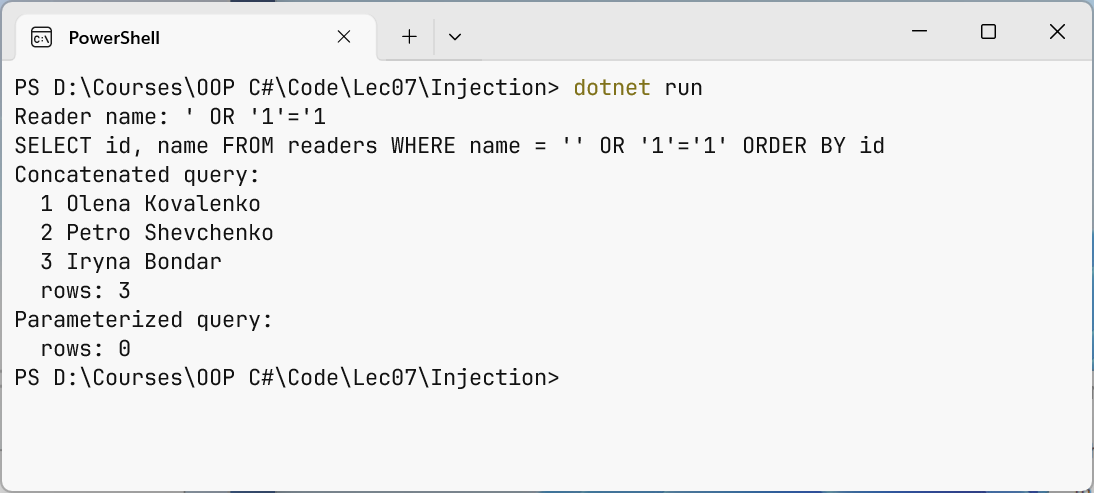
Figure 7.10. SQL injection and a parameterized query
The input x'; DROP TABLE loans; -- is even more dangerous: after the quote comes a separate command that drops the table, and -- turns the rest of the string into a comment. A parameterized query protects against both attacks: the command text and the parameter values are sent to the server separately, and a value is never parsed as SQL. Any quotes and semicolons in the name remain just characters of the name, so no such reader is found.
Rules for safe work:
- pass all values that come from outside (the keyboard, a file, the network, a form field) only as parameters:
$1andParameters.AddWithValue(value). Npgsql also supports named@nameparameters withAddWithValue("name", value), but the documentation recommends positional ones; - a parameter can replace only a value, not a table name, column name, or sort direction. Such parts are chosen from a list of allowed options in code (
"title","pub_year"), not substituted from input; - the
%and_characters in aLIKEparameter remain wildcards: this is not injection, but a search for50%will find extra rows; - connect as a role with minimal privileges, not as
postgres: then even a successful attack cannot drop the database.
Transactions
A transaction is a sequence of commands that executes as a single unit: either all changes are saved, or none are. Issuing a book consists of two commands: decreasing the number of copies and adding a record to loans. If the program crashes between them, the book "disappears". Transactions have the ACID properties:
- atomicity—all commands are executed or canceled together;
- consistency—after the transaction, all integrity constraints hold;
- isolation—concurrent transactions do not see each other's unfinished changes;
- durability—committed changes survive even a power failure.
In SQL, a transaction is started by BEGIN, committed by COMMIT, and canceled by ROLLBACK. Each command outside an explicit transaction runs in its own transaction.
sql
BEGIN;
UPDATE books SET copies = copies - 1 WHERE id = 2 AND copies > 0;
INSERT INTO loans (book_id, reader_id, due)
VALUES (2, 3, CURRENT_DATE + 14);
COMMIT;   -- or ROLLBACK to cancel both changes
In Npgsql, a transaction is started by the BeginTransactionAsync() method of an open connection. Each command of the transaction is created on the same connection with this transaction object. The CommitAsync() method commits the changes, and RollbackAsync() cancels them; if the transaction object is disposed without CommitAsync (for example, because of an exception), the changes are rolled back automatically. PostgreSQL does not support nested transactions: only one can be active on a connection at a time.
Isolation levels determine how much concurrent transactions affect each other (https://www.postgresql.org/docs/current/transaction-iso.html). In PostgreSQL, the default is Read Committed: each command sees the data committed before it started. The Repeatable Read level sees a snapshot of the data as of the start of the transaction, and Serializable guarantees a result as if executed sequentially but may end the transaction with a serialization error, in which case it is retried. The level is passed as a parameter: BeginTransactionAsync(IsolationLevel.Serializable).
The "Issuing a book" example
The LoanService class issues a book in a transaction (the LoanService.cs file of the "Book catalog" project). The availability check and the decrease in the number of copies are performed by one UPDATE … WHERE copies > 0 command: if two programs issue the last copy at the same time, the second command changes 0 rows, because PostgreSQL locks the row being changed until the end of the first transaction.
cs
using Npgsql;

namespace Library;

public class LoanService(NpgsqlDataSource dataSource)
{
    // Issuing a book: decrease copies and add a record to loans,
    // or do nothing.
    public async Task<long> IssueAsync(int bookId, int readerId,
        int days)
    {
        await using NpgsqlConnection conn =
            await dataSource.OpenConnectionAsync();
        await using NpgsqlTransaction tx =
            await conn.BeginTransactionAsync();

        await using var take = new NpgsqlCommand("""
            UPDATE books SET copies = copies - 1
            WHERE id = $1 AND copies > 0
            """, conn, tx);
        take.Parameters.AddWithValue(bookId);
        if (await take.ExecuteNonQueryAsync() == 0)
        {
            await tx.RollbackAsync();
            throw new InvalidOperationException(
                $"Book {bookId} is not available.");
        }
cs
        await using var insert = new NpgsqlCommand("""
            INSERT INTO loans (book_id, reader_id, due)
            VALUES ($1, $2, CURRENT_DATE + $3)
            RETURNING id
            """, conn, tx);
        insert.Parameters.AddWithValue(bookId);
        insert.Parameters.AddWithValue(readerId);
        insert.Parameters.AddWithValue(days);
        long loanId = (long)(await insert.ExecuteScalarAsync())!;

        await tx.CommitAsync();   // commit both changes
        return loanId;
    }
}
If there is no reader with the number readerId, the INSERT command violates the foreign key and throws a PostgresException with code 23503 (ForeignKeyViolation). The exception leaves the method before CommitAsync, await using disposes the transaction, and the decrease of copies is rolled back: the number of copies stays correct. The result of the call is shown in the "Book catalog" example: loan 6 is issued, and for book 4, which has no copies, Book 4 is not available. is printed.
Disconnected mode and DataGridView
The DataTable class (the System.Data namespace) stores a table in memory: the Columns and Rows collections and the state of each row (Added, Modified, Deleted) (https://learn.microsoft.com/dotnet/api/system.data.datatable). An NpgsqlDataAdapter object executes a SELECT command, opens and closes the connection itself, and fills the table with the Fill method. The adapter's command needs its own closed connection (dataSource.CreateConnection()): commands from dataSource.CreateCommand give no access to their connection, and Fill fails for them with a NotSupportedException. The finished table is assigned to the DataSource property of a DataGridView control (Topic 3), and the grid creates columns from the data names and types itself. The adapter's Update method together with NpgsqlCommandBuilder can save changed rows back, but applications more often use explicit INSERT/UPDATE commands with parameters or Entity Framework Core (Topic 8). To simply fill a table without an adapter, there is the table.Load(reader) method.
The Windows Forms App "Book Browser" application shows books in a grid and searches for them by part of the title. Program.cs creates an NpgsqlDataSource (the connection string from user secrets, using the AddUserSecrets(typeof(Program).Assembly) method because the Program class is static) and passes it to the form's constructor. The form creates in code the searchBox field, the Search button (which is also the AcceptButton, so Enter starts the search too), the grid table with Dock = DockStyle.Fill and ReadOnly = true, and a StatusStrip status bar with the status label. The form's Load handler and the button's Click handler call the LoadBooks method, which fills a DataTable with the adapter and assigns it to the grid.
The application is shown in Fig. 7.11.
cs
private void LoadBooks()
{
    // The adapter opens the connection itself, so the command
    // needs its own (still closed) connection, not CreateCommand.
    using NpgsqlConnection conn = dataSource.CreateConnection();
    using var cmd = new NpgsqlCommand("""
        SELECT id, title, pub_year AS "Year", isbn, copies
        FROM books
        WHERE title ILIKE $1
        ORDER BY title
        """, conn);
    cmd.Parameters.AddWithValue($"%{searchBox.Text.Trim()}%");
    using var adapter = new NpgsqlDataAdapter(cmd);
    var table = new DataTable();
    try
    {
        adapter.Fill(table);   // open, read, close
        grid.DataSource = table;
        status.Text = $"Books: {table.Rows.Count}";
    }
    catch (NpgsqlException ex)
    {
        MessageBox.Show(this, ex.Message, "Database error",
            MessageBoxButtons.OK, MessageBoxIcon.Error);
    }
}
The alias "Year" in double quotes keeps the uppercase letter and becomes the column header of the grid. An empty search field gives the pattern %%, that is, all books. The Fill method is synchronous and blocks the interface for large results; in that case, ExecuteReaderAsync and table.Load(reader) are used, as in the "Product catalog" lab example.
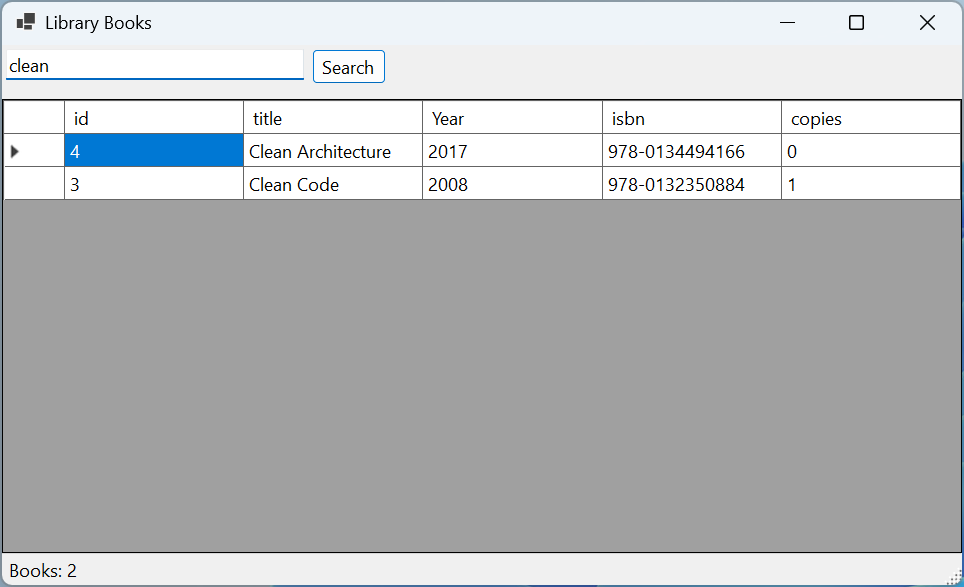
Figure 7.11. The "Book Browser" application with PostgreSQL data