
English
Practice
Each example consists of two projects: a server (dotnet new web) and a client (dotnet new console or dotnet new winforms) with the Microsoft.AspNetCore.SignalR.Client package. First the server is started in a separate terminal (dotnet run), then one or more clients.
Example 1. An audience poll
Create a SignalR server that runs a poll with four answer options, and a console client that asks for the participant's name, shows the question and the current results, accepts an option number, and redraws the results as a text chart after each vote of any participant. Each participant has one vote: voting again changes the choice. An out-of-range number is rejected by the server with a message.
The server (PollServer/Program.cs) stores votes by participant name in the Poll singleton service, so a vote is not lost after the client reconnects:
cs
using System.Collections.Concurrent;
using Microsoft.AspNetCore.SignalR;

var builder = WebApplication.CreateBuilder(args);
builder.Services.AddSignalR();
builder.Services.AddSingleton<Poll>();

var app = builder.Build();
app.MapHub<PollHub>("/hubs/poll");
app.Run("http://localhost:5112");

// The poll state lives for the whole lifetime of the server.
public class Poll
{
    // Votes: participant name → option number (a repeat vote replaces it).
    private readonly ConcurrentDictionary<string, int> votes = new();

    public string Question => "Which language do you like most?";
    public string[] Options { get; } =
        ["C#", "Python", "Kotlin", "C++"];

    public void Vote(string voter, int option) =>
        votes[voter] = option;

    public int[] Results() => [.. Options.Select(
        (_, i) => votes.Values.Count(option => option == i))];
}

public interface IPollClient
{
    Task ShowPoll(string question, string[] options);
    Task ResultsChanged(int[] counts);
}

public class PollHub(Poll poll) : Hub<IPollClient>
{
    public override async Task OnConnectedAsync()
    {
        await Clients.Caller.ShowPoll(poll.Question, poll.Options);
        await Clients.Caller.ResultsChanged(poll.Results());
    }

    public async Task Vote(int option)
    {
        if (option < 0 || option >= poll.Options.Length)
        {
            throw new HubException(
                $"Choose an option from 1 to {poll.Options.Length}");
        }
        string voter = Context.GetHttpContext()!
            .Request.Query["voter"].ToString().ToLowerInvariant();
        poll.Vote(voter, option);
        await Clients.All.ResultsChanged(poll.Results());
    }
}
The client (PollClient/Program.cs) passes the name in the query string. The ResultsChanged handler is called on a thread pool thread at the same time as the main loop, so the results table is built in a StringBuilder and printed with a single Console.Write call: otherwise its lines could get mixed with other output.
cs
using System.Text;
using Microsoft.AspNetCore.SignalR;
using Microsoft.AspNetCore.SignalR.Client;

Console.Write("Your name: ");
string name = Console.ReadLine()?.Trim() ?? "";
if (name.Length == 0)
{
    Console.Error.WriteLine("The name is required");
    return 1;
}

string[] options = [];
await using HubConnection connection = new HubConnectionBuilder()
    .WithUrl("http://localhost:5112/hubs/poll?voter="
        + Uri.EscapeDataString(name))
    .WithAutomaticReconnect()
    .Build();

connection.On<string, string[]>("ShowPoll", (question, list) =>
{
    options = list;
    Console.WriteLine(question);
    for (int i = 0; i < list.Length; i++)
    {
        Console.WriteLine($"  {i + 1}. {list[i]}");
    }
});
connection.On<int[]>("ResultsChanged", PrintResults);

await connection.StartAsync();
Console.WriteLine("Enter an option number, an empty line to exit.");
while (Console.ReadLine() is { Length: > 0 } line)
{
    if (!int.TryParse(line, out int number))
    {
        Console.WriteLine("Enter a number");
        continue;
    }
    try
    {
        await connection.InvokeAsync("Vote", number - 1);
    }
    catch (HubException ex)
    {
        Console.WriteLine(ex.Message);
    }
}
return 0;

void PrintResults(int[] counts)
{
    int total = counts.Sum();
    var text = new StringBuilder($"Results, votes: {total}\n");
    for (int i = 0; i < counts.Length; i++)
    {
        int percent = total == 0 ? 0 : counts[i] * 100 / total;
        string bar = new('#', percent / 5);   // 20 characters = 100 %
        text.AppendLine(
            $"  {options[i],-7}{bar,-20}{counts[i],3}{percent,5}%");
    }
    Console.Write(text);   // in one call: the lines do not get mixed
}
Two clients were started. The participant Taras sees the question, the empty results, and the results after Olena's vote for C#, and then enters 7 (an error), 3 (Kotlin), and changes his choice to 1 (C#). The end of his client's output (the lines 7, 3, and 1 were typed on the keyboard):
7
An unexpected error occurred invoking 'Vote' on the server.
HubException: Choose an option from 1 to 4
3
Results, votes: 2
  C#     ##########            1   50%
  Python                       0    0%
  Kotlin ##########            1   50%
  C++                          0    0%
1
Results, votes: 2
  C#     ####################  2  100%
  Python                       0    0%
  Kotlin                       0    0%
  C++                          0    0%
The error message is printed on one line; here it is wrapped. Olena's client shows the same results tables at the same time.
Example 2. A shared whiteboard
Create a Windows Forms "Shared whiteboard" application in which several users draw with the mouse on one board: each finished stroke appears for all participants, a new participant sees what has already been drawn, the Clear button clears the board for everyone, and the line width is chosen from a list.
The server (BoardServer/Program.cs) stores the strokes in a singleton service and sends a new stroke to everyone except the author (Clients.Others): the author has already drawn it locally. The coordinates are passed as an array of System.Drawing.Point structures, which the JSON protocol serializes as ordinary objects:
cs
using System.Drawing;
using Microsoft.AspNetCore.SignalR;

var builder = WebApplication.CreateBuilder(args);
builder.Services.AddSignalR();
builder.Services.AddSingleton<Board>();

var app = builder.Build();
app.MapHub<BoardHub>("/hubs/board");
app.Run("http://localhost:5113");

public record Stroke(int Width, Point[] Points);

// All strokes on the board: a new participant receives them on connection.
public class Board
{
    private readonly List<Stroke> strokes = [];
    private readonly Lock sync = new();

    public void Add(Stroke stroke)
    {
        lock (sync) { strokes.Add(stroke); }
    }

    public void Clear()
    {
        lock (sync) { strokes.Clear(); }
    }

    public Stroke[] Snapshot()
    {
        lock (sync) { return [.. strokes]; }
    }
}

public interface IBoardClient
{
    Task Load(Stroke[] strokes);
    Task StrokeDrawn(Stroke stroke);
    Task Cleared();
}

public class BoardHub(Board board) : Hub<IBoardClient>
{
    public override Task OnConnectedAsync() =>
        Clients.Caller.Load(board.Snapshot());

    public async Task Draw(Stroke stroke)
    {
        if (stroke.Points.Length < 2 || stroke.Width is < 1 or > 20)
        {
            throw new HubException("Invalid stroke");
        }
        board.Add(stroke);
        await Clients.Others.StrokeDrawn(stroke);  // except the author
    }

    public async Task Clear()
    {
        board.Clear();
        await Clients.All.Cleared();
    }
}
The client form MainForm (Shared Whiteboard) contains a ToolStrip with a Width: label, a widthComboBox list (ToolStripComboBox, DropDownList), and a clearButton button (Clear), a canvas (PictureBox, Dock = Fill, white background; PictureBox is double-buffered, Topic 4), and a status bar with a statusLabel label. The form's Load event, the canvas's MouseDown, MouseMove, MouseUp, Paint events, and the button's Click event are subscribed in the form designer:
cs
using System.Drawing.Drawing2D;
using Microsoft.AspNetCore.SignalR;
using Microsoft.AspNetCore.SignalR.Client;

namespace BoardClient;

public record Stroke(int Width, Point[] Points);

public partial class MainForm : Form
{
    private readonly List<Stroke> strokes = [];
    private readonly HubConnection connection;
    private List<Point>? current;     // the stroke being drawn now

    public MainForm()
    {
        InitializeComponent();
        widthComboBox.Items.AddRange("1", "3", "6");
        widthComboBox.SelectedIndex = 1;
        connection = new HubConnectionBuilder()
            .WithUrl("http://localhost:5113/hubs/board")
            .WithAutomaticReconnect()
            .Build();
        connection.On<Stroke[]>("Load", all => InvokeAsync(() =>
        {
            strokes.Clear();
            strokes.AddRange(all);
            canvas.Invalidate();
        }));
        connection.On<Stroke>("StrokeDrawn", s => InvokeAsync(() =>
        {
            strokes.Add(s);
            canvas.Invalidate();
        }));
        connection.On("Cleared", () => InvokeAsync(() =>
        {
            strokes.Clear();
            canvas.Invalidate();
        }));
    }

    private async void MainForm_Load(object sender, EventArgs e)
    {
        try
        {
            await connection.StartAsync();
            statusLabel.Text = "Online";
        }
        catch (HttpRequestException ex)
        {
            statusLabel.Text = $"Offline: {ex.Message}";
        }
    }

    private void canvas_MouseDown(object sender, MouseEventArgs e)
    {
        if (e.Button == MouseButtons.Left)
        {
            current = [e.Location];
        }
    }

    private void canvas_MouseMove(object sender, MouseEventArgs e)
    {
        if (current is not null)
        {
            current.Add(e.Location);
            canvas.Invalidate();
        }
    }

    private async void canvas_MouseUp(object sender, MouseEventArgs e)
    {
        if (current is not { Count: > 1 })
        {
            current = null;
            return;
        }
        int width = int.Parse((string)widthComboBox.SelectedItem!);
        var stroke = new Stroke(width, [.. current]);
        current = null;
        strokes.Add(stroke);            // own stroke – immediately
        canvas.Invalidate();
        try
        {
            await connection.InvokeAsync("Draw", stroke);
        }
        catch (Exception ex) when (ex is HubException
            or InvalidOperationException)   // rejected by the hub or offline
        {
            statusLabel.Text = ex.Message;
        }
    }

    private async void clearButton_Click(object sender, EventArgs e)
    {
        if (connection.State == HubConnectionState.Connected)
        {
            await connection.InvokeAsync("Clear");
        }
    }

    private void canvas_Paint(object sender, PaintEventArgs e)
    {
        e.Graphics.SmoothingMode = SmoothingMode.AntiAlias;
        foreach (Stroke stroke in strokes)
        {
            DrawStroke(e.Graphics, stroke.Width, stroke.Points);
        }
        if (current is { Count: > 1 })
        {
            int width =
                int.Parse((string)widthComboBox.SelectedItem!);
            DrawStroke(e.Graphics, width, [.. current]);
        }
    }

    private static void DrawStroke(Graphics g, int width,
        Point[] points)
    {
        using var pen = new Pen(Color.Black, width)
        {
            StartCap = LineCap.Round,
            EndCap = LineCap.Round,
            LineJoin = LineJoin.Round
        };
        g.DrawLines(pen, points);
    }
}
A stroke is sent only after the mouse button is released, not on every movement. If the server is unavailable, InvokeAsync throws an InvalidOperationException, whose text appears in the status bar. During testing, the first client drew a polyline of width 3, the second a square of width 6, after which a third client connected: all three windows show both shapes (Fig. 11.8), the third client received them in the Load message, and Clear in the third window cleared the boards of all clients.
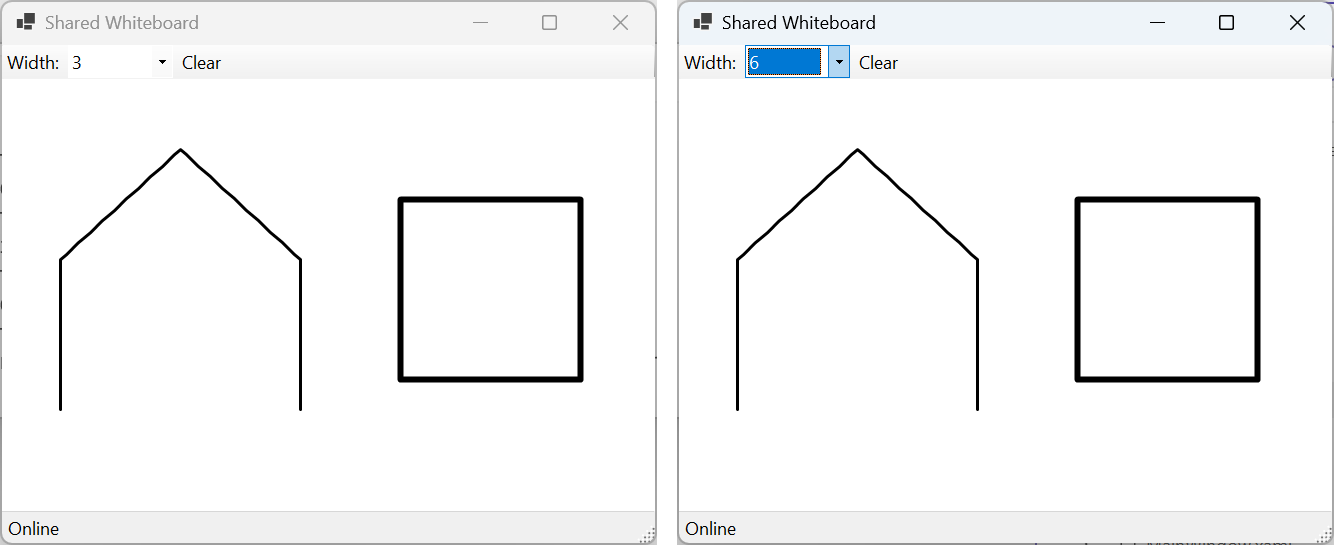
Fig. 11.8. The "Shared whiteboard" application in two windows
Example 3. Restaurant orders
Create a restaurant server with a REST endpoint POST /api/orders that accepts a table number (1–20) and a list of dishes and sends the new order to the kitchen, and a SignalR hub in which cooks mark an order as ready and waiters receive notifications. The console client receives its role (kitchen or waiters) as a command-line argument; a cook who connects later sees the pending orders.
The server (RestaurantServer/Program.cs) uses two groups. The endpoint receives IHubContext<RestaurantHub, IStaffClient> as a parameter, and the orders are stored by the OrderBook service:
cs
using Microsoft.AspNetCore.SignalR;

var builder = WebApplication.CreateBuilder(args);
builder.Services.AddSignalR();
builder.Services.AddSingleton<OrderBook>();

var app = builder.Build();
app.MapHub<RestaurantHub>("/hubs/restaurant");

// A new order arrives through REST and is sent to the kitchen.
app.MapPost("/api/orders", async (NewOrder request, OrderBook book,
    IHubContext<RestaurantHub, IStaffClient> hub) =>
{
    if (request.Table is < 1 or > 20 || request.Dishes.Length == 0)
    {
        return Results.BadRequest(
            "Table 1-20 and dishes are required");
    }
    Order order = book.Add(request.Table, request.Dishes);
    await hub.Clients.Group(RestaurantHub.Kitchen).NewOrder(order);
    return Results.Created($"/api/orders/{order.Id}", order);
});

app.Run("http://localhost:5114");

public record NewOrder(int Table, string[] Dishes);
public record Order(int Id, int Table, string[] Dishes, bool Ready);

public class OrderBook
{
    private readonly List<Order> orders = [];
    private readonly Lock sync = new();

    public Order Add(int table, string[] dishes)
    {
        lock (sync)
        {
            var order =
                new Order(orders.Count + 1, table, dishes, false);
            orders.Add(order);
            return order;
        }
    }

    public Order? MarkReady(int id)
    {
        lock (sync)
        {
            int i = orders.FindIndex(o => o.Id == id && !o.Ready);
            if (i < 0)
            {
                return null;
            }
            orders[i] = orders[i] with { Ready = true };
            return orders[i];
        }
    }

    public Order[] Pending()
    {
        lock (sync) { return [.. orders.Where(o => !o.Ready)]; }
    }
}

public interface IStaffClient
{
    Task NewOrder(Order order);
    Task OrderReady(Order order);
}

public class RestaurantHub(OrderBook book) : Hub<IStaffClient>
{
    public const string Kitchen = "kitchen", Waiters = "waiters";

    public async Task JoinAs(string role)
    {
        if (role is not (Kitchen or Waiters))
        {
            throw new HubException("Role must be kitchen or waiters");
        }
        await Groups.AddToGroupAsync(Context.ConnectionId, role);
        if (role == Kitchen)
        {
            // A cook who connected later sees the pending orders.
            foreach (Order order in book.Pending())
            {
                await Clients.Caller.NewOrder(order);
            }
        }
    }

    public async Task MarkReady(int id)
    {
        Order order = book.MarkReady(id)
            ?? throw new HubException($"No pending order {id}");
        await Clients.Group(Waiters).OrderReady(order);
    }
}
The client (RestaurantClient/Program.cs) checks the argument with a list pattern and rejoins its role's group after a reconnect:
cs
using Microsoft.AspNetCore.SignalR;
using Microsoft.AspNetCore.SignalR.Client;

if (args is not ["kitchen" or "waiters"])
{
    Console.Error.WriteLine(
        "Usage: RestaurantClient kitchen|waiters");
    return 1;
}
string role = args[0];

await using HubConnection connection = new HubConnectionBuilder()
    .WithUrl("http://localhost:5114/hubs/restaurant")
    .WithAutomaticReconnect()
    .Build();

connection.On<Order>("NewOrder", o => Console.WriteLine(
    $"{DateTime.Now:HH:mm:ss} NEW   #{o.Id} table {o.Table}: " +
    string.Join(", ", o.Dishes)));
connection.On<Order>("OrderReady", o => Console.WriteLine(
    $"{DateTime.Now:HH:mm:ss} READY #{o.Id} -> table {o.Table}"));
// After a reconnect the group must be restored.
connection.Reconnected += id =>
    connection.InvokeAsync("JoinAs", role);

await connection.StartAsync();
await connection.InvokeAsync("JoinAs", role);
Console.WriteLine($"Joined as {role}. " + (role == "kitchen"
    ? "Enter an order number when it is ready."
    : "Waiting for ready orders."));

while (Console.ReadLine() is { Length: > 0 } line)
{
    if (role != "kitchen" || !int.TryParse(line, out int id))
    {
        continue;
    }
    try
    {
        await connection.InvokeAsync("MarkReady", id);
    }
    catch (HubException ex)
    {
        Console.Error.WriteLine(ex.Message);
    }
}
return 0;

record Order(int Id, int Table, string[] Dishes, bool Ready);
The first order was created before the clients were started, with PowerShell 7 commands:
powershell
$body = @{ table = 5; dishes = @("Borscht", "Varenyky") } |
    ConvertTo-Json
Invoke-RestMethod -Method Post -ContentType application/json `
    -Uri http://localhost:5114/api/orders -Body $body
The command prints a table with the row 1 5 {Borscht, Varenyky} False (the columns id, table, dishes, ready). Then the kitchen (dotnet run -- kitchen) and the waiters (dotnet run -- waiters) were started, order No. 2 was created (table 12, Deruny), and 1 and 7 were entered in the kitchen terminal. The kitchen output:
Joined as kitchen. Enter an order number when it is ready.
14:26:28 NEW   #1 table 5: Borscht, Varenyky
14:26:35 NEW   #2 table 12: Deruny
1
7
An unexpected error occurred invoking 'MarkReady' on the server.
HubException: No pending order 7
After the line Joined as waiters. Waiting for ready orders., the waiters receive 14:26:40 READY #1 -> table 5.
The server rejects an order with table 25 and an empty list of dishes with code 400 and the text "Table 1-20 and dishes are required", and running the client with the argument cook writes Usage: RestaurantClient kitchen|waiters to the error stream and exits with code 1.