
English
Migrations and LINQ queries
Migrations
A migration is a C# class with the Up (apply the schema change) and Down (undo it) methods, which EF Core generates by comparing the current model with the model snapshot (ModelSnapshot) taken after the previous migration (Fig. 8.5, https://learn.microsoft.com/ef/core/managing-schemas/migrations/).
Figure 8.5. Working with migrations
The commands are run in the project folder:
dotnet ef migrations add InitialCreate—create a migration in theMigrationsfolder;dotnet ef database update—apply all new migrations to the database;dotnet ef database update AddPostViews—move to the specified migration (extra ones are undone with theDownmethods);dotnet ef migrations remove—remove the last migration that has not been applied yet;dotnet ef migrations list—list migrations;dotnet ef migrations script—an SQL script for the database administrator;dotnet ef dbcontext scaffold "<connection string>" Npgsql.EntityFrameworkCore.PostgreSQL -o Models—generate a context and classes from an existing database (database-first).
In Visual Studio, the same actions are performed with the Add-Migration and Update-Database commands in the Package Manager Console window (the Microsoft.EntityFrameworkCore.Tools package).
For the blog model, dotnet ef migrations add InitialCreate prints Build started..., Build succeeded., and Done. To undo this action, use 'ef migrations remove' and creates three files: 20260924165317_InitialCreate.cs, …Designer.cs, and BlogContextModelSnapshot.cs. The dotnet ef database update command applies the migration (Fig. 8.6). The red Failed executing DbCommand line on the first run is not an error: EF Core looks for the history table, which does not exist yet, and then creates it itself. After Done., the database gets the "Authors" and "Posts" tables and the service table "__EFMigrationsHistory" with the MigrationId and ProductVersion columns, which records the applied migrations (Fig. 8.7).
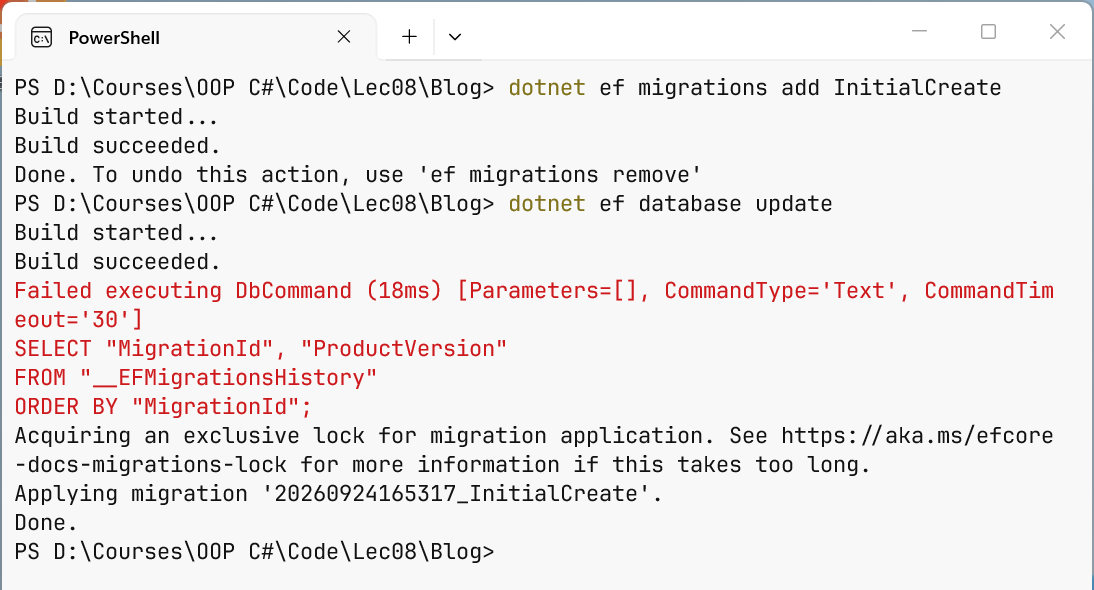
Figure 8.6. Creating and applying a migration
The dotnet ef migrations script command does not connect to the database and shows the migration's SQL (a fragment):
sql
CREATE TABLE "Posts" (
    "Id" integer GENERATED BY DEFAULT AS IDENTITY,
    "Title" text NOT NULL,
    "Published" date NOT NULL,
    "AuthorId" integer NOT NULL,
    CONSTRAINT "PK_Posts" PRIMARY KEY ("Id"),
    CONSTRAINT "FK_Posts_Authors_AuthorId" FOREIGN KEY ("AuthorId")
        REFERENCES "Authors" ("Id") ON DELETE CASCADE
);
CREATE INDEX "IX_Posts_AuthorId" ON "Posts" ("AuthorId");
After the property public int Views { get; set; } is added to the Post class, the dotnet ef migrations add AddPostViews command generates a migration:
cs
protected override void Up(MigrationBuilder migrationBuilder)
{
    migrationBuilder.AddColumn<int>(
        name: "Views",
        table: "Posts",
        type: "integer",
        nullable: false,
        defaultValue: 0);
}

protected override void Down(MigrationBuilder migrationBuilder)
{
    migrationBuilder.DropColumn(name: "Views", table: "Posts");
}
A migration is always reviewed before it is applied: EF Core sees renaming a property as dropping a column and creating a new one, that is, as data loss; in that case, the migration code is corrected to RenameColumn. Migrations are stored in Git together with the code.
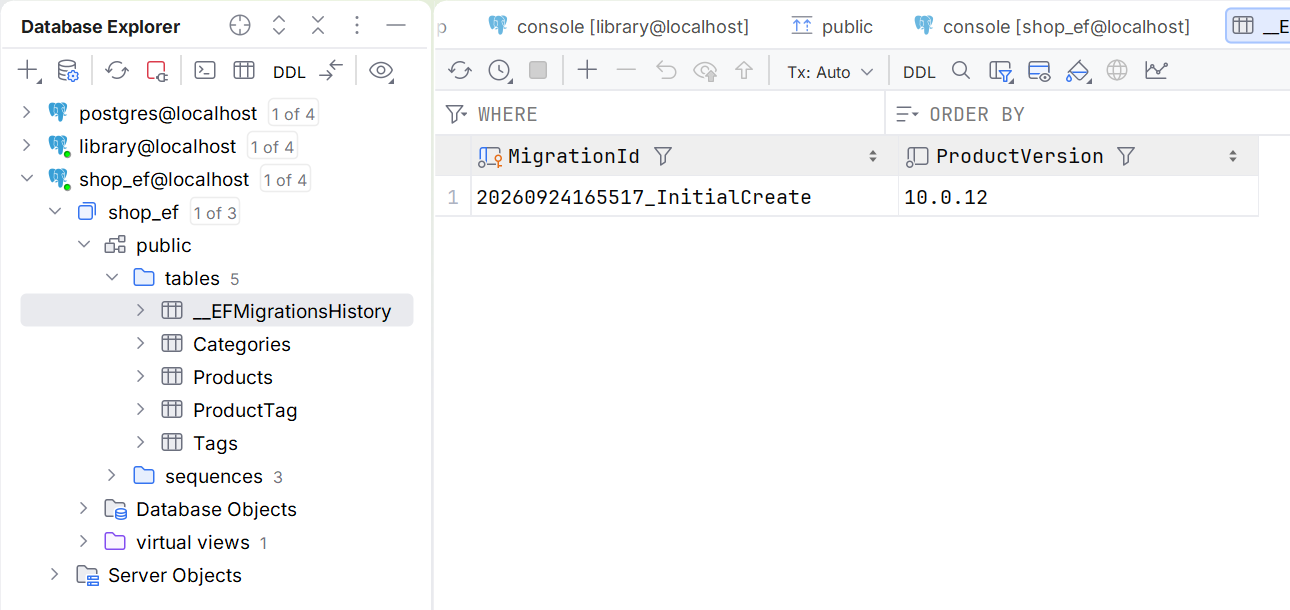
Figure 8.7. Tables created by a migration
Seed data. Unchanging reference data (cinema halls, statuses) is specified in the model with the HasData method with explicit keys: it gets into the migration as InsertData commands. For other data, the documentation recommends the UseSeeding and UseAsyncSeeding methods in the context options: they are called by database update, Migrate, and EnsureCreated (https://learn.microsoft.com/ef/core/modeling/data-seeding).
The "Blog" example
The program adds an author with two posts, reads the posts, and changes and deletes one of them (the Program.cs file; the model is in the Model.cs file above):
cs
using Blog;
using Microsoft.EntityFrameworkCore;

await using var db = new BlogContext();

// Create: an author and two posts with one SaveChangesAsync
var author = new Author { Name = "Olena Koval" };
author.Posts.Add(new Post
    { Title = "EF Core basics", Published = new(2026, 9, 1) });
author.Posts.Add(new Post
    { Title = "Migrations", Published = new(2026, 9, 8) });
db.Authors.Add(author);
int saved = await db.SaveChangesAsync();
Console.WriteLine($"Saved rows: {saved}, author Id: {author.Id}");

// Read: the author's posts sorted by date
var posts = await db.Posts
    .Where(p => p.Author.Name == "Olena Koval")
    .OrderBy(p => p.Published)
    .ToListAsync();
foreach (var p in posts)
    Console.WriteLine($"{p.Id}. {p.Title} ({p.Published:d})");

// Update: change a property and save
var post = await db.Posts.SingleAsync(p => p.Title == "Migrations");
post.Title = "EF Core migrations";
await db.SaveChangesAsync();

// Delete
db.Posts.Remove(post);
await db.SaveChangesAsync();
Console.WriteLine($"Posts left: {await db.Posts.CountAsync()}");
The result of the first run on an empty database:
Saved rows: 3, author Id: 1
1. EF Core basics (9/1/2026)
2. Migrations (9/8/2026)
Posts left: 1
The Add method adds the whole object graph: the author and the posts from its collection. SaveChangesAsync executes three INSERT commands, returns the number of rows changed, and writes the generated keys into the Id and AuthorId properties. The condition p.Author.Name == … is converted into a JOIN of the "Posts" and "Authors" tables. No separate method is needed for the update: the context itself detects that the Title property of the loaded object has changed.
LINQ to Entities queries
A query against a DbSet<T> has the type IQueryable<T> and is built with LINQ methods (covered in the OOP course): Where, OrderBy/ThenBy, Select, Skip/Take, Count, Sum, Max, GroupBy, Any (https://learn.microsoft.com/ef/core/querying/). Execution is deferred: SQL is sent only when the result is needed—on a call to ToListAsync, FirstOrDefaultAsync, SingleAsync, CountAsync, AnyAsync, or during an await foreach iteration. So a query can be composed step by step:
cs
IQueryable<Product> query = db.Products;
if (onlyInStock)
    query = query.Where(p => p.Stock > 0);      // not executed yet
query = query.OrderBy(p => p.Price);
List<Product> list = await query.ToListAsync(); // one SELECT
The difference between IQueryable<T> and IEnumerable<T> is fundamental: IQueryable<T> methods are added to the SQL query, while IEnumerable<T> methods run in memory. After AsEnumerable() or ToList(), the next Where filters rows that have already been loaded, that is, the whole table is read from the database.
Projections, pagination, and grouping
A Select projection into a record or an anonymous type reads only the needed columns and returns objects that are not tracked. Pagination is done with a Skip/Take pair, always after OrderBy; otherwise the row order is undefined. The ToQueryString() method shows the SQL without executing the query; for the query of the second page
cs
var page = db.Products
    .OrderBy(p => p.Price)
    .Skip((pageNo - 1) * PageSize).Take(PageSize)
    .Select(p => new { p.Name, Category = p.Category.Name, p.Price });
Console.WriteLine(page.ToQueryString());
the Npgsql provider generates the following SQL:
sql
-- @p='2'
SELECT p0."Name", c."Name" AS "Category", p0."Price"
FROM (
    SELECT p."CategoryId", p."Name", p."Price"
    FROM "Products" AS p
    ORDER BY p."Price"
    LIMIT @p OFFSET @p
) AS p0
INNER JOIN "Categories" AS c ON p0."CategoryId" = c."Id"
ORDER BY p0."Price"
The values of C# variables become parameters (@p) rather than part of the SQL text, so SQL injection is impossible. GroupBy with the Count, Sum, Max aggregates in Select is translated into GROUP BY with the count(*), sum, max functions, so the server does the counting, not the program.
String methods are translated too: p.Name.Contains(text) gives LIKE, and the PostgreSQL ILIKE function (case-insensitive) is available as EF.Functions.ILike(p.Name, $"%{text}%").
Translation and client evaluation
Not every C# expression can be converted to SQL. If you call your own method Rules.IsLong(v.Minutes) in Where, EF Core throws an InvalidOperationException with the message The LINQ expression … could not be translated and a suggestion to rewrite the query or explicitly switch to in-memory evaluation through AsEnumerable() (https://learn.microsoft.com/ef/core/querying/client-eval). The exception is the final Select: such a call is allowed there; EF Core reads the needed columns and calls the method for each row in the program (client evaluation).
The SQL log
To see all the commands the context executes, simple logging is enabled in OnConfiguring (https://learn.microsoft.com/ef/core/logging-events-diagnostics/simple-logging):
cs
options.UseNpgsql(ConnectionString)
    .LogTo(Console.WriteLine, LogLevel.Information)
    .EnableSensitiveDataLogging();   // parameter values
For each command, an Executed DbCommand message with the execution time, parameters, and SQL text is printed to the console (Fig. 8.8). The EnableSensitiveDataLogging method shows parameter values instead of ?; it is enabled only during development, because user data gets into the log. The namespace of LogLevel is Microsoft.Extensions.Logging.
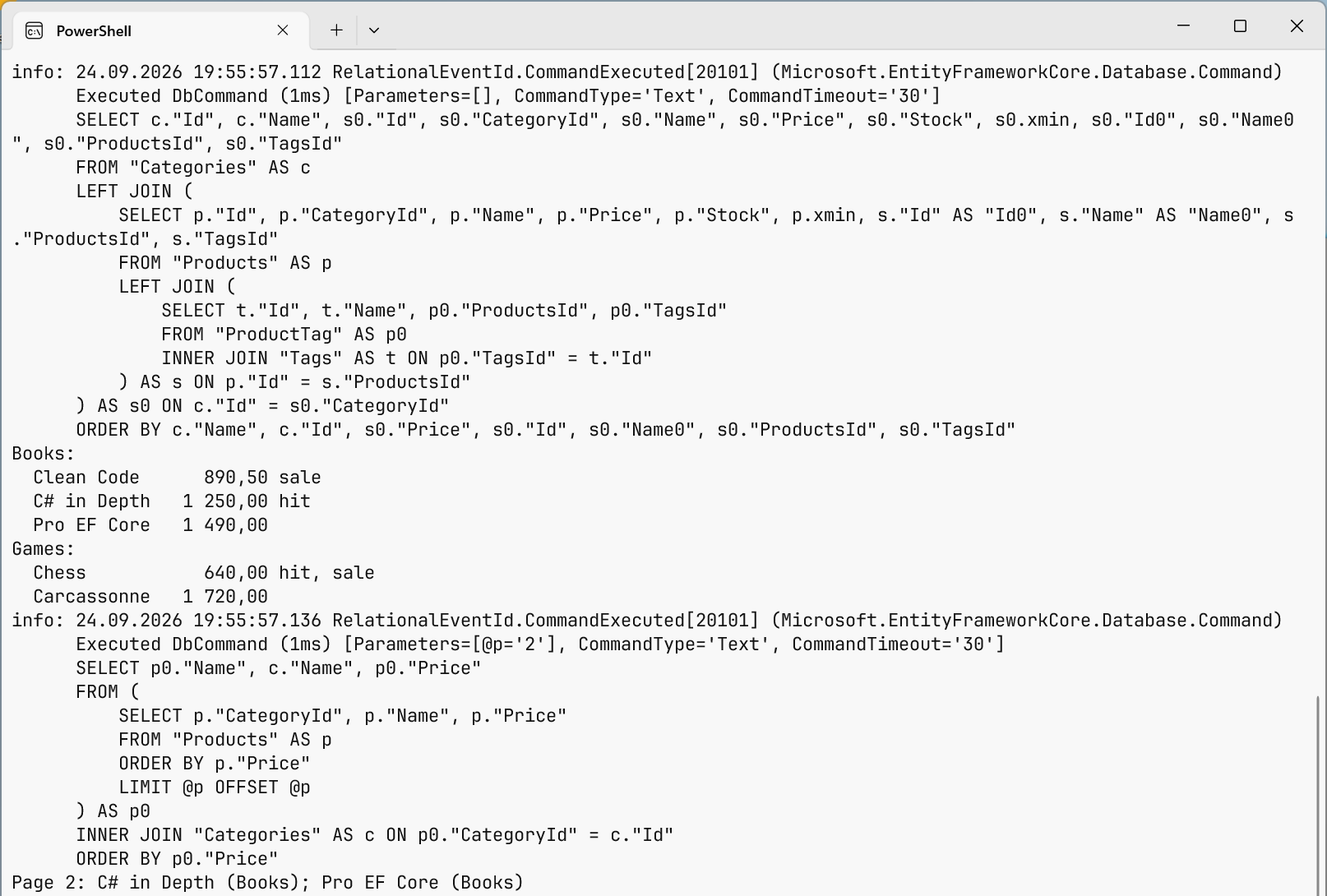
Figure 8.8. SQL queries generated by EF Core