
English
Logging
Logging
A log is a sequence of records about program events: startup, completed operations, warnings, errors. Unlike Console.WriteLine, a log has severity levels, filters, and several destinations, which are configured without changing the code (https://learn.microsoft.com/dotnet/core/extensions/logging/overview).
A service receives a logger through its constructor as ILogger<T>. The type parameter sets the category—the full class name, for example Shop.OrderService. Each record has a level (Table 6.3). Without configuration, levels from Information and above are written.
Table 6.3. Log levels
| Level | Number | Method | When to use |
|---|---|---|---|
Trace | 0 | LogTrace | the most detailed data; may contain sensitive information |
Debug | 1 | LogDebug | debugging during development |
Information | 2 | LogInformation | the normal flow of work |
Warning | 3 | LogWarning | unusual events that do not stop the work |
Error | 4 | LogError | an error in the current operation |
Critical | 5 | LogCritical | a failure that requires immediate attention |
None | 6 | – | turn logging off |
Message templates
The first argument of the Log… methods is a message template with named placeholders in curly braces, and the values are passed as the following arguments. The values are substituted by position, not by name. The provider receives both the finished text and the separate fields: this is structured logging, in which records can be searched and filtered by the OrderId field rather than by parsing text.
cs
logger.LogInformation("Customer {Customer} paid {Amount} UAH",
    customer, amount);                        // correct
logger.LogInformation($"Customer {customer} paid {amount} UAH");
// bad: the fields are lost, and the string is built even for a disabled level
For the second line, the .NET analyzer issues warning CA2254 (the template should be a constant expression). An exception is passed as the first argument: logger.LogError(ex, "Order error {Id}", id). Numbers and dates in the log text are formatted with the invariant culture, that is, with a period: 1250.5.
The BeginScope method opens a log scope: its data is added to all records inside the using block. A program with the LoggerFactory.Create factory (the Microsoft.Extensions.Logging.Console package) demonstrates levels, categories, a filter, and a scope:
cs
using ILoggerFactory factory = LoggerFactory.Create(logging =>
{
    logging.SetMinimumLevel(LogLevel.Debug);
    logging.AddFilter("Shop.Payments", LogLevel.Warning);
    logging.AddSimpleConsole(o => o.IncludeScopes = true);
});

ILogger orders = factory.CreateLogger("Shop.Orders");
ILogger payments = factory.CreateLogger("Shop.Payments");

int id = 1045;
decimal amount = 1250.5m;
orders.LogDebug("Checking the cart");
using (orders.BeginScope("Order {OrderId}", id))
{
    orders.LogInformation("Customer {Customer} paid {Amount} UAH",
        "Olena", amount);
    payments.LogInformation("Payment of {Amount} UAH succeeded", amount);
    payments.LogWarning("Duplicate payment of {Amount} UAH", amount);
}
The Shop.Payments category passes only warnings, so the informational record about the payment is filtered out. The line => Order 1045 is the scope:
dbug: Shop.Orders[0]
      Checking the cart
info: Shop.Orders[0]
      => Order 1045
      Customer Olena paid 1250.5 UAH
warn: Shop.Payments[0]
      => Order 1045
      Duplicate payment of 1250.5 UAH
Filters in configuration
In an application with a host, levels are set in the Logging section of the configuration. LogLevel:Default applies to all categories, a category name applies to it and all categories with that prefix (Microsoft covers Microsoft.Hosting.Lifetime), and a nested provider section (Console, Debug) overrides the general rules for that provider. The longest prefix match is chosen:
json
{
  "Logging": {
    "LogLevel": {
      "Default": "Information",
      "Microsoft": "Warning",
      "Microsoft.Hosting.Lifetime": "Information"
    },
    "Console": {
      "FormatterName": "simple",
      "FormatterOptions": { "SingleLine": true }
    }
  }
}
Logging providers
Records that pass the filter are received by all connected logging providers (Fig. 6.8, https://learn.microsoft.com/dotnet/core/extensions/logging/providers):
Console—the console window; the formatterssimple(the default, with theSingleLine,TimestampFormat, andIncludeScopesoptions),json, andsystemd;Debug—the Visual Studio Output window throughSystem.Diagnostics.Debug, only when a debugger is attached;EventSource—Microsoft-Extensions-Loggingtrace events for thedotnet-tracetool;EventLog—the Windows Application log (Event Viewer). It does not inherit the general rules and by default writes only levels fromWarningup.
Figure 6.8. The logging pipeline
The builder.Logging.ClearProviders() method removes the default providers, after which you add the ones you need: AddConsole(), AddJsonConsole(), AddDebug(). The json formatter writes each record as a JSON object with the EventId, LogLevel, Category, Message, and State fields, where State contains the separate placeholder values ("Customer": "Olena", "Amount": 1250.5) and the template itself.
The built-in providers do not write logs to files. For that, third-party libraries such as Serilog or NLog are used; they plug into the same ILogger<T>.
The [LoggerMessage] source generator
The LogInformation methods parse the template every time and box numbers into objects. For frequently executed code, a source generator is recommended: in a partial class, you declare a partial method with the [LoggerMessage] attribute, which specifies the event ID, level, and template. The compiler creates the implementation; the method parameters match the placeholders case-insensitively (https://learn.microsoft.com/dotnet/core/extensions/logging/source-generation). An example of such declarations is the WeatherWorker class below.
An instance method takes the logger from a field or a primary constructor parameter of type ILogger; a static method receives ILogger as its first parameter. The method returns void, and a parameter of type Exception is passed as the record's exception. Errors in the template become compiler warnings.
The "Weather monitor" example
A console host (the Worker Service template) periodically reads the temperature from a sensor, logs the measurements, and warns about heat. The monitor's options are read from the Weather section and validated at startup. The sensor is simulated: every fifth measurement ends with a timeout. Program.cs:
cs
using System.ComponentModel.DataAnnotations;

Console.OutputEncoding = System.Text.Encoding.UTF8;

HostApplicationBuilder builder = Host.CreateApplicationBuilder(args);

builder.Services.AddOptions<WeatherOptions>()
    .Bind(builder.Configuration.GetSection(WeatherOptions.Section))
    .ValidateDataAnnotations()
    .ValidateOnStart();
builder.Services.AddSingleton<ITemperatureSensor, FakeSensor>();
builder.Services.AddHostedService<WeatherWorker>();

using IHost host = builder.Build();
await host.RunAsync();

public class WeatherOptions
{
    public const string Section = "Weather";

    [Required]
    public string City { get; set; } = "";

    [Range(1, 3600)]
    public int IntervalSeconds { get; set; } = 60;

    [Range(-50, 60)]
    public double AlertTemperature { get; set; } = 35;
}

public interface ITemperatureSensor
{
    double Read();
}

// A simulated sensor: every fifth measurement fails.
public class FakeSensor : ITemperatureSensor
{
    private readonly Random random = new(2026);
    private int count;

    public double Read()
    {
        if (++count % 5 == 0)
            throw new TimeoutException("no response");
        return 24 + random.NextDouble() * 10;
    }
}
The WeatherWorker.cs background service receives the sensor, options, and logger through a primary constructor:
cs
using Microsoft.Extensions.Options;

public partial class WeatherWorker(
    ITemperatureSensor sensor,
    IOptions<WeatherOptions> options,
    ILogger<WeatherWorker> logger) : BackgroundService
{
    private int readings;

    protected override async Task ExecuteAsync(
        CancellationToken stoppingToken)
    {
        WeatherOptions o = options.Value;
        LogStarted(o.City, o.IntervalSeconds);
        while (!stoppingToken.IsCancellationRequested)
        {
            try
            {
                double t = sensor.Read();
                readings++;
                if (t >= o.AlertTemperature)
                    LogHeat(o.City, t, o.AlertTemperature);
                else
                    LogReading(o.City, t);
            }
            catch (TimeoutException ex)
            {
                LogSensorError(o.City, ex.Message);
            }
            await Task.Delay(TimeSpan.FromSeconds(o.IntervalSeconds),
                stoppingToken);
        }
    }

    public override Task StopAsync(CancellationToken token)
    {
        LogStopped(readings);
        return base.StopAsync(token);
    }

    [LoggerMessage(1, LogLevel.Information,
        "Monitoring {City} every {Seconds} s")]
    private partial void LogStarted(string city, int seconds);

    [LoggerMessage(2, LogLevel.Information,
        "{City}: {Temperature:F1} °C")]
    private partial void LogReading(string city, double temperature);

    [LoggerMessage(3, LogLevel.Warning,
        "{City}: heat {Temperature:F1} °C (threshold {Limit} °C)")]
    private partial void LogHeat(string city, double temperature,
        double limit);

    [LoggerMessage(4, LogLevel.Error,
        "{City}: sensor error – {Error}")]
    private partial void LogSensorError(string city, string error);

    [LoggerMessage(5, LogLevel.Information,
        "Monitoring stopped, readings: {Count}")]
    private partial void LogStopped(int count);
}
The appsettings.json file contains a Weather section with the options (the city "Madrid", an interval of 2 s, a threshold of 30 °C) and the Logging section shown in "Filters in configuration".
When the user presses Ctrl+C, Task.Delay receives the canceled token and ends the loop with an OperationCanceledException, which the host expects. Then the host calls StopAsync. The result (long lines of the Microsoft.Hosting.Lifetime category are wrapped, the path is shortened; see also Fig. 6.9):
info: Microsoft.Hosting.Lifetime[0]
      Application started. Press Ctrl+C to shut down.
info: Microsoft.Hosting.Lifetime[0] Hosting environment: Production
info: Microsoft.Hosting.Lifetime[0] Content root path: D:\Courses\OOP C#\Code\Lec06\…
info: WeatherWorker[1] Monitoring Madrid every 2 s
info: WeatherWorker[2] Madrid: 25.6 °C
info: WeatherWorker[2] Madrid: 26.8 °C
warn: WeatherWorker[3] Madrid: heat 33.2 °C (threshold 30 °C)
warn: WeatherWorker[3] Madrid: heat 33.9 °C (threshold 30 °C)
fail: WeatherWorker[4] Madrid: sensor error – no response
warn: WeatherWorker[3] Madrid: heat 33.2 °C (threshold 30 °C)
info: WeatherWorker[2] Madrid: 24.8 °C
info: Microsoft.Hosting.Lifetime[0] Application is shutting down...
info: WeatherWorker[5] Monitoring stopped, readings: 6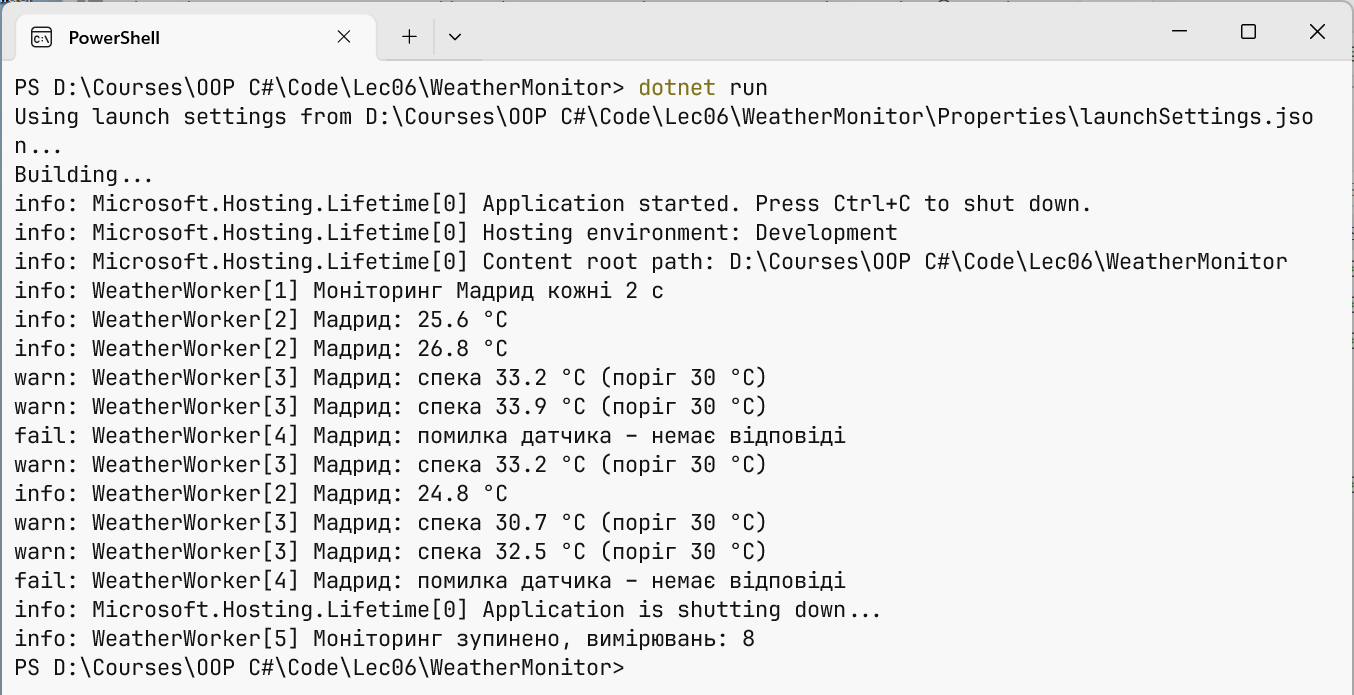
Figure 6.9. The weather monitor log in the console
The event ID from the attribute appears in square brackets after the category. A run with invalid options, dotnet run -- Weather:IntervalSeconds=0 Weather:City=, does not start: a fail record of the Microsoft.Extensions.Hosting.Internal.Host category "Hosting failed to start" and an unhandled exception (lines wrapped):
Unhandled exception. Microsoft.Extensions.Options.
OptionsValidationException: DataAnnotation validation failed for
'WeatherOptions' members: 'City' with the error: 'The City field is
required.'.; DataAnnotation validation failed for 'WeatherOptions'
members: 'IntervalSeconds' with the error: 'The field IntervalSeconds
must be between 1 and 3600.'.