
English
Documentation and the database
Documentation and testing
The OpenAPI document
OpenAPI is a standard machine-readable description of an HTTP API: addresses, methods, parameters, JSON schemas, and response codes. Tools use it to generate clients, documentation, and tests. The Microsoft.AspNetCore.OpenApi package builds the document automatically from the endpoints (https://learn.microsoft.com/aspnet/core/fundamentals/openapi/overview): AddOpenApi() registers the generator, and MapOpenApi() publishes the document at /openapi/v1.json. In .NET 10 the document conforms to OpenAPI 3.1. The template publishes it only in the Development environment so as not to expose the API structure on a production server.
The description is extended with endpoint methods: WithSummary("…"), WithDescription("…"), WithTags("…"), WithName("…") (the operation name), and Produces<T>(statusCode) for results that are not visible from the handler type. Validation attributes also end up in the schema: [Range(1, 50)] becomes minimum and maximum.
.http files in Visual Studio
You can send a request from Visual Studio 2026 without third-party programs: the .http file editor shows a Send request link above each request, and the response – the status code, headers, and formatted JSON – appears in the pane on the right (Fig. 10.6, https://learn.microsoft.com/aspnet/core/test/http-files). The file syntax:
@host = http://localhost:5080– a variable, used as{{host}};- a
###line separates requests; text after###or#is a comment; - the first line of a request is the method and address, followed by the headers without empty lines;
- after an empty line comes the request body.
A fragment of the TodoApi.http file (the full file also contains GET, PUT, and DELETE requests for a single to-do and an invalid POST):
@host = http://localhost:5080

### Create a to-do
POST {{host}}/api/todos
Content-Type: application/json

{
  "title": "Buy milk",
  "priority": "high",
  "dueDate": "2026-09-20"
}

### Unfinished to-dos
GET {{host}}/api/todos?done=false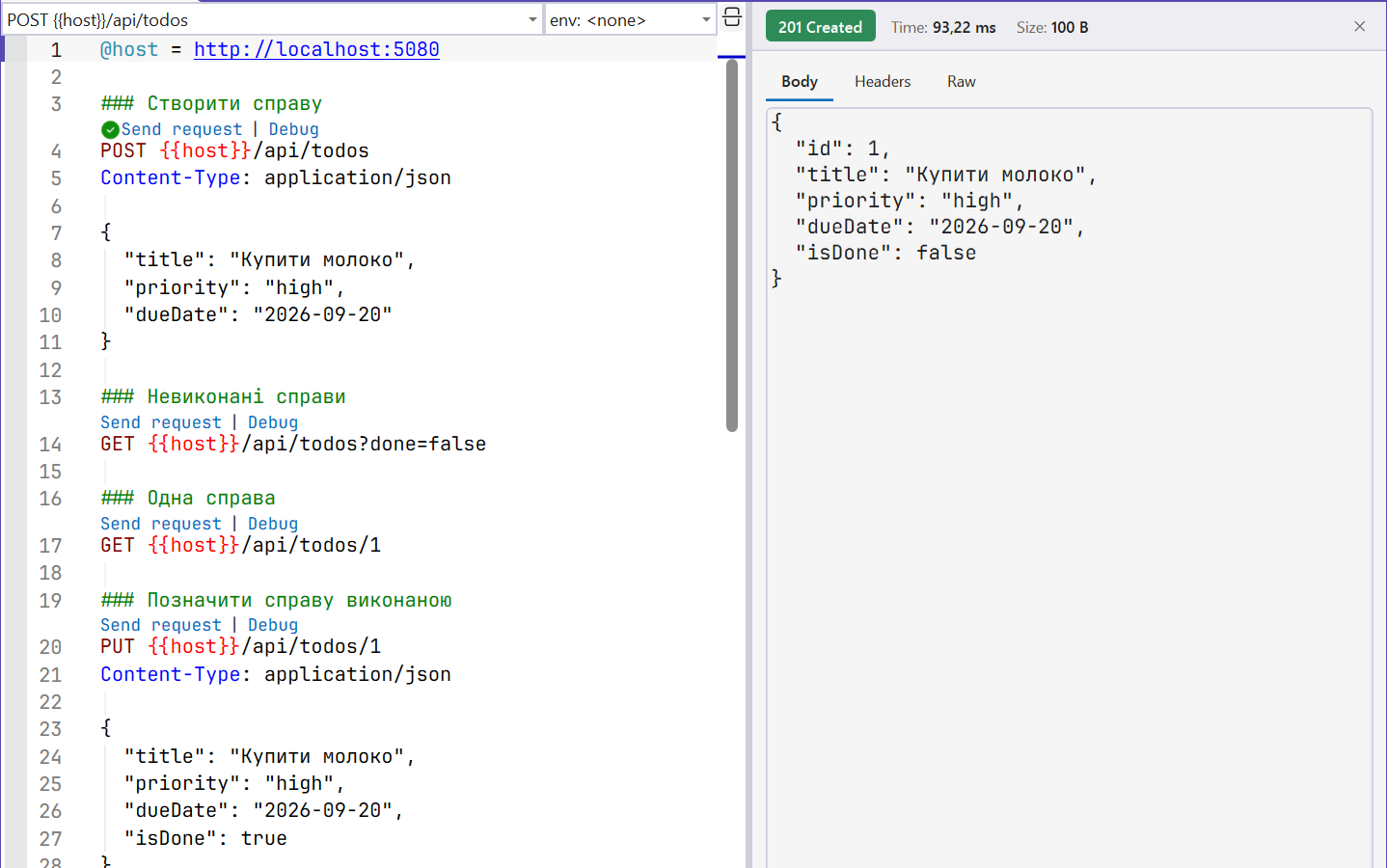
Fig. 10.6. Requests from the TodoApi.http file and the response pane
The View → Other Windows → Endpoints Explorer window shows all the project's endpoints with their HTTP methods. The Generate Request context menu command adds a request template for the selected endpoint to the .http file. Variables for different environments (the local computer, a test server) are moved to the http-client.env.json file, and secrets to the http-client.env.json.user file, which is not added to Git.
Interactive documentation
The Microsoft.AspNetCore.OpenApi package has no built-in web page for viewing the document. Third-party packages provide one, for example Scalar.AspNetCore (https://www.nuget.org/packages/Scalar.AspNetCore): after calling app.MapScalarApiReference() next to MapOpenApi(), the /scalar page shows a description of all endpoints and lets you send requests from the browser. In this course, .http files remain the main testing tool.
Connecting a database through EF Core
In-memory data is lost after a restart, so a production service stores it in a database. A repository built on EF Core (Topic 8) with PostgreSQL implements the same ITodoRepository interface. The Npgsql.EntityFrameworkCore.PostgreSQL (https://www.npgsql.org/efcore/) and Microsoft.EntityFrameworkCore.Design (migration tools) packages are added to the project. The database context (the TodoDbContext.cs file) describes the to-do table; the priority is stored as a string:
cs
using Microsoft.EntityFrameworkCore;

namespace TodoApi;

public class TodoDbContext(DbContextOptions<TodoDbContext> options)
    : DbContext(options)
{
    public DbSet<TodoItem> Todos => Set<TodoItem>();

    protected override void OnModelCreating(ModelBuilder model) =>
        model.Entity<TodoItem>(todo =>
        {
            todo.Property(t => t.Title).HasMaxLength(100);
            todo.Property(t => t.Priority).HasConversion<string>();
        });
}
The repository translates operations into LINQ to Entities queries. The filter, Skip, and Take run in the database (SQL WHERE, OFFSET, LIMIT) rather than in server memory, and read-only queries are not tracked (AsNoTracking):
cs
using Microsoft.EntityFrameworkCore;

namespace TodoApi;

// The same ITodoRepository abstraction, but the data is in PostgreSQL.
public class EfTodoRepository(TodoDbContext db) : ITodoRepository
{
    public async Task<PagedResult<TodoItem>> GetPageAsync(
        bool? done, int page, int pageSize)
    {
        IQueryable<TodoItem> query = db.Todos.AsNoTracking();
        if (done != null)
            query = query.Where(t => t.IsDone == done);
        int total = await query.CountAsync();
        List<TodoItem> items = await query
            .OrderBy(t => t.Id)
            .Skip((page - 1) * pageSize)
            .Take(pageSize)
            .ToListAsync();
        return new PagedResult<TodoItem>(
            items, page, pageSize, total);
    }

    public Task<TodoItem?> FindAsync(int id) =>
        db.Todos.AsNoTracking().FirstOrDefaultAsync(t => t.Id == id);

    public async Task<TodoItem> AddAsync(TodoItem item)
    {
        db.Todos.Add(item);
        await db.SaveChangesAsync();     // INSERT, Id from the database
        return item;
    }
The UpdateAsync and DeleteAsync methods update and delete a row with a single SQL statement without reading it first: db.Todos.Where(t => t.Id == item.Id).ExecuteUpdateAsync(s => s .SetProperty(t => t.Title, item.Title)…) and …ExecuteDeleteAsync(); both return the number of affected rows, so 0 means "not found".
In Program.cs only the service registrations change. A DbContext is not thread-safe, so AddDbContext registers it with the Scoped lifetime – a separate object for each request; the repository that uses it must also be Scoped:
cs
builder.Services.AddDbContext<TodoDbContext>(options =>
    options.UseNpgsql(
        builder.Configuration.GetConnectionString("Todos")));
builder.Services.AddScoped<ITodoRepository, EfTodoRepository>();
The connection string is not written in code. During development it is stored in user secrets (https://learn.microsoft.com/aspnet/core/security/app-secrets), and on the server in the ConnectionStrings__Todos environment variable. Then (after dotnet user-secrets init and installing the tool with dotnet tool install --global dotnet-ef) you create and apply a migration:
powershell
$cs = "Host=localhost;Port=5432;Database=todos;" +
      "Username=postgres;Password=<password>"
dotnet user-secrets set "ConnectionStrings:Todos" $cs
dotnet ef migrations add InitialCreate
dotnet ef database update
The migration creates the Todos table with the columns Id (integer, auto-increment), Title (character varying(100)), Priority (text), DueDate (date), and IsDone (boolean). After dotnet ef database update, the requests from the TodoApi.http file return the same responses as before, but the data survives a service restart.