
English
DI in Windows Forms and testability
Dependency injection in Windows Forms
The Windows Forms App template does not include a host, but it is easy to add: the Microsoft.Extensions.Hosting package and a few lines in Program.cs. Forms are registered as Transient, the main form is obtained from the container, and the host is started before Application.Run and stopped after the form is closed (https://learn.microsoft.com/dotnet/desktop/winforms/advanced/how-to-use-host-builder).
The "To-do list" example
The application stores tasks in the ITaskStore service (the MemoryTaskStore implementation based on List<string>), reads the window title and the task limit from the Todo section of the appsettings.json file into the TodoOptions class with the Title and MaxTasks properties, and logs its actions. For appsettings.json, the .csproj sets CopyToOutputDirectory = PreserveNewest. Program.cs:
cs
using Microsoft.Extensions.DependencyInjection;
using Microsoft.Extensions.Hosting;

namespace TodoApp;

internal static class Program
{
    [STAThread]
    private static void Main(string[] args)
    {
        ApplicationConfiguration.Initialize();

        HostApplicationBuilder builder =
            Host.CreateApplicationBuilder(args);
        builder.Services.Configure<TodoOptions>(
            builder.Configuration.GetSection("Todo"));
        builder.Services.AddSingleton<ITaskStore, MemoryTaskStore>();
        builder.Services.AddTransient<MainForm>();

        using IHost host = builder.Build();
        host.Start();
        Application.Run(host.Services.GetRequiredService<MainForm>());
        host.StopAsync().GetAwaiter().GetResult();
    }
}
The main form, MainForm.cs, receives services through its constructor, like any other service:
cs
using Microsoft.Extensions.Logging;
using Microsoft.Extensions.Options;

namespace TodoApp;

public class MainForm : Form
{
    private readonly ITaskStore store;
    private readonly TodoOptions options;
    private readonly ILogger<MainForm> logger;
    private readonly TextBox input = new() { Dock = DockStyle.Top };
    private readonly ListBox list = new() { Dock = DockStyle.Fill };

    public MainForm(ITaskStore store, IOptions<TodoOptions> options,
        ILogger<MainForm> logger)
    {
        this.store = store;
        this.options = options.Value;
        this.logger = logger;

        Text = $"{this.options.Title} (max {this.options.MaxTasks})";
        ClientSize = new Size(360, 220);
        var add = new Button
        {
            Text = "Add",
            Dock = DockStyle.Bottom
        };
        add.Click += (s, e) => AddTask(input.Text.Trim());
        AcceptButton = add;
        Controls.AddRange([list, input, add]);
    }

    public void AddTask(string task)
    {
        if (task.Length == 0) return;
        if (store.Tasks.Count >= options.MaxTasks)
        {
            logger.LogWarning("Limit {Max} reached",
                options.MaxTasks);
            MessageBox.Show(this, "Task limit reached.", Text);
            return;
        }
        store.Add(task);
        list.Items.Add(task);
        input.Clear();
        logger.LogInformation("Task {Task} added, total {Count}",
            task, store.Tasks.Count);
    }
}
The Todo section sets the title "My Tasks" and a limit of 3, so the window title is "My Tasks (max 3)". After a task is added, the Visual Studio Output window (the Debug provider) shows the record TodoApp.MainForm: Information: Task Write lecture 6 added, total 1 (Fig. 6.10).
Child forms are also registered as Transient, and the main form receives an IServiceProvider in its constructor and creates them by calling services.GetRequiredService<StatsForm>() in a using statement: the container does not release Transient objects obtained from the root provider until the program exits.
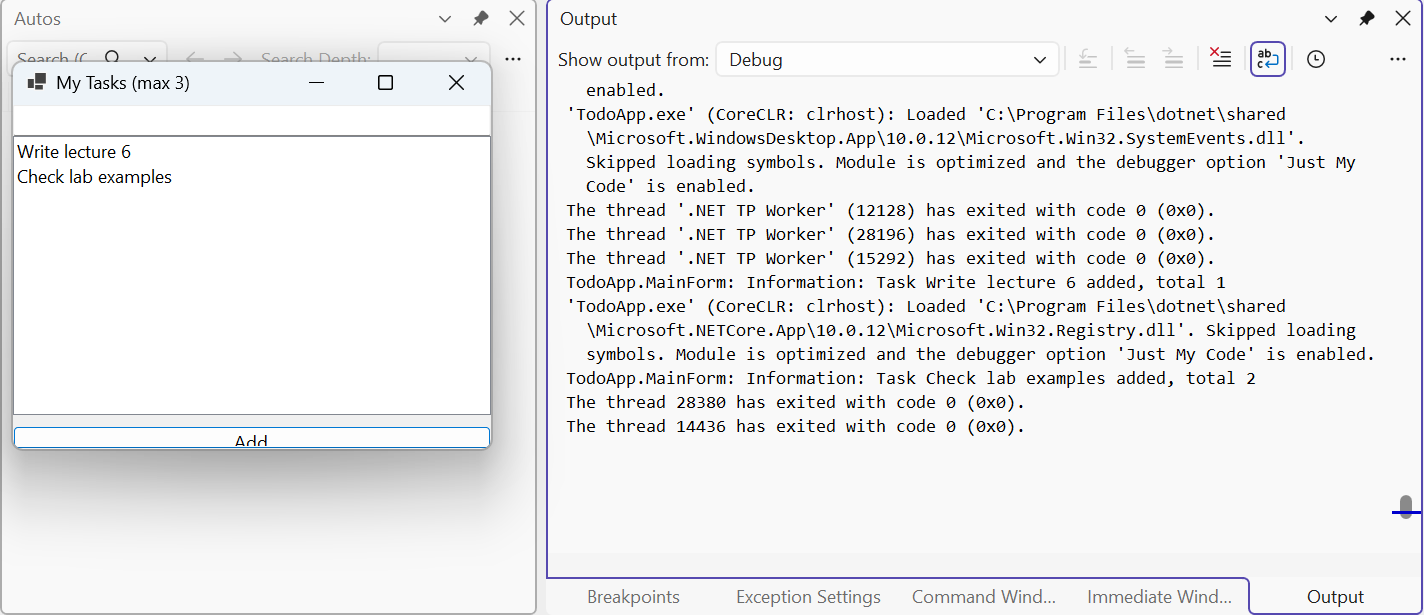
Figure 6.10. A Windows Forms application with a host and the log in the Output window
Testability
The main practical benefit of DI is that code is easy to test. A class that receives all its dependencies through the constructor is created in a unit test without a container, passing simple substitutes:
- a fake—your own simplified implementation of the interface, like
FakeSenderin the first example; NullLogger<T>.Instance—a logger that writes nothing;Options.Create(new DiscountOptions { Percent = 25 })—a ready-madeIOptions<T>without configuration;TimeProvider—a time abstraction (.NET 8+). Code callstime.GetUtcNow()ortime.GetLocalNow()instead ofDateTime.Now; the program registersTimeProvider.System, and a test usesFakeTimeProviderfrom theMicrosoft.Extensions.TimeProvider.Testingpackage, whose time is set with theSetUtcNowandAdvancemethods.
A unit test with such substitutes runs in milliseconds and does not depend on the computer's clock; a complete test project is given in the lab assignment. If a new of a concrete class is hidden inside a method, it cannot be replaced in a test, so the code needs to be refactored.