
English
Serving multiple clients
Serving multiple clients
The echo server serves clients one after another. To serve them simultaneously, the accept loop starts a separate asynchronous task for each client and, without waiting for it to finish, accepts the next one (Fig. 9.7). An asynchronous task does not occupy a thread while it waits for data, so one server can serve hundreds of connections.
Client tasks run in parallel on different thread pool threads, so shared data needs protection:
- the collection of connected clients is stored in a
ConcurrentDictionary<TKey, TValue>(https://learn.microsoft.com/dotnet/api/system.collections.concurrent.concurrentdictionary-2), which is safe to modify from multiple threads; - two tasks must not write to the same
NetworkStreamsimultaneously: the bytes of two messages would get interleaved. Writes are serialized with a lock; for asynchronous code useSemaphoreSlim, becauseawaitcannot be used insidelock.
Fig. 9.7. A server serving multiple clients
A graceful shutdown of a server means: stop accepting new connections, notify the clients, wait for their tasks to finish, and close the sockets. The stop signal is passed with a cancellation token CancellationToken (https://learn.microsoft.com/dotnet/standard/threading/cancellation-in-managed-threads): after Cancel() is called, the AcceptTcpClientAsync(token) and ReadLineAsync(token) methods throw OperationCanceledException. A client shuts down just as gracefully: Shutdown(SocketShutdown.Send) tells the server that there will be no more requests (the server reads the end of the stream), after which the client reads the remaining responses and closes the socket.
Example: a chat
The chat server accepts any number of clients. The first line from a client is the name, and each following line is a message that the server broadcasts to everyone. The listening address can be given as an argument: without an argument the server listens on all interfaces (the firewall prompt appears on the first run), and with the argument 127.0.0.1 it listens only on this computer. Pressing Enter in the server window stops it.
cs
using System.Collections.Concurrent;
using System.Net;
using System.Net.Sockets;
using System.Text;

Console.OutputEncoding = Encoding.UTF8;

// Address from the argument; without an argument – all network interfaces.
IPAddress address = args.Length > 0
    ? IPAddress.Parse(args[0]) : IPAddress.Any;
var clients = new ConcurrentDictionary<int, StreamWriter>();
var sendLock = new SemaphoreSlim(1, 1);
var tasks = new List<Task>();
int lastId = 0;

using var stop = new CancellationTokenSource();
_ = Task.Run(() => { Console.ReadLine(); stop.Cancel(); });

var listener = new TcpListener(address, 5055);
listener.Start();
Console.WriteLine($"Chat server is listening on {listener.LocalEndpoint}");
Console.WriteLine("Enter – stop the server");
try
{
    while (true)
    {
        TcpClient client =
            await listener.AcceptTcpClientAsync(stop.Token);
        int id = Interlocked.Increment(ref lastId);
        tasks.Add(ServeAsync(id, client, stop.Token));
    }
}
catch (OperationCanceledException)
{
    listener.Stop();        // new connections are no longer accepted
}
await Task.WhenAll(tasks);  // wait for all clients to finish
Console.WriteLine("Server stopped");

async Task ServeAsync(int id, TcpClient client,
    CancellationToken token)
{
    using (client)
    {
        NetworkStream stream = client.GetStream();
        var reader = new StreamReader(stream, Encoding.UTF8);
        var writer = new StreamWriter(stream, new UTF8Encoding(false))
        {
            AutoFlush = true,
            NewLine = "\n"
        };
        string? name = null;
        try
        {
            // The first line from the client is the user name.
            name = (await reader.ReadLineAsync(token))?.Trim();
            if (name is null || name.Length is 0 or > 20) return;
            clients[id] = writer;
            await BroadcastAsync($"* {name} joins the chat");

            string? line;
            while ((line = await reader.ReadLineAsync(token)) != null)
            {
                if (line.Length > 500) line = line[..500];
                await BroadcastAsync($"{name}: {line}");
            }
        }
        catch (OperationCanceledException)
        {
            await writer.WriteLineAsync("* Server is shutting down");
        }
        catch (IOException)
        {
            // The connection was broken without a proper close.
        }
        finally
        {
            if (clients.TryRemove(id, out _))
            {
                await BroadcastAsync($"* {name} leaves the chat");
            }
        }
    }
}

async Task BroadcastAsync(string message)
{
    Console.WriteLine($"{DateTime.Now:HH:mm:ss} {message}");
    await sendLock.WaitAsync();     // one network write at a time
    try
    {
        foreach ((int id, StreamWriter writer) in clients)
        {
            try
            {
                await writer.WriteLineAsync(message);
            }
            catch (Exception ex)
                when (ex is IOException or ObjectDisposedException)
            {
                clients.TryRemove(id, out _);
            }
        }
    }
    finally
    {
        sendLock.Release();
    }
}
The Interlocked.Increment method atomically increments the ID counter. The expression line[..500] truncates an overly long message. The ServeAsync task finishes when the client closes the connection (ReadLineAsync returns null), when the connection is broken (IOException), or when the server stops; in all cases the finally block removes the client from the dictionary and notifies the others.
The client is a Windows Forms application (Fig. 9.8). The project was created from the Windows Forms App template, the Form1.cs and Form1.Designer.cs files were deleted, and Program.cs runs new ChatForm(). The form is built in code:
cs
using System.Net.Sockets;
using System.Text;

namespace ChatClient;

public class ChatForm : Form
{
    private readonly TextBox hostBox = new() { Text = "127.0.0.1" };
    private readonly TextBox nameBox = new()
    {
        PlaceholderText = "Name"
    };
    private Button connectButton = new()
    {
        Text = "Connect", AutoSize = true
    };
    private ListBox messages = new() { Dock = DockStyle.Fill };
    private TextBox inputBox = new() { Dock = DockStyle.Fill };
    private readonly Button sendButton = new()
    {
        Text = "Send", Dock = DockStyle.Right, Enabled = false
    };
    private TcpClient? client;
    private StreamWriter? writer;
    private CancellationTokenSource? cts;

    public ChatForm()
    {
        Text = "Chat Client";
        AutoScaleDimensions = new SizeF(96, 96); // sizes for 100 %
        AutoScaleMode = AutoScaleMode.Dpi;       // scale to the DPI
        ClientSize = new Size(460, 360);
        var top = new FlowLayoutPanel
        {
            Dock = DockStyle.Top, AutoSize = true
        };
        top.Controls.AddRange([hostBox, nameBox, connectButton]);
        var bottom = new Panel
        {
            Dock = DockStyle.Bottom, Height = 28
        };
        bottom.Controls.AddRange([inputBox, sendButton]);
        Controls.AddRange([messages, bottom, top]);
        AcceptButton = sendButton;      // Enter sends the line

        connectButton.Click += async (_, _) => await ConnectAsync();
        sendButton.Click += async (_, _) => await SendAsync();
        FormClosing += (_, _) => Disconnect();
    }

    private async Task ConnectAsync()
    {
        if (client != null)
        {
            Disconnect();
            return;
        }
        connectButton.Enabled = false;
        try
        {
            client = new TcpClient();
            await client.ConnectAsync(hostBox.Text, 5055);
            NetworkStream stream = client.GetStream();
            writer = new StreamWriter(stream, new UTF8Encoding(false))
            {
                AutoFlush = true,
                NewLine = "\n"
            };
            await writer.WriteLineAsync(nameBox.Text);
            cts = new CancellationTokenSource();
            SetConnected(true);
            _ = ReceiveAsync(new StreamReader(stream), cts.Token);
        }
        catch (SocketException ex)
        {
            Disconnect();
            messages.Items.Add($"* {ex.Message}");
        }
        connectButton.Enabled = true;
    }

    // await does not block the UI thread, and the continuation runs
    // on that same thread, so the ListBox can be changed without Invoke.
    private async Task ReceiveAsync(StreamReader reader,
        CancellationToken token)
    {
        try
        {
            string? line;
            while ((line = await reader.ReadLineAsync(token)) != null)
            {
                messages.Items.Add(line);
                messages.TopIndex = messages.Items.Count - 1;
            }
            messages.Items.Add("* Connection closed by server");
        }
        catch (Exception) when (token.IsCancellationRequested)
        {
            return;                 // the user disconnected
        }
        catch (IOException ex)
        {
            messages.Items.Add($"* Connection lost: {ex.Message}");
        }
        Disconnect();
    }

    private async Task SendAsync()
    {
        if (writer is null || inputBox.Text.Length == 0) return;
        try
        {
            await writer.WriteLineAsync(inputBox.Text);
            inputBox.Clear();
        }
        catch (IOException)
        {
            Disconnect();
        }
    }

    private void Disconnect()
    {
        cts?.Cancel();
        client?.Dispose();          // closes the socket and the stream
        client = null;
        writer = null;
        SetConnected(false);
    }

    private void SetConnected(bool connected)
    {
        connectButton.Text = connected ? "Disconnect" : "Connect";
        hostBox.Enabled = nameBox.Enabled = !connected;
        sendButton.Enabled = connected;
    }
}
The ReceiveAsync receive loop is started without await and runs as long as the connection is open. Each await releases the UI thread, so the window responds to input, and the continuation after await runs on the UI thread again (the Windows Forms synchronization context), so controls can be changed without Invoke. Clicking Disconnect cancels the token and closes the TcpClient.
For testing, the server was started with the argument 127.0.0.1, and two clients (Olena and Taras) were connected to it; Taras sent a message and disconnected. Olena's window contains the same messages without timestamps, and the server log contains timestamped lines such as 14:23:32 Olena: Hi! Who has already done the lab? and 14:23:33 * Taras leaves the chat.
If you press Enter in the server window while clients are connected, each client receives * Server is shutting down and * Connection closed by server, and the server prints Server stopped only after all client tasks have finished.
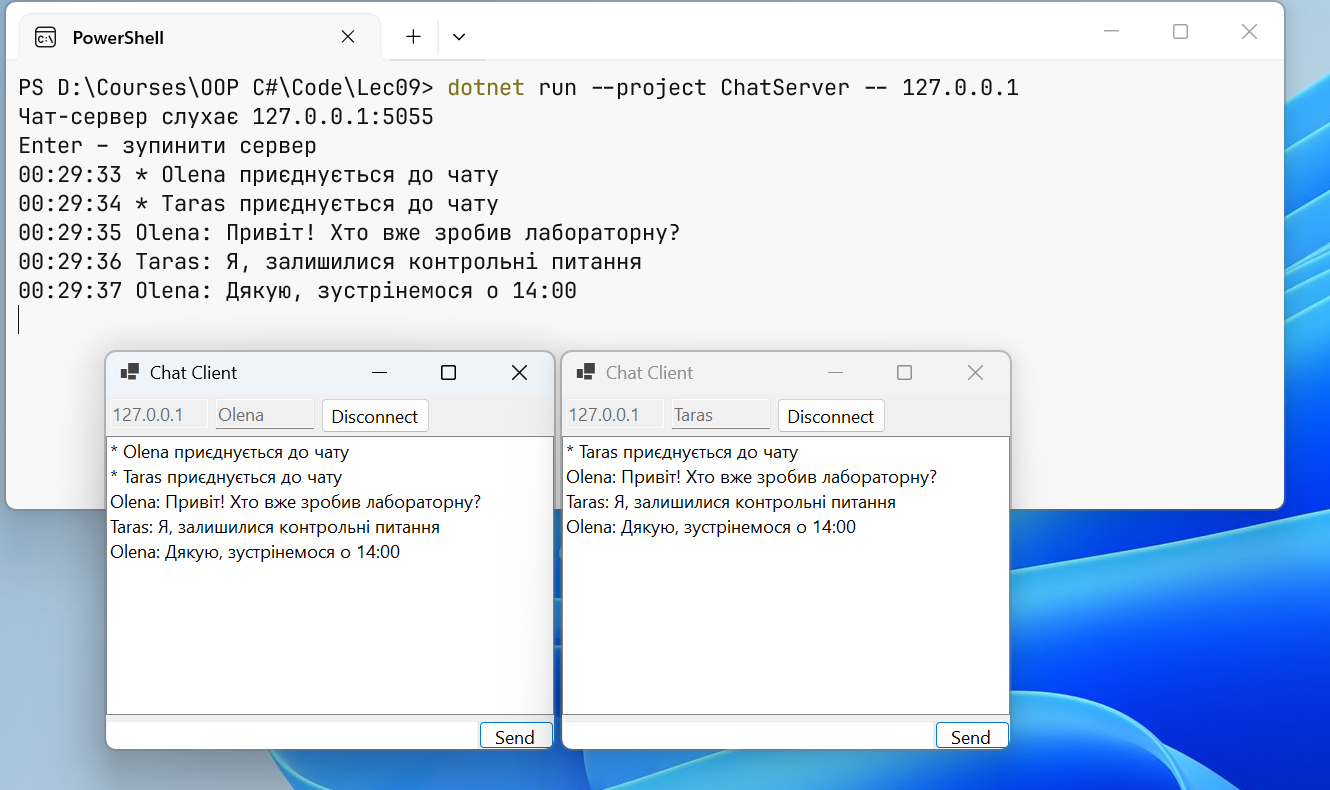
Fig. 9.8. Two Windows Forms chat clients and the server console
To start the server and the client with one command in Visual Studio 2026, add both projects to one solution, choose Configure Startup Projects… in the solution's context menu, select Multiple startup projects, and set the Start action for both projects (Fig. 9.9) (https://learn.microsoft.com/visualstudio/ide/how-to-set-multiple-startup-projects). The server must be first in the list. A second client instance is started with Debug → Start New Instance in the project's context menu.
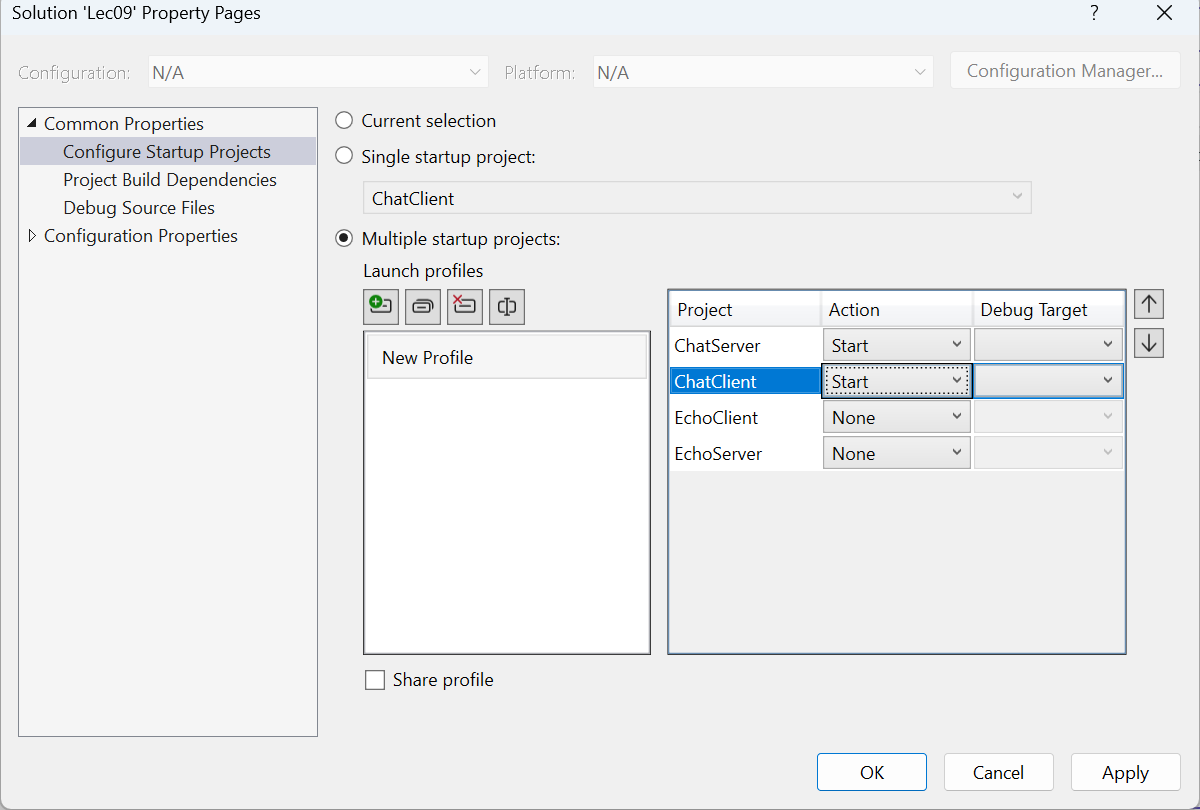
Fig. 9.9. Starting the server and client at the same time