
English
Tests and MSTest
Why tests are needed
Checking a program manually after every change is slow and unreliable: it is easy to miss a case that used to work but broke after the change (a regression). An automated test is code that calls program code with known input data and checks the result. A test suite runs in seconds after every change and immediately shows what exactly broke.
There are several levels of testing:
- unit tests check an individual method or class in isolation from the database, files, and network;
- integration tests check the interaction of several components, for example, a service and a database;
- system (end-to-end, UI) tests check the whole application from the user’s point of view.
There should be the most unit tests: they are fast, cheap, and point precisely to the error (the testing pyramid, Fig. 18.1).
Figure 18.1. The testing pyramid
Good unit tests follow the FIRST principles: they are fast (Fast), independent of each other (Independent), repeatable with the same result (Repeatable), self-validating, that is, the result is “passed/failed” without manual analysis (Self-validating), and written in a timely manner, together with the code (Timely).
Frameworks and solution structure
Three unit testing frameworks are common for .NET: MSTest (developed by Microsoft, the default Visual Studio template), xUnit, and NUnit. They have the same capabilities and differ mostly in the names of their attributes (Table 18.1). This course uses MSTest.
Table 18.1. Attributes of testing frameworks
| Purpose | MSTest | xUnit | NUnit |
|---|---|---|---|
| test class | [TestClass] | – | [TestFixture] |
| test | [TestMethod] | [Fact] | [Test] |
| parameterized test | [DataRow] | [Theory], [InlineData] | [TestCase] |
| before each test | [TestInitialize] | constructor | [SetUp] |
Tests are placed in a separate test project that references the project with the code. That is why the code being tested is moved into a class library, and the console application only uses it (Fig. 18.2). The commands for creating such a solution (Topic 8):
dotnet new sln -n Shop
dotnet new classlib -n Shop.Core
dotnet new mstest -n Shop.Tests
dotnet sln add Shop.Core Shop.Tests
dotnet add Shop.Tests reference Shop.Core
dotnet test
Figure 18.2. A solution with a class library and a test project
In Visual Studio, a test project is added through Add → New Project with the MSTest Test Project template (Fig. 18.3). The template adds the MSTest NuGet package (version 4.x in .NET 10) and an MSTestSettings.cs file that enables parallel test execution.
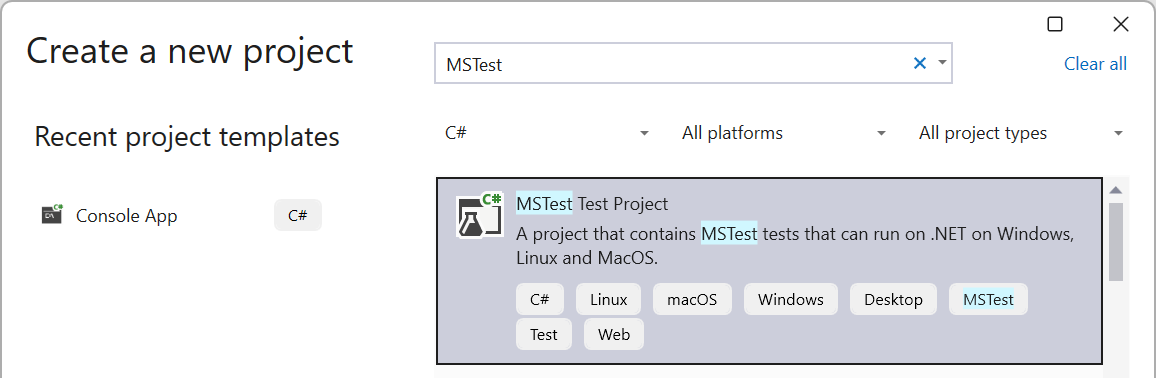
Figure 18.3. Creating a test project
The first test in MSTest
A test class is marked with the [TestClass] attribute, and each test is a public parameterless method with the [TestMethod] attribute. A test consists of three parts, the Arrange–Act–Assert pattern (Fig. 18.4):
- Arrange: create objects and input data;
- Act: call the method under test;
- Assert: compare the result with the expected one.
Figure 18.4. The Arrange–Act–Assert test structure
The name of a test describes what is being checked, following the scheme “method_scenario_expected result,” for example, Divide_ByZero_Throws. Then, from the name of a failed test, it is clear which behavior is broken. One test checks one behavior.
Assertions
The Assert class contains checking methods; if a condition is not met, the test fails with a message (Table 18.2).
Table 18.2. The main MSTest assertions
| Assertion | Checks |
|---|---|
Assert.AreEqual(expected, actual) | equality (the expected value comes first!) |
Assert.AreEqual(0.333, x, delta: 0.001) | equality of double values with a tolerance |
Assert.IsTrue(c), IsFalse, IsNull | a logical condition, null |
Assert.ThrowsExactly<T>(() => …) | that an exception of exactly type T is thrown |
Assert.HasCount(n, list), IsEmpty | the number of elements in a collection |
CollectionAssert.AreEqual, Contains | collections element by element, whether an element is present |
StringAssert.Contains, StartsWith | the contents of a string |
Floating-point numbers are compared with a tolerance because calculations with double have errors (Topic 2). ThrowsExactly returns the exception, so you can additionally check its message. The [ExpectedException] attribute of older MSTest versions was removed in version 4.
Parameterized tests
To avoid copying a test for each data set, the method takes parameters, and [DataRow] attributes specify the values. Each row is executed and displayed as a separate test. Attribute values must be constants, so a decimal is passed as a double and converted in the test. For complex data (objects, collections), [DynamicData] is used with a property or method that returns sets of arguments.
Test data is chosen using equivalence classes and boundary values: values for which the program behaves the same way form a class, and one value is taken from each class, as well as values at the boundaries of the classes and next to them. For a discount “from 1000 UAH,” these are 999.99, 1000, and 1000.01; for a product quantity, 0, 1, and −1; for conversion to Roman numerals, 0, 1, 3999, and 4000.