
English
Debug.Assert and exception handling
The Debug class: WriteLine and Assert
The System.Diagnostics.Debug class provides diagnostic methods that work only in the Debug configuration: in Release, the compiler removes their calls entirely.
Debug.WriteLine(message)— writes a message to the Visual Studio Output window, not the console (Fig. 6.5);Debug.Assert(condition, message)— checks an invariant, a condition that should always hold when the program works correctly. If it is false, execution pauses under a debugger; without one, a console application crashes withAssertion failed.
cs
using System.Diagnostics;

int[] data = [4, 8, 15];
int sum = 0;
foreach (int x in data)
{
    sum += x;
    Debug.WriteLine($"x = {x}, sum = {sum}");
}
Debug.Assert(sum >= 0, "The sum of nonnegative numbers is negative");
Console.WriteLine(sum);                        // 27
Debug.Assert checks programmer errors, not user errors: validate input using ordinary conditions or exceptions, which also work in Release.
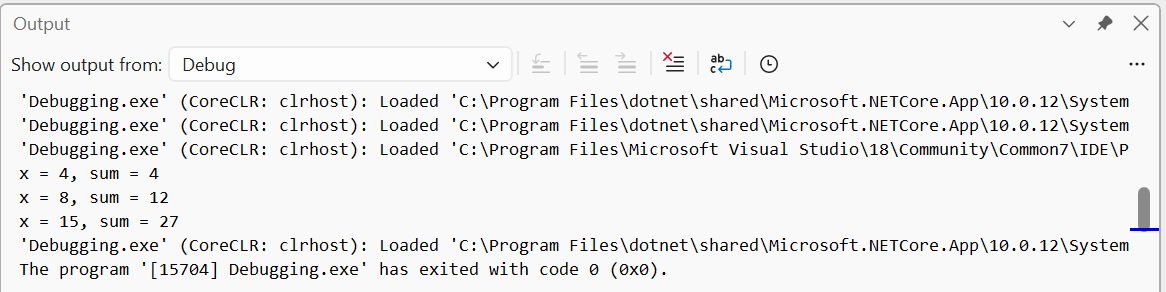
Figure 6.5. Debug.WriteLine messages in the Output window
Exceptions
An exception is an object reporting a runtime error (https://learn.microsoft.com/dotnet/csharp/fundamentals/exceptions/). When a method cannot do its work, it throws an exception: the method stops executing, and the CLR searches for code to catch it. If none exists, the program terminates with an unhandled exception message. When debugging, Visual Studio pauses on the line where the exception occurred and displays Exception Helper (Fig. 6.6).
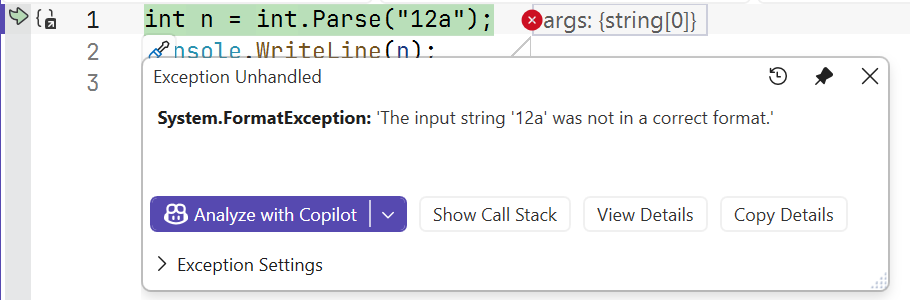
Figure 6.6. An unhandled exception in the debugger
All exceptions are objects of classes derived from System.Exception. Standard .NET exceptions form a hierarchy (Fig. 6.7); Table 6.2 lists the most common ones.
Figure 6.7. Hierarchy of standard .NET exceptions
Table 6.2. Common standard exceptions
| Exception | When it occurs (example) |
|---|---|
FormatException | the string has the wrong format: int.Parse("12a") |
IndexOutOfRangeException | array index out of bounds: a[a.Length] |
NullReferenceException | accessing a member through null: s.Length where s == null |
DivideByZeroException | integer or decimal division by zero |
OverflowException | overflow in checked, Convert.ToByte("300"), int.MinValue / -1 |
ArgumentException | invalid method argument |
ArgumentNullException | an argument is null when it must not be |
ArgumentOutOfRangeException | argument outside the valid range |
InvalidOperationException | operation impossible in the current state: maximum of an empty sequence |
Every exception has Message (error description), StackTrace (the call stack when it occurred), and InnerException (the exception that caused this one) properties, and a GetType() method that returns its type.
The try/catch/finally statement
Place code that may throw in a try block and handlers in one or more catch blocks (https://learn.microsoft.com/dotnet/csharp/language-reference/statements/exception-handling-statements). A typed catch handles exceptions of that type and its derived types. The blocks are checked in order, so arrange them from specific to general: placing catch (Exception) before catch (FormatException) would make the second block unreachable (CS0160).
The finally block always runs: after a successful try, after an exception is handled in catch, and even when an uncaught exception propagates further (Fig. 6.8). Use it to release resources: close files and restore state.
Figure 6.8. Execution order of try/catch/finally
cs
string[] inputs = ["42", "abc", "99999999999"];

foreach (string text in inputs)
{
    try
    {
        int value = int.Parse(text);
        Console.WriteLine($"{text}: {value * 2}");
    }
    catch (FormatException)
    {
        Console.WriteLine($"{text}: not a number");
    }
    catch (OverflowException ex)
    {
        Console.WriteLine($"{text}: {ex.Message}");
    }
    finally
    {
        Console.WriteLine("  check complete");
    }
}
Output:
42: 84
  check complete
abc: not a number
  check complete
99999999999: Value was either too large or too small for an Int32.
  check complete
The ex variable in catch is needed only when using exception properties; omit it if the type alone is sufficient for handling.
when exception filters
A when condition can follow catch: the block catches the exception only if the condition is true. A filter lets you handle exceptions of the same type differently or catch several types in one block:
cs
int[] values = [10, 20, 30];
string[] requests = ["1", "7", "x"];

foreach (string request in requests)
{
    try
    {
        Console.WriteLine(values[int.Parse(request)]);
    }
    catch (Exception ex) when (ex is FormatException
                                 or IndexOutOfRangeException)
    {
        Console.WriteLine($"Request “{request}”: {ex.GetType().Name}");
    }
}
Output: 20, Request “7”: IndexOutOfRangeException, Request “x”: FormatException. This block does not catch other exception types.