
English
Throwing exceptions and strategy
Throwing exceptions
Your own method reports an error using throw with an exception object. Most often, a method validates its arguments: invalid data from the caller is an error the method cannot fix itself. .NET provides static helper methods for common checks (https://learn.microsoft.com/dotnet/standard/exceptions/best-practices-for-exceptions):
cs
Console.WriteLine(Discount(1200m, 10));        // 1080

try
{
    Console.WriteLine(Discount(850m, 150));
}
catch (ArgumentOutOfRangeException ex)
{
    Console.WriteLine($"{ex.ParamName}: {ex.ActualValue}");
}

static decimal Discount(decimal price, int percent)
{
    ArgumentOutOfRangeException.ThrowIfNegative(price);
    ArgumentOutOfRangeException.ThrowIfNegative(percent);
    ArgumentOutOfRangeException.ThrowIfGreaterThan(percent, 100);
    return Math.Round(price * (100 - percent) / 100, 2);
}
Output: 1080 and percent: 150. The helpers build messages and record the parameter name (ParamName) and value automatically. Other helpers include ArgumentNullException.ThrowIfNull(arg), ArgumentException.ThrowIfNullOrWhiteSpace(text), and ArgumentOutOfRangeException.ThrowIfZero(n). You can also create an exception explicitly: throw new InvalidOperationException("Insufficient funds");.
throw expressions let you throw within an expression, for example with the ?? and ?: operators:
cs
string? input = "Olena";
string name = input ?? throw new ArgumentNullException(nameof(input));
Console.WriteLine(name);
The nameof operator returns a variable’s name as a string and keeps working when the variable is renamed.
Rethrowing: throw; versus throw ex;
Sometimes an exception is caught only to log something before propagating it. Write throw; without an argument inside catch: the exception propagates unchanged, preserving its stack trace. Writing throw ex; throws the same object again and loses information about its original location. To replace an exception with a clearer one, pass the original as InnerException: throw new FormatException("Line 3 is invalid", ex);.
Unhandled exceptions and exit codes
If no catch handles an exception, it passes through the methods on the call stack (stack unwinding) (Fig. 6.9). Each method without a matching catch exits, and its finally blocks execute.
Figure 6.9. Exception propagation through the call stack
If an exception reaches the top level of the program, the CLR writes its text and stack trace to standard error and terminates the process with code -532462766 (0xE0434352) (Fig. 6.10):
Unhandled exception. System.InvalidOperationException:
Configuration file not found
   at Program.<Main>$(String[] args) in C:\Labs\Demo\Program.cs:line 2
Figure 6.10. An unhandled exception in the terminal
An exit code tells the operating system and automation scripts whether the program succeeded: 0 means success; another value means an error. Set it by returning from an int-returning Main or assigning Environment.ExitCode. Write error messages to Console.Error instead of Console.Out so they can be separated from results (dotnet run > result.txt writes only normal output to the file).
cs
if (args.Length == 0)
{
    Console.Error.WriteLine("Usage: Demo <file>");
    return 2;
}
Console.WriteLine($"Processing {args[0]}...");
return 0;
In PowerShell, $LASTEXITCODE shows the last program’s exit code.
When to use exceptions
Exceptions are intended for exceptional situations that a method cannot handle itself. A few rules:
- check expected situations without exceptions: users often make input mistakes, so use
int.TryParseinstead oftry/catcharoundint.Parse; check the divisor before dividing; - do not leave an empty
catch { }: it hides the error and allows the program to continue with incorrect data; - do not catch
Exceptionwhere you do not know how to handle the error: catch specific types and keep a general handler at the program’s top level; - catch an exception where you can take action: retry input, skip a line, or inform the user;
- throw the most specific exception type with a message explaining the cause.
Custom exception classes
If standard types do not describe a domain error, create a custom exception class. The notation : Exception means the new class inherits from Exception (inheritance is covered in detail in Topic 9); the constructor passes the message to the base class:
cs
decimal balance = 500m;
try
{
    Withdraw(ref balance, 800m);
}
catch (InsufficientFundsException ex)
{
    Console.WriteLine($"{ex.Message} Shortfall: {ex.Shortage:N2} UAH");
}

static void Withdraw(ref decimal balance, decimal amount)
{
    if (amount > balance)
    {
        throw new InsufficientFundsException(amount - balance);
    }
    balance -= amount;
}

class InsufficientFundsException(decimal shortage)
    : Exception("Insufficient funds in the account.")
{
    public decimal Shortage { get; } = shortage;
}
Output: Insufficient funds in the account. Shortfall: 300,00 UAH. By convention, exception class names end with Exception.
The Exception Settings window (Debug → Windows → Exception Settings, Ctrl+Alt+E) lets you choose which exceptions cause the debugger to pause as soon as they are thrown, even if a later catch handles them (Fig. 6.11). This helps locate an exception that the program handles silently (https://learn.microsoft.com/visualstudio/debugger/managing-exceptions-with-the-debugger).
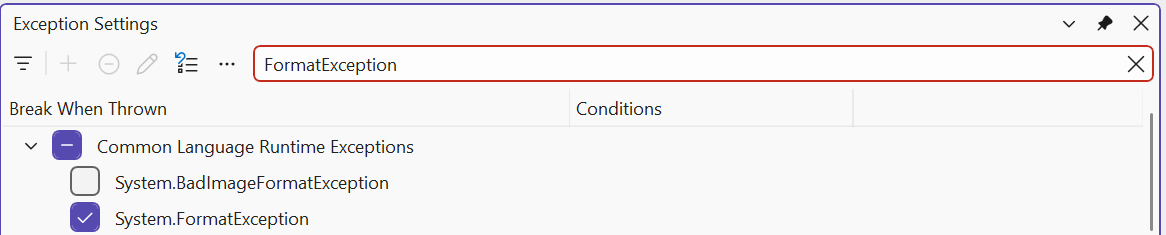
Figure 6.11. The Exception Settings window