
English
switch and patterns
The switch statement
A switch statement selects one of several branches based on an expression's value. Each branch (switch section) begins with one or more case labels and ends with a statement that exits it, most often break. The default label handles all other values:
cs
int day = 6;

switch (day)
{
    case 1:
    case 2:
    case 3:
    case 4:
    case 5:
        Console.WriteLine("Working day");
        break;
    case 6:
    case 7:
        Console.WriteLine("Weekend");
        break;
    default:
        Console.WriteLine("No such day of the week");
        break;
}
Consecutive labels (case 6: case 7:) lead to one block. Unlike C and C++, C# does not allow fall-through from one nonempty branch to the next: forgetting break causes CS0163, Control cannot fall through from one case label to another. To deliberately transfer to another branch, use goto case 7;, though this makes code harder to read. A branch may also end with return, continue (inside a loop), or throw.
The expression tested by switch can be int, char, string, bool, or an enumeration, and with patterns (see below), any type. String comparisons are case-sensitive: "Q" and "q" are different values.
Patterns
Pattern matching checks whether a value has a particular form. Patterns are used with is, in case labels, and in switch expressions (https://learn.microsoft.com/dotnet/csharp/language-reference/operators/patterns). Table 3.1 lists the main patterns.
Table 3.1. Main C# patterns
| Pattern | What it checks | Example |
|---|---|---|
| constant | equality to a constant | 0, "q", null |
| relational | comparison with a constant | < 0, >= 90 |
logical and | both patterns match | >= 1 and <= 12 |
logical or | at least one pattern matches | 6 or 7 |
logical not | the pattern does not match | not null |
| parenthesized | grouping patterns | not (< 0 or > 100) |
discard _ | any value (in a switch expression) | _ |
| declaration | a type and a new variable | int n |
The is operator
expression is pattern returns true if the value matches the pattern. Combined with logical patterns, it produces concise, clear conditions that mention a variable only once:
cs
int month = 7;
char c = 'k';
string? name = null;

bool isSummer = month is 6 or 7 or 8;             // True
bool valid = month is >= 1 and <= 12;             // True
bool isLetter = c is (>= 'a' and <= 'z')
                  or (>= 'A' and <= 'Z');         // True
bool hasName = name is not null;                  // False
Console.WriteLine($"{isSummer} {valid} {isLetter} {hasName}");
month is 6 or 7 or 8 is equivalent to month == 6 || month == 7 || month == 8. The not null pattern is the recommended way to check for null.
Patterns in switch statements and the when condition
A case label can contain a pattern followed by an additional when condition. Branches are checked from top to bottom, and the first matching branch executes:
cs
int score = 87;
bool isRetake = true;

switch (score)
{
    case < 0 or > 100:
        Console.WriteLine("Invalid score");
        break;
    case >= 50 when isRetake:
        Console.WriteLine("Retake passed");
        break;
    case >= 50:
        Console.WriteLine("Passed");
        break;
    default:
        Console.WriteLine("Failed");
        break;
}
The switch expression
A switch expression selects a value by pattern. Its syntax is shorter than a statement: the value precedes switch, and comma-separated pattern => result arms need no case or break (https://learn.microsoft.com/dotnet/csharp/language-reference/operators/switch-expression):
cs
int points = 76;

string ects = points switch
{
    >= 90 => "A",
    >= 80 => "B",
    >= 71 => "C",
    >= 61 => "D",
    >= 50 => "E",
    >= 30 => "FX",
    _ => "F",
};
Console.WriteLine(ects);    // C
Arms are checked in order (Fig. 3.2), so >= 80 does not need < 90. The discard pattern _ matches any value and always comes last. If a pattern can never match because earlier arms already cover it, the compiler reports CS8510.
Figure 3.2. Pattern checking order in a switch expression
Visual Studio suggests converting a switch statement whose branches only assign values to an expression: place the cursor on switch, press Ctrl+., and select Convert switch statement to expression (Fig. 3.3).
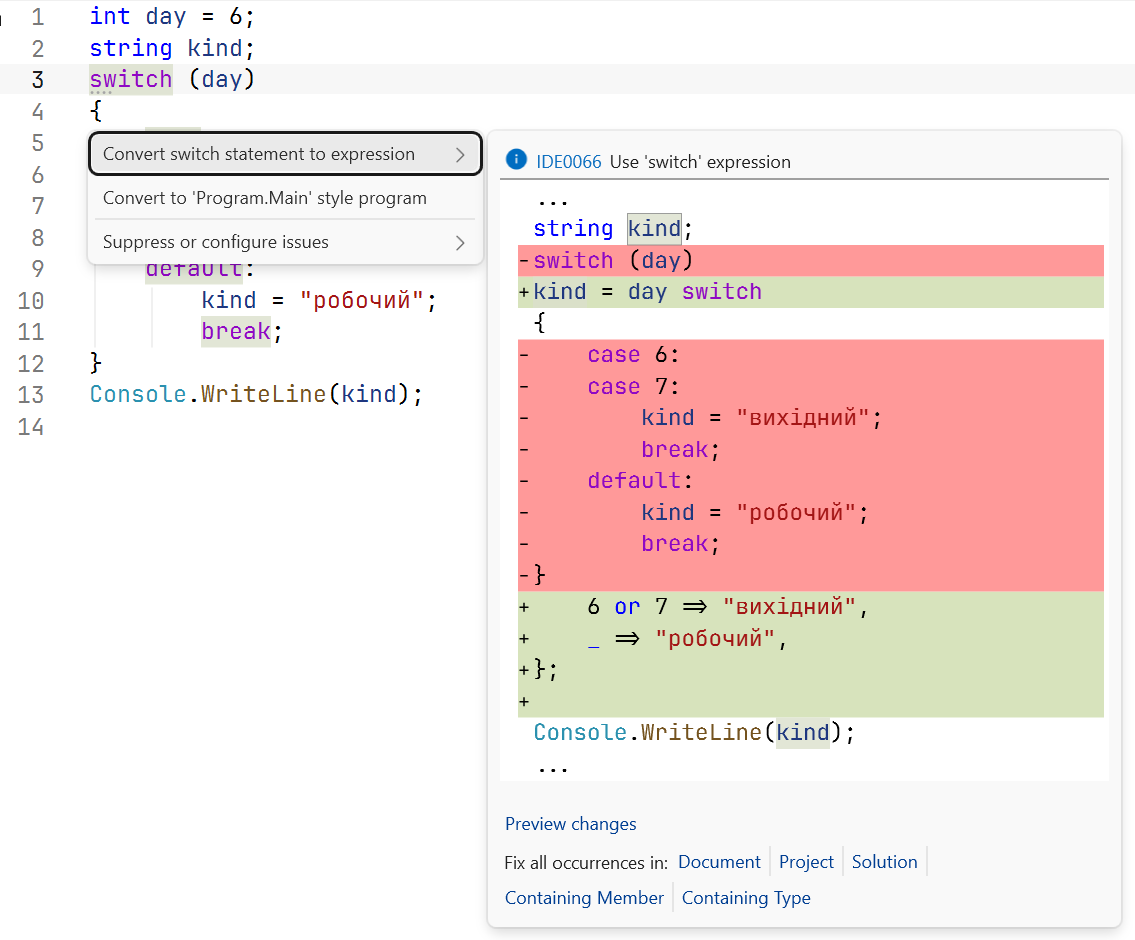
Figure 3.3. Converting a switch statement to a switch expression
A switch expression must be exhaustive: every possible value must match an arm. If the compiler finds an uncovered value, it issues CS8509 and gives an example (Fig. 3.4). At runtime, that value would cause SwitchExpressionException. Numeric and string expressions therefore almost always include _.
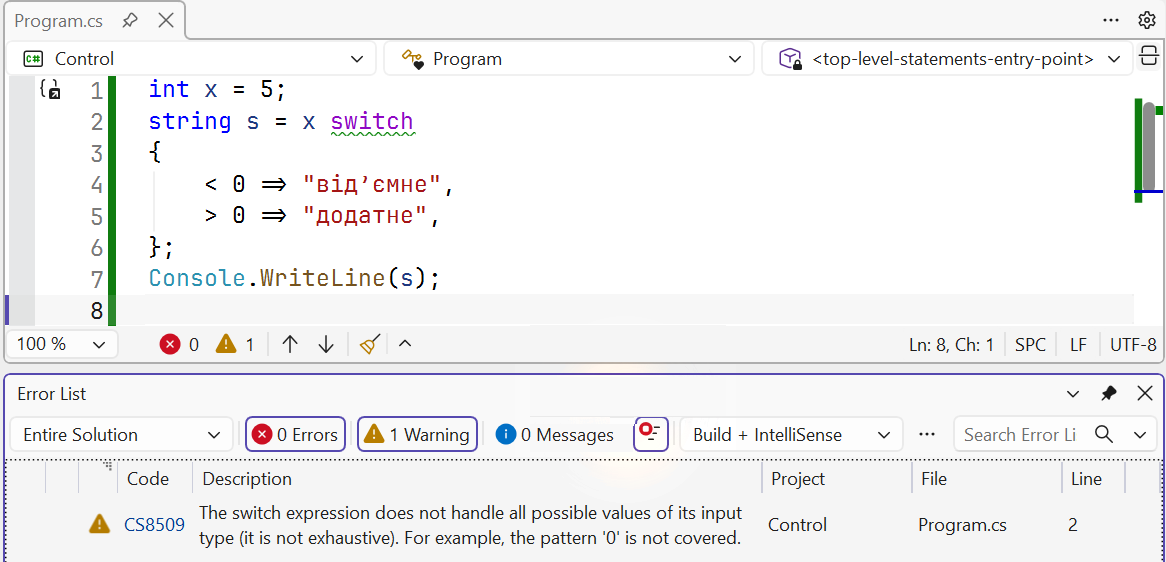
Figure 3.4. Warning about a non-exhaustive switch expression
Arm results must convert to a common type, and arms can be grouped with logical patterns:
cs
int month = 4;
int year = 2028;
bool isLeap = (year % 4 == 0 && year % 100 != 0) || year % 400 == 0;

int days = month switch
{
    2 => isLeap ? 29 : 28,
    4 or 6 or 9 or 11 => 30,
    >= 1 and <= 12 => 31,
    _ => 0,
};
Console.WriteLine(days);    // 30