
English
Classes, objects, and fields
The object-oriented approach
In previous topics, data and the actions performed on it were separate: individual methods processed arrays of product prices, quantities, and names. As a program grows, this procedural style becomes harder to manage: it is easy to pass the wrong array to a method or forget to update one of the parallel arrays.
Object-oriented programming (OOP) combines data and the actions performed on it into objects. An object has:
- state — its data values: an account balance, a product name and price;
- behavior — the actions it performs: deposit money, calculate a cost;
- identity — each object is a separate entity, even if its state matches another object’s state.
A class is a description (template) of objects of the same kind: what data they store and what they can do. An object created from a class is called an instance of that class. One class describes many objects with different states (Fig. 7.1) (https://learn.microsoft.com/dotnet/csharp/fundamentals/object-oriented/objects).
Figure 7.1. A class and its objects
Classes model domain concepts: Student, BankAccount, Order. A well-designed class is responsible for one concept and keeps its own state valid: for example, an account does not allow withdrawals greater than its balance.
Declaring a class
Declare a class with the class keyword; place its members inside braces: fields, properties, constructors, and methods (https://learn.microsoft.com/dotnet/csharp/fundamentals/types/classes). A UML class diagram conveniently represents a class’s structure: a rectangle with three sections — name, data, and operations (Fig. 7.2).
Figure 7.2. Class notation in a UML diagram
In small examples, classes are declared in Program.cs after the top-level statements. In real projects, place each class in a separate file named after the class: BankAccount.cs. In Visual Studio, add a class file with Project → Add Class… or from the project’s context menu in Solution Explorer (Fig. 7.3). The new file uses the project’s namespace:
cs
namespace Banking;

public class BankAccount
{
    // class members
}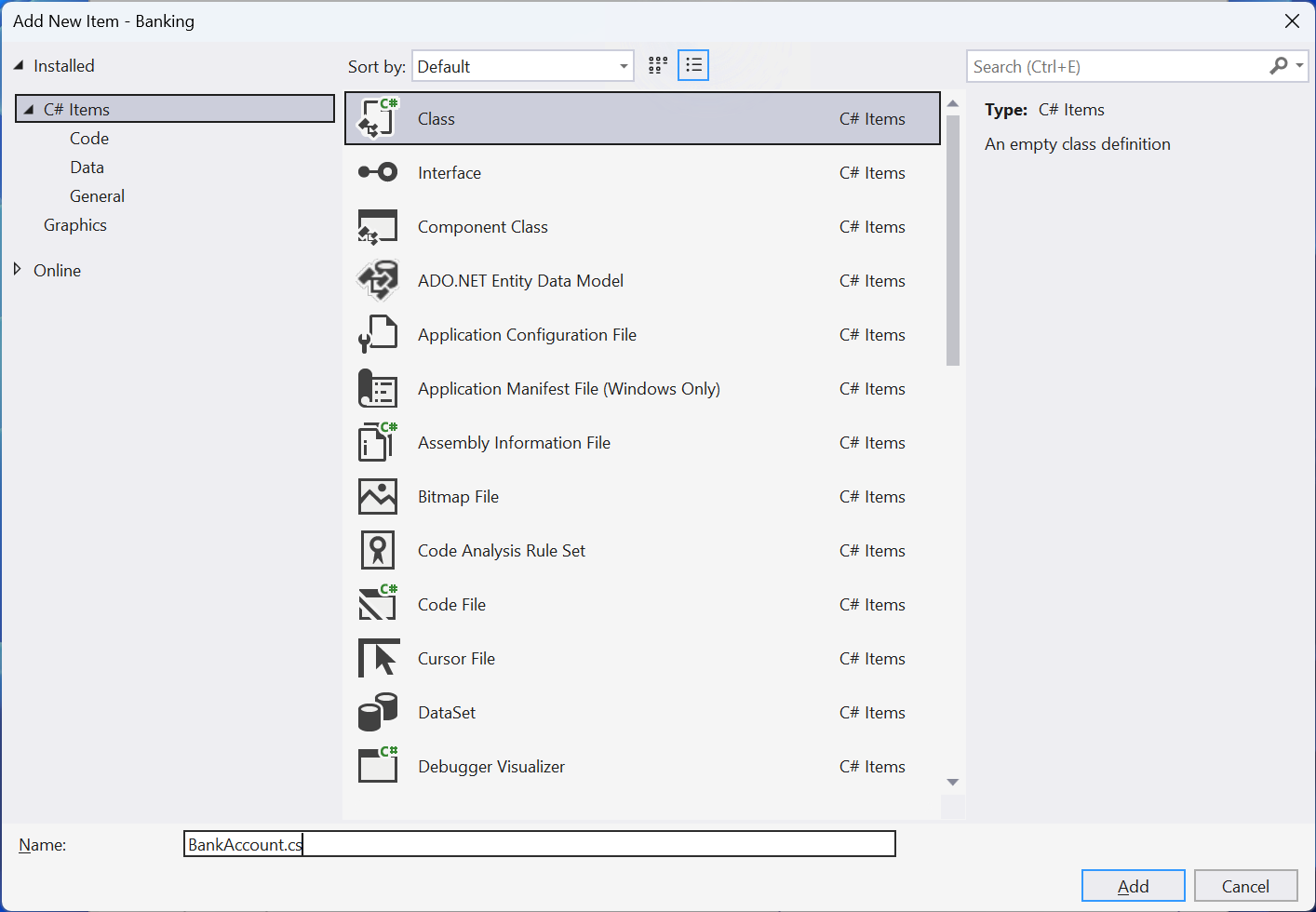
Figure 7.3. Adding a class to a project
The Class View window (View → Class View, Ctrl+Shift+C) shows all classes in the project and their members (Fig. 7.4).
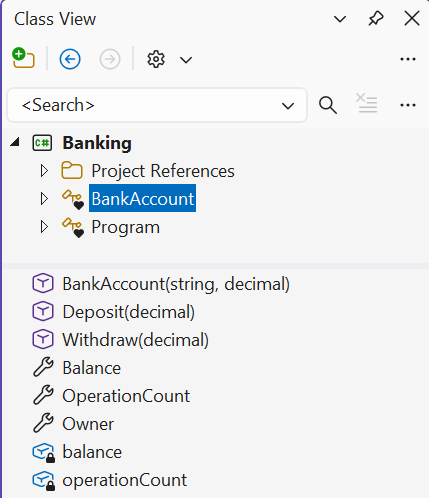
Figure 7.4. Class members in the Class View window
Creating objects and reference semantics
Create an object with new, which allocates memory on the managed heap, calls the constructor, and returns a reference to the object. If the variable’s type is already specified, you can omit the type after new (target-typed new()):
cs
BankAccount first = new BankAccount("Olena", 100m);
var second = new BankAccount("Petro", 0m);
BankAccount third = new("Iryna", 250m);
A class is a reference type: a variable stores a reference rather than the object itself. Assignment b = a copies the reference, so both variables refer to the same object: a change made through one variable is visible through the other (Fig. 7.5). By default, == compares references for classes: two distinct objects with the same state are not equal.
Figure 7.5. Two variables refer to one object
A class-type variable can have the value null, meaning “refers to nothing.” Accessing a member through null causes NullReferenceException. To avoid this, mark variables that can be null with ? and check them: the null-conditional operator ?. returns null if the object is null; otherwise, it accesses the member (https://learn.microsoft.com/dotnet/csharp/nullable-references):
cs
string? name = args.Length > 0 ? args[0] : null;

int? length = name?.Length;          // null if name == null
int safeLength = name?.Length ?? 0;  // 0 instead of null
Console.WriteLine($"{length} {safeLength}");

if (name is not null)
{
    Console.WriteLine(name.ToUpper());
}
The compiler warns (CS8602) if a potentially null variable is used without a check (Fig. 7.6).
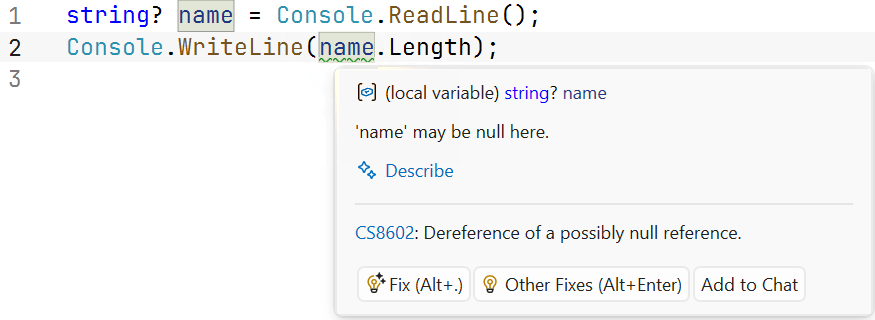
Figure 7.6. Warning about a possible null value
Fields, methods, and this
A field is a variable declared in a class. Each object has its own copy of instance fields, which make up its state. An instance method works with the fields of the object on which it is called. Inside a method, the this keyword refers to the current object; use it when a parameter name matches a field name (this.hours = hours;).
Access modifiers control access to class members. This topic uses two:
public— the member is accessible to any code: this is the class’s interface, used by other parts of the program;private— the member is accessible only inside the class; fields are usually private so that only class methods that perform validation can change the object’s state.
If no modifier is specified, class members are private. The readonly modifier on a field allows assignment only in its declaration or a constructor. Topic 8 covers access modifiers and encapsulation in detail.
cs
var counter = new Counter();
counter.Increment();
counter.Increment(5);
Console.WriteLine(counter.Value);    // 6

class Counter
{
    private int value;               // object state

    public int Value => value;

    public void Increment(int step = 1)
    {
        ArgumentOutOfRangeException.ThrowIfNegativeOrZero(step);
        value += step;               // same as this.value += step
    }
}
Trying to access a private field from outside (counter.value = 100;) causes error CS0122: state can be changed only through the Increment method, which validates the step.