
English
The Array class and multidimensional arrays
The Array class
The static Array class provides methods for working with arrays of any type (Table 4.1, https://learn.microsoft.com/dotnet/api/system.array).
Table 4.1. Main array methods
| Method | Purpose |
|---|---|
Array.Sort(a) | sorts the array in ascending order (modifies the array itself) |
Array.Reverse(a) | reverses the element order |
Array.IndexOf(a, x) | index of the first element equal to x, or −1 |
Array.LastIndexOf(a, x) | index of the last such element, or −1 |
Array.BinarySearch(a, x) | fast search in a sorted array; a negative value if the element is absent |
Array.Fill(a, x) | fills all elements with x |
Array.Resize(ref a, n) | creates a new array of length n and copies the elements |
Array.Exists(a, x => x < 0) | whether an element satisfies the condition |
Array.Copy(src, dst, n) | copies n elements from one array to another |
a.Contains(x) | whether the array contains x |
cs
int[] data = [42, 7, 19, 7, 88, 3];

Array.Sort(data);
Console.WriteLine(string.Join(" ", data));        // 3 7 7 19 42 88
Console.WriteLine(Array.BinarySearch(data, 42));  // 4
Console.WriteLine(Array.IndexOf(data, 7));        // 1
Console.WriteLine(Array.Exists(data, x => x > 50)); // True

Array.Resize(ref data, 8);                  // add 2 slots
Console.WriteLine(string.Join(" ", data));  // 3 7 7 19 42 88 0 0
Array.Fill(data, -1);
Console.WriteLine(string.Join(" ", data));  // -1 -1 … -1
The Array.Resize method does not change an existing array’s length: it creates a new array and stores a reference to it in the variable (which is why the parameter uses ref, Topic 5). The condition in Array.Exists is a lambda expression x => x > 50: “for element x, check x > 50” (covered in detail in Topic 14). If the element count is unknown in advance and changes frequently, use a List<T> instead of an array (Topic 13).
Rectangular and jagged arrays
A rectangular (multidimensional) array int[,] stores a table with the same number of elements in every row: a matrix, game board, or schedule. The GetLength(n) method returns the number of elements in a dimension, and Length returns the total element count:
cs
int[,] matrix =
{
    { 1, 2, 3 },
    { 4, 5, 6 },
};
int rows = matrix.GetLength(0);     // 2
int cols = matrix.GetLength(1);     // 3

for (int i = 0; i < rows; i++)
{
    for (int j = 0; j < cols; j++)
    {
        Console.Write($"{matrix[i, j] * 10,4}");
    }
    Console.WriteLine();
}
Console.WriteLine($"Elements: {matrix.Length}");   // 6
A jagged array int[][] is an array of arrays: every row is a separate one-dimensional array and can have its own length. Create rows separately (Fig. 4.4):
cs
int[][] jagged = new int[3][];
jagged[0] = [1, 2];
jagged[1] = [3, 4, 5, 6];
jagged[2] = [7, 8, 9];

for (int i = 0; i < jagged.Length; i++)
{
    Console.WriteLine($"Row {i}: {string.Join(" ", jagged[i])}");
}
Console.WriteLine(jagged[1][2]);    // 5
Figure 4.4. Rectangular and jagged arrays
Comparing the two array types:
- rectangular array: one object, access with
m[i, j], dimensionsGetLength(0)andGetLength(1); a row cannot be accessed as a separate array; - jagged array: an array of row references, access with
j[i][k], row countj.Length, row lengthj[i].Length; a row can be passed to a method, replaced, or sorted independently. Before rows are created, thej[i]elements arenull.
In the debugger, rectangular array elements are shown with two indices [0, 0], [0, 1], … (Fig. 4.5).
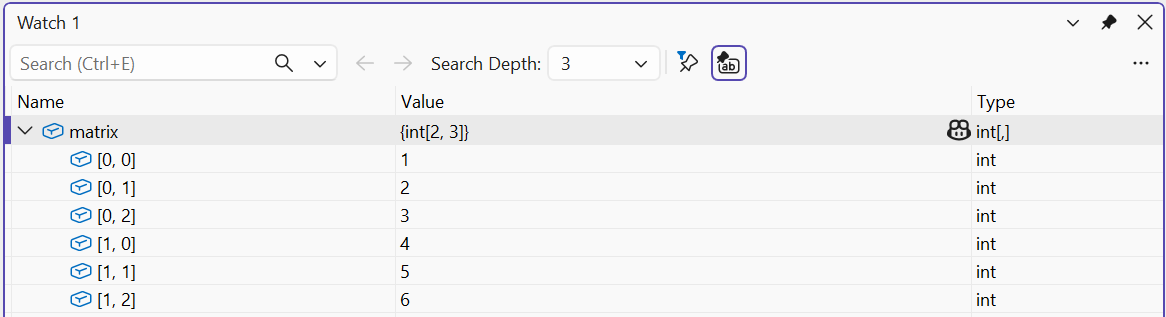
Figure 4.5. A two-dimensional array in the Watch window