
English
Refactoring
Refactoring
Refactoring is changing the internal structure of code without changing its behavior in order to improve readability and simplify future changes. Refactoring is done in small steps, running the tests after each one. If there are no tests, you first write characterization tests that capture the current behavior, even if it is strange (Example 4 and Example 3 of the lab assignment).
Signs of code that needs refactoring are called “code smells” (Table 18.3).
Table 18.3. “Code smells” and the corresponding refactorings
| “Smell” | Refactoring |
|---|---|
| a long method | extract methods (Extract Method) |
| magic numbers and strings | named constants (Introduce Constant), enumerations |
| duplicated code | extract a common method or class |
| a large class | split it by responsibility (SRP) |
| a long parameter list | combine the parameters into a record or class |
unclear names (r, t, Calc) | rename (Rename) |
a switch on type in several places | polymorphism, Strategy (Topic 17) |
| commented-out and dead code | delete it (the history is in version control) |
Visual Studio refactoring tools
Visual Studio performs refactorings automatically and safely across the whole solution:
- Rename (Ctrl+R, Ctrl+R) renames a symbol everywhere it is used (Fig. 18.11);
- Extract Method (Ctrl+R, Ctrl+M or Ctrl+. on a selected fragment) extracts a method, automatically determining the parameters and the result (Fig. 18.10);
- Introduce constant / local replaces an expression with a constant or variable;
- Inline method / temporary variable is the reverse operation;
- Change signature changes the order and set of parameters and updates the calls;
- Move type to file moves a class into a separate file with the matching name.
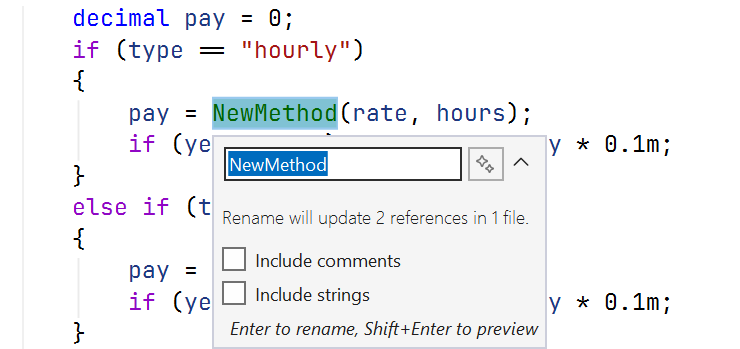
Figure 18.10. The Extract Method refactoring
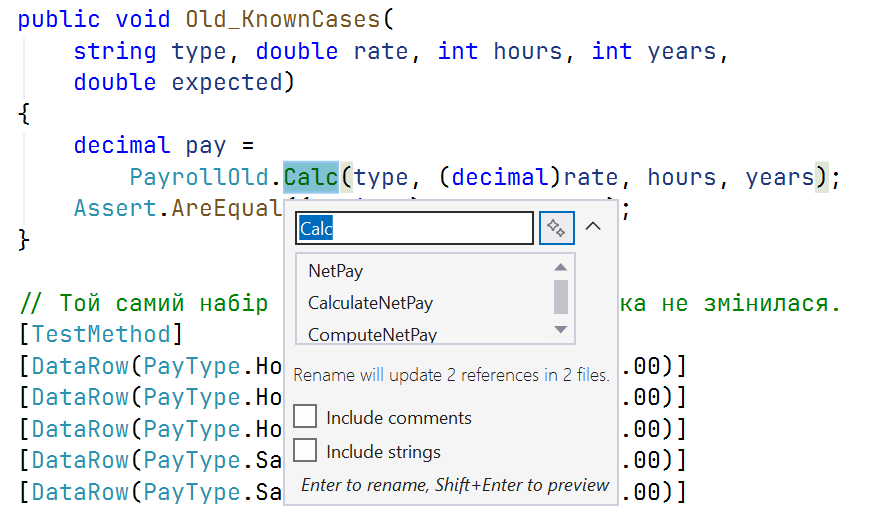
Figure 18.11. Renaming a symbol across the whole solution
.NET code analyzers and the .editorconfig style settings file let you automatically detect some “smells” and style violations during the build.