
English
Loops
while and do/while loops
A loop repeats its body, a statement or block, while a condition holds. One execution of the body is an iteration. C# provides four loops: while, do/while, for, and foreach. Figure 3.5 compares the first three (https://learn.microsoft.com/dotnet/csharp/language-reference/statements/iteration-statements).
Figure 3.5. Flowcharts of while, do/while, and for loops
The while loop
A while loop (a pre-test loop) checks its condition before each iteration. If the condition is initially false, the body never executes. Choose while when the number of repetitions is unknown, for example when reading input until an empty line:
cs
int number = 1_234_567;
int digits = 0;
int sum = 0;

while (number > 0)
{
    sum += number % 10;   // last digit
    number /= 10;         // discard the last digit
    digits++;
}
Console.WriteLine($"Digits: {digits}, digit sum: {sum}");
Output: Digits: 7, digit sum: 28. The loop body must change something affecting the condition, or the loop becomes infinite. An intentional infinite loop uses while (true) and exits through break or return (see below). Stop a stuck program with Ctrl+C in the console or Shift+F5 in Visual Studio.
The do/while loop
A do/while loop (a post-test loop) executes its body before checking the condition, so the body runs at least once. This is natural for menus and repeated input prompts: you must ask before checking the answer. A semicolon is required after the condition:
cs
int level;
do
{
    Console.Write("Difficulty level (1–3): ");
}
while (!int.TryParse(Console.ReadLine(), out level)
       || level is < 1 or > 3);

Console.WriteLine($"Selected level {level}");
The for loop
for is convenient when the repetition count is known or a counter is involved. The header has three semicolon-separated parts: initialization (executed once), condition (checked before every iteration), and iterator (executed after every iteration):
cs
for (int i = 1; i <= 5; i++)
{
    Console.Write($"{i * i} ");      // 1 4 9 16 25
}
Console.WriteLine();

for (int i = 10; i > 0; i -= 3)
{
    Console.Write($"{i} ");          // 10 7 4 1
}
Console.WriteLine();

for (int left = 0, right = 9; left < right; left++, right--)
{
    Console.Write($"{left}-{right} "); // 0-9 1-8 2-7 3-6 4-5
}
Console.WriteLine();
A variable declared in the for header is visible only inside the loop. Any header part may be omitted: for (;;) is an infinite loop. Every for loop can be rewritten as while, but for collects all counter information on one line, making it easier to read.
Nested loops
A loop can contain another loop. For each outer iteration, the inner loop runs in full (Fig. 3.6). If the outer loop runs n times and the inner loop m times, the inner body executes n · m times. Nested loops are used for tables, rectangular patterns, and iterating over pairs of values:
Figure 3.6. Execution order of nested loops
cs
for (int row = 1; row <= 4; row++)
{
    for (int col = 1; col <= row; col++)
    {
        Console.Write('*');
    }
    Console.WriteLine();
}
The program prints a triangle: one asterisk on the first line, four on the fourth. The inner counter depends on the outer one (col <= row), so its iteration count increases with each row.
Stepping through a loop
To understand how variables change, step through the loop in the debugger: set a breakpoint (F9) inside the body, start with F5, and press F10 (Step Over). Autos or Locals shows current values, highlighting those changed in the last step in red (Fig. 3.7). F5 continues to the next breakpoint hit, meaning the next iteration (https://learn.microsoft.com/visualstudio/debugger/navigating-through-code-with-the-debugger).
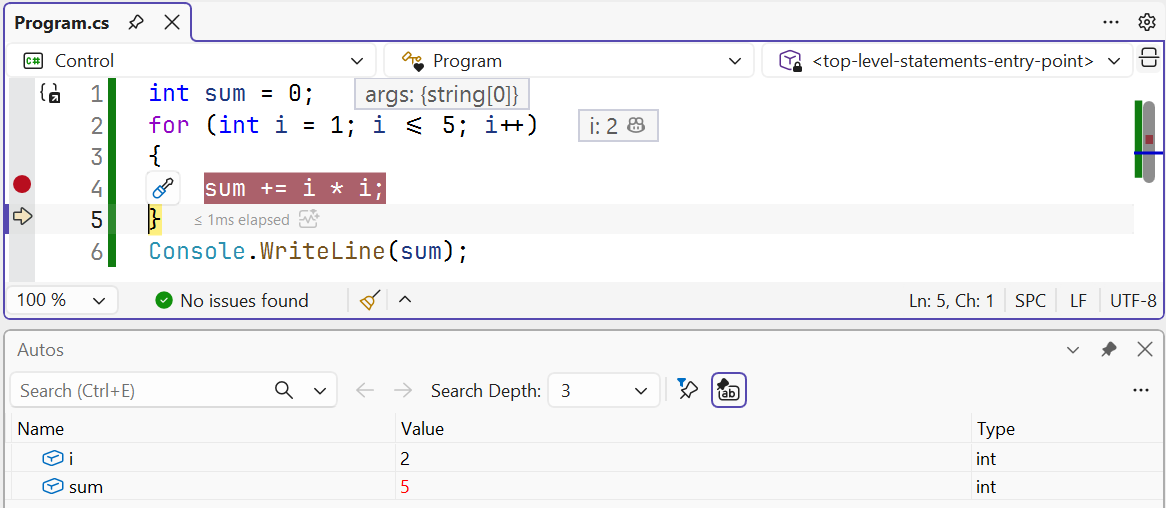
Figure 3.7. Stepping through a for loop in the debugger
The foreach loop
foreach iterates over collection elements: characters in a string, array elements, or command-line arguments. No counter is needed: each iteration assigns the next element to the variable:
cs
string text = "Object-oriented programming";
int vowels = 0;

foreach (char ch in text)
{
    if ("aeiouAEIOU".Contains(ch))
    {
        vowels++;
    }
}
Console.WriteLine($"Vowels: {vowels}");   // Vowels: 9
A foreach variable is read-only: you cannot assign to it (CS1656). Iterate over command-line arguments similarly: foreach (string arg in args). Arrays and collections are covered in detail in Topics 4 and 13.