
English
Strings and formatting
Strings
The string type (System.String) stores text as a sequence of char values encoded in UTF-16 (https://learn.microsoft.com/dotnet/csharp/programming-guide/strings/). The main properties of strings are:
- length: the
Lengthproperty is the number ofcharvalues; - indexer:
s[i]returns a character,s[^1]the last character, ands[1..4]a substring; - immutability: you cannot change a character in a string (
s[0] = 'A'does not compile), and any operation that “changes” a string creates a new one (Fig. 4.6); - comparison:
==compares string contents, not references.
Figure 4.6. String immutability
To analyze characters, use static char methods: char.IsDigit, char.IsLetter, char.IsLetterOrDigit, char.IsWhiteSpace, char.IsUpper, and char.ToUpper:
cs
string code = "Ab-12 \u0457";
int letters = 0, digits = 0, spaces = 0;

foreach (char c in code)
{
    if (char.IsLetter(c)) letters++;
    else if (char.IsDigit(c)) digits++;
    else if (char.IsWhiteSpace(c)) spaces++;
}
Console.WriteLine(
    $"Letters {letters}, digits {digits}, spaces {spaces}");
Console.WriteLine($"{code[0]} {code[^1]} {code[3..5]}");  // A ї 12
Output of the first line: Letters 3, digits 2, spaces 1. For brevity, each branch body is written on the same line without braces; in programs, it is better to always use braces.
Comparing strings
The == operator and Equals method compare strings character by character, with case sensitivity. For other comparison rules, supply a StringComparison parameter (https://learn.microsoft.com/dotnet/standard/base-types/best-practices-strings):
Ordinal— by character codes, fastest and predictable; for identifiers, keys, and file names;OrdinalIgnoreCase— by codes, ignoring case; for commands and login names;CurrentCulture,CurrentCultureIgnoreCase— by the user’s language rules; for sorting and displaying human-readable text.
cs
string city = "London";
Console.WriteLine(city == "london");                // False
Console.WriteLine(string.Equals(city, "LONDON",
    StringComparison.OrdinalIgnoreCase));           // True
Console.WriteLine(city.StartsWith("lo",
    StringComparison.CurrentCultureIgnoreCase));    // True
Console.WriteLine(string.Compare("ґанок", "гора",
    StringComparison.CurrentCulture));              // 1
The string.Compare method returns a negative number, zero, or a positive number when the first string is respectively less than, equal to, or greater than the second. In Ukrainian alphabetical order, Ghe with upturn (U+0491) follows Ghe (U+0433), so "ґанок" is greater than "гора".
String methods
No string method modifies the string: each returns a new string or a search result, so you must store the result in a variable. Table 4.2 lists the main methods; IntelliSense displays them with descriptions after a dot (Fig. 4.7).
Table 4.2. Main string methods
| Method | Example and result |
|---|---|
Length | "London".Length — 6 |
ToUpper, ToLower | "London".ToUpper() — "LONDON" |
Trim, TrimStart, TrimEnd | " a b ".Trim() — "a b" |
Contains | "program".Contains("gram") — true |
StartsWith, EndsWith | "report.pdf".EndsWith(".pdf") — true |
IndexOf, LastIndexOf | "a-b-c".IndexOf('-') — 1, or −1 if not found |
Substring | "program".Substring(3, 4) — "gram" |
Replace | "1,5".Replace(',', '.') — "1.5" |
Insert, Remove | "abc".Insert(1, "X") — "aXbc", "abcd".Remove(1, 2) — "ad" |
PadLeft, PadRight | "7".PadLeft(3, '0') — "007" |
Split | "a;b;;c".Split(';') — ["a", "b", "", "c"] |
string.Join | string.Join("-", ["a", "b"]) — "a-b" |
string.IsNullOrWhiteSpace | true for null, "", and a whitespace-only string |

Figure 4.7. String methods in the IntelliSense list
Splitting and joining strings
The Split method splits a string into an array of parts using one or more separators. The StringSplitOptions.RemoveEmptyEntries option discards empty parts (for example between consecutive spaces), and TrimEntries trims whitespace around each part:
cs
string line = "  12, 7,,  -3 , 40 ";
string[] parts = line.Split(',',
    StringSplitOptions.RemoveEmptyEntries
    | StringSplitOptions.TrimEntries);
Console.WriteLine(parts.Length);                  // 4

int sum = 0;
foreach (string p in parts)
{
    sum += int.Parse(p);
}
Console.WriteLine($"{string.Join(" + ", parts)} = {sum}");
Output: 12 + 7 + -3 + 40 = 56. Parsing a string of numbers this way is common in tasks; for user input, use int.TryParse instead of int.Parse.
Finding and extracting parts
cs
string email = "[email protected]";
int at = email.IndexOf('@');

if (at > 0)
{
    string user = email[..at];                 // before @
    string domain = email[(at + 1)..];         // after @
    Console.WriteLine($"{user} | {domain}");
    Console.WriteLine(domain.EndsWith(".ua"));  // True
    Console.WriteLine(user.Replace('.', ' ').ToUpper());
}
Output: olena.koval | knu.edu.ua, True, and OLENA KOVAL. The range email[..at] is equivalent to email.Substring(0, at).
String literals and formatting
C# has several kinds of string literals:
- regular
"C:\\Temp\\data.txt"— escape sequences\n,\t,\",\\; - verbatim
@"C:\Temp\data.txt"— the backslash has no special meaning, and quotes are doubled""; convenient for file paths; - interpolated
$"Total: {total:N2}"— expressions in braces with field widths and formats (Topic 1); can be combined with@:$@"{folder}\{file}"; - raw string literal
"""…"""— text between triple quotes is preserved, including quotes and backslashes, while common line indentation is removed (https://learn.microsoft.com/dotnet/csharp/language-reference/tokens/raw-string).
cs
string name = "Olena";
int score = 92;
string json = $$"""
    {
      "student": "{{name}}",
      "score": {{score}}
    }
    """;
Console.WriteLine(json);
In a raw interpolated string with two dollar signs $$, expressions use double braces {{…}}, so single JSON braces remain ordinary text. The program displays the JSON object without the indentation present in the source code:
{
  "student": "Olena",
  "score": 92
}
Multiline strings are easy to inspect in the debugger: hover over the variable, click the magnifying-glass icon, and select Text Visualizer (Fig. 4.8).
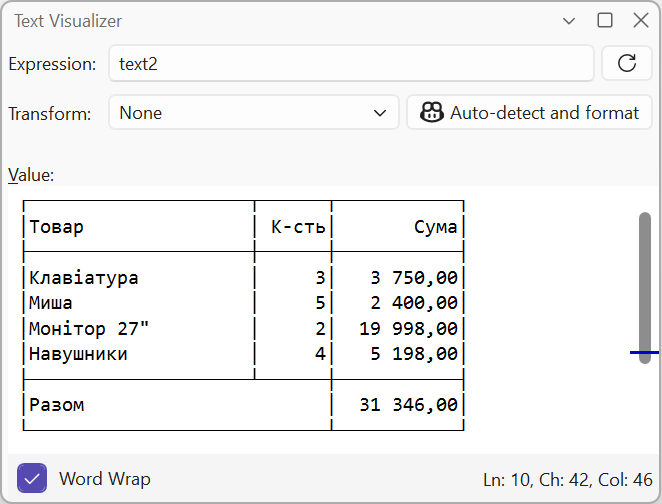
Figure 4.8. Viewing a string in Text Visualizer