
English
Characters, strings, variables, and null
Boolean, character, and string types
The Boolean type bool has two values: true and false. Comparison operators produce these values, which are used in conditions. Unlike C and C++, C# does not allow a number to be used as a Boolean value: bool flag = 1; causes error CS0029.
The character type char stores one Unicode character in UTF-16 encoding and occupies 2 bytes. Character literals use single quotes: 'A', '\u0457', '7'. Special characters use escape sequences (Table 2.3).
Table 2.3. Escape sequences
| Notation | Character | Notation | Character |
|---|---|---|---|
\n | new line | \' | single quote |
\t | tab | \" | double quote |
\\ | backslash | \0 | character with code 0 |
\r | carriage return | \u0410 | Unicode character by code (Cyrillic A) |
A character has a numeric code, so you can perform arithmetic on it, but the result has type int:
cs
char letter = 'A';
Console.WriteLine(letter + 1);          // 66
Console.WriteLine((char)(letter + 1));  // B
Console.WriteLine('7' - '0');           // 7 – the digit as a number
Console.WriteLine(char.IsDigit('7'));   // True
Console.WriteLine(char.ToUpper('\u0457'));   // U+0407 (Ukrainian capital letter Yi)
The string type string is a sequence of char characters. It is a reference type with two special properties: strings are immutable—every “change” creates a new string—and == compares string contents, not references. Strings are covered in detail in Topic 4.
cs
string s = "Hello";
string t = s;
t += "!";                    // a new string is created
Console.WriteLine(s);        // Hello
Console.WriteLine(t);        // Hello!
Console.WriteLine(s.Length); // 5
The object type can store a value of any type. It is useful when the type is not known in advance, but loses the benefits of static typing: to perform operations on the value again, you must explicitly cast it to the required type.
Variables and constants
A variable is a named memory location that stores a value of a particular type. Declare a variable by specifying its type and name, and usually initialize it immediately—assign an initial value:
cs
int count = 10;
double price = 12.5, discount = 0.1;   // two variables of the same type
string city;                           // declaration without a value
city = "Madrid";                       // assignment
A local variable cannot be used until it has been assigned a value: the compiler reports CS0165, Use of unassigned local variable. You can change a variable, but only to values of its type.
A local variable's scope extends from its declaration to the end of the { … } block in which it is declared. You cannot declare a variable with the same name in a nested block (error CS0136).
Naming rules. A name consists of letters, digits, and _; it cannot begin with a digit or match a keyword. Case matters: count and Count are different names. .NET conventions use camelCase for local variables (totalPrice) and PascalCase for constants (MaxCount). Names should explain their meaning: distanceKm is better than d. Although C# permits Ukrainian letters in names, English words are used by convention (https://learn.microsoft.com/dotnet/csharp/fundamentals/coding-style/identifier-names).
Implicit typing with var
You can use var instead of a type: the compiler then determines the variable's type from its initializer. The variable still has a specific type that does not change (Fig. 2.5):
cs
var count = 5;           // int
var price = 12.5;        // double
var sum = 12.5m;         // decimal
var big = 5L;            // long
var name = "Olena";      // string
var total = price * count;   // double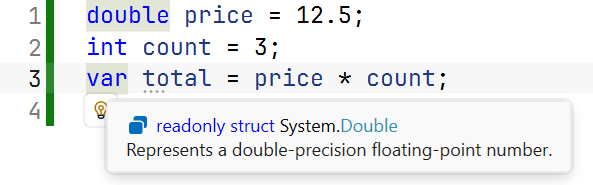
Figure 2.5. A var variable's type in Quick Info
A var variable must be initialized (error CS0818), and its initializer cannot be null (CS0815). Use var when the type is obvious from the right-hand side; if it is not obvious, as in var result = Calculate();, writing the type explicitly is preferable.
Constants
A constant is a named value set at compile time that does not change. Declare it with const:
cs
const double G = 9.81;               // gravitational acceleration
const int SecondsPerHour = 60 * 60;  // evaluated by the compiler
const string Currency = "UAH";
A constant's value must be known to the compiler: a number, string, Boolean value, or expression made from them. A method call, such as const double Root = Math.Sqrt(2);, causes CS0133. Constants replace “magic numbers” in code: total * VatRate is clearer than total * 0.2m, and the rate needs to be changed in only one place.
Default values
Each type has a default value, assigned to class fields and array elements without explicit initialization: 0 for numeric types, false for bool, '\0' for char, and null for reference types. The expression default(T) or the default literal returns it:
cs
int zero = default;             // 0
bool flag = default(bool);      // False
string? text = default;         // null
Types that allow null
null means “no value” or “the reference points nowhere.” A value type such as int always contains a number, so when a value may be absent (an optional form field or an unknown grade), use a nullable value type: int?, double?, or bool?.
cs
int? age = null;
Console.WriteLine(age.HasValue);             // False
Console.WriteLine(age.GetValueOrDefault());  // 0
Console.WriteLine(age + 1 == null);          // True
age = 19;
Console.WriteLine(age.Value);                // 19
HasValue indicates whether a value is present, and Value returns it; if no value is present, accessing Value throws InvalidOperationException. An arithmetic operation involving null produces null (https://learn.microsoft.com/dotnet/csharp/language-reference/builtin-types/nullable-value-types).
The ?? and ??= operators
The null-coalescing operator a ?? b returns a if it is not null, otherwise b. The a ??= b operator assigns b to a only if a is null (https://learn.microsoft.com/dotnet/csharp/language-reference/operators/null-coalescing-operator):
cs
int? discount = null;
int percent = discount ?? 0;        // 0

string? name = Console.ReadLine();
name ??= "Guest";                   // if input has ended
string input = Console.ReadLine() ?? "";
Nullable reference types
Reference variables have always been able to contain null, and accessing a member through null (name.Length) causes the very common NullReferenceException. To find such errors at compile time, C# provides a nullable context (nullable reference types). New projects enable it with <Nullable>enable</Nullable> in the .csproj file. In this context:
stringis a string that should not benull;string?is a string that may benull, such as the result ofConsole.ReadLine().
The compiler analyzes the code and issues warnings (not errors) (Fig. 2.6):
cs
string name = Console.ReadLine();   // CS8600
string? city = Console.ReadLine();
Console.WriteLine(city.Length);     // CS8602
CS8600 means a potentially null value is assigned to a variable whose type has no ?; CS8602 means a potentially null variable is dereferenced without a check. Fix this by supplying a default value with ?? or checking for null. Do not ignore these warnings: each indicates a possible runtime exception. The nullable context is covered in detail in Topic 7 (https://learn.microsoft.com/dotnet/csharp/nullable-references).
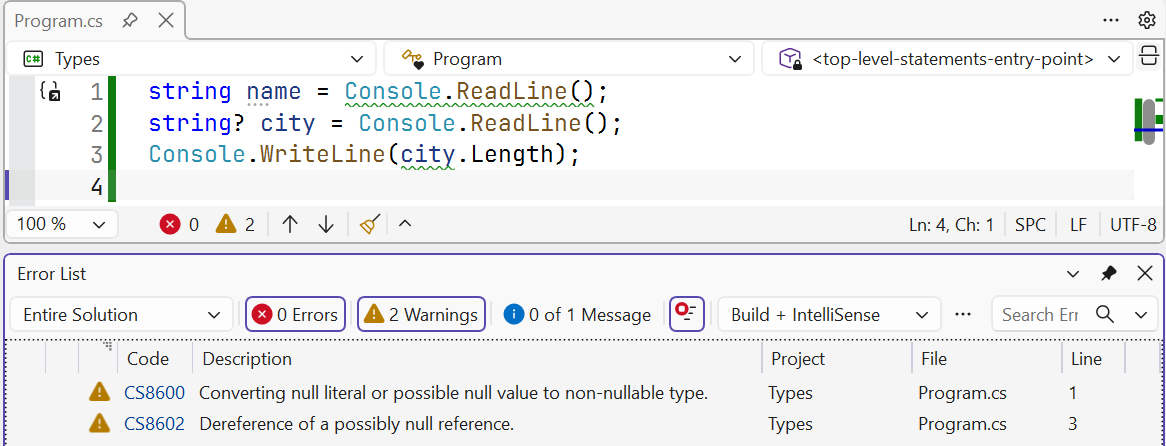
Figure 2.6. Warning about a possible null value