
English
The file system and encoding
The file system in .NET
The classes for working with files are located in the System.IO namespace, which is imported implicitly in console projects. They can be divided into three groups (Fig. 16.1): file system classes, byte streams, and classes for reading and writing data on top of streams.
Figure 16.1. The main classes of the System.IO namespace
Paths
An absolute path starts at the root of a drive (C:\Labs\data\books.json), and a relative path (data\books.json) is resolved relative to the process’s working directory, Environment.CurrentDirectory. When run from Visual Studio, the working directory is the build output directory (bin\Debug\net10.0), and with dotnet run, it is the directory from which the command was executed. That is why data files that ship with a program are located relative to the application directory, AppContext.BaseDirectory.
Do not glue paths together by hand: the separator is \ on Windows and / on Linux and macOS. The Path class builds and parses paths for the current operating system:
cs
string path = Path.Combine("data", "reports", "2026-09.txt");
Console.WriteLine(Path.GetFileName(path));           // 2026-09.txt
Console.WriteLine(Path.GetFileNameWithoutExtension(path)); // 2026-09
Console.WriteLine(Path.GetExtension(path));          // .txt
Console.WriteLine(Path.GetDirectoryName(path));      // data\reports
Console.WriteLine(Path.GetFullPath(path));           // absolute
string temp = Path.Combine(Path.GetTempPath(), "import.tmp");
To have a data file from the project copied into the output directory, set Copy to Output Directory = Copy if newer in the file’s properties (Fig. 16.2).
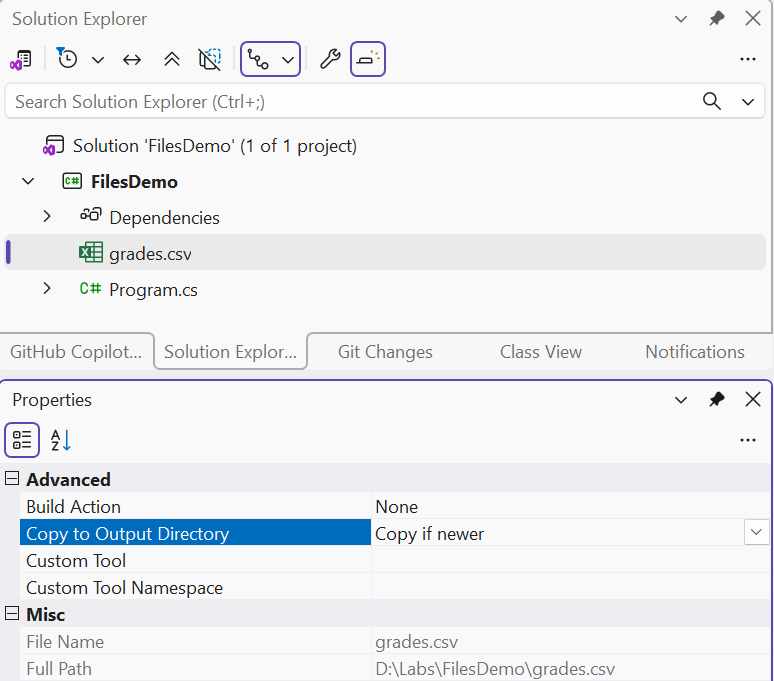
Figure 16.2. Copying a data file to the output directory
The File and Directory classes
The static classes File and Directory perform common operations in a single call (Table 16.1).
Table 16.1. The main methods of the File and Directory classes
| Method | Purpose |
|---|---|
File.Exists, Directory.Exists | check whether it exists |
File.ReadAllText, ReadAllLines | read the whole file into a string or an array of lines |
File.ReadLines | read lines gradually (lazily) |
File.WriteAllText, WriteAllLines | create or overwrite a file |
File.AppendAllText | append to the end of a file |
File.Copy, Move, Delete | copy, move, delete |
Directory.CreateDirectory | create a directory together with missing parent directories |
Directory.EnumerateFiles | list files by a mask, including recursively |
ReadAllText and ReadAllLines load the whole file into memory, which is convenient for small files. File.ReadLines returns an IEnumerable<string> and reads the next line only during iteration, so it is suitable for files of any size and for LINQ queries (Topic 15). Delete does not throw an exception if the file does not exist.
FileInfo and DirectoryInfo
The FileInfo and DirectoryInfo classes describe a specific file or directory: the size Length, the dates CreationTime and LastWriteTime, the Extension, and the parent directory. They are convenient when you need several properties of one file or a recursive traversal:
cs
DirectoryInfo dir = new("data");
foreach (FileInfo file in
    dir.EnumerateFiles("*.json", SearchOption.AllDirectories))
{
    Console.WriteLine($"{file.Name,-20} {file.Length,8} B " +
        $"{file.LastWriteTime:dd.MM.yyyy HH:mm}");
}
Text encoding
A text file stores bytes, while a program works with characters. The correspondence between them is defined by an encoding. The File and StreamWriter methods write UTF-8 without a BOM (byte order mark, three service bytes at the beginning of a file) by default and detect a BOM automatically when reading. A Cyrillic character takes 2 bytes in UTF-8: the six-letter Ukrainian word for “hello” is written in 12 bytes.
Old Windows files often use the Windows-1251 encoding. In .NET, it must be registered first; otherwise, Cyrillic text is read as “�” replacement characters:
cs
using System.Text;

Encoding.RegisterProvider(CodePagesEncodingProvider.Instance);
Encoding win1251 = Encoding.GetEncoding(1251);
string text = File.ReadAllText("old-report.txt", win1251);
File.WriteAllText("report-utf8.txt", text);      // re-encoding