
English
Streams and CSV format
Streams
A stream is an abstraction of a sequence of bytes that can be read or written. The abstract Stream class defines the methods Read, Write, and Seek and the properties Position, Length, CanRead, CanWrite, and CanSeek. Derived classes work with different sources: FileStream with a file, MemoryStream with an array in memory, and NetworkStream with the network. Code that works with Stream processes any source the same way.
When an object is written to a file, the data passes through several layers (Fig. 16.3): the serializer converts the object into text, StreamWriter encodes characters into bytes, and FileStream accumulates bytes in a buffer and writes them to disk.
Figure 16.3. Data processing layers when writing to a file
The FileStream constructor takes an open mode FileMode and an access type FileAccess:
cs
using FileStream stream = new("data.bin",
    FileMode.OpenOrCreate,     // Create, Open, Append, Truncate…
    FileAccess.ReadWrite);     // Read, Write, ReadWrite
stream.Seek(0, SeekOrigin.End);  // move to the end
Console.WriteLine($"{stream.Position} / {stream.Length}");
StreamReader and StreamWriter
StreamReader and StreamWriter read and write text on top of a stream, performing the encoding. They can be created directly from a file path:
cs
using (StreamWriter writer = new("log.txt", append: true))
{
    writer.WriteLine($"{DateTime.Now:HH:mm} started");
}

using StreamReader reader = new("log.txt");
while (reader.ReadLine() is string line)   // null – end of file
{
    Console.WriteLine(line);
}
Streams, readers, and writers implement IDisposable (Topic 10). The Dispose method writes the rest of the buffer to disk and closes the file. If the object is not closed, some of the data may not reach the file, and the file itself remains open and locked: an attempt to open it again throws IOException (Fig. 16.4). That is why streams are always created in a using statement or a using declaration.
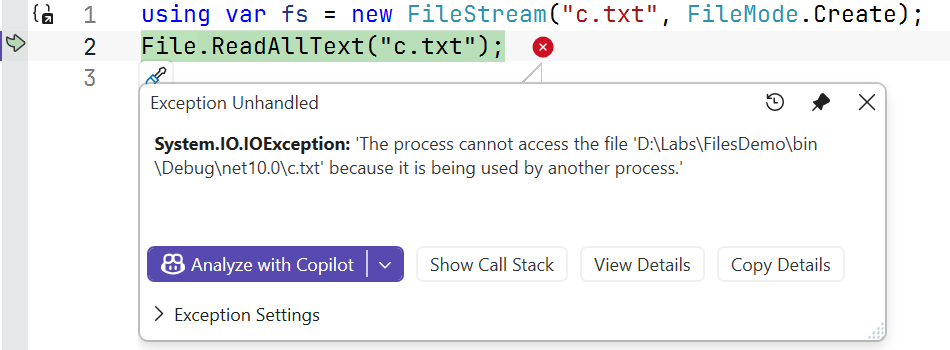
Figure 16.4. An exception when accessing a locked file
Binary files
BinaryWriter and BinaryReader write and read values of simple types in binary form: an int takes 4 bytes and a double takes 8 bytes, regardless of the number of digits. Binary files are compact and cannot be viewed in a text editor. If all records have a fixed length, you can jump directly to record number n with Seek(n · record size) without reading the previous ones (Fig. 16.5). Strings in such records are stored with a fixed number of characters.
Figure 16.5. A binary file with fixed-length records
I/O exceptions
File operations depend on the external environment, so they are always checked for exceptions (Table 16.2). Checking File.Exists before opening does not guarantee success: the file may be deleted or locked between the check and the opening.
Table 16.2. The main I/O exceptions
| Exception | Cause |
|---|---|
FileNotFoundException | the file does not exist (“Could not find file …”) |
DirectoryNotFoundException | part of the path does not exist (“Could not find a part of the path …”) |
UnauthorizedAccessException | no access rights, or the file is read-only |
IOException | the file is used by another process, the disk is full, and so on (the base class) |
PathTooLongException | the path is too long |
FileNotFoundException, DirectoryNotFoundException, and PathTooLongException derive from IOException, so in a chain of catch blocks they are placed before IOException (Topic 6).
CSV format
CSV (comma-separated values) is a text tabular format: each line is a record, fields are separated by commas, and the first line often contains headers. When processing CSV, take into account:
- the culture of numbers and dates: a file contains
92.5and2026-06-10regardless of the system language, so parsing is done withCultureInfo.InvariantCultureand an explicit date format; in the Ukrainian culture,double.Parse("92.5")gives 925; - quotes: a field with a comma is written in quotes (
"Shevchenko, Taras"), and quotes inside a field are doubled; a simpleSplit(',')does not handle such fields, so libraries such as CsvHelper are used for complex files; - the separator: Excel in the Ukrainian locale saves CSV with a semicolon
;; - invalid lines: an invalid line is skipped with a message rather than stopping the whole import.