
English
Declaring methods
Why methods are needed
A method is a named block of code that performs a specific task and can be called from different places in a program. So far, we have used existing methods: Console.WriteLine, int.TryParse, and Math.Round. Your own methods let you:
- divide a large task into smaller, understandable parts (decomposition);
- avoid repeating code: write an action once and call it many times;
- name an action:
ReadInt("Age: ", 0, 120)explains its purpose better than ten lines of loop code; - test and debug each part separately.
A good method performs one task, has a verb-based name that describes it, and fits on one screen. If you have to describe a method with “and… and…,” consider splitting it (https://learn.microsoft.com/dotnet/csharp/programming-guide/classes-and-structs/methods).
Visual Studio can extract a method automatically: select a code fragment, press Ctrl+., and choose Extract method. The IDE creates a method, passes the necessary variables as parameters, and prompts for a name (Fig. 5.1).
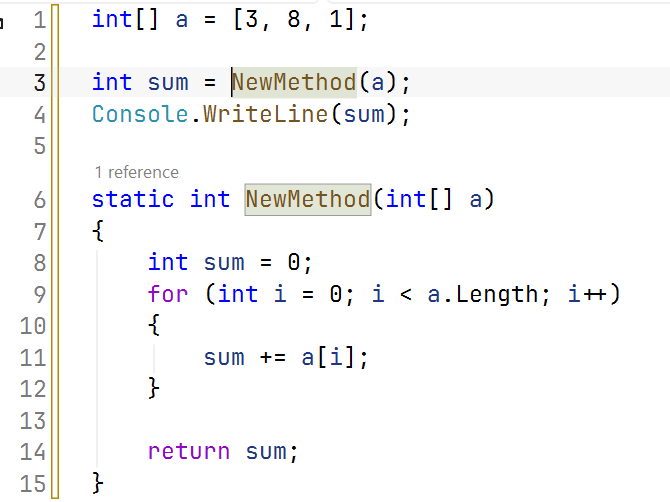
Figure 5.1. Extracting a method with Extract method
Method declarations
A method declaration consists of a header and body (Fig. 5.2): modifiers (such as static), a return type, name, a parenthesized parameter list, and a body in braces. If the method returns nothing, its return type is void. The return statement ends the method and, when the return type is not void, returns a value of that type. The name together with the list of parameter types is called the method’s signature.
Figure 5.2. Parts of a method declaration
cs
Console.WriteLine(Average([4, 5, 3]));      // 4
Console.WriteLine(Average([4, 5, 3], 1));   // 4
PrintLine('=', 20);

// Average of the elements starting at index from.
static double Average(int[] values, int from = 0)
{
    double sum = 0;
    for (int i = from; i < values.Length; i++)
    {
        sum += values[i];
    }
    return sum / (values.Length - from);
}

// Displays a line of count identical characters.
static void PrintLine(char symbol, int count)
{
    Console.WriteLine(new string(symbol, count));
}
Values supplied in a call are arguments, while variables in the method header are parameters. The compiler checks argument counts and types: Average("abc") will not compile. A method whose return type is not void must return a value on every execution path; otherwise, error CS0161, not all code paths return a value, occurs.
Local functions and class methods
In a program with top-level statements, methods are declared after the main code: they are local functions of the generated Main method (https://learn.microsoft.com/dotnet/csharp/programming-guide/classes-and-structs/local-functions). The static modifier prevents a local function from using variables from the main program: it receives all data through parameters. This makes the method independent and understandable, so this course declares local functions as static.
The same program with an explicit Program class contains class methods:
cs
namespace Methods;

internal class Program
{
    static void Main()
    {
        Console.WriteLine(Square(12));   // 144
    }

    static int Square(int x) => x * x;
}
There is an important difference between the forms: local functions cannot be overloaded (declaring two functions with the same name causes CS0128). Methods with the same name are declared in a class. A small static class can be placed in the same file after the top-level statements, as in the “Array statistics” example at the end of the lecture; the public modifier makes a method accessible outside the class (covered in detail in Topics 7 and 8).
Expression-bodied methods and naming
If a method body consists of one expression, it can be written concisely with => (an expression-bodied member). The expression’s result is the method’s result:
cs
Console.WriteLine(IsEven(10));             // True
Console.WriteLine(Hypotenuse(3, 4));       // 5
Greet("Olena");                            // Hello, Olena!

static bool IsEven(int n) => n % 2 == 0;
static double Hypotenuse(double a, double b) =>
    Math.Sqrt(a * a + b * b);
static void Greet(string name) =>
    Console.WriteLine($"Hello, {name}!");
.NET conventions use PascalCase for method names, starting with a verb: Calculate, ReadInt, PrintReport. Methods returning bool often start with Is, Has, or Can (IsEven, HasErrors), while methods that do not throw on failure start with Try (TryParse). Parameter names use camelCase.