
English
JSON and asynchronous operations
JSON and System.Text.Json
JSON (JavaScript Object Notation) is a text data interchange format with objects { }, arrays [ ], strings, numbers, true, false, and null. Serialization is the conversion of an object into JSON, and deserialization is the restoration of an object from JSON. In .NET, the JsonSerializer class of the System.Text.Json namespace is used for this:
cs
using System.Text.Json;

Book book = new("Tiger Trappers", 1944, ["Ivan Bahrianyi"], Genre.Novel);
string json = JsonSerializer.Serialize(book);
Book? copy = JsonSerializer.Deserialize<Book>(json);

record Book(string Title, int Year, string[] Authors, Genre Genre);
enum Genre { Novel, Poetry, Drama }
Public properties are serialized. Records, classes with init properties, collections, dictionaries, DateTime, and DateOnly (ISO 8601 format, "2026-09-16") are supported without additional code. Deserialize returns null for a JSON null and throws JsonException if the text is not valid JSON or a value does not match the property type.
Tip
For file-based apps (dotnet run app.cs, Topic 1), Native AOT compilation is enabled by default, in which reflection-based serialization is disabled: a call to JsonSerializer.Serialize throws InvalidOperationException. For learning examples, add the directive #:property PublishAot=false as the first line of the file. Regular Visual Studio projects do not need this.
Serialization options
A JsonSerializerOptions object changes the behavior of the serializer (Fig. 16.6). Create it once and reuse it:
cs
using System.Text.Encodings.Web;
using System.Text.Json.Serialization;

JsonSerializerOptions options = new(JsonSerializerDefaults.Web)
{
    WriteIndented = true,                        // indentation
    Converters = { new JsonStringEnumConverter() },
    Encoder = JavaScriptEncoder.UnsafeRelaxedJsonEscaping,
};JsonSerializerDefaults.Websets the web style: property names in camelCase (title), case-insensitive name matching during deserialization, and numbers can be read from strings.WriteIndented = trueformats JSON with indentation for human reading.JsonStringEnumConverterwrites an enumeration by name ("Novel") rather than as a number (1).- By default, the serializer escapes all non-ASCII characters: the word Kobzar written in Cyrillic is stored as
\u041A\u043E\u0431\u0437\u0430\u0440. TheUnsafeRelaxedJsonEscapingencoder keeps Cyrillic readable; it is used for files, not for JSON embedded in web pages.
Figure 16.6. Correspondence between a C# object and a JSON document
A JSON string is convenient to inspect in the debugger with the JSON Visualizer (Fig. 16.7).
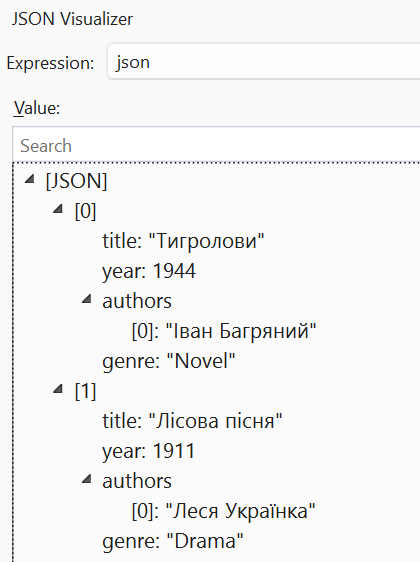
Figure 16.7. Viewing JSON in the visualizer
Serialization attributes
Property attributes control how individual properties correspond to JSON:
cs
class AppSettings
{
    [JsonPropertyName("font_size")]      // the name in JSON
    public int FontSize { get; set; } = 14;   // default value

    [JsonRequired]                       // required in JSON
    public string Theme { get; set; } = "light";

    [JsonIgnore]                         // not serialized
    public bool IsDark => Theme == "dark";
}
If a property is missing from the JSON, it keeps the value from its initializer, so initializers set default values. For a missing property with [JsonRequired], a JsonException is thrown: “JSON deserialization for type 'AppSettings' was missing required properties including: 'Theme'”. Unknown JSON properties are ignored by default.
Polymorphic serialization
If a collection contains objects of derived types, by default the serializer writes only the properties of the declared base type and, when reading, does not know which type to create. [JsonDerivedType] attributes on the base type add a type discriminator $type to the JSON:
cs
Item[] items = [new BookItem("Atlas", 350), new DiscItem("Jazz", 60)];
string json = JsonSerializer.Serialize(items);
// [{"$type":"book","Pages":350,"Title":"Atlas"},
//  {"$type":"disc","Minutes":60,"Title":"Jazz"}]
Item[] back = JsonSerializer.Deserialize<Item[]>(json)!;

[JsonDerivedType(typeof(BookItem), "book")]
[JsonDerivedType(typeof(DiscItem), "disc")]
abstract record Item(string Title);
record BookItem(string Title, int Pages) : Item(Title);
record DiscItem(string Title, int Minutes) : Item(Title);
After deserialization, the array contains BookItem and DiscItem objects. For JSON of arbitrary structure without a matching class, use JsonNode.Parse(json) with access such as node["title"], or JsonDocument for fast reading.
Asynchronous file operations
Reading a large file or a file from a network drive can take a long time. So that a GUI program or a web server does not “hang” while waiting, .NET has asynchronous versions of the methods: File.ReadAllTextAsync, WriteAllTextAsync, ReadLinesAsync, JsonSerializer.SerializeAsync, and so on. They are called with the await operator, which frees the thread of execution while waiting:
cs
string json = await File.ReadAllTextAsync("data/books.json");
Console.WriteLine($"Characters read: {json.Length}");
In top-level statements, await can be used directly; in your own methods, the async modifier and the Task result type are required. Asynchronous programming is not covered in detail in this course; synchronous methods are sufficient for the console lab assignments.