
English
The type system and numeric types
The C# type system
A program processes data: numbers, text, dates, and Boolean values. Every value in C# has a type, which determines:
- how much memory the value occupies;
- which values are allowed (the range);
- which operations can be performed on the value.
C# uses strong static typing: each variable's type is known at compile time and does not change. The compiler checks that operations are valid for their operand types, so an error such as “multiply a string by a Boolean value” is detected before the program runs.
The most common types are built into the language and have keywords: int, double, bool, string, and so on. Each keyword is an alias for a .NET type in the System namespace: int means System.Int32, and string means System.String. int x and System.Int32 x are equivalent, but keywords are used by convention. All C# types derive directly or indirectly from object (System.Object). The built-in types are listed at https://learn.microsoft.com/dotnet/csharp/language-reference/builtin-types/built-in-types.
C# types fall into two broad groups (Fig. 2.1):
- value types — the variable contains the value directly. These include numeric types,
bool,char, structures (struct), and enumerations (enum); - reference types — the variable contains a reference to an object located elsewhere in memory. These include
string,object, arrays, classes, interfaces, and delegates.
Figure 2.1. Classification of C# types
The stack and managed heap
In a simplified model, program memory consists of two regions (Fig. 2.2):
- stack — the region for a method's local variables. Stack memory is allocated and released very quickly: when a method ends, its variables disappear;
- managed heap — the region for objects. An object lives as long as at least one reference points to it; the garbage collector removes unneeded objects (https://learn.microsoft.com/dotnet/standard/garbage-collection/fundamentals).
A local value-type variable stores its value directly on the stack. A local reference-type variable stores only a reference on the stack, while the object itself resides on the heap.
Figure 2.2. Variables on the stack and managed heap
The difference between these groups is most visible during assignment. Value-type assignment copies the value, so the variables remain independent. Reference-type assignment copies the reference, and both variables point to the same object. Arrays are covered in detail in Topic 4, but already illustrate the difference well:
cs
int a = 1;
int b = a;                   // copy of the value
b = 2;
Console.WriteLine(a);        // 1 – variable a has not changed

int[] first = { 1, 2 };
int[] second = first;        // copy of the reference
second[0] = 9;
Console.WriteLine(first[0]); // 9 – this is the same array
Boxing and unboxing
A value of any type can be assigned to an object variable. For a value type, this performs boxing: an object is created on the heap and the value is copied into it. The reverse operation, unboxing, uses an explicit cast and is possible only to the same type:
cs
int n = 42;
object boxed = n;              // boxing: a copy of 42 on the heap
n = 43;
Console.WriteLine(boxed);      // 42
int m = (int)boxed;            // unboxing
long l = (long)boxed;          // InvalidCastException
The last line throws InvalidCastException because the object contains an int, not a long. Boxing occurs implicitly, for example when passing a number to an object parameter, and requires additional memory, so it is avoided in frequently executed code (https://learn.microsoft.com/dotnet/csharp/programming-guide/types/boxing-and-unboxing).
Integer types
Integer types (integral numeric types) store numbers without a fractional part. They differ in size and signedness (Table 2.1). Unsigned types (byte, ushort, uint, ulong) cannot store negative numbers, but their maximum value is twice as large.
Table 2.1. C# integer types
| Type | .NET type | Bytes | Range |
|---|---|---|---|
sbyte | SByte | 1 | −128…127 |
byte | Byte | 1 | 0…255 |
short | Int16 | 2 | −32 768…32 767 |
ushort | UInt16 | 2 | 0…65 535 |
int | Int32 | 4 | −2 147 483 648…2 147 483 647 |
uint | UInt32 | 4 | 0…4 294 967 295 |
long | Int64 | 8 | ≈ ±9.22 · 1018 |
ulong | UInt64 | 8 | 0…≈ 1.84 · 1019 |
nint, nuint | IntPtr, UIntPtr | 4 or 8 | depends on the process bitness |
The main integer type is int: use it unless there is a reason to choose another. Use long for large values (a count of milliseconds or file size in bytes) and byte for data bytes (color components or file contents). Each type's exact limits are available through MinValue and MaxValue: int.MaxValue is 2 147 483 647. Documentation: https://learn.microsoft.com/dotnet/csharp/language-reference/builtin-types/integral-numeric-types.
Integer literals can use decimal, hexadecimal (0x prefix), or binary (0b prefix) notation. Separate digits with _ for readability:
cs
int million = 1_000_000;
int mask = 0xFF;             // 255
int flags = 0b1010_0001;     // 161
long population = 8_100_000_000L;
uint big = 4_000_000_000U;
A literal's type is determined by its value: it is the first of int, uint, long, and ulong that can hold it. Thus 3_000_000_000 has type uint. The L suffix makes a literal long, U makes it uint, and UL makes it ulong. Lowercase l is allowed, but easily confused with the digit one, so uppercase L is used.
Floating-point types
C# provides three types for numbers with fractional parts (Table 2.2). float and double store numbers in binary floating-point format following IEEE 754, while decimal uses decimal format.
Table 2.2. C# floating-point types
| Type | .NET type | Bytes | Approximate range | Digits |
|---|---|---|---|---|
float | Single | 4 | ±1.5 · 10−45…±3.4 · 1038 | 6–9 |
double | Double | 8 | ±5.0 · 10−324…±1.7 · 10308 | 15–17 |
decimal | Decimal | 16 | ±1.0 · 10−28…±7.9 · 1028 | 28–29 |
A literal containing a decimal point or exponent (12.5, 1.5e3) has type double. Add f for float (12.5f) or m for decimal (12.5m). In C# code, the decimal separator is always a period, regardless of regional settings.
Binary fraction representation error
A double occupies 64 bits: sign, exponent, and mantissa (Fig. 2.3). Most decimal fractions, such as 0.1, cannot be represented exactly in binary, just as 1/3 cannot be represented exactly as a decimal fraction. A double therefore stores the nearest binary value, introducing small errors during calculations:
Figure 2.3. IEEE 754 representation of a double
cs
double a = 0.1 + 0.2;
Console.WriteLine(a);             // 0,30000000000000004
Console.WriteLine(a == 0.3);      // False
decimal m = 0.1m + 0.2m;
Console.WriteLine(m);             // 0,3
The error is clearly visible in the Visual Studio debugger's Watch window (Fig. 2.4). The debugger displays values with a period because it is independent of regional settings.
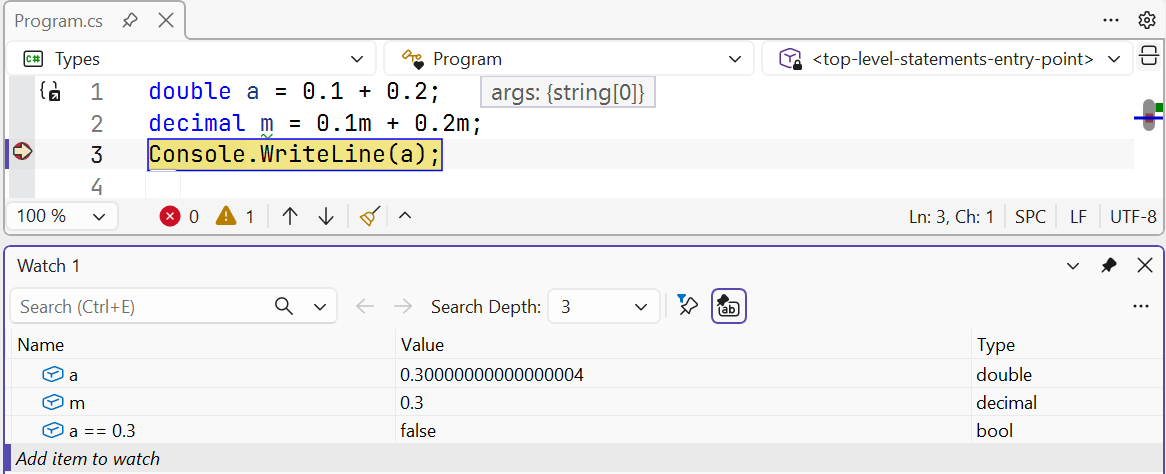
Figure 2.4. Floating-point representation error in Watch
Practical conclusions:
- do not compare
doublevalues with==; check that their difference is below a tolerance:Math.Abs(a - 0.3) < 1e-9; - use
decimalfor monetary amounts: it stores decimal fractions exactly up to 28 digits; - use
doublefor scientific and engineering calculations (physics, geometry, graphics): it is much faster thandecimaland has a larger range; choosefloatwhen conserving memory matters (for example, in graphics).
Infinity and NaN
Integer division by zero throws DivideByZeroException. The floating-point types float and double, however, have special values: infinity and NaN (Not a Number):
cs
double zero = 0;
Console.WriteLine(1 / zero);        // ∞
Console.WriteLine(-1 / zero);       // -∞
Console.WriteLine(zero / zero);     // NaN
Console.WriteLine(double.NaN == double.NaN);    // False
Console.WriteLine(double.IsNaN(zero / zero));   // True
NaN is not equal to any number, including itself, so test for it with double.IsNaN. Infinity can be tested with double.IsInfinity and double.IsPositiveInfinity. decimal has no such values: division by zero and values outside its range cause exceptions. Documentation: https://learn.microsoft.com/dotnet/csharp/language-reference/builtin-types/floating-point-numeric-types.