
English
Conversions and arithmetic
Type conversions
A value of one type often needs to be used as another: adding an int to a double, storing a fractional result as an integer, or obtaining a number from a string. C# offers several conversion mechanisms (https://learn.microsoft.com/dotnet/csharp/language-reference/builtin-types/numeric-conversions).
Implicit conversions
An implicit conversion happens automatically when it is safe: a source-type value always fits in the target type (Fig. 2.7). For example, int converts to long or double, and char to int:
cs
int count = 3;
long total = count;          // int → long
double average = count;      // int → double
int code = 'A';              // char → int, 65
Conversions from long to float or double are also implicit but may lose precision: large integers have more significant digits than float can hold.
Figure 2.7. Implicit numeric type conversions
Explicit conversions (type casts)
If a conversion may lose data, the compiler requires an explicit conversion, or cast: write the type in parentheses before the value. Without it, error CS0266 occurs (Fig. 2.8):
cs
double price = 3.99;
int n = price;         // CS0266: Cannot implicitly convert type
                       // 'double' to 'int'
int whole = (int)price;           // 3
int negative = (int)-3.99;        // -3
int big = 300;
byte low = (byte)big;             // 44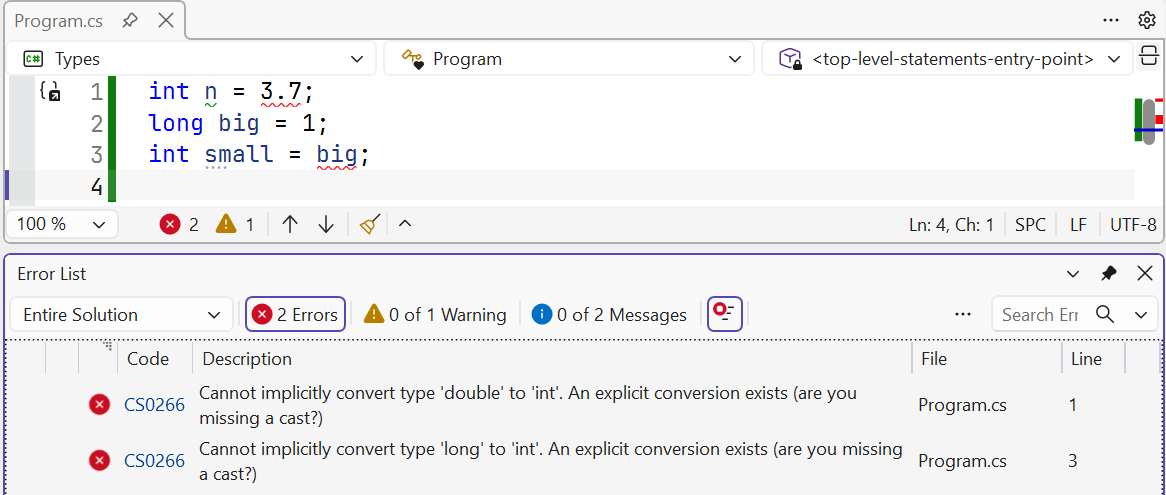
Figure 2.8. Implicit conversion error CS0266
Casting a floating-point number to an integer discards the fractional part (toward zero) rather than rounding. Casting an integer to a smaller integer type discards the high-order bits: 300 = 256 + 44, so (byte)300 is 44. The program does not report this data loss, so check the range before casting or use checked (see below).
The literal 12.5 has type double, so decimal price = 12.5; and float f = 1.5; cause CS0664. A suffix is required: 12.5m, 1.5f.
String conversions and the Convert class
Use Parse and TryParse to convert a string to a number, and the Convert class to convert between different types (Table 2.4).
Table 2.4. String and number conversions
| Expression | Result |
|---|---|
int.Parse("42") | 42 |
int.Parse("12,5") | FormatException |
int.TryParse("abc", out int x) | false, x is 0, no exception |
double.Parse("12,5") | 12.5 (Ukrainian settings) |
double.Parse("12.5") | FormatException (Ukrainian settings) |
double.Parse("12.5", inv) | 12.5 with any settings |
12.5.ToString("F2", inv) | "12.50" — a string with a period |
Convert.ToInt32(3.5) | 4 — to the nearest even integer |
Convert.ToInt32(2.5) | 2 — to the nearest even integer |
Convert.ToInt32("ff", 16) | 255 — from a string in the specified base |
Convert.ToString(10, 2) | "1010" — representation in the specified base |
Notice the difference: (int)3.5 discards the fractional part (3), whereas Convert.ToInt32(3.5) rounds (4). In the table, inv means CultureInfo.InvariantCulture. Without parameters, Parse and ToString use the current user's regional settings: in Ukraine, the decimal separator is a comma. For files, command-line arguments, and data exchange between programs, use CultureInfo.InvariantCulture (in System.Globalization), where the separator is a period (https://learn.microsoft.com/dotnet/standard/base-types/parsing-numeric).
Tip
Always validate user input with TryParse: Parse terminates the program with an exception if the user makes an input mistake.
Arithmetic operators
An expression combines values, variables, method calls, and operators and evaluates to a single value. Table 2.5 lists arithmetic operators (https://learn.microsoft.com/dotnet/csharp/language-reference/operators/arithmetic-operators).
Table 2.5. Arithmetic operators
| Operator | Name | Example | Result |
|---|---|---|---|
+ | addition | 7 + 2 | 9 |
- | subtraction | 7 - 2 | 5 |
* | multiplication | 7 * 2 | 14 |
/ | integer division | 7 / 2 | 3 |
/ | floating-point division | 7.0 / 2 | 3.5 |
% | remainder | 7 % 3 | 1 |
++, -- | increment, decrement | x++ | x + 1 |
-x | unary minus | -(2 + 3) | −5 |
Integer division and remainder
If both operands are integers, / performs integer division: the fractional part is discarded (toward zero). For a fractional result, at least one operand must be floating-point:
cs
int total = 7, parts = 2;
Console.WriteLine(total / parts);             // 3
Console.WriteLine(-total / parts);            // -3
Console.WriteLine((double)total / parts);     // 3,5
Console.WriteLine((double)(total / parts));   // 3
Console.WriteLine(total / parts * 2.0);       // 6
The fourth line performs integer division first (3), then converts the result to double. In the last line, operations proceed left to right: 7 / 2 is 3, which is then multiplied by 2.0.
The % operator returns the remainder; its sign matches the dividend: 7 % 3 is 1, and -7 % 3 is −1. Use remainders to test divisibility (n % 2 == 0 means an even number), get the last digit (n % 10), or split a quantity into units: 125 minutes is 125 / 60 hours and 125 % 60 minutes.
Increment and decrement
++ increases a variable by 1, and -- decreases it. In prefix form (++x), the expression yields the new value; in postfix form (x++), it yields the old value:
cs
int x = 5;
int y = x++;     // y = 5, x = 6: value first, then increment
int z = ++x;     // z = 7, x = 7: increment first, then value
When increment is a separate statement (count++;), both forms are equivalent. Avoid incrementing the same variable several times in one expression: such code is difficult to read.
Compound assignment
x += 5 means x = x + 5; -=, *=, /=, and %= work similarly. Compound assignment also implicitly casts the result to the variable's type:
cs
byte level = 250;
level += 10;           // compiles, level = 4 (overflow)
level = level + 10;    // CS0266: byte + int produces int
Arithmetic on byte, sbyte, short, and ushort is performed as int, so adding two byte values produces an int.
Division by zero
Division by zero behaves differently depending on the type:
- integer types and
decimal—DivideByZeroException(Attempted to divide by zero); floatanddouble— infinity (∞,-∞) orNaN, without an exception.
Integer overflow
Overflow occurs when the result of an integer operation does not fit in its type. By default, C# does not check for overflow: the high-order result bits are discarded, and the value “wraps around” to the other end of the range:
cs
int max = int.MaxValue;
Console.WriteLine(max + 1);       // -2147483648
This behavior is called an unchecked context. It is fast but hides errors: a sum calculated with overflow looks like an ordinary number. To make overflow throw OverflowException, use a checked context—a checked operator or block (Fig. 2.9):
cs
Console.Write("Seconds: ");
int seconds = int.Parse(Console.ReadLine() ?? "0");
int millis = checked(seconds * 1000);   // OverflowException

checked
{
    int total = seconds * 1000 + 500;   // all operations are checked
}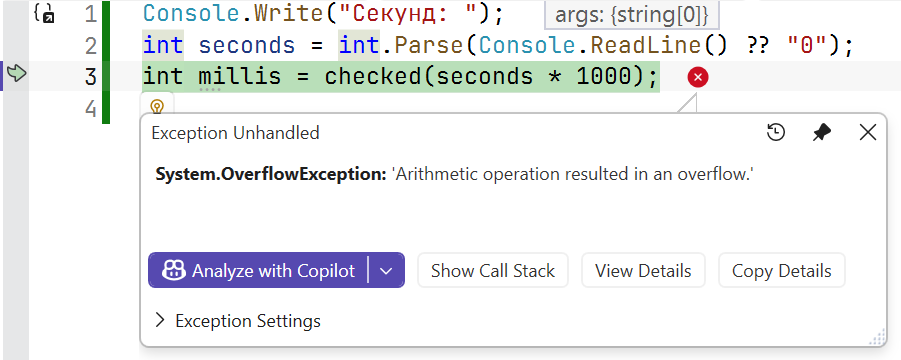
Figure 2.9. Overflow exception in a checked context
You can enable checking for the whole project with a .csproj property, then use unchecked blocks in individual places where overflow is acceptable:
xml
<PropertyGroup>
  <CheckForOverflowUnderflow>true</CheckForOverflowUnderflow>
</PropertyGroup>
The compiler always checks constant expressions: int x = int.MaxValue + 1; causes CS0220. Casting a floating-point number outside the int range with (int) produces the nearest range boundary: if double huge = 1e10;, then (int)huge is 2 147 483 647 (https://learn.microsoft.com/dotnet/csharp/language-reference/statements/checked-and-unchecked).
Floating-point types do not throw an overflow exception: double.MaxValue * 2 is infinity. By contrast, decimal always checks for overflow and throws OverflowException.