
English
Multi-file projects and the ODR
From one program to a project
In the previous topics, a program was often contained in one file so that the whole algorithm was visible. As the code grows, such a file mixes the data model, reading commands, formatting a report, and working with storage. Changing one rule forces you to look for related places among many unrelated details. Splitting code into files is needed primarily for clear boundaries of responsibility.
An interface tells a client which operations it can call. An implementation defines how these operations are performed. For example, a client of a geometry library knows the name of a function, the types of its arguments, the units of measurement, and the reaction to a negative length. It does not need to know how the area is computed. However, the argument types alone do not describe the whole contract: the conditions for valid data should be explained in text and checked with tests.
A file boundary is not the same as a class boundary. A small library may contain several related classes, and the implementation of a large component may span several files. Putting each function into a separate file does not make the architecture better. A good criterion: files that have to be changed together represent one responsibility; independent changes should not require rebuilding the whole application.
A compiler usually processes each translation unit separately. For a traditional program, this is a .cpp file together with the text of the included headers after preprocessing. The compiler does not look through arbitrary neighboring files in search of the needed definition. Successful compilation of main.cpp does not yet guarantee successful linking. The linker must receive the object code of all the operations used.
The Microsoft reference on translation units and linkage: https://learn.microsoft.com/cpp/cpp/program-and-linkage-cpp. Fig. 16.1 compares two ways of organizing an interface.
Figure 16.1. Textual inclusion of a header and import of a module interface
Example 1. A geometry library with a header
Let’s create a program that computes the area of a 3 by 4 rectangle. We treat negative sides as an error and allow a zero side. We store all three files in a separate headers directory. Keep the projects shown below with other versions of the geometry library separately: they are not built together.
The geometry.h file. It contains the declaration of the function, that is, its name, parameters, and return type. The client does not need the text of its body.
cpp
#ifndef COURSE_GEOMETRY_H
#define COURSE_GEOMETRY_H
namespace geometry {
    double rectangle(double width, double height);
}
#endif
The geometry.cpp file. The implementation includes its own header first. This lets the compiler detect a mismatch between the declaration and the definition.
cpp
#include "geometry.h"
#include <stdexcept>

double geometry::rectangle(double width, double height)
{
    if (width < 0 || height < 0) {
        throw std::invalid_argument("negative side");
    }
    return width * height;
}
The main.cpp file. The client includes the header and uses the fully qualified name geometry::rectangle. The numbers in the example are set in the code; there is no keyboard input.
cpp
#include "geometry.h"
#include <print>

int main()
{
    std::println("Area: {:.1f}", geometry::rectangle(3, 4));
}
In Developer PowerShell opened in the directory of these files, run:
powershell
cl /std:c++latest /EHsc /utf-8 /W4 main.cpp geometry.cpp
.\main.exe
The result is Area: 12.0. This command compiles two translation units and then runs the linker. If you remove geometry.cpp from the command, the call in main.cpp remains syntactically correct, but the definition of the function will not be among the object files. This is a typical cause of LNK2019.
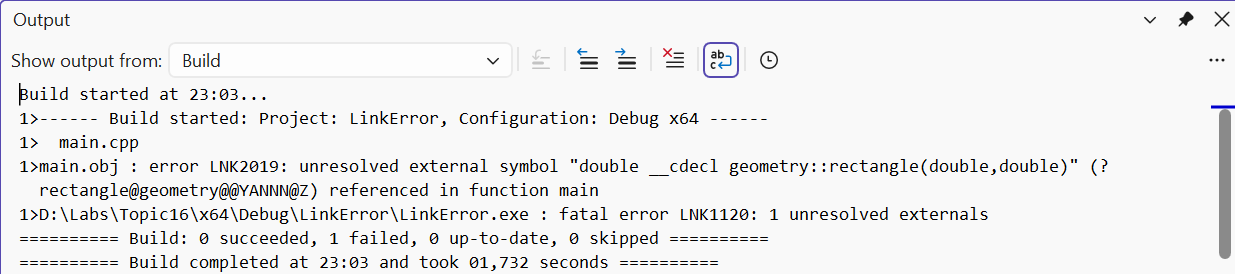
Figure 16.2. An unresolved external symbol during linking
Protection against repeated inclusion
The conditional directives #ifndef, #define, and #endif form an include guard. After the first inclusion, the macro is defined, so a repeated inclusion into the same translation unit skips the contents. The macro name must be unique within the project. Do not use reserved names with two underscores.
MSVC also supports #pragma once: the file is included at most once into a translation unit. This is a convenient implementation extension. An include guard does not prevent including a header into different .cpp files; that is exactly what a header is for. It also does not eliminate duplicate external definitions in different translation units.
A header must include what its own declarations need. If it uses std::string, do not rely on the client including <string> earlier. Checking self-sufficiency is simple: create an empty .cpp file, include only this header in it, and compile it. At the same time, do not add libraries needed only by the implementation to the header.
The one definition rule and linkage
A declaration introduces a name and describes an entity. A definition additionally provides its implementation or creates an object. A function prototype with a semicolon is a declaration; the same function with a body is a definition. The line extern int counter; declares a variable, and int counter = 0; defines it. extern with an initializer is already a definition.
The one definition rule (ODR) has several parts. Within one translation unit, you cannot define the same entity again. An ordinary external function or variable that the program uses needs exactly one definition in the program. Classes, templates, and inline entities can have definitions in several units under conditions specified by the standard. They do not permit arbitrarily different bodies of the same function.
In particular, identical definitions must agree not only visually: the names in them must find the corresponding entities. An ODR violation is not always diagnosed by the linker. Therefore, “the program built” does not prove that all definitions are correct. In training projects, it is useful to keep shared definitions in one header instead of copying them by hand.
Linkage describes whether declarations in different places can denote the same entity. It is different from scope: scope determines where a name can be found in the program text. A namespace groups names, but by itself it does not hide the implementation from linking.
Figure 16.3. One external variable and independent internal objects
Example 2. A shared counter without duplication
This small example demonstrates the linkage mechanism; it does not recommend global mutable state as the main design approach. The files are stored in the odr directory.
counter.h:
cpp
#pragma once
namespace demo {
    extern int counter;
    void increment();
    inline constexpr int step = 2;
}counter.cpp:
cpp
#include "counter.h"

int demo::counter = 0;
void demo::increment() { counter += step; }main.cpp:
cpp
#include "counter.h"
#include <print>

int main()
{
    demo::increment();
    demo::increment();
    std::println("Counter: {}", demo::counter);
}
powershell
cl /std:c++latest /EHsc /W4 main.cpp counter.cpp
.\main.exe
The result is Counter: 4. The header contains only the declaration of counter. The definition is in counter.cpp, so both units refer to the same object. The constant step is inline constexpr, so its definition can be placed in a header and included into several units.
For a controlled experiment, in a copy of the project, replace the declaration extern int counter; with int counter = 0;, and remove the definition from the .cpp file. Now the header creates an external definition in both units. MSVC reports LNK2005 and LNK1169. Restore the original files and check that the build succeeds. Do not “fix” the duplication with a forced linking option.
Internal linkage and inline
Namespace-scope functions and variables declared static have internal linkage. An anonymous namespace in a .cpp file also lets you make helper entities local to the translation unit. They are not details of the public API. Do not confuse this with a static class member: it has a different context and different rules.
If you define static int counter in a header, each .cpp file gets its own counter. The linker error disappears, but the behavior no longer meets the requirement of shared state. This technique hides the problem instead of solving it.
The inline keyword does not instruct the optimizer to substitute the function body. Its important language property is permitting consistent definitions in different units. The compiler decides by itself whether to replace a call with the body. A small function size, constexpr, and optimization are related to this decision but are not guarantees. Functions defined inside a class in an ordinary header are usually implicitly inline; you should not mechanically carry this rule over to named modules without checking.
Namespaces and the library interface
Your own namespace, for example course::geometry, reduces the risk of a conflict with the area function of another library. The nested form namespace course::geometry lets you define it compactly. The alias namespace geo = course::geometry; shortens references in a client .cpp file without creating a new library.
The directive using namespace std; in a header affects name lookup in all clients that include it. Because of this, a change in a third-party header can make a previously unambiguous call ambiguous. In public headers, write qualified names. A local using std::swap; in a function body can be a justified technique; it is not the same as opening the whole namespace.
The shape of an interface should support testing without a console. A function that computes an area returns a number or reports an error; it does not read std::cin or print a menu. Then a console application, a test, or another interface can use it. The dependency points from the user interface to the domain logic.