
English
std::filesystem
A path is a structure, not a string with slashes
filesystem::path knows the parts of a path: the root, the directory, the name, and the extension. The / operator joins components according to the platform’s rules. If you pass an absolute path on the right, the result may replace the previous base, so this is not an automatic check for “staying inside the folder.” Handling untrusted paths requires separate checks.
Figure 15.6. The parts of a Windows path
A relative path is interpreted from the current working directory of the process, not necessarily from the location of main.cpp or the exe. Running from Visual Studio, a terminal, and a test environment may have different current_path values. For diagnostics, first print the absolute path the program actually works with, and only after that look for the problem in the parser.
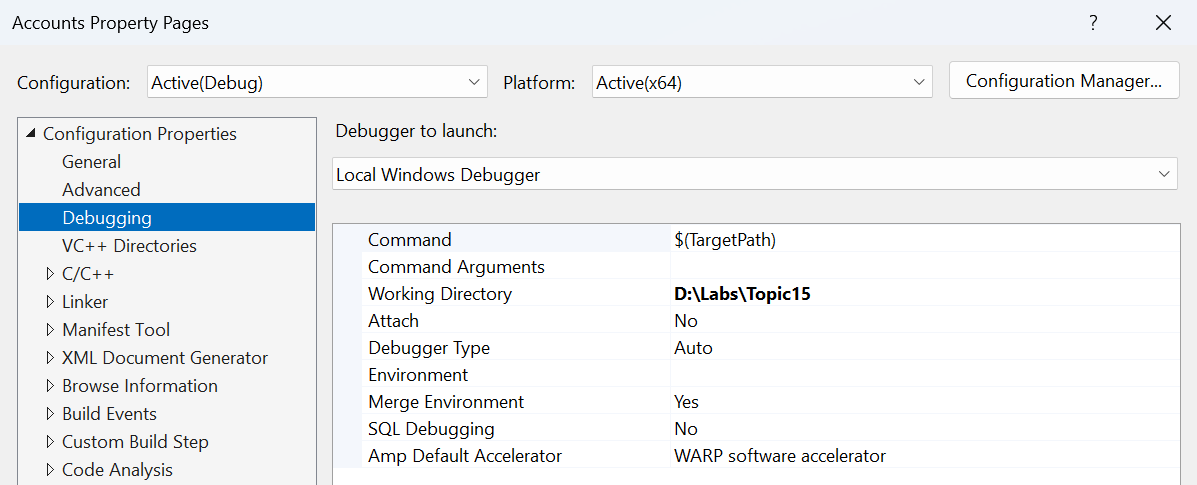
Figure 15.7. The working directory during debugging
filename returns the last component, stem returns the name without the last extension, and extension returns the extension with the dot. A file may have no extension or contain several dots. exists and is_directory answer different questions; the existence of a path does not guarantee that it can be opened as a regular file.
UTF-8: contents and file names
The /utf-8 option sets the encoding of the source text and of narrow literals in MSVC. It does not change an arbitrary file that already exists on disk. A UTF-8 BOM may appear at the beginning of a text file; a simple parser must either support it explicitly or document that it is not supported. Otherwise the first name or number will contain extra leading bytes.
On Windows, path uses the native representation based on wide characters. u8string() returns UTF-8 in std::u8string, that is, with char8_t, and this is not the same type as std::string. Do not cast pointers at random just to satisfy an output overload. A consistent conversion must be explicit.
All the required examples use ASCII file names to separate the stream logic from path conversions. Cyrillic contents can be stored as UTF-8. Check an extension to Cyrillic names with a separate Windows test using path, not with the claim that string automatically means UTF-8 in all file APIs.
Traversing a tree and handling errors
directory_iterator traverses one directory, and recursive_directory_iterator descends into subdirectories. The order is not defined as alphabetical. For a reproducible report, collect the data and sort it separately. During traversal, another process may change the directory; checking existence before an operation does not make the operation itself guaranteed to succeed.
Many functions have a form that throws filesystem_error and a form with error_code. With the second one, you need to check ec after every call. If several consecutive calls overwrite the same ec, the cause of the first failure may be lost. In a loop, you check not only file_size but also the creation of the iterator and increment.
Symbolic links require a policy: whether to follow them or not, and how to avoid cycles and double counting. Skipping permission_denied means that the traversal is not complete. An honest report lists the skipped entries or ends with an error. The training fixture below contains no links and stops on any file error.
The size of a training directory
Problem. Create three files, traverse a subdirectory, and total the bytes by extension.
cpp
#include <filesystem>
#include <fstream>
#include <map>
#include <print>
#include <string>
#include <system_error>

namespace fs = std::filesystem;

int main()
{
    const fs::path root = "directory-demo";
    fs::create_directories(root / "sub");
    for (const auto& [name, data] :
        std::map<std::string, std::string>{
        {"a.cpp", "abc"}, {"b.txt", "hello"},
        {"sub/c.cpp", "1234567"}}) {
        std::ofstream out(root / name, std::ios::binary);
        out << data;
        out.close();
        if (!out) return 1;
    }
    std::map<std::string, std::uintmax_t> totals;
    std::error_code ec;
    fs::recursive_directory_iterator it(root, ec), end;
    if (ec) { std::println("open: {}", ec.message()); return 1; }
    while (it != end) {
        bool regular = it->is_regular_file(ec);
        if (ec) { std::println("type: {}", ec.message()); return 1; }
        if (regular) {
            auto size = it->file_size(ec);
            if (ec) return 1;
            totals[it->path().extension().string()] += size;
        }
        it.increment(ec);
        if (ec) { std::println("next: {}", ec.message()); return 1; }
    }
    for (const auto& [ext, bytes] : totals)
        std::println("{}: {} bytes", ext, bytes);
}
Output:
text
.cpp: 10 bytes
.txt: 5 bytes
To reproduce the result exactly, run the program in a clean training directory: the generator creates the three given files but does not delete other ones. Any additional files already in directory-demo will also be included in the total. This is the logical size of the data, not the number of occupied disk clusters. The output is sorted thanks to map.
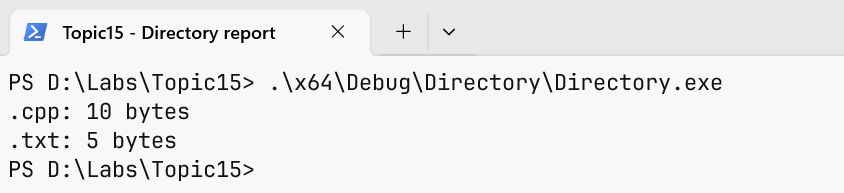
Figure 15.8. The actual size totals by extension
Writing to a temporary file and publishing it
When you overwrite a result directly, a failure in the middle of the operation can leave a truncated file. Another scheme is to create a temporary file in the same directory, write the complete contents, close it with a check, and only after that rename it to the final name. However, the details of replacing an existing file depend on the platform and the file system, and flush does not guarantee physical durability in case of a power loss.
The example below deliberately supports only creating a new result in a private training directory. If the final or the temporary path already exists, it refuses. This is not a general concurrent atomic replacement algorithm: between exists and opening, another process may create the file. A shared directory requires platform mechanisms for exclusive creation and a different threat model.
Publishing a new report
Problem. Write a new report through a temporary file and refuse on a repeated run.
cpp
#include <filesystem>
#include <fstream>
#include <print>
#include <system_error>

namespace fs = std::filesystem;

int main()
{
    const fs::path target = "published-demo.txt";
    const fs::path temporary = "published-demo.tmp";
    std::error_code ec;
    bool exists = fs::exists(target, ec);
    if (ec || exists) {
        std::println("refused: target exists or is inaccessible");
        return 1;
    }
    if (fs::exists(temporary, ec) || ec) {
        std::println("refused: temporary path unavailable");
        return 1;
    }
    std::ofstream out(temporary, std::ios::binary);
    out << "verified report\n";
    out.close();
    if (!out) { std::println("write failed"); return 1; }
    fs::rename(temporary, target, ec);
    if (ec) {
        std::println("rename failed: {}", ec.message());
        return 1;
    }
    std::println("published: {}", target.string());
}
Output:
text
published: published-demo.txtAfter the first successful run, the final file contains verified report and a newline. A repeated run returns code 1 and the refused message, as expected. The program does not delete the old result to fake success. After a failed rename, the temporary file remains for diagnostics; what to do with it is decided explicitly.
Checking the format and failures
For text, create an empty file, a valid line, a line without a delimiter, an extra field, an out-of-range number, a line without a final newline, and an unexpected BOM. Check a path that cannot be opened separately. A syntax error and the inability to read a resource require different messages.
For a binary file, check the correct length, a truncated last record, an out-of-range record number, a wrong version, and an unrealistic number of elements in the header. Do not allocate memory based on an unchecked number from a file. If a record has fixed fields, print an offset map and check it with individual bytes.
For directories, check an empty folder, a missing folder, nested folders, a file without an extension, and the inability to write the result. The remove/remove_all operations in this topic are not necessary to demonstrate reading; cleanup utilities start with a dry-run report and work only in an explicitly specified training folder.
A std::expected wrapper can return either a result or a structured error with the path and the cause. It does not turn an error into a successful empty value. An empty directory is a valid result, and an inaccessible directory is a separate state. Do not reduce them to the same empty table without an explanation.
Formatting a path in C++26 is checked separately; the examples use .string() only for ASCII paths. This is a deliberate limitation of the demonstration, not a universal promise to correctly display any Windows name.