
English
Operators, output, and input
Operators and numeric limits
The arithmetic operators +, -, *, / work on numeric values. If both operands of a division are integers, the result is also an integer: 7 / 2 gives 3, and 7.0 / 2 gives 3.5. % returns the remainder of integer division. For nonnegative time, this gives a convenient pair of formulas: hours = seconds / 3600 and rest = seconds % 3600. For negative data, first define the rules of the problem rather than expecting an automatic calendar carry.
The operators ==, !=, <, <=, >, >= compare values and give a bool. = performs assignment. The expression if (x = 5) changes x, while if (x == 5) checks it. The logical &&, ||, ! combine conditions. The first two use short-circuit evaluation: in x != 0 && y / x > 2, the division is not performed when x is zero.
The bitwise &, |, ^, ~, <<, >> operate on the bits of integer values. For classroom masks, use unsigned numbers and check that a shift is smaller than the number of bits in the type. Don’t replace && with & in input validation: these are different operations. The three-way comparison <=> returns an ordering category; it is useful for your own types and will be covered in detail together with operator overloading.
The compound assignment sum += value adds to an accumulator; ++i increments a counter. The conditional expression condition ? first : second selects one of two values. Don’t hide many state changes in one large expression: several simple statements are easier to check in the debugger. When in doubt about precedence, add parentheses. The precedence table: https://learn.microsoft.com/cpp/cpp/cpp-built-in-operators-precedence-and-associativity.
Conversions and overflow
static_cast<double>(sum) / count converts the first operand before the division. The expression static_cast<double>(sum / count) only converts the already truncated integer result. static_cast makes the intent explicit, but it doesn’t prove that the value fits in the new type. Before converting, check the range and the requirements for losing the fractional part.
Signed integer overflow during arithmetic is undefined behavior. Unsigned arithmetic works modulo a power of two, but this can also break the meaning of the problem. Before adding nonnegative a and b, check a <= max - b; before multiplying nonzero values, check a <= max / b. Computing an overflowed sum and then checking it is already too late.
For floating-point numbers, check the domain: the denominator must be nonzero, and the argument of a square root must be nonnegative. The <cmath> header provides std::sqrt, std::pow, std::abs, std::isfinite. <numbers> provides std::numbers::pi. Don’t use an approximate 3.14 if the library already has the constant you need. Comparing computed floating-point values often requires a tolerance that is determined by the problem, not an arbitrary constant copied from another program.
In C++26, saturation arithmetic includes std::add_sat from <numeric>: instead of going out of range, it returns the nearest limit of the type. This is not ordinary addition and not an automatic mode for all integer operations. Before using it, check support in your standard library; manual limit checks in the exercises are needed regardless of whether this function is available. In the tested MSVC 19.51 library, std::add_sat is still missing, so the runnable examples in this topic don’t use it.
Formatted output
std::print and std::println from <print> take a format string and arguments. The first function doesn’t add a new line; the second one does. The {} field prints the next argument in its default representation. In {0:>10.2f}, the number 0 selects the first argument, > aligns to the right, 10 sets the minimum width, .2 is the precision, and f is the fixed-point format (Fig. 2.4).
Figure 2.4. Parts of a format specification
The width doesn’t truncate text or limit values. For integers, {:.2f} is not a valid way to add zeros after the decimal point: the specification must match the argument type. {:x} prints hexadecimal notation, {:b} prints binary, and {:08b} pads it with zeros to eight positions. {:08.3f} formats a floating-point number with a total minimum width of 8. A brace itself is written in the format text as {{ or }}.
Errors in a constant format string are often detected at compile time. Don’t “fix” the diagnostic by converting all the values to text: first make the format and the type agree. Unlike the regional settings of a spreadsheet, the default C++ format prints a decimal point. Formatting doesn’t change the value of a variable and doesn’t remove calculation errors.
The alternative interface std::cout << value uses the stream insertion operator. You need it to read other people’s code, but in this course the main output facility is std::println. For error messages, it is convenient to use std::cerr to separate them from the useful result when streams are redirected.
Input and stream state
std::cin >> value from <iostream> tries to read a value of the required type. This operation can fail: the user can enter letters, a number that is too large, or end the input. The check if (!(std::cin >> value)) detects an extraction error. It doesn’t check the meaning in the problem domain: a negative mass is syntactically a number, but it is invalid.
After a failed read, clear() resets the error flags, and ignore(std::numeric_limits<std::streamsize>::max(), '\n') discards the rest of the line. Both actions are needed: resetting the state alone leaves the same invalid characters for the next attempt. However, end of file eof() shouldn’t be handled by repeating the prompt forever; the program exits. Stream documentation: https://learn.microsoft.com/cpp/standard-library/basic-istream-class.
The >> operator reads a numeric prefix: after 12abc, the number 12 may already be read, and abc stays in the stream. If you need strict validation of the whole line, use std::getline and parse the full text; this will be covered in the topic on strings. In the example with retries here, the rest of the line is explicitly discarded, so the input policy is one value per line.
Example 2. Body mass index as a classroom formula
The program reads a positive mass in kilograms and a height in meters. It demonstrates numeric input validation rather than giving a medical conclusion: the result is just the value of the formula mass / (height * height). The limits of 300 kg and 3 m are restrictions of this classroom example.
cpp
#include <print>
#include <iostream>
#include <limits>
#include <cmath>

int main()
{
    double mass{}, height{};
    while (true)
    {
        std::println("Mass kg (0 < value <= 300):");
        if (std::cin >> mass)
        {
            std::cin.ignore(
                std::numeric_limits<std::streamsize>::max(), '\n');
            if (std::isfinite(mass) && mass > 0 && mass <= 300)
                break;
        }
        else if (std::cin.eof()) return 1;
        else
        {
            std::cin.clear();
            std::cin.ignore(
                std::numeric_limits<std::streamsize>::max(), '\n');
        }
        std::println("Invalid mass");
    }
    std::println("Height m (0 < value <= 3):");
    if (!(std::cin >> height) || !std::isfinite(height)
        || height <= 0 || height > 3)
    {
        std::cerr << "Invalid height\n";
        return 1;
    }
    const double bmi = mass / (height * height);
    std::println("BMI = {:.2f}", bmi);
}
For the input sequence abc, 72, 1.8, the program reports an error, repeats the first prompt, and prints BMI = 22.22. A zero height is rejected before the division. The std::isfinite check doesn’t allow infinity or NaN. Short English prompts make it easier to reproduce tests regardless of the terminal encoding; Ukrainian strings are also acceptable with /utf-8.
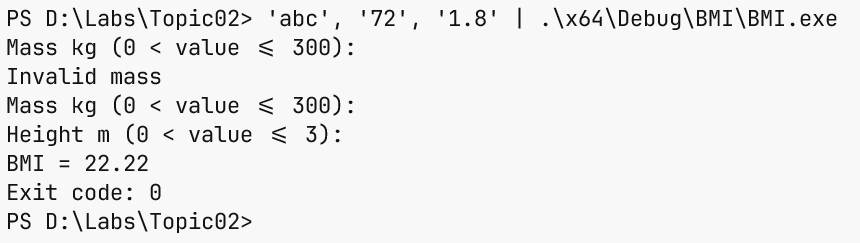
Figure 2.5. Repeating input after an error