
English
std::array and std::vector
When you need a collection
For three temperatures you can declare three variables, but for a month this is inconvenient: the formula for the mean would contain dozens of names, and the amount of data would be hard-coded. A collection groups values by a common rule. An array stores elements of one type in consecutive cells; an index specifies a position. In C++, indexing starts at zero.
For six elements the valid indices are 0–5. The number 6 is the count, not the last index. This very difference causes the typical mistake i <= size instead of i < size. Before access, you need to prove that the index belongs to the range, especially if the number was entered by the user in the familiar form starting from 1.
Figure 4.1. Consecutive elements and the array bound
The declaration int values[6]{1,3,5,7,9,11}; creates a built-in array. Writing int values[6]{}; zero-initializes all elements. The size of such a local array must be known at compile time; a variable-length array, which some compilers accept as an extension, is not portable standard C++.
std::size(values) from <iterator> returns the number of elements of a real array. However, in the parameter void f(int a[]) the array notation turns into a pointer parameter: the length itself is not passed. This decay (array-to-pointer conversion) is why sizeof(a) inside such a function does not recover the array length. Pointers are covered in detail in the following topics.
std::array and iterating over elements
std::array<int,6> from <array> also has a fixed size, but it behaves like a full-fledged object: it can be copied, assigned and passed by reference without losing its length. The size() member function returns 6, and fill(value) fills all cells. Different lengths are different types: array<int,3> cannot be used in place of array<int,4>.
The [] operator does not perform mandatory bounds checking. at(index) checks the index and throws std::out_of_range on error. The exception mechanism comes in Topic 6, but already now it is important to understand: checked access reports a defect rather than making any index valid. Do not rely on Debug always showing a dialog for every bounds violation; undefined behavior does not have a mandatory visible sign.
The loop for (auto value : values) creates a copy of each element. auto& allows modifying the elements, and const auto& reads without copying. For small numbers a copy is convenient; for strings and large structures a const reference avoids extra work. If you need the position number, use an index loop and a type consistent with size().
Example 1. Temperatures of the week
The program reads exactly seven finite values from −100 to 100 and computes statistics. The initial minimum and maximum are taken from the first element, so a week of negative values is processed correctly.
cpp
#include <array>
#include <iostream>
#include <print>
#include <cmath>

int main()
{
    std::array<double, 7> days{};
    for (auto& value : days)
    {
        if (!(std::cin >> value) || !std::isfinite(value)
            || value < -100 || value > 100) return 1;
    }
    double low = days[0], high = days[0], sum{};
    for (double value : days)
    {
        if (value < low) low = value;
        if (value > high) high = value;
        sum += value;
    }
    std::println("min={:.1f}, max={:.1f}, mean={:.1f}",
        low, high, sum / days.size());
}
For 1 2 3 4 5 6 7 the result is min=1.0, max=7.0, mean=4.0. The first loop needs auto&, otherwise input would change only a local copy. In the second one a value is enough. The array always has seven elements, so days[0] exists; a dynamic empty collection would need a separate check.
std::vector: size and capacity
A vector std::vector<T> from <vector> owns a dynamic array and manages memory allocation and deallocation itself. vector<int> values; is initially empty, and vector<int> values(5); has five zero elements. vector<int>{5}, in contrast, contains one element with the value 5. The brackets here express different intents.
size() is the number of existing elements; capacity() is the capacity of the already allocated buffer. reserve(100) requests room for at least 100 elements but does not create them. After reserve an empty vector still has no element 0. resize(100), in contrast, changes the number of existing elements.
Figure 4.2. Size, capacity and reallocation
push_back(value) adds an element at the end. emplace_back(arguments...) constructs an element from the arguments directly in the vector; this is not a promise to speed up every operation. pop_back() removes the last element but does not return its value and requires a non-empty vector. clear() removes all elements, usually keeping the buffer. shrink_to_fit() is a non-binding request to reduce the capacity, not a guarantee of an exact buffer size.
If an addition exceeds the capacity, the vector allocates a new buffer and moves the elements. Previously saved addresses, references and iterators to the old elements become invalid. The exact growth factor is not specified by the standard: the diagram with doubling is an illustration, not a rule for all implementations. Documentation: https://learn.microsoft.com/cpp/standard-library/vector-class.
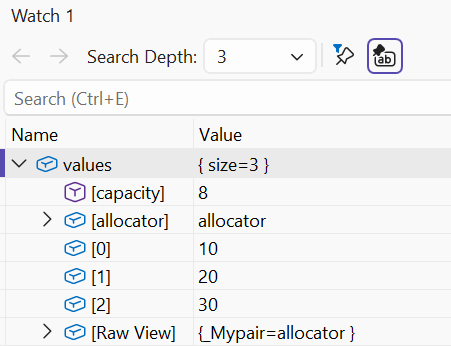
Figure 4.3. Vector elements in the debugger
Insertion at position i can be written as values.insert(values.begin() + i, value), and removal as values.erase(values.begin() + i). Here begin()+i is only a way to denote a position; the full theory of iterators comes later. For insertion i=size is allowed, for removal i < size is required. Shifting the following elements changes positions; an index is not a permanent identifier of a record.