
English
Overloading and results
Overloading and default arguments
Overloading allows several functions to have the same name if their parameters differ. For example, area(double) can compute the area of a circle, and area(double, double) the area of a rectangle. The compiler selects the matching function by the number and types of arguments, not by the names of the variables in the call. The return type alone does not make it possible to create another overload.
The declarations double area(double); and int area(double); contradict each other. The pair f(int) and f(int&) can be declared, but for an ordinary int variable the call may be ambiguous: both candidates fit. Do not create such sets without a strong reason. An exact type match is usually better than a conversion, but read the detailed rules in https://learn.microsoft.com/cpp/cpp/function-overloading.
A default argument is substituted when a call does not contain the corresponding argument. Such parameters are placed at the end of the list. The values are given in one visible declaration and are not repeated in every definition. Do not combine f(int) and f(int,int=0): the call f(1) has no obvious single candidate. A convenient interface must not create ambiguity.
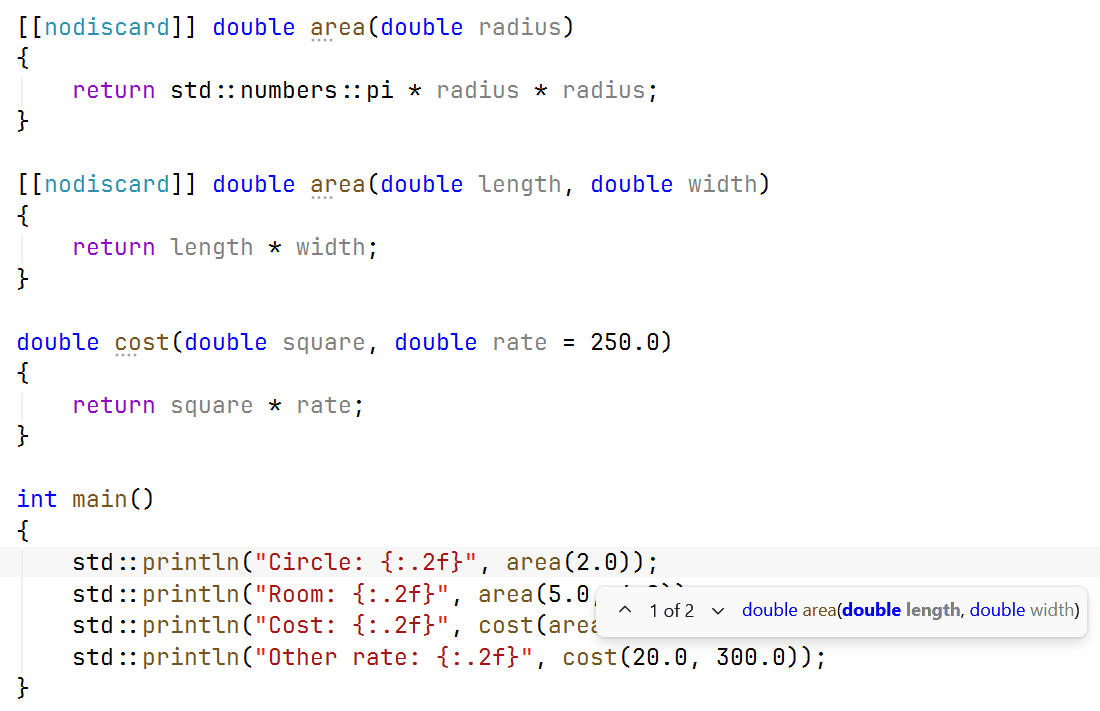
Figure 3.3. Parameter info for overloaded functions
Example 2. Shape geometry
Both area functions compute an area but take different sets of dimensions. cost has a default rate. The data in this example are constant and valid; in a program with input you must check that the dimensions are positive and finite before the call.
cpp
#include <print>
#include <numbers>

[[nodiscard]] double area(double radius)
{
    return std::numbers::pi * radius * radius;
}

[[nodiscard]] double area(double length, double width)
{
    return length * width;
}

double cost(double square, double rate = 250.0)
{
    return square * rate;
}

int main()
{
    std::println("Circle: {:.2f}", area(2.0));
    std::println("Room: {:.2f}", area(5.0, 4.0));
    std::println("Cost: {:.2f}", cost(area(5.0, 4.0)));
    std::println("Other rate: {:.2f}", cost(20.0, 300.0));
}
text
Circle: 12.57
Room: 20.00
Cost: 5000.00
Other rate: 6000.00
The [[nodiscard]] attribute asks for a diagnostic when the result is simply ignored. It does not force the user to check the content of the value and does not replace testing. The nested call cost(area(...)) first gets the area and passes it to another function; rounding to two digits happens only on output, not between computations.
Returning several values
std::pair combines two values, std::tuple any finite number of them. Their headers are <utility> and <tuple>. A structured bindingauto [low, high] = result; gives meaningful local names to the components. However, a large number of unnamed components makes maintenance harder: the reader has to remember the order.
A simple struct is an aggregate with fields, for example struct Summary { int minimum; int maximum; double mean; };. Returning Summary expresses the meaning through names. In this topic a structure only groups data; constructors, encapsulation and member functions will be covered in the topic on classes. The access result.mean reads as “the mean field of the result object”.
Example 3. Statistics of three observations
The function computes the minimum, the maximum and the mean without changing the arguments. For a compact series we pass three values; an array of arbitrary length will become the natural generalization in Topic 4.
cpp
#include <print>
#include <algorithm>

struct Summary
{
    double minimum;
    double maximum;
    double mean;
};

Summary summarize(double a, double b, double c)
{
    return {std::min({a, b, c}), std::max({a, b, c}),
        a / 3.0 + b / 3.0 + c / 3.0};
}

int main()
{
    const auto [low, high, mean] = summarize(3.0, 7.0, 5.0);
    std::println("min={:.1f}; max={:.1f}; mean={:.1f}",
        low, high, mean);
}
text
min=3.0; max=7.0; mean=5.0Dividing each term before summation reduces the risk of overflowing the intermediate sum of large positive values, but it is not a universal numerically exact algorithm. For this small, finite teaching data it is sufficient. A structured binding without & creates its own value of the result; borrowing an object requires another form and control of its lifetime.
Lifetime, static and constexpr
Lifetime determines when an object exists. A local automatic variable disappears on exit from its block. Therefore you must not return a reference to a local variable: the caller would get a reference to an object whose life has already ended. Returning a number or a small structure by value is the natural safe solution.
A local static variable is preserved between calls, but its name is accessible only in the scope of its declaration. The counter static int calls = 0; in a function remembers previous calls. This is useful for special tasks but creates hidden state: two identical calls may depend on the previous history. For a testable computation, it is better to pass the required state explicitly. Global variables make this problem worse.
In modern C++, inline concerns primarily the rules of definition in several translation units. It does not order the compiler to insert the body instead of the call. The optimizer may inline a function without this keyword or not inline one marked with it. Defining a small inline function in a header allows using it from several .cpp files while following the rules of identical definitions.
A constexpr function can be evaluated at compile time if the arguments and the context allow it; with ordinary input arguments it is evaluated at run time. static_assert(condition) checks a condition at compile time and does not generate a prompt for the user. This is convenient for known mathematical properties, but it does not check future values from the keyboard. A function with the return type auto allows deducing the type from return; for recursion an explicit type is often more readable and avoids problems before type deduction is complete.