
English
Types, variables, and constants
A type as a set of values and allowed operations
A variable binds a name to an object that stores a value. A type defines the allowed values, their representation, and the operations on them. For example, it makes sense to store the number of students as an integer, a temperature as a number with a fractional part, and the answer to the question “Is the work finished?” as a Boolean value. Choosing a type starts with the meaning of the data, not with the wish to use the largest available type everywhere.
bool has the values true and false. char stores one code unit of an ordinary string, not an arbitrary Unicode letter. short, int, long, and long long are integer types with different minimum ranges. The word unsigned selects an unsigned type; it is not a universal way to forbid negative input. float, double, and long double are floating-point types. Their values have finite precision, even if many digits are printed.
In MSVC x64, int and long are 4 bytes, long long is 8, and long double has the same representation as double. These are properties of the implementation: don’t carry the conclusion “long is always 8 bytes” over from Linux to Windows. The standard sets minimum guarantees, and the actual sizes are checked with the sizeof operator (Fig. 2.1). Documentation: https://learn.microsoft.com/cpp/cpp/fundamental-types-cpp.
Figure 2.1. Typical type sizes in MSVC x64
The result of sizeof has the type std::size_t, an unsigned type for sizes. It measures the number of C++ bytes, and sizeof(char) is always 1. For a data format that needs exactly a 32-bit integer, the <cstdint> header provides std::int32_t if the implementation has a suitable type. For limits, use <limits> and std::numeric_limits<T>. For integers, min() is the smallest value; for floating-point types, the lowest negative finite value is returned by lowest(), and min() returns the smallest positive normalized value. Confusing these functions breaks range checks.
Example 1. Type characteristics
The program doesn’t read any data; it reports the properties of the implementation it was built with. Compare the output for a specific platform.
cpp
#include <print>
#include <limits>

int main()
{
    std::println("int: {} bytes, {} .. {}", sizeof(int),
        std::numeric_limits<int>::min(),
        std::numeric_limits<int>::max());
    std::println("long: {} bytes", sizeof(long));
    std::println("long long: {} bytes", sizeof(long long));
    std::println("double: {} bytes, {} digits", sizeof(double),
        std::numeric_limits<double>::digits10);
}
text
int: 4 bytes, -2147483648 .. 2147483647
long: 4 bytes
long long: 8 bytes
double: 8 bytes, 15 digits
digits10 describes the decimal precision of the type, not the number of digits that you must show to the user. The size of a variable also isn’t equal to the length of its printed value: the number 7 and the number 1000000 of type int take up the same amount of memory.
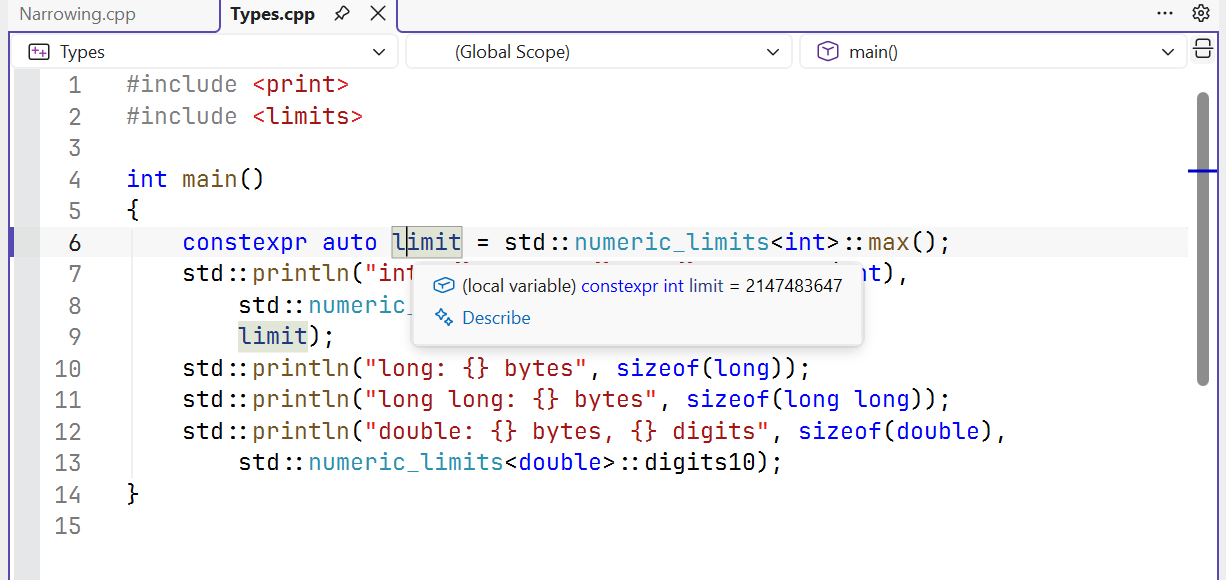
Figure 2.2. Tooltip showing the type and value of a constant expression
Initialization, names, and constants
Initialization sets the initial value at the moment an object is created. The declarations int count = 3;, int count(3);, and int count{3}; give the same value in the simple case, but curly braces forbid dangerous narrowing. That’s why int n{3.7}; is an error: the fractional part would be lost. The declaration int n = 3.7; may compile with a warning and give 3, which doesn’t make it correct.
A local int count; without initialization doesn’t automatically get zero. Reading an indeterminate initial state doesn’t give a correct result. The habit of writing int count{}; creates a known initial value of 0. Declare a variable close to its first use and name it by its meaning: minutes, attempts, massKg explain the data better than a, b, c.
auto value = 3.5; asks the compiler to deduce the type from the initializer; in this case, it is double. auto is not a dynamic type: after the declaration, the type doesn’t change. const forbids subsequent assignment, and constexpr requires the initial value to be computable at compile time. For example, constexpr int days = 7; is a compile-time constant; const double mass read from user input is not.
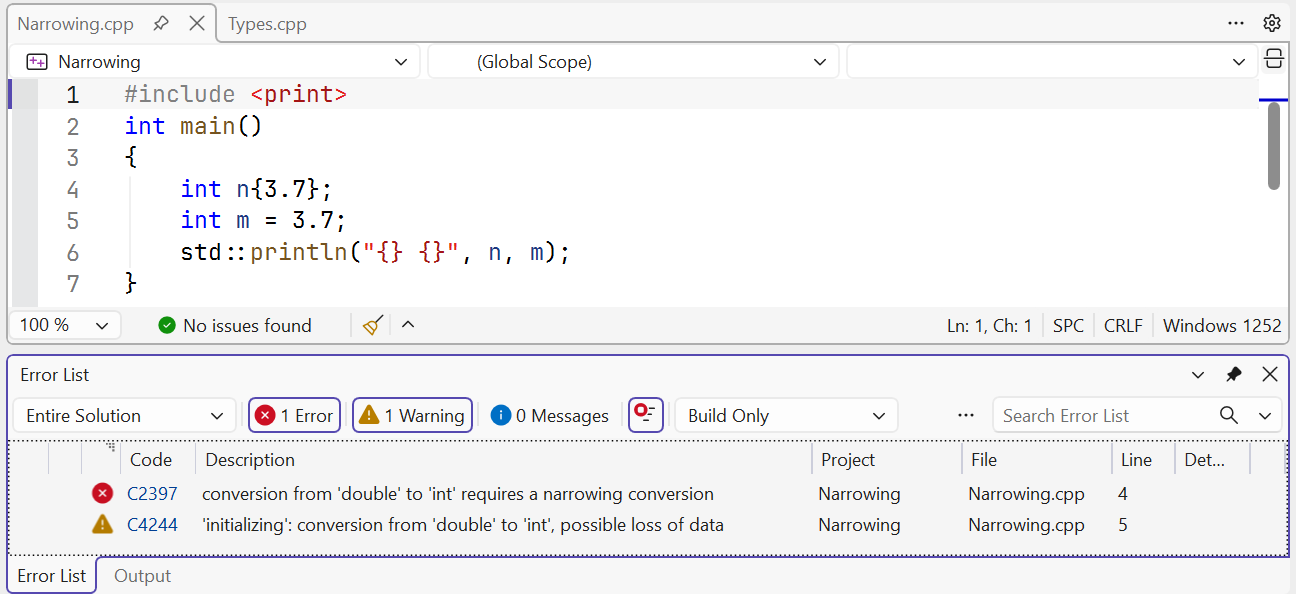
Figure 2.3. Narrowing conversion diagnostic
Scope determines where a name is accessible. A local variable inside { ... } is not accessible after the closing brace. The same name in an inner block can hide the outer one, but for a beginner this makes errors harder to find. The counter in for (int i = 0; ...) belongs to the loop. Don’t create global variables just to avoid thinking through how to pass data: we’ll study functions and parameters in the next topic.
Literals and their types
An integer literal can be written in decimal 42, hexadecimal 0x2A, or binary 0b101010. The digit separator in 1'000'000 makes it easier to read and doesn’t change the value. The LL suffix gives the integer type long long; 3.0f is a float, while 3.0 is a double. Single quotes denote a character literal 'A', and double quotes denote a string "A", which also contains a terminating null.
u8"text" has char8_t code units, so it is not an ordinary const char*. Don’t add the u8 prefix to all std::println arguments mechanically. For the course examples, ordinary strings compile with /utf-8. A Cyrillic letter in UTF-8 usually takes several bytes; working with individual bytes is not yet correct processing of individual letters.