
English
Recursion and program organization
Recursion and the call stack
Recursion occurs when a function calls itself directly or through other functions. It is natural for problems that reduce to smaller problems of the same kind. Every correct recursive algorithm has a base case and a step that moves toward it. For the factorial the base is 0!=1, and the step is n!=n·(n−1)! for positive n.
The base condition will not help if the recursive argument does not decrease or the input is outside the valid domain. For the factorial of a negative number, the call with n−1 moves away from zero. You must check n before the first call. Likewise, mathematical definedness does not guarantee that the result fits into a machine type: 21! does not fit into a 64-bit unsigned integer type.
Each active call has its own parameters and local variables. The Call Stack window shows the sequence of these calls, and selecting a frame lets you inspect its context. Excessive depth can exhaust the stack. Converting tail recursion into a loop is not guaranteed by the standard, so it cannot be considered protection against stack overflow.
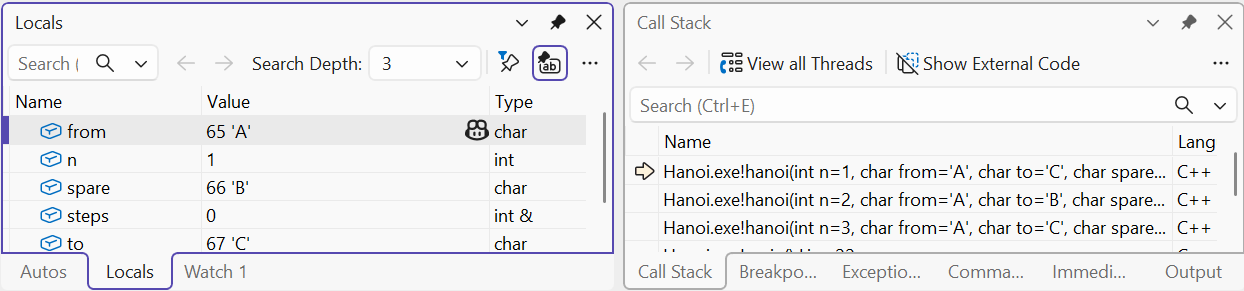
Figure 3.4. Stack of recursive calls
Example 4. Towers of Hanoi
There are three rods A,B,C and n disks of different sizes. You need to move all disks from A to C, moving one at a time; a larger disk cannot be placed on a smaller one. Moving n disks reduces to moving n−1 to the auxiliary rod, the single largest one to the target, and then n−1 from the auxiliary rod to the target (Fig. 3.5).
Figure 3.5. Splitting the Towers of Hanoi problem for three disks
cpp
#include <print>
#include <iostream>

void hanoi(int n, char from, char to, char spare, int& steps)
{
    if (n == 0) return;
    hanoi(n - 1, from, spare, to, steps);
    std::println("{}: {} -> {}", ++steps, from, to);
    hanoi(n - 1, spare, to, from, steps);
}

int main()
{
    int n{};
    if (!(std::cin >> n) || n < 0 || n > 10)
    {
        std::cerr << "Expected disk count 0..10\n";
        return 1;
    }
    int steps{};
    hanoi(n, 'A', 'C', 'B', steps);
    std::println("Total: {}", steps);
}
text
1: A -> C
2: A -> B
3: C -> B
4: A -> C
5: B -> A
6: B -> C
7: A -> C
Total: 7
This is the result for n=3. For n=0 there are no steps; for n=1 one is needed. The counter is passed by reference so that all calls change a shared number, and n, from, to and spare are passed by value so that each call has its own description of the subproblem. The limit of 10 caps the output at 1023 steps.
The number of steps is T(n)=2T(n−1)+1, hence T(n)=2ⁿ−1. The stack depth, in contrast, is linear in n. These two quantities should not be confused: a small depth does not yet mean little computation. The recursive factorial has a different tree shape: each call produces only one next call.
Organizing functions and program arguments
While a program is small, defining functions in a single .cpp is enough. Later, declarations are moved to a .h file and definitions to a .cpp file. The #pragma once directive in an MSVC header prevents its contents from being included again into one translation unit. It does not replace the rules of definitions across different .cpp files. Do not include an implementation .cpp file instead of adding it to the project.
For a function, it is useful to write down the preconditions, the result and the side effects. For example: “takes three finite positive sides; returns the area; does not change the arguments and does not print”. Output is separated from computation so that a test can compare a number without parsing console text. Validation of the keyboard stream is usually left at the program boundary, while a mathematical function works with already parsed, typed values.
The form int main(int argc, char* argv[]) receives command-line arguments. argc is their count including the service element argv[0]; the entered arguments start at argv[1]. Each element is text. Writing 12 in a command is not by itself converted to int: parsing and validation are needed. The pointer mechanism is explained in Topic 5; here the rule “check the count before access” is enough.
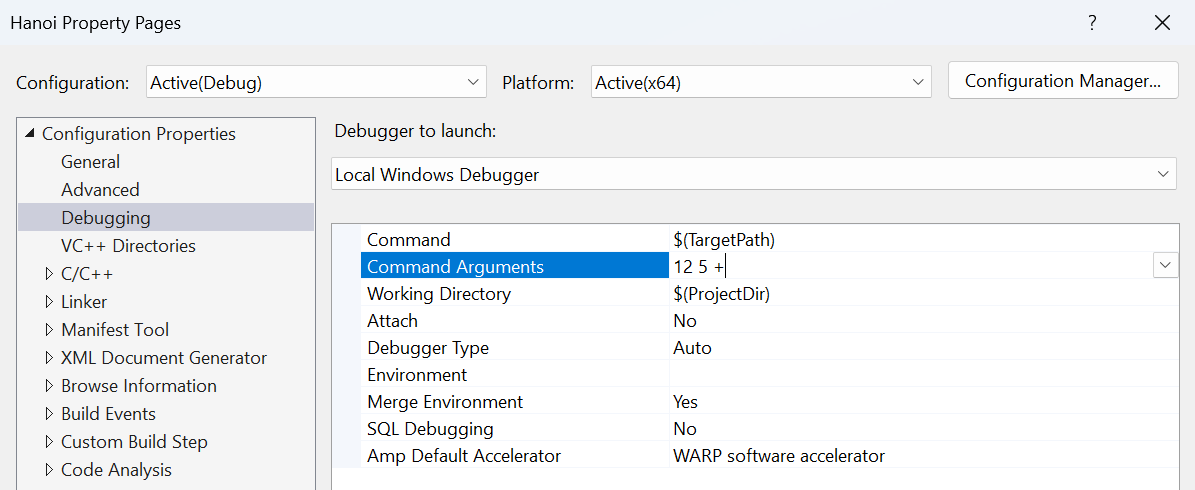
Figure 3.6. Passing arguments in Visual Studio
In Visual Studio, arguments are set via Project Properties → Configuration Properties → Debugging → Command Arguments. In a terminal they are written after the .exe name; spaces separate arguments, and quotes join text with spaces. The program should print a clear short description for --help and report a wrong number of arguments rather than access elements outside the argv array.
Testing functions
A small function lets you check computations without the program's full dialog. For sort_three you need all six orderings of distinct numbers, repeats and negative values. For recursion, the base, the first nontrivial case and the largest allowed argument. For area, known geometric values and the rule for handling invalid dimensions.
Do not substitute an independent expected answer with the same formula in the test. For three numbers the result can be checked by the ordering condition and preservation of the initial values. For Hanoi, check not only the number of steps but also the legality of the moves in a small example. Such a check finds the error of mixed-up rods even when the counter still equals 2ⁿ−1.